
questboard
v0.1.1
Published
Companion app that runs multiple Claude Code workers in parallel against your Git repository, with a kanban-style review board.

Maintainers
 bsangs
Readme
questboard
Run multiple Claude Code agents in parallel from a local Kanban board.
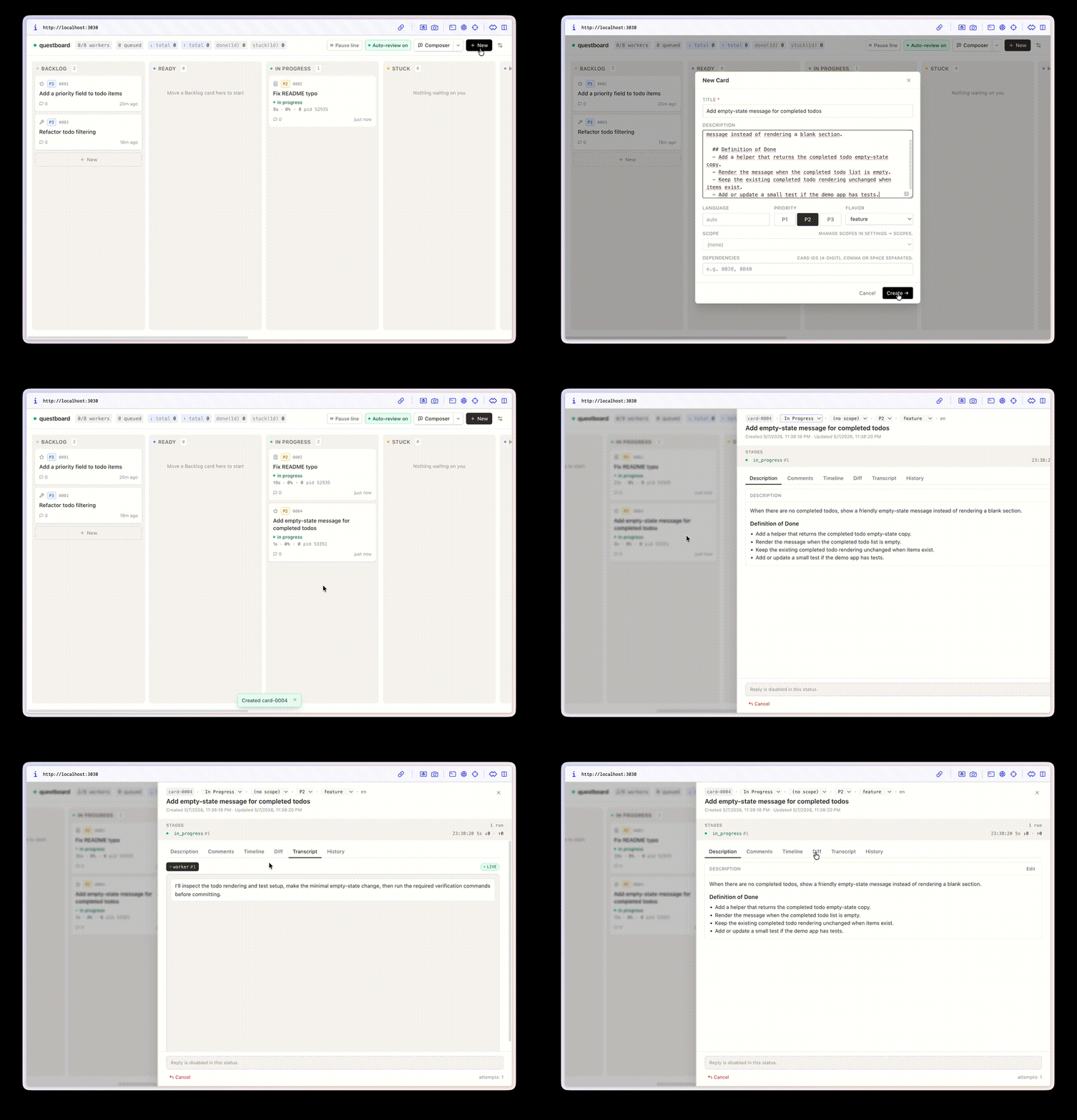
Each card gets its own worker branch, Git worktree, transcript, review state, and merge path — without copying your source code into questboard.
Why questboard?
Claude Code is great at working through one task. Coordinating several AI coding tasks manually gets messy fast: terminal tabs, temporary branches, repeated context, hidden logs, and unclear review state.
questboard gives that work a board. Create cards, move them to Ready, watch workers run, review their diffs, and keep the whole workflow local to your repository.
Features
- Parallel agent work — run several Claude Code workers against one repo.
- Git worktree isolation — every card runs on its own
worker/card-<id>branch and checkout. - Visible review flow — track Backlog, Ready, In Progress, AI Review, Stuck, Merging, and Done states.
- Local-first runtime — cards, logs, transcripts, SQLite, and worktrees live under
.questboard/. - Human control points — stuck questions, review notes, diffs, and merge results surface back to the board.
- Session auth by default — use your existing
claude login; API keys are optional for bare/proxy/non-interactive setups.
Quickstart
Requirements:
- Node.js 20+
- Git with at least one commit in the repo
- Claude Code CLI installed and logged in (
claude login)
Run questboard inside any Git repository:
cd your-repo
npx questboard init
npx questboard start
Open http://localhost:3030. You should see an empty board. Create a card, move it to Ready, and questboard will spawn a worker in .questboard/worktrees/.
Press Ctrl+C to stop foreground mode.
For background operation:
npx questboard start --detach
npx questboard status
npx questboard logs
npx questboard stop
How it works
questboard initcreates.questboard/runtime files in your repo and adds.questboard/to.gitignore.- You create cards in the UI.
- The dispatcher claims Ready cards up to the configured concurrency limit.
- Each worker runs Claude Code in a separate Git worktree and branch.
- Completed worker commits move to AI Review with a diff and transcript.
- Approved work moves through merge; rejected or stuck work returns to the board with context.
Concepts
- Card — one unit of work, stored as markdown under
.questboard/data/cards/. - Worker — a Claude Code process that implements a card.
- Reviewer — a Claude Code process that reviews a worker branch.
- Merger — the merge step that lands approved work.
- Worktree — an isolated Git checkout for one card.
- Base branch — the branch workers compare against. By default questboard tries
origin/main,main,master, thenHEAD.
What init creates
your-repo/
  .questboard/
    .env                # ports, concurrency, auth mode, paths
    config.json         # live board config
    data/
      cards/            # one card directory per task
      archive/          # archived cards
      board.sqlite      # derived index, rebuilt from cards/ at boot
      logs/             # server / dispatcher jsonl logs
    worktrees/          # per-card Git worktrees
    run/                # pid + log files for detached mode
  .questboardignore     # optional paths hidden from worker worktrees
  .gitignore            # `.questboard/` appended if missing
.questboard/ is local runtime state. Do not commit it.
Configuration
Most users can keep the generated .questboard/.env as-is.
Common settings:
| Key | Default | Purpose |
| --- | --- | --- |
| BOARD_UI_PORT | 3030 | Board UI port. |
| BOARD_SERVER_PORT | 3031 | API/SSE port. |
| BOARD_CONCURRENCY | 4 from init | Maximum concurrent workers before live config overrides it. |
| BOARD_BASE_BRANCH | auto | Optional base branch override, e.g. develop. |
| BOARD_DATA | .questboard/data | Card files, SQLite, logs, archive. |
| BOARD_WORKTREES | .questboard/worktrees | Per-card Git worktrees. |
| TELEGRAM_BOT_TOKEN / TELEGRAM_CHAT_ID | empty | Optional stuck/review/done notifications. |
Auth modes
questboard reads ANTHROPIC_API_KEY from .questboard/.env to decide how to invoke Claude Code.
- Session mode, default — leave
ANTHROPIC_API_KEYblank and use your interactiveclaude loginsession. - Bare mode — set
ANTHROPIC_API_KEYwhen you need proxy, multi-host, or non-interactive operation.ANTHROPIC_BASE_URLis optional and only meaningful with a key.
Switching auth mode requires restarting questboard.
Local data and privacy
questboard is local-first, but it does run AI workers against your Git checkout.
Do not commit .questboard/. It may contain prompts, card descriptions, transcripts, logs, source diffs, model output, local filesystem paths, worktrees, and credentials accidentally pasted into cards.
questboard is designed for trusted local use. Do not expose the unauthenticated API/UI directly to the public internet.
See SECURITY.md for supported usage and vulnerability reporting.
Limitations
questboard is probably not right for you if you need:
- a hosted multi-user SaaS board
- production-grade authentication around the UI/API
- public internet exposure without additional network controls
- Windows support today
- agents that run without access to a local Git checkout
Troubleshooting
fatal: invalid reference: origin/main
Older questboard builds required origin/main. Current builds support local-only repos and fall back through origin/main, main, master, then HEAD. Make sure your repo has at least one commit:
git log --oneline -1If your base branch is not main, set it in .questboard/.env:
BOARD_BASE_BRANCH=developRestart questboard after changing .questboard/.env.
UI opens but /api/* requests fail
Make sure both UI and API are running:
npx questboard statusDefault ports are UI 3030 and API 3031.
Port already in use
Edit .questboard/.env:
BOARD_UI_PORT=3032
BOARD_SERVER_PORT=3033
Then restart questboard.
Worker seems stuck after finishing
Workers transition only after their Claude Code process exits and the dispatcher routes the result. Check logs:
npx questboard logs dispatcherCLI reference
questboard init             initialize .questboard/ in the current Git repo
questboard start            run server + dispatcher + UI in foreground
questboard start --detach   run in background and write pids/logs to .questboard/run/
questboard stop             stop a detached run for this project
questboard status           show detached role pids and liveness
questboard logs [role]      tail logs for server | dispatcher | ui
Useful start flags:
| Flag | Effect |
| --- | --- |
| --root <path> | Override project root. |
| --no-server | Skip the API server. |
| --no-dispatcher | Skip worker spawning; server + UI only. |
| --no-ui | Headless API + dispatcher. |
| --detach | Spawn detached and return immediately. |
Advanced usage
Split-host UI/API
Single-host localhost is the default. For split-host deployments, run API + dispatcher on one host and UI on another.
Backend host:
BOARD_CORS_ALLOWED_ORIGINS=https://questboard.example.com
npx questboard start --no-ui --detach
Frontend build/run:
NEXT_PUBLIC_API_BASE_URL=https://api.example.com pnpm --filter ./ui build
npx questboard start --no-server --no-dispatcher --detach
PM2
PM2 is optional. questboard start --detach is the recommended built-in supervisor for local use. If you already standardize on PM2, an example ecosystem.config.js ships in the package.
Development
This repo is questboard's source.
git clone https://github.com/bsangs/questboard.git
cd questboard
pnpm install
pnpm build
pnpm typecheck
Workspace layout:
board/core/— shared TypeScript schemas, card types, and state machine helpers.board/server/— REST/SSE API, SQLite persistence, card files, merge automation, and optional Telegram alerts.board/dispatcher/— watches Ready cards and spawns worker / reviewer / merger processes.board/worker-tools/— CLI binary plus helper commands for spawned agents.board/prompts/— runtime system prompts.ui/— Next.js board UI.
For local development, pnpm dev:server, pnpm dev:dispatcher, and pnpm dev:ui run each role separately.
Contributing
Contributions are welcome. See CONTRIBUTING.md for expectations, safety boundaries, and the review checklist.
License
questboard is licensed under the MIT License. See LICENSE.