
r3f-light-studio
v0.3.0
Published
Lighting rigs for react-three-fiber, described by JSON and edited in the browser
Downloads
614

Maintainers
 aaron_claes
Readme
r3f-light-studio
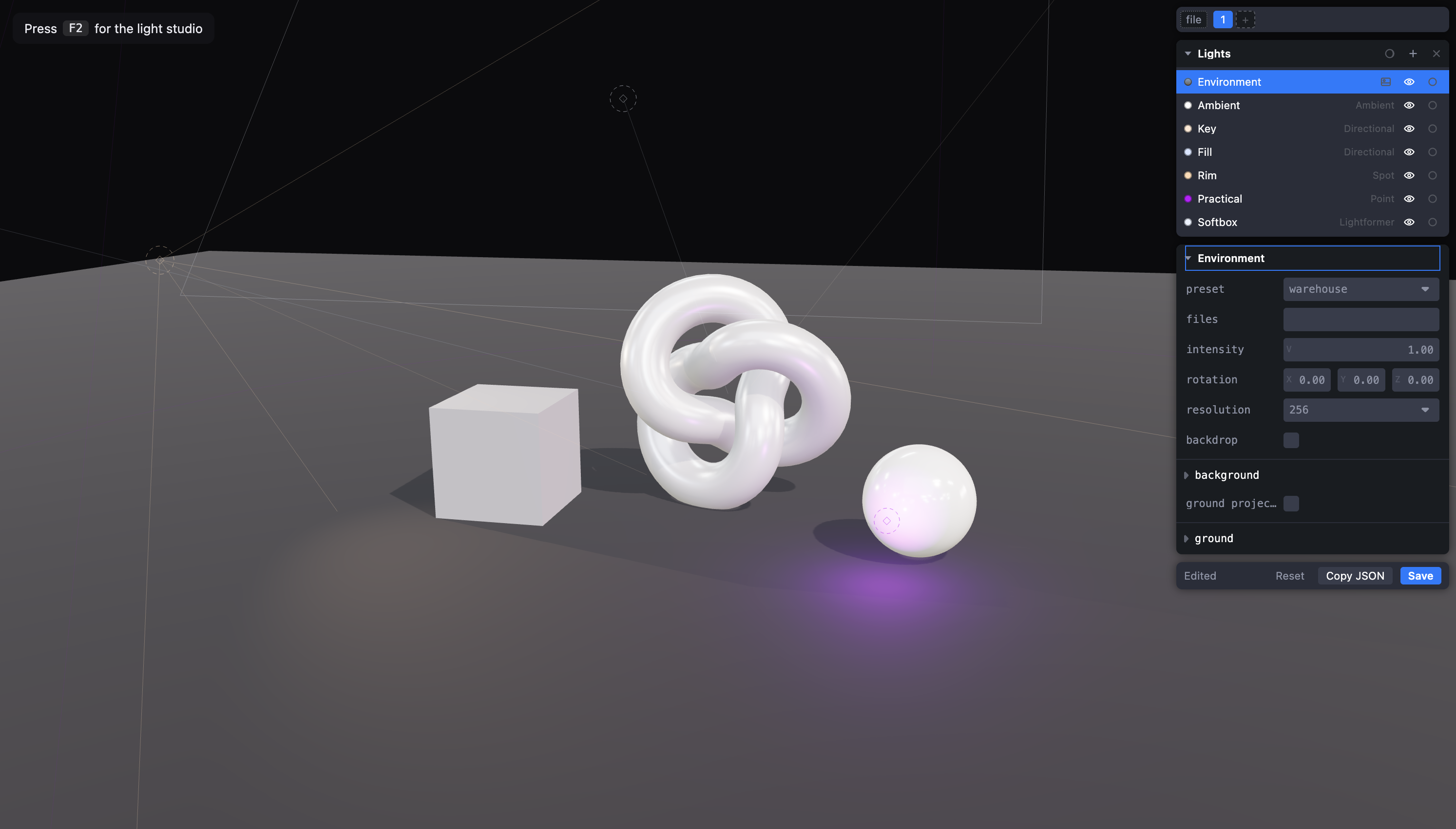
A lighting rig for react-three-fiber, described by one JSON file and editable in the browser.
<LightStudio /> renders your lights in production. Pass debug and the same
component becomes an editor: click a light, drag it, tune every field, then press
Cmd+S to write the JSON back to disk.
Scope is deliberately narrow: only the lights you pass in. This is not a scene editor (see Triplex) and not an animation tool (see Theatre.js).
Thanks
This is a thin layer over pmndrs amazing work. react-three-fiber renders it, drei supplies the environment, the lightformers and the transform gizmo, leva is the properties panel, and zustand holds the editor state. Almost none of the hard parts are mine.
Install
npm install r3f-light-studio levaleva hosts the properties panel and is a required peer, even if you never open
the editor. The rest are peers you will already have.
| Peer | Version |
| -------------------- | ------------------------------------ |
| react, react-dom | >=19 |
| three | >=0.180 |
| @react-three/fiber | >=9 |
| @react-three/drei | >=10 |
| leva | ^0.10 |
| vite | >=5 (optional, for saving to disk) |
Quick start
import { Canvas } from '@react-three/fiber'
import { OrbitControls } from '@react-three/drei'
import { LightStudio } from 'r3f-light-studio'

import setup from './lights.json'

export function Scene() {
  return (
    <Canvas shadows>
      <OrbitControls makeDefault />
      <LightStudio setup={setup} debug={import.meta.env.DEV} />
      <YourScene />
    </Canvas>
  )
}
A minimal lights.json:
{
  "version": 1,
  "lights": [
    { "id": "key", "type": "directional", "intensity": 3, "position": [4, 6, 3] },
    { "id": "ambient", "type": "ambient", "intensity": 0.2 }
  ]
}
Press F2 to open the editor. It starts hidden, stays open across reloads for
the life of the tab, and leaves the scene untouched while closed.
Saving to disk
Add the Vite plugin and Cmd+S writes the file the rig came from:
// vite.config.ts
import { lightStudio } from 'r3f-light-studio/vite'

export default defineConfig({
  plugins: [react(), lightStudio('src/lights.json')],
})
For several rigs, pass an object and name the key from the component:
plugins: [lightStudio({ hero: 'src/hero.json', product: 'src/product.json' })]<LightStudio id="hero" setup={hero} debug />The browser only ever sends an id you declared, never a path, so a page cannot
talk the server into writing somewhere else. The plugin is apply: 'serve' and
does not survive a build.
Without the plugin the editor offers Copy JSON instead, and edits live in memory until you reload.
Props
| Prop | Type | Default | Description |
| ----------- | ------------------- | --------------- | --------------------------------------------------------------------------- |
| setup | unknown | required | The rig. Usually a raw JSON import. Invalid input warns rather than throws. |
| debug | boolean | false | Arms the editor. Leave off in production. |
| toggleKey | ToggleKey \| null | { key: 'F2' } | What shows and hides the editor. null binds nothing. |
| id | string | 'default' | Which plugin target to save to. Only needed with several rigs. |
| helpers | HelperStyle | see below | What the editor draws its helpers and handles in. |
| children | ReactNode | | Only <LightStudio.Environment>, see below. |
The toggle key matches both KeyboardEvent.code and .key, so 'Backquote',
'F2' and 'd' all work, and takes an optional modifier of 'meta', 'ctrl',
'alt' or 'shift'.
Keyboard
Bound only while the editor is on screen, and never while you are typing in a field.
| Key | Action |
| ----------------------------------- | ---------------------------------------- |
| F2 | Show or hide the editor |
| Cmd/Ctrl + S | Save to the file (needs the Vite plugin) |
| Cmd/Ctrl + Z | Undo |
| Cmd + Shift + Z, Ctrl + Y | Redo |
| Cmd/Ctrl + D | Duplicate the selected light |
| Delete, Backspace | Remove the selected light |
The rig file
Seven types: ambient, hemisphere, directional, point, spot, rectArea
and lightformer. Every light has an id and a type; everything else is
optional and falls back to that type's default.
{
  "id": "key",
  "type": "directional",
  "name": "Key",
  "color": "#ffe8d5",
  "intensity": 3.2,
  "position": [4, 6, 3],
  "target": [0, 0.8, 0],
  "shadow": { "enabled": true, "mapSize": 2048, "far": 30, "frustum": [-8, 8, 8, -8] }
}
A few things worth knowing:
- Aiming is a point, not a rotation. Directional and spot lights store
target: [x, y, z], and theObject3Dthree needs is created for you. - Intensities assume physically-correct lighting (three r155 and later), so point and spot values are in the tens rather than around 1.
- Defaults are omitted on write, so the file stays about your rig. A freshly
added light serialises to
{ "id": "spot", "type": "spot" }. - Numbers in short arrays round to three decimals and stay on one line, so nudging a light is a one line diff.
- Tone mapping and exposure are not in the schema. They belong to
<Canvas gl={{ toneMappingExposure: 1.1 }} />.
Environment
The rig carries one optional environment block: an HDRI by drei preset name or
by files URL, an optional visible background, and optional ground projection.
Lightformers live in lights like any other light and are drawn into it.
For meshes the JSON cannot describe, such as an occluder in front of a lightformer, use the slot:
<LightStudio setup={setup} debug>
  <LightStudio.Environment>
    <mesh position={[0, 3, 1]}>
      <planeGeometry args={[2, 4]} />
      <meshBasicMaterial color="black" />
    </mesh>
  </LightStudio.Environment>
</LightStudio>
Exports
import {
  LightStudio,
  parseSetup, // unknown -> a valid setup, plus warnings
  serializeSetup, // a setup -> the JSON that gets written
  LIGHT_DEFINITIONS, // every type's defaults, clamps and label
  LIGHT_TYPES,
  ENVIRONMENT_PRESETS,
  LIGHTFORMER_FORMS,
  SCHEMA_VERSION,
} from 'r3f-light-studio'
Types for the whole schema are exported alongside them, including LightSetup,
LightConfig, LightType, EnvironmentConfig and ShadowConfig.
Notes
<OrbitControls makeDefault />is required, or dragging a gizmo orbits the camera at the same time. drei readsmakeDefaultto find the controls it has to suspend mid-drag, and it is also how the editor finds them to switch off when you free the camera.Free the camera in the header lifts whatever limits your controls put on the camera, for when a rig has to be judged from an angle the app will not give you. Off until you ask for it, since a camera that quietly stops behaving as you built it is worse than one you turned on. Switching it off puts the camera back exactly where it was, so your app resumes inside its own limits. Works with any controls library, camera-controls included.
The editor is fixed to the viewport rather than laid out in your page, so run one
<LightStudio debug />at a time.While the editor is showing, your own scene stops receiving pointer events.
Helpers ignore each light's own colour, so a white light on a white page is still visible. As in Blender, the selected light is drawn in an accent colour and every other one in black. Which light is which is the outliner swatch's job. Override any of it with
helpers:<LightStudio setup={setup} debug helpers={{ color: '#d97706', idleColor: '#000000', idleOpacity: 0.75 }} />Those are the defaults. Handles carry at a little under
idleOpacity, since they draw over the scene while the wireframes can be occluded.All editor code sits behind a lazy import, so it is a separate chunk your production bundle never loads. Its styles are injected as a
<style>tag, so there is no CSS file to import.Rect-area lights pull in around 247 kB of BRDF lookup tables. That import is lazy and only happens when a rig actually contains one.
License
MIT