
radar_screen_react
v1.0.2
Published
A React radar screen component for visualizing grid-based data with highlighting capabilities.

Maintainers
 mhefny
Readme
Radar Screen React Component
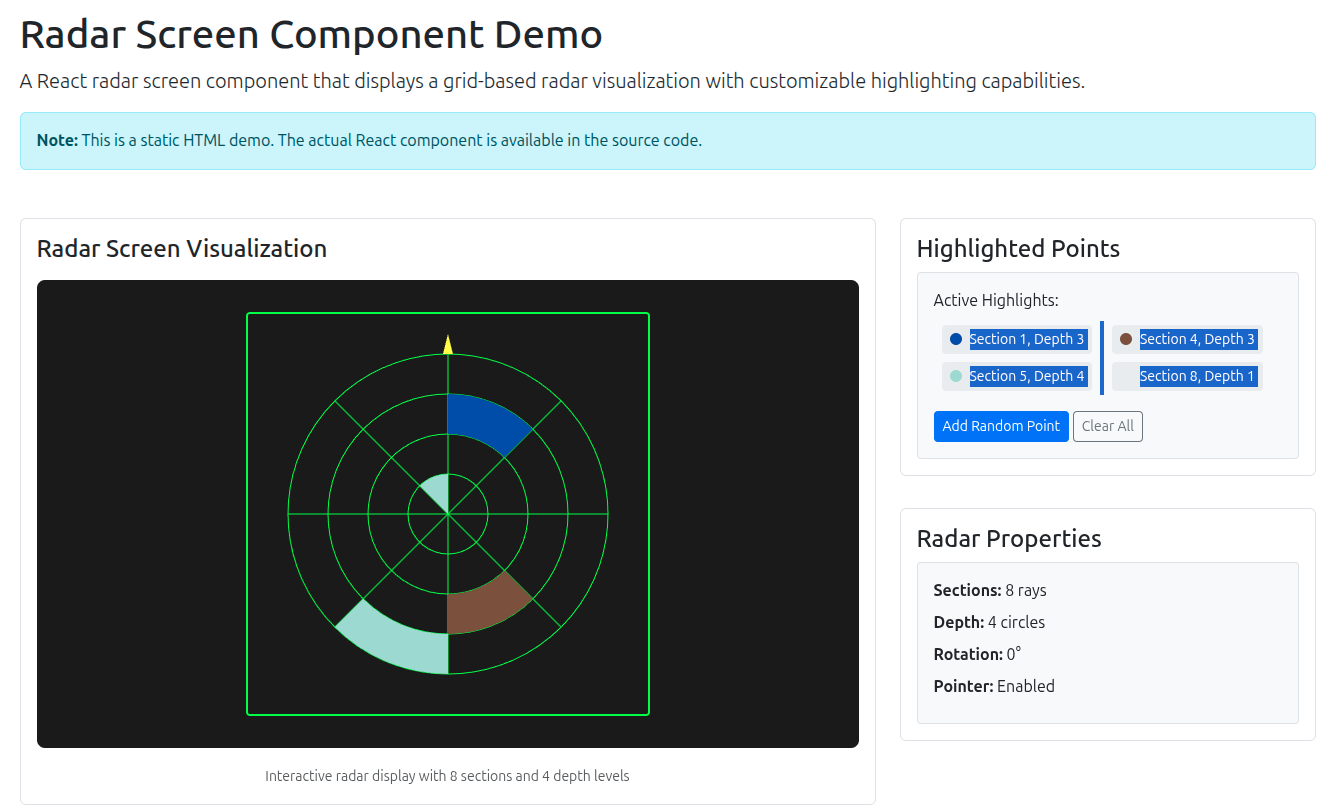
Overview
Class_Radar_Screen is a powerful React component that creates an interactive radar-like visualization. It displays a customizable grid system with radial sections and concentric circles, supporting dynamic highlighting, rotation, and distance calculations. Perfect for visualizing spatial data, sensor readings, or any grid-based information.
🆕 Recent Updates (v1.1.0)
Major Features
- 🎯 Radar Visualization: Canvas-based rendering for smooth performance
- 🎨 Dynamic Highlighting: Real-time point highlighting with custom colors
- 🔄 Dual Rotation System: Initial offset + continuous rotation
- 📏 Distance Display: Automatic distance calculation and labeling
- 🧭 North Pointer: Optional directional indicator
- ⚡ High Performance: Optimized canvas rendering with efficient redraws
Technical Improvements
- React class component with lifecycle optimization
- Efficient canvas rendering with minimal redraws
- Prop-based configuration system
- Responsive design with automatic scaling
- Cross-browser compatible
🔄 Rotation System Explained
The component features a dual rotation system for precise control:
📐 rotation_steps (Initial Offset)
- Purpose: Sets the initial grid alignment/offset
- Function: Discrete step-based rotation
- Formula:
(rotation_steps × π) / sections - Use Case: Align radar with specific directions (North, East, etc.)
Example with 8 sections:
rotation_steps = 0→ Default position (0°)rotation_steps = 1→ Shift by 1 section (45°)rotation_steps = 2→ Shift by 2 sections (90°)
🔄 rotation (Continuous)
- Purpose: Fine-grained rotation and animation
- Function: Continuous rotation in radians
- Use Case: Animation, precise positioning, real-time updates
💡 Combined Usage
// Start with East pointing up, then rotate continuously
<Class_Radar_Screen
    sections={8}
    rotation_steps={2}        // Initial 90° offset (East up)
    rotation={currentAngle}   // Continuous rotation
    highlighted_points={data}
    draw_pointer={true}
/>
Features
- Grid System: Configurable number of radial sections and depth levels
- Dynamic Highlighting: Real-time highlighting of grid sections with custom colors
- Dual Rotation Control: Initial offset + continuous rotation
- Distance Display: Automatic distance calculation and display for highlighted areas
- North Pointer: Optional directional arrow indicator
- Canvas Rendering: High-performance HTML5 canvas-based visualization
- Responsive Design: Automatic scaling and responsive layout
- Easy Integration: Simple prop-based configuration
🚀 Quick Start
Option 1: HTML Demo (Fastest)
Open the included demo file in your browser to see the component in action:
# Simply open this file in any browser
open demo.html
# or double-click the file in your file manager
Option 2: React Development
# Install dependencies
npm install

# Start development server
npm start

# Or run the example specifically
npm run example
Option 3: Build for Production
npm run buildInstallation
📦 NPM Installation
npm install radar_screen_react🌐 GitHub Repository
Available on GitHub: https://github.com/HefnySco/radar_screen_react
# Clone directly from GitHub
git clone https://github.com/HefnySco/radar_screen_react.git
cd radar_screen_react
npm install
Dependencies
- React 16.8+ (for class component support)
- Modern browser with HTML5 Canvas support
📖 Usage Guide
Basic Usage
import React from 'react';
import { Class_Radar_Screen } from 'radar_screen_react';

const MyComponent = () => {
    const highlightedPoints = [
        [3, 2, '#ff0000'],  // section 3, depth 2, red
        [5, 4, '#00ff00']   // section 5, depth 4, green
    ];

    return (
        <Class_Radar_Screen
            sections={8}
            depth={4}
            rotation_steps={0}
            rotation={0}
            highlighted_points={highlightedPoints}
            draw_pointer={true}
        />
    );
};
Real-World Example
import React, { useState } from 'react';
import { Class_Radar_Screen } from 'radar_screen_react';

const SensorDashboard = () => {
    const [sensorData, setSensorData] = useState([
        [1, 3, '#ff6b6b'],  // North sector - high alert
        [4, 2, '#4ecdc4'],  // East sector - normal
        [7, 4, '#feca57']   // West sector - warning
    ]);

    const addSensorReading = (section, depth, severity) => {
        const colors = {
            low: '#2ecc71',
            medium: '#f39c12',
            high: '#e74c3c'
        };

        setSensorData(prev => [...prev, [section, depth, colors[severity]]]);
    };

    return (
        <div className="container">
            <h4>Radar Sensor Dashboard</h4>

            <div className="row">
                <div className="col-md-8">
                    <div style={{ backgroundColor: '#1a1a1a', padding: '2rem' }}>
                        <Class_Radar_Screen
                            sections={8}
                            depth={5}
                            rotation_steps={0}
                            rotation={0}
                            highlighted_points={sensorData}
                            draw_pointer={true}
                        />
                    </div>
                </div>

                <div className="col-md-4">
                    <div className="card">
                        <div className="card-header">
                            <h5>Sensor Controls</h5>
                        </div>
                        <div className="card-body">
                            <button
                                className="btn btn-sm btn-primary mb-2"
                                onClick={() => addSensorReading(2, 3, 'low')}
                            >
                                Add Low Alert
                            </button>
                            <button
                                className="btn btn-sm btn-warning mb-2"
                                onClick={() => addSensorReading(5, 2, 'medium')}
                            >
                                Add Medium Alert
                            </button>
                            <button
                                className="btn btn-sm btn-danger mb-2"
                                onClick={() => addSensorReading(8, 4, 'high')}
                            >
                                Add High Alert
                            </button>
                            <button
                                className="btn btn-sm btn-outline-secondary"
                                onClick={() => setSensorData([])}
                            >
                                Clear All
                            </button>
                        </div>
                    </div>
                </div>
            </div>
        </div>
    );
};
Advanced Configuration
const AdvancedRadar = () => {
    const [rotation, setRotation] = useState(0);
    const [highlights, setHighlights] = useState([]);

    // Rotate radar continuously
    useEffect(() => {
        const interval = setInterval(() => {
            setRotation(prev => (prev + Math.PI / 180) % (Math.PI * 2));
        }, 50);

        return () => clearInterval(interval);
    }, []);

    return (
        <Class_Radar_Screen
            sections={12}
            depth={6}
            rotation_steps={3}
            rotation={rotation}
            highlighted_points={highlights}
            draw_pointer={true}
        />
    );
};
📋 Props Reference
| Prop Name | Type | Default | Required | Description |
|-----------|------|---------|----------|-------------|
| sections | number | 8 | No | Number of radial sections (rays) |
| depth | number | 4 | No | Number of concentric circles |
| rotation_steps | number | 0 | No | Initial grid offset in section steps (0-sections) |
| rotation | number | 0 | No | Continuous rotation in radians |
| highlighted_points | array | [] | No | Array of [section, depth, color] points |
| draw_pointer | boolean | false | No | Draw north arrow pointer |
🔄 Rotation Props Explained
rotation_steps (Initial Offset)
- Type: Number (0 to sections)
- Purpose: Sets initial grid alignment
- Calculation:
(rotation_steps × π) / sections - Example:
rotation_steps={2}on 8 sections = 90° offset
rotation (Continuous)
- Type: Number (radians)
- Purpose: Fine rotation and animation
- Range: Any real number
- Example:
rotation={Math.PI / 4}= 45° continuous rotation
highlighted_points Format
const highlighted_points = [
    [section, depth, color],  // Format: [section_number, depth_level, hex_color]
    [3, 2, '#ff0000'],       // Section 3, Depth 2, Red color
    [5, 4, '#00ff00']        // Section 5, Depth 4, Green color
];
🎨 Styling and Customization
Container Styling
<div style={{
    backgroundColor: '#1a1a1a',  // Dark radar background
    padding: '2rem',             // Internal padding
    borderRadius: '0.5rem',      // Rounded corners
    boxShadow: '0 4px 6px rgba(0, 0, 0, 0.1)'  // Subtle shadow
}}>
    <Class_Radar_Screen {...props} />
</div>
Canvas Customization
The component uses a 400x400 canvas with responsive scaling:
// The canvas automatically scales to fit its container
// while maintaining aspect ratio
<div style={{ width: '100%', maxWidth: '500px' }}>
    <Class_Radar_Screen {...props} />
</div>
🔄 Component Lifecycle
The component efficiently handles updates through React's lifecycle methods:
- componentDidMount: Initial radar draw and highlight application
- componentDidUpdate: Selective redraw only when sections/depth change
- highlightSection: Efficient highlighting without full redraw
🌐 Browser Support
- Chrome 60+
- Firefox 55+
- Safari 12+
- Edge 79+
🛠 Development
Available Scripts
npm run build      # Build component for distribution
npm run start      # Start React development server
npm run example    # Run the example application
npm run dev        # Development mode with hot reload
Project Structure
radar_screen_react/
├── src/
│   └── jsc_mctrl_radar_screen.jsx  # Component implementation
├── example.js                       # React example application
├── demo.html                        # Static HTML demo
├── package.json                     # Dependencies and scripts
└── README.md                        # This file
🎯 Use Cases
1. Sensor Visualization
Perfect for displaying sensor data from IoT devices, radar systems, or spatial monitoring.
2. Gaming Interfaces
Create mini-maps, radar displays, or spatial indicators for games and simulations.
3. Data Analytics
Visualize multi-dimensional data in a radial format for easy pattern recognition.
4. Navigation Systems
Display directional information, proximity alerts, or spatial relationships.
5. Control Panels
Create intuitive control interfaces for industrial or aerospace applications.
🔧 Troubleshooting
Common Issues
Q: Radar not displaying highlights
A: Ensure the highlighted_points array follows the format [section, depth, color] and that section/depth values are within the configured ranges.
Q: Canvas appears blank A: Check that the component has sufficient container dimensions. The canvas needs at least 100px width/height to render properly.
Q: Performance issues with frequent updates
A: The component only redraws when sections or depth props change. Highlighting updates are optimized to avoid full redraws.
Q: Rotation not working as expected A: Remember the dual rotation system:
rotation_steps= Initial grid offset (discrete steps)rotation= Continuous rotation (radians)- Try combining both:
rotation_steps={2}for 90° offset +rotation={Math.PI/4}for additional 45°
Q: Highlights not rotating with radar A: This is the correct behavior! Highlights rotate WITH the grid automatically. The component uses the same rotation calculation for both grid and highlights.
Q: rotation_steps vs rotation - which to use?
A: Use rotation_steps for:
- Setting initial radar orientation
- Aligning with compass directions (North, East, South, West)
- Discrete positioning
Use rotation for:
- Animation and continuous movement
- Fine-tuning adjustments
- Real-time rotation updates
Getting Help
- 📖 Check the
demo.htmlfile for visual examples with interactive controls - 📱 Review the
example.jsfile for React implementation with rotation controls - 🐛 Open an issue on GitHub for bug reports
- 📋 Check the component props documentation for configuration options
- 🎯 Try the interactive demo to understand rotation behavior
📄 License
MIT License - see LICENSE file for details.
🤝 Contributing
- Fork the repository
- Create your feature branch (
git checkout -b feature/amazing-feature) - Commit your changes (
git commit -m 'Add amazing feature') - Push to the branch (
git push origin feature/amazing-feature) - Open a Pull Request
📋 Changelog
v1.1.0 (Current)
- Breaking Changes: Complete refactor from tri-state checkbox to radar screen component
- Added: Canvas-based radar visualization with grid system
- Added: Dynamic highlighting with custom colors
- Added: Rotation control and north pointer functionality
- Added: Distance calculation and display
- Improved: Performance with optimized canvas rendering
- Updated: Documentation with comprehensive examples and use cases
v1.0.5
- Previous tri-state checkbox component (deprecated)
🔧 Advanced Examples
Real-time Data Visualization
const RealTimeRadar = () => {
    const [data, setData] = useState([]);

    useEffect(() => {
        const interval = setInterval(() => {
            // Simulate real-time data
            const newDataPoint = [
                Math.floor(Math.random() * 8) + 1,
                Math.floor(Math.random() * 4) + 1,
                `#${Math.floor(Math.random()*16777215).toString(16)}`
            ];

            setData(prev => [...prev.slice(-9), newDataPoint]);
        }, 1000);

        return () => clearInterval(interval);
    }, []);

    return (
        <Class_Radar_Screen
            sections={8}
            depth={4}
            highlighted_points={data}
            draw_pointer={true}
        />
    );
};
Interactive Radar
const InteractiveRadar = () => {
    const [highlights, setHighlights] = useState([]);

    const handleCanvasClick = (event) => {
        // Calculate clicked section and depth
        const rect = event.target.getBoundingClientRect();
        const x = event.clientX - rect.left;
        const y = event.clientY - rect.top;

        // Convert to radar coordinates (implementation depends on requirements)
        const section = Math.floor(Math.random() * 8) + 1;
        const depth = Math.floor(Math.random() * 4) + 1;

        setHighlights(prev => [...prev, [section, depth, '#ff0000']]);
    };

    return (
        <div onClick={handleCanvasClick}>
            <Class_Radar_Screen
                sections={8}
                depth={4}
                highlighted_points={highlights}
                draw_pointer={true}
            />
        </div>
    );
};
Transform your data visualization with the powerful and flexible Radar Screen component! 🎯