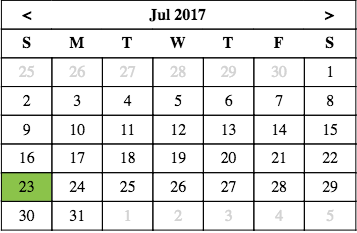
rc-month-calendar
v0.2.0
Published
React month view calendar

Maintainers
 yogeshkhatri1989
Readme
rc-month-calendar
A simple react component to show and navigate calendar month view.
Installation
npm install rc-month-calendar --saveUsage
import React from 'react';
import ReactDOM from 'react-dom';
import MonthCalendar from 'rc-month-calendar';
import "rc-month-calendar/dist/calendar.css";

class App extends React.Component {
  render() {
      return <MonthCalendar />
    }
}
ReactDOM.render(<App/>, document.getElementById('container'));
Documentation
onDateClick: React.PropTypes.func
Callback called when clicked on any date (receives date and oldDate as arguments - both type Date)
Adds selected class on the clicked date.
onMonthChange: React.PropTypes.func
Callback called when month changed (receives newMonth and oldMonth as arguments - both type Date)
isDateEnabled: React.PropTypes.func
Callback to check if date should be enabled for click, if not function passed, all dates are enabled by default
selectedDate: React.PropTypes.object
current date to be selected, default new Date
currentDate: React.PropTypes.object
current month view to be shown by default, default selectedDate
using this, month navigation can be handled from outside too
containerClass: React.PropTypes.string
class name to add on the monthe calendar top level element.
prevButtonClass: React.PropTypes.string
class name to add on the previous month button element
nextButtonClass: React.PropTypes.string
class name to add on the next month button element
prevButtonHtml: React.PropTypes.string
HTML to replace for previous button element (default <)
nextButtonHtml: React.PropTypes.string
HTML to replace for next button element (default >)
dateClass: React.PropTypes.string
class to add on every date field
disabledDateClass: React.PropTypes.string
class to add on disabled date fields
enabledDateClass: React.PropTypes.string
class to add on enabled date fields
Screenshot