
rdigital-twin
v3.0.27
Published
Framework-agnostic 3D/2D digital twin map viewer


Readme
rdigital-twin
Framework-agnostic 3D/2D map viewer for digital twin applications — interactive POI markers, heatmaps, crowd evacuation simulation, and floor navigation.
Keywords: digital-twin, 3d-viewer, 2d-viewer, map-viewer, threejs, webgl, poi, heatmap, crowd-simulation, evacuation, floor-navigation, react, angular, vue, svelte, map-builder, drm
Works with React, Angular, Vue 3, Svelte, or plain JavaScript.
🌐 Website: https://rdigital-twin.web.app
📦 npm: rdigital-twin
📁 Example: https://github.com/humsyong/rdigitaltwin-example
Try the free online map builder → https://rdigital-twin.web.app No installation required.
Powered by Three.js (OrbitControls, CSS2DRenderer) and the Web Crypto API (AES-256-GCM in-browser decryption).
Requirements
| Dependency | Version |
|-----------|---------|
| three | ^0.173.0 |
Note:
@noble/ciphersis installed automatically. Browser-script and CommonJS bundles include their dependencies.
Installation
npm install rdigital-twin
npm install --save three@^0.173.0
Quick Start (Vanilla JS)
import { DigitalTwinViewer } from 'rdigital-twin';
import 'rdigital-twin/styles.css';

const viewer = new DigitalTwinViewer({
  apiBaseUrl: 'https://api.your-domain.com/api',
  clientId: 'your-client-license-id',
  mapId: 'floor-plan',
  initialViewMode: '2d', // Top-down view, including solid kitchen and bathroom fixtures
  pois: [],
  onPoiClick: (id) => console.log('POI clicked:', id),
  onReady: () => console.log('Viewer ready'),
});

viewer.mount(document.getElementById('viewer-container'));
Note: The parent container must have explicit
widthandheight— the viewer fills its container viaResizeObserver.
Quick Start (React)
import { useEffect, useRef } from 'react';
import { DigitalTwinViewer } from 'rdigital-twin';
import 'rdigital-twin/styles.css';

function MapViewer() {
  const containerRef = useRef<HTMLDivElement>(null);
  const viewerRef = useRef<DigitalTwinViewer | null>(null);

  useEffect(() => {
    if (!containerRef.current) return;
    const viewer = new DigitalTwinViewer({
      apiBaseUrl: 'https://api.example.com/api',
      clientId: 'demo-client',
      mapId: 'floor-plan',
      pois: [],
    });
    viewer.mount(containerRef.current);
    viewerRef.current = viewer;

    return () => viewer.unmount();
  }, []);

  return <div ref={containerRef} style={{ width: '100%', height: '600px' }} />;
}
Quick Start (Vue 3)
<script setup lang="ts">
import { onMounted, onBeforeUnmount, ref } from 'vue';
import { DigitalTwinViewer } from 'rdigital-twin';
import 'rdigital-twin/styles.css';

const container = ref<HTMLElement>();
let viewer: DigitalTwinViewer;

onMounted(() => {
  if (!container.value) return;
  viewer = new DigitalTwinViewer({
    apiBaseUrl: 'https://api.example.com/api',
    clientId: 'demo-client',
    mapId: 'floor-plan',
    pois: [],
  });
  viewer.mount(container.value);
});

onBeforeUnmount(() => viewer?.unmount());
</script>

<template>
  <div ref="container" style="width:100%;height:600px" />
</template>
Showcase
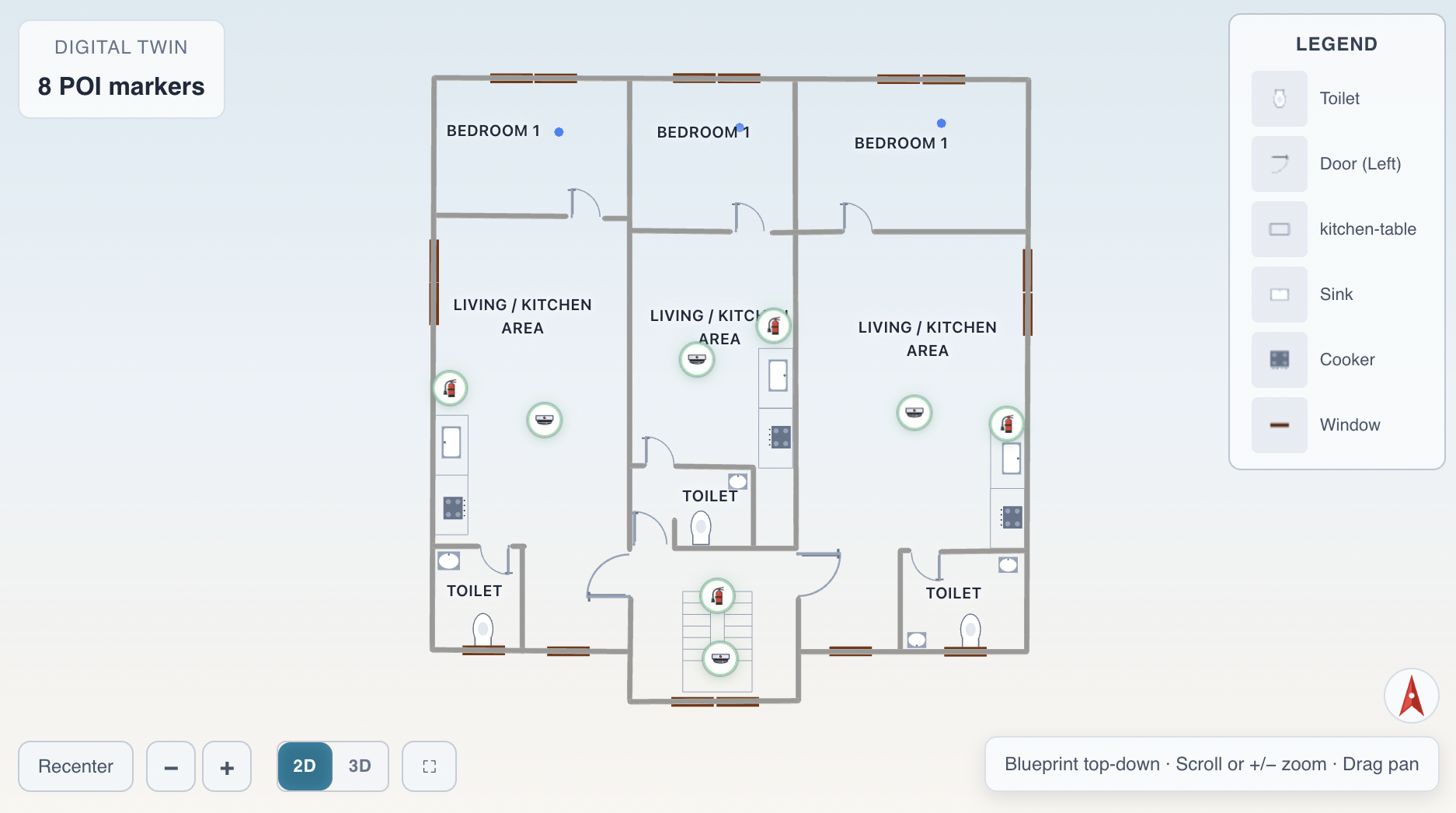
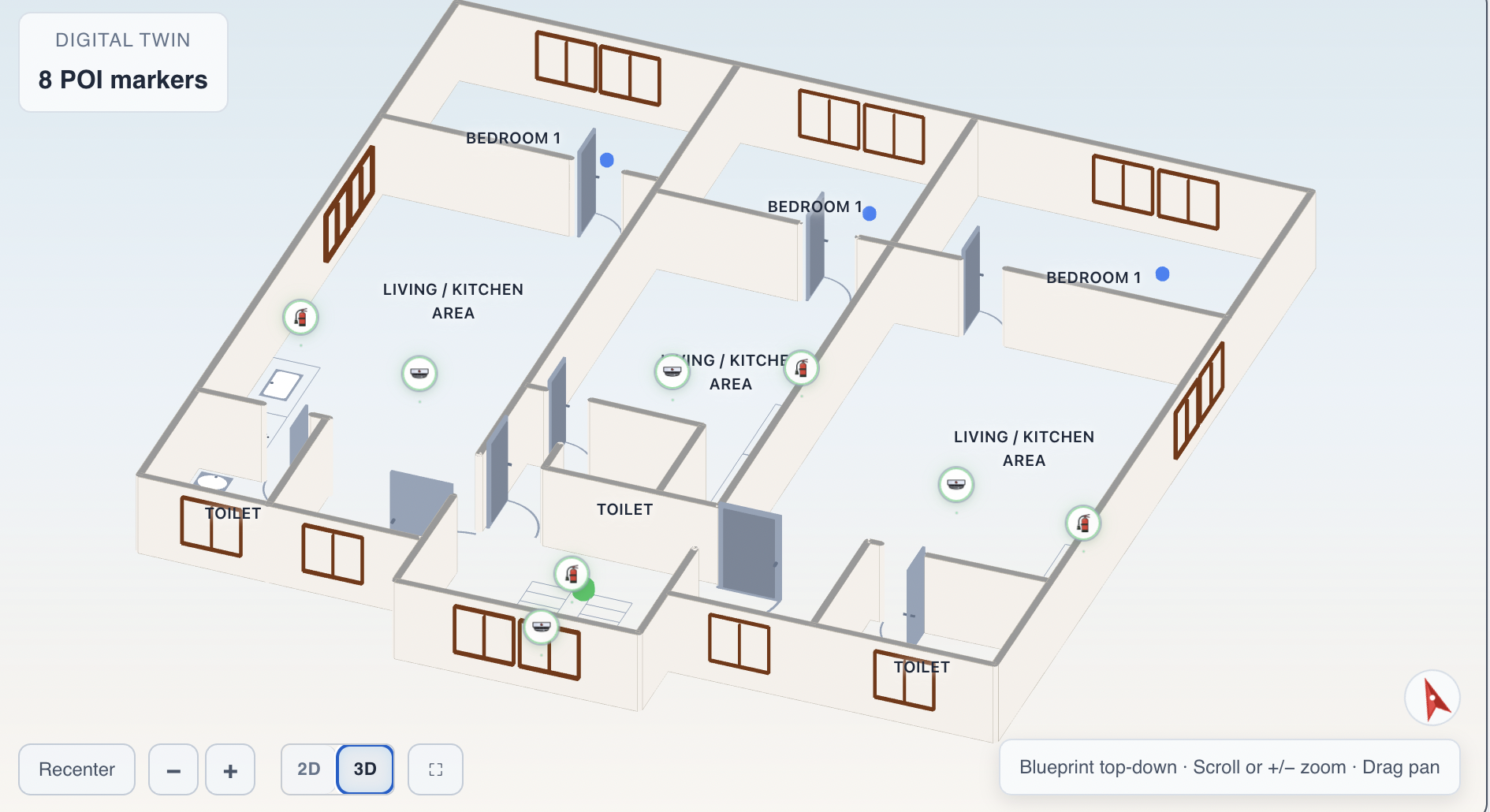
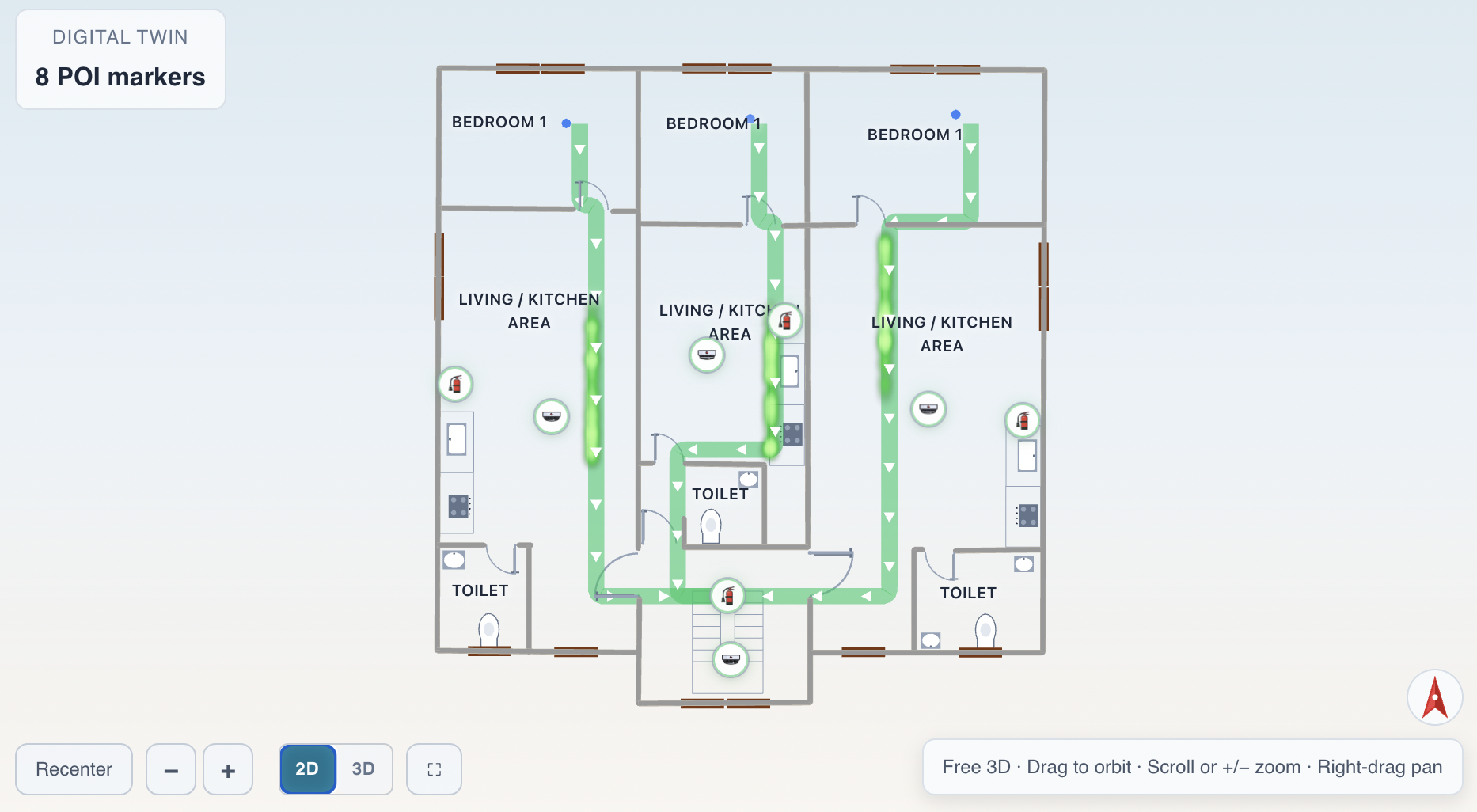
Viewer & Visualization
| Feature | Description | |---------|-------------| | 2D / 3D Viewer | High-performance WebGL viewer supporting both top-down blueprint view and free 3D perspective mode. Smooth 60 FPS rendering for large-scale projects. | | Multi-Floor Navigation | Built-in floor switcher with alarm indicators. Navigate between floors, basements, and levels seamlessly with instant map transitions. | | PNG Map Overlay | Upload a PNG floor plan image and overlay interactive elements on top. Perfect for quickly digitizing existing paper maps and diagrams. |
Interactive Elements
| Feature | Description | |---------|-------------| | Interactive Markers | Add interactive points of interest (POIs) with 12+ icon types. Each marker supports status indicators — normal, alert, warning, or offline — with color-coded visual feedback. | | Areas of Interest | Define semi-transparent polygon zones on your map to highlight rooms, restricted areas, or operational zones. Reshape them dynamically by dragging vertices. | | Decoration Objects | Furnish your digital twin with realistic 3D objects — tables, chairs, stairs, windows, doors, meeting areas, and emergency equipment. Fully rotatable and scalable. |
Simulation & Analytics
| Feature | Description | |---------|-------------| | Evacuation Simulation | Run multi-agent crowd simulations with smart pathfinding. Agents navigate around obstacles to reach exits, with real-time tracking of evacuated, walking, and trapped occupants. | | Heatmap Visualization | Visualize people density and movement patterns with thermal-style heatmap overlays. Automatically generated from simulation routes or custom sensor data. | | Real-Time Data Feeds | Connect live sensor data, POI updates, and zone changes through polling feeds. Your digital twin reflects real-world changes as they happen. |
Platform & Tools
| Feature | Description | |---------|-------------| | Map Builder | Visual editor for creating and editing digital twin maps without writing code. Drag, drop, and configure your spaces with an intuitive interface. | | REST APIs | Programmatically manage projects, maps, markers, and zones through well-documented REST endpoints. Integrate with your existing infrastructure seamlessly. |
API Reference
DigitalTwinViewer
Constructor Options
| Option | Type | Required | Default | Description |
|--------|------|----------|---------|-------------|
| apiBaseUrl | string | Yes | — | Absolute backend API URL |
| clientId | string | Yes | — | DRM client license identifier |
| mapId | string | Yes | — | Encrypted map asset id |
| pois | PointOfInterest[] | No | [] | Live POI / sensor data array |
| areasOfInterest | AreaOfInterest[] | No | [] | Semi-translucent floor polygons |
| draggable | boolean | No | true | Allow dragging POI/AOI markers |
| showPoiInfoOnClick | boolean | No | true | Show POI detail panel on click |
| backgroundColor | string | No | '#111827' | Scene & container background |
| modelSource | ModelSource | No | { type: 'encrypted-gltf', mapId } | Override model loading |
| initialCameraPosition | Coordinates | No | — | Override initial camera focus |
| initialViewMode | '2d' \| '3d' | No | '2d' | Initial view mode |
| hideOverlays | boolean | No | false | Hide all HUD overlays |
| hideRecenter | boolean | No | false | Hide Recenter button |
| hideZoom | boolean | No | false | Hide Zoom buttons |
| hideViewToggle | boolean | No | false | Hide 2D/3D toggle |
| hideNorthArrow | boolean | No | false | Hide north arrow |
| hideEvacuation | boolean | No | true | Hide evacuation panel |
| lockCameraAboveFloor | boolean | No | true | Prevent camera below floor |
| heatmapData | HeatmapPoint[] | No | [] | Thermal-camera heatmap data |
| evacuationTriggerIcons | string[] | No | ['fire', 'fireAlarmPanel'] | POI types triggering evacuation |
| evacuationStartPoints | Coordinates[] | No | [] | Evacuation spawn positions |
| allowSelectEvacRoute | boolean | No | false | Allow clicking routes |
| selectedEvacRouteId | string \| null | No | null | Currently selected route |
| evacuationRouteMode | 'single' \| 'multiple' | No | 'single' | Route computation mode |
| theme | 'dark' \| 'light' | No | 'dark' | UI theme |
| legend | boolean | No | false | Show decoration legend |
| hideLabels | boolean | No | false | Hide map labels |
TypeScript Interfaces
PointOfInterest
interface Coordinates {
  x: number;
  y: number;
  z: number;
}

type PoiStatus = 'NORMAL' | 'ALERT' | 'WARNING' | 'OFFLINE';

type PoiIconType =
  | 'default' | 'sensor' | 'camera' | 'hvac' | 'door'
  | 'fire' | 'fireExtinguisher' | 'breakGlass' | 'fireHose'
  | 'fireAlarmPanel' | 'smokeDetector' | 'sosPanicAlarm';

interface PointOfInterest {
  id: string;
  name: string;
  coordinates: Coordinates;
  iconType: PoiIconType;
  status: PoiStatus;
  color: string;
  customIcon?: string;   // Optional custom icon URL (PNG/SVG)
  scale?: number;        // 1–10, default 5
  radius?: number;       // Hazard radius in meters
}
AreaOfInterest
interface AreaOfInterest {
  id: string;
  name?: string;            // Display label shown on hover
  points: Coordinates[];    // Closed ring of floor vertices
  color: string;
}
HeatmapPoint
A single person's position for the thermal-camera-style heatmap. Each point represents one person — when people stand close together their heat signatures merge into a hotspot, just like a thermal camera.
interface HeatmapPoint {
  /** World X-coordinate on the map floor */
  x: number;
  /** Ground Y (typically 0 or floor height) */
  y: number;
  /** World Z-coordinate on the map floor */
  z: number;
}
Event Callbacks
| Callback | Signature | Description |
|----------|-----------|-------------|
| onPoiClick | (id: string) => void | POI marker clicked |
| onPoiDragMove | (payload: PoiDragPayload) => void | POI being dragged |
| onPoiDragEnd | (payload: PoiDragPayload) => void | POI drag finished |
| onAoiDragMove | (payload: AoiDragPayload) => void | AOI vertex being dragged |
| onAoiDragEnd | (payload: AoiDragPayload) => void | AOI vertex drag finished |
| onReady | () => void | Viewer initialized |
| onError | (message: string) => void | Error occurred |
| onAccessDenied | (error: MapAccessDeniedError) => void | DRM rejected |
| onCanvasClick | (coords: Coordinates) => void | Click on empty ground |
| onPolygonClick | (payload: {id, name}) => void | Click on room polygon |
| onAoiClick | (id: string) => void | Click on AOI body |
| onEvacuationRoutes | (routes: Map<string, EscapeRoute>) => void | Routes computed |
| onCrowdStatus | (status: CrowdSimulationStatus) => void | Crowd sim progress |
Methods
| Method | Return | Description |
|--------|--------|-------------|
| mount(container) | void | Attach viewer to DOM element |
| unmount() | void | Cleanup and detach |
| setPois(pois) | void | Update POI markers |
| setAreasOfInterest(areas) | void | Update AOI polygons |
| setHeatmapData(data) | void | Update heatmap overlay |
| setMapId(mapId) | void | Switch map (triggers reload) |
| setClientId(id) | void | Update client ID |
| setApiBaseUrl(url) | void | Update API URL |
| setTheme(theme) | void | Switch dark/light theme |
| setSelectedPoiId(id) | void | Programmatically select a POI |
| setSelectedEvacRouteId(id) | void | Select an evacuation route |
| setEvacuationStarts(starts) | void | Override evacuation spawn points |
| updateOptions(partial) | void | Batch-update options without reload |
| recenterCamera() | void | Reset camera to map center |
| toggleFreeCamera() | void | Toggle 2D/3D mode |
| getFreeCameraEnabled() | boolean | Check if 3D (free camera) mode is active |
| zoomIn() / zoomOut() | void | Step zoom |
| startCrowdSimulation(count?) | void | Start crowd evacuation |
| stopCrowdSimulation() | void | Stop crowd simulation |
| generateRouteHeatmap() | HeatmapPoint[] | Sample route heat points |
| getSelectedPoi() | PointOfInterest \| null | Currently selected POI |
| getMarkers() | PointOfInterest[] | All active POI markers |
| recalcEvacuation() | void | Recompute escape routes with current state |
| reevaluatePois(pois) | void | Re-evaluate hazard POIs for evacuation |
Tip:
setEvacuationStarts()overrides the map JSON start points. CallrecalcEvacuation()after changing starts to regenerate routes.
FloorNavigator
import { FloorNavigator } from 'rdigital-twin';
import 'rdigital-twin/styles.css';

const nav = new FloorNavigator({
  floors: [{ id: '6F', label: 'Floor 6' }, { id: '5F', label: 'Floor 5' }],
  currentFloor: '6F',
  alarms: [{ floorId: '5F', count: 3 }],
  onCurrentFloorChange: (floorId) => console.log('Floor:', floorId),
});
nav.mount(document.getElementById('nav-container'));
FloorNavigator Methods
| Method / Property | Return | Description |
|-------------------|--------|-------------|
| mount(container) | void | Attach to a DOM element |
| unmount() | void | Detach and clean up |
| setFloors(floors) | void | Replace floor list |
| setCurrentFloor(floorId) | void | Switch active floor |
| setAlarms(alarms) | void | Update alarm events |
| setTheme(theme) | void | Switch dark/light theme |
| currentFloor (getter) | string | Currently selected floor ID |
| floors (getter) | FloorItem[] | All floor entries |
| alarms (getter) | AlarmEvent[] | Active alarm events |
| theme (getter) | string | Current theme |
EvacuationPanel
import { EvacuationPanel } from 'rdigital-twin';

const panel = new EvacuationPanel({ onClear: () => console.log('Cleared') });
panel.mount(document.getElementById('panel-container'));

// Update with evacuation data
panel.setIsEvacuating(true);
panel.setEvents(events);
panel.setRoutes(routes);
EvacuationPanel Methods
| Method / Property | Return | Description |
|-------------------|--------|-------------|
| mount(container) | void | Attach panel to a DOM element |
| unmount() | void | Detach and clean up |
| setIsEvacuating(val) | void | Show/hide the panel |
| setEvents(events) | void | Update hazard events |
| setRoutes(routes) | void | Update escape route list |
| isEvacuating (getter) | boolean | Whether panel is visible |
| events (getter) | readonly EvacuationEvent[] | Current hazard events |
| routes (getter) | ReadonlyMap<string, EscapeRoute> | Current route map |
EvacuationEngine
Standalone evacuation logic (no UI) — useful for custom integrations:
import { EvacuationEngine } from 'rdigital-twin';

const engine = new EvacuationEngine({
  onRoutesChanged: (routes) => console.log('Routes:', routes.size),
  onStateChanged: (isActive, events) => console.log('Evacuating:', isActive),
});

engine.init(floorPlanData);
engine.evaluatePois(alertPois);
engine.recalculateRoutes();
EvacuationEngine Methods
| Method / Property | Return | Description |
|-------------------|--------|-------------|
| init(plan) | void | Initialize with floor plan data (maze or room-based) |
| evaluatePois(pois) | void | Detect ALERT hazard POIs and trigger evacuation |
| recalculateRoutes(selId?) | void | Recompute escape routes from current hazards |
| clearAll() | void | Reset all evacuation state |
| setRouteMode(mode) | void | Set 'single' or 'multiple' route mode |
| setExternalStarts(starts) | void | Override spawn points (replaces map JSON starts) |
| setCallbacks(callbacks) | void | Update or override callbacks |
| activeEvents (getter) | readonly EvacuationEvent[] | Current hazard events |
| activeRoutes (getter) | ReadonlyMap<string, EscapeRoute> | Current escape routes |
| isEvacuating (getter) | boolean | Whether evacuation is active |
| selectedRouteId (getter) | string \| null | Currently selected route ID |
| routeMode (getter) | 'single' \| 'multiple' | Current route computation mode |
Styles
Import the self-contained CSS separately:
import 'rdigital-twin/styles.css';All class names are prefixed with dtv- to avoid collisions. No Tailwind or other framework required.
What's Included / Excluded
Included in the package (dist/):
- Minified ESM bundle (
rdigital-twin.esm.js) - Minified UMD bundle (
rdigital-twin.umd.js) - TypeScript declarations (
.d.ts) - Minified CSS (
rdigital-twin.css) - CommonJS bundle (
rdigital-twin.cjs)
Not included (install separately as peer dependencies):
three— 3D rendering engine
Not shipped (no raw source):
- No
.vuefiles - No
.tssource files - No Vue dependency
Architecture
rdigital-twin/
├── dist/
│   ├── rdigital-twin.esm.js        # ESM bundle
│   ├── rdigital-twin.umd.js        # UMD bundle
│   ├── rdigital-twin.css           # Self-contained styles
│   ├── rdigital-twin.cjs           # CommonJS bundle
│   └── index.d.ts                  # TypeScript declarations
├── package.json
└── README.md
License
Proprietary — see license agreement with your provider.