react-admin-tailwind
v1.0.28
Published
A frontend Framework for building admin applications on top of REST services, using ES6, React and Tailwind CSS


Readme
react-admin
A frontend Framework for building single-page applications running in the browser on top of REST/GraphQL APIs, using TypeScript, React and Material Design. Open sourced and maintained by marmelab.
Home page - Documentation - Demos - Blog - Releases - Support
Features
🔌 Backend Agnostic: Connects to any API (REST or GraphQL, see the list of more than 45 adapters)
🧩 All The Building Blocks You Need: Provides hooks and components for authentication, routing, forms & validation, datagrid, search & filter, relationships, validation, roles & permissions, rich text editor, i18n, notifications, menus, theming, caching, etc.
🪡 High Quality: Accessibility, responsive, secure, fast, testable
💻 Great Developer Experience: Complete documentation, IDE autocompletion, type safety, storybook, demo apps with source code, modular architecture, declarative API
👑 Great User Experience: Optimistic rendering, filter-as-you-type, undo, preferences, saved queries
🛠 Complete Customization: Replace any component with your own
☂️ Opt-In Types: Develop either in TypeScript or JavaScript
👨👩👧👦 Powered by Tailwind CSS, react-hook-form, react-router, react-query, TypeScript and a few more
Installation
React-admin is available from npm. You can install it (and its required dependencies) using:
npm install react-admin
#or
yarn add react-admin
Documentation
- Read the Tutorial for a 30 minutes introduction
- Watch the YouTube video tutorials
- Head to the Documentation for a complete API reference
- Checkout the source code of the examples (e-commerce, CRM, blog, media player)
At a Glance
// in app.js
import * as React from "react";
import ReactDOM from 'react-dom';
import { Admin, Resource } from 'react-admin';
import restProvider from 'ra-data-simple-rest';

import { PostList, PostEdit, PostCreate, PostIcon } from './posts';

ReactDOM.createRoot(document.getElementById('root')!).render(
    <Admin dataProvider={restProvider('http://localhost:3000')}>
        <Resource name="posts" list={PostList} edit={PostEdit} create={PostCreate} icon={PostIcon} />
    </Admin>
);
The <Resource> component defines CRUD pages (list, edit, and create) for an API endpoint (/posts). The page components use react-admin components to fetch and render data:
// in posts.js
import * as React from "react";
import { List, DataTable, Edit, Create, SimpleForm, DateField, EditButton, TextInput, DateInput, useRecordContext } from 'react-admin';
import BookIcon from '@heroicons/react/24/outline/Book';
export const PostIcon = BookIcon;

export const PostList = () => (
    <List>
        <DataTable>
            <DataTable.Col source="id" />
            <DataTable.Col source="title" />
            <DataTable.Col source="published_at" field={DateField} />
            <DataTable.Col source="average_note" />
            <DataTable.Col source="views" />
            <DataTable.Col>
                <EditButton />
            </DataTable.Col>
        </DataTable>
    </List>
);

const PostTitle = () => {
    const record = useRecordContext();
    return <span>Post { record ? `"${record.title}"` : '' }</span>;
};

export const PostEdit = () => (
    <Edit title={<PostTitle />}>
        <SimpleForm>
            <TextInput disabled source="id" />
            <TextInput source="title" />
            <TextInput source="teaser" options={{ multiline: true }} />
            <TextInput multiline source="body" />
            <DateInput label="Publication date" source="published_at" />
            <TextInput source="average_note" />
            <TextInput disabled label="Nb views" source="views" />
        </SimpleForm>
    </Edit>
);

export const PostCreate = () => (
    <Create title="Create a Post">
        <SimpleForm>
            <TextInput source="title" />
            <TextInput source="teaser" options={{ multiline: true }} />
            <TextInput multiline source="body" />
            <TextInput label="Publication date" source="published_at" />
            <TextInput source="average_note" />
        </SimpleForm>
    </Create>
);
Does It Work With My API?
Yes.
React-admin uses an adapter approach, with a concept called Data Providers. Existing providers can be used as a blueprint to design your API, or you can write your own Data Provider to query an existing API. Writing a custom Data Provider is a matter of hours.

See the Data Providers documentation for details.
Batteries Included But Removable
React-admin is designed as a library of loosely coupled React components built on top of Tailwind CSS, in addition to custom react hooks exposing reusable controller logic. It is very easy to replace one part of react-admin with your own, e.g. to use a custom datagrid, GraphQL instead of REST, or Bootstrap instead of Material Design.
Examples
There are several examples inside the examples folder:
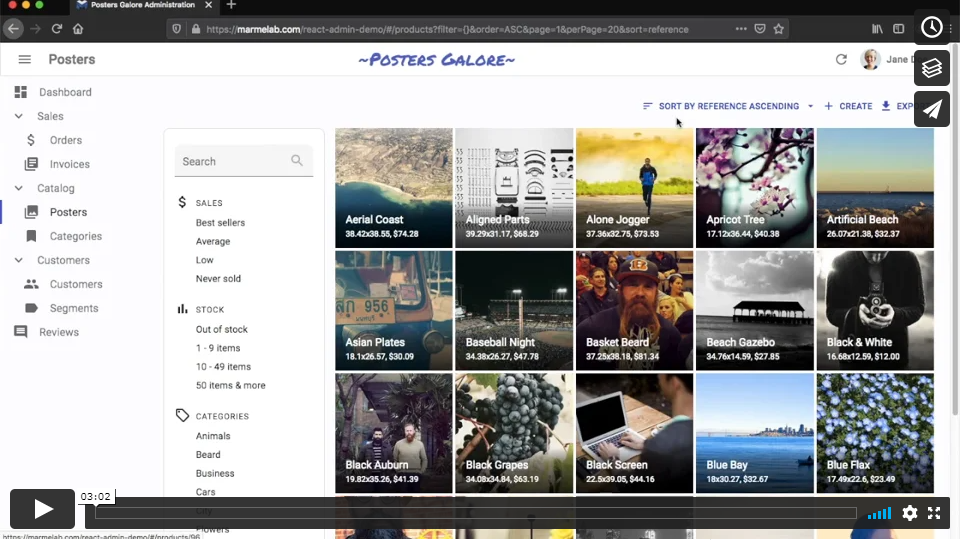
simple(StackBlitz): a simple blog with posts, comments and users that we use for our e2e tests.e-commerce: (demo, source) A fictional poster shop admin, serving as the official react-admin demo.CRM: (demo, source) A customer relationship management applicationhelpdesk: (demo, source) A ticketing application with realtime locks and notificationstutorial(Stackblitz): the application built while following the tutorial.
You can run those example applications by calling:
# At the react-admin project root
make install
# or
yarn install

# Run the simple application
make run-simple

# Run the tutorial application
make build
make run-tutorial

# Run the demo application
make build
make run-demo
And then browse to the URL displayed in your console.
Support
- Get commercial support from Marmelab via React-Admin Enterprise Edition
- Get community support via Discord and StackOverflow.
License
React-admin is licensed under the MIT License, sponsored and supported by marmelab. It is free to use, even for commercial purpose.
If you want to give back, please talk about it, help newcomers, subscribe to the Enterprise Edition, or contribute code.