
react-ai-voice-visualizer
v0.1.6
Published
A collection of React components for building AI voice interfaces with real-time audio visualization

Maintainers
 chevgan
Readme
react-ai-voice-visualizer
The Standard UI Kit for AI Voice Agents



A collection of production-ready React components for building AI voice interfaces with real-time audio visualization. Featuring Siri-like animations, Web Audio API integration, and canvas-based rendering optimized for 60fps performance.
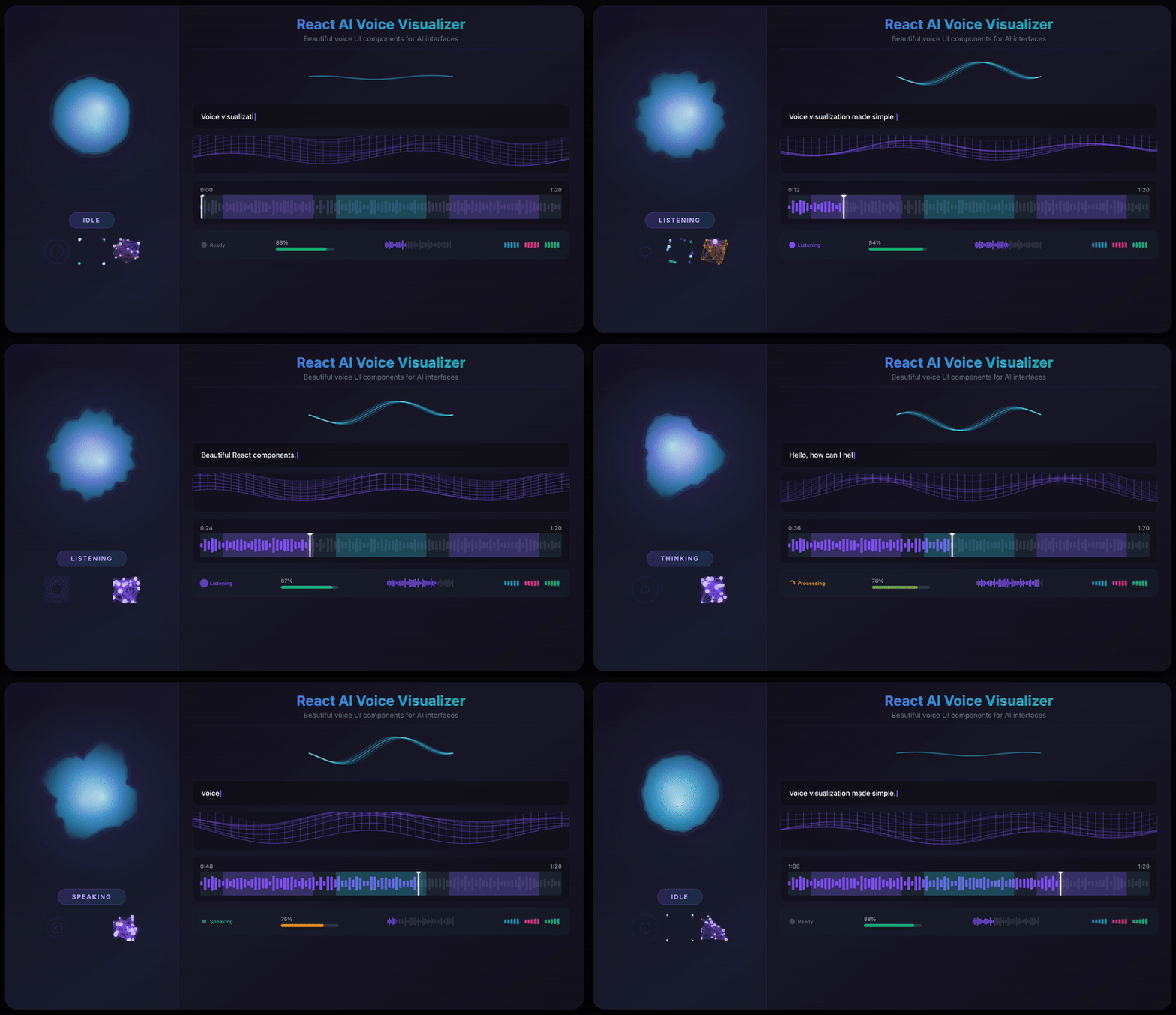
Features
- 12 Visualization Components - From fluid orbs to neural networks, particle swarms to waveforms
- 3 Powerful Hooks - Microphone capture, real-time audio analysis, and voice activity detection
- State-Aware Animations - Built-in support for
idle,listening,thinking, andspeakingstates - Web Audio API Integration - FFT-based frequency analysis with bass/mid/treble extraction
- Retina Display Support - Automatic
devicePixelRatioscaling for crisp visuals on all screens - Full TypeScript Support - Comprehensive type definitions for all components and hooks
- Zero External Dependencies - Only
simplex-noisefor organic deformation effects - 60fps Canvas Rendering - Optimized
requestAnimationFrameloops with delta-time smoothing
Installation
npm install react-ai-voice-visualizeryarn add react-ai-voice-visualizerpnpm add react-ai-voice-visualizerQuick Start
import {
  VoiceOrb,
  useMicrophoneStream,
  useAudioAnalyser,
} from 'react-ai-voice-visualizer';

function VoiceInterface() {
  const { stream, isActive, start, stop } = useMicrophoneStream();
  const { frequencyData, volume } = useAudioAnalyser(stream);

  return (
    <div>
      <VoiceOrb
        audioData={frequencyData}
        volume={volume}
        state={isActive ? 'listening' : 'idle'}
        size={200}
        primaryColor="#06B6D4"
        secondaryColor="#8B5CF6"
        onClick={isActive ? stop : start}
      />
    </div>
  );
}
Components
Hero Visualizations
VoiceOrb
A beautiful, fluid 3D-like sphere that reacts to voice in real-time. The hero component featuring organic simplex noise deformation and smooth state transitions.
<VoiceOrb
  audioData={frequencyData}
  volume={volume}
  state="listening"
  size={200}
  primaryColor="#06B6D4"
  secondaryColor="#8B5CF6"
  glowIntensity={0.6}
  noiseScale={0.2}
  noiseSpeed={0.5}
/>
| Prop | Type | Default | Description |
|------|------|---------|-------------|
| audioData | Uint8Array | - | Frequency data from useAudioAnalyser |
| volume | number | 0 | Volume level (0-1), can drive animation without full audioData |
| state | 'idle' \| 'listening' \| 'thinking' \| 'speaking' | 'idle' | Current state of the voice interface |
| size | number | 200 | Diameter in pixels |
| primaryColor | string | '#06B6D4' | Primary color for the orb |
| secondaryColor | string | '#8B5CF6' | Secondary color for gradient |
| glowColor | string | - | Glow color (defaults to primaryColor) |
| glowIntensity | number | 0.6 | Glow intensity (0-1) |
| noiseScale | number | 0.2 | Deformation intensity |
| noiseSpeed | number | 0.5 | Animation speed multiplier |
| onClick | () => void | - | Click handler |
| className | string | - | Additional CSS class |
| style | CSSProperties | - | Inline styles |
VoiceWave
Siri/Gemini-inspired multiple sine waves with phase-shifted dancing animation.
<VoiceWave
  audioData={frequencyData}
  volume={volume}
  state="speaking"
  size={300}
  lineColor="#FFFFFF"
  numberOfLines={5}
/>
| Prop | Type | Default | Description |
|------|------|---------|-------------|
| audioData | Uint8Array | - | Frequency data from useAudioAnalyser |
| volume | number | 0 | Volume level (0-1) |
| state | VoiceState | 'idle' | Current state |
| size | number | 200 | Component size in pixels |
| lineColor | string | '#FFFFFF' | Color of the wave lines |
| lineWidth | number | 2 | Width of each line |
| numberOfLines | number | 5 | Number of wave lines |
| phaseShift | number | 0.15 | Phase shift between lines |
| amplitude | number | 1 | Amplitude multiplier |
| speed | number | 1 | Animation speed multiplier |
| onClick | () => void | - | Click handler |
| className | string | - | Additional CSS class |
| style | CSSProperties | - | Inline styles |
VoiceParticles
Particle swarm visualization with state-based behaviors (brownian, swirl, pulse, jitter).
<VoiceParticles
  audioData={frequencyData}
  volume={volume}
  state="thinking"
  particleCount={100}
  particleSize={3}
/>
| Prop | Type | Default | Description |
|------|------|---------|-------------|
| audioData | Uint8Array | - | Frequency data from useAudioAnalyser |
| volume | number | 0 | Volume level (0-1) |
| state | VoiceState | 'idle' | Current state |
| size | number | 200 | Component size in pixels |
| primaryColor | string | '#8B5CF6' | Primary particle color |
| secondaryColor | string | '#EC4899' | Secondary particle color |
| particleCount | number | 100 | Number of particles |
| particleSize | number | 3 | Base particle size |
| speed | number | 1 | Animation speed multiplier |
| onClick | () => void | - | Click handler |
| className | string | - | Additional CSS class |
| style | CSSProperties | - | Inline styles |
VoiceRing
Minimal ring with ripple effects and breathing animation when idle.
<VoiceRing
  audioData={frequencyData}
  volume={volume}
  state="listening"
  rotationSpeed={1}
/>
| Prop | Type | Default | Description |
|------|------|---------|-------------|
| audioData | Uint8Array | - | Frequency data from useAudioAnalyser |
| volume | number | 0 | Volume level (0-1) |
| state | VoiceState | 'idle' | Current state |
| size | number | 200 | Component size in pixels |
| primaryColor | string | '#8B5CF6' | Primary ring color |
| secondaryColor | string | '#EC4899' | Secondary color for gradient |
| glowColor | string | - | Glow color |
| glowIntensity | number | 0.5 | Glow intensity (0-1) |
| rotationSpeed | number | 1 | Ring rotation speed |
| onClick | () => void | - | Click handler |
| className | string | - | Additional CSS class |
| style | CSSProperties | - | Inline styles |
VoiceNeural
Neural network node visualization with connecting lines and pulse propagation.
<VoiceNeural
  audioData={frequencyData}
  volume={volume}
  state="thinking"
  nodeCount={40}
  connectionDistance={100}
/>
| Prop | Type | Default | Description |
|------|------|---------|-------------|
| audioData | Uint8Array | - | Frequency data from useAudioAnalyser |
| volume | number | 0 | Volume level (0-1) |
| state | VoiceState | 'idle' | Current state |
| size | number | 200 | Component size in pixels |
| primaryColor | string | '#8B5CF6' | Primary node color |
| secondaryColor | string | '#EC4899' | Secondary color for connections |
| nodeCount | number | 40 | Number of neural nodes |
| connectionDistance | number | 100 | Max distance for node connections |
| onClick | () => void | - | Click handler |
| className | string | - | Additional CSS class |
| style | CSSProperties | - | Inline styles |
Audio Visualizers
Waveform
Bar-based waveform visualization for real-time or static audio data with playback progress.
<Waveform
  timeDomainData={timeDomainData}
  progress={0.5}
  height={48}
  barWidth={3}
  barGap={2}
  color="#8B5CF6"
  progressColor="#06B6D4"
/>
| Prop | Type | Default | Description |
|------|------|---------|-------------|
| timeDomainData | Uint8Array | - | Time domain data for real-time visualization |
| staticData | number[] | - | Pre-computed waveform data for static visualization |
| progress | number | - | Playback progress (0-1) |
| width | number \| string | - | Component width |
| height | number | 48 | Component height |
| barWidth | number | 3 | Width of each bar |
| barGap | number | 2 | Gap between bars |
| barRadius | number | 2 | Border radius of bars |
| color | string | '#8B5CF6' | Waveform color |
| progressColor | string | - | Color for played portion |
| backgroundColor | string | 'transparent' | Background color |
| animated | boolean | true | Enable smooth transitions |
| className | string | - | Additional CSS class |
| style | CSSProperties | - | Inline styles |
WaveformMini
Compact equalizer bars with glow effect, perfect for inline status indicators.
<WaveformMini
  audioData={frequencyData}
  volume={volume}
  barCount={8}
  width={80}
  height={24}
  color="#00EAFF"
/>
| Prop | Type | Default | Description |
|------|------|---------|-------------|
| audioData | Uint8Array | - | Frequency data from useAudioAnalyser |
| volume | number | - | Volume level for simulated animation |
| barCount | number | 8 | Number of equalizer bars |
| width | number | 80 | Component width |
| height | number | 24 | Component height |
| color | string | '#00EAFF' | Bar color |
| className | string | - | Additional CSS class |
| style | CSSProperties | - | Inline styles |
AudioReactiveMesh
Cyberpunk wireframe grid/terrain with perspective 3D transformation and audio-reactive wave animation.
<AudioReactiveMesh
  audioData={frequencyData}
  volume={volume}
  rows={20}
  cols={30}
  height={200}
  perspective={60}
  waveSpeed={1}
  waveHeight={1}
/>
| Prop | Type | Default | Description |
|------|------|---------|-------------|
| audioData | Uint8Array | - | Frequency data from useAudioAnalyser |
| volume | number | - | Volume level (0-1) |
| rows | number | 20 | Number of grid rows |
| cols | number | 30 | Number of grid columns |
| width | number \| string | - | Component width |
| height | number | 200 | Component height |
| color | string | '#8B5CF6' | Line color |
| lineWidth | number | 1 | Line width |
| perspective | number | 60 | Perspective angle in degrees |
| waveSpeed | number | 1 | Wave animation speed |
| waveHeight | number | 1 | Wave height multiplier |
| className | string | - | Additional CSS class |
| style | CSSProperties | - | Inline styles |
Status Indicators
VADIndicator
Voice Activity Detection status indicator with state-specific animations.
<VADIndicator
  state="listening"
  size="md"
  showLabel={true}
  labels={{
    idle: 'Ready',
    listening: 'Listening...',
    processing: 'Processing...',
    speaking: 'Speaking',
  }}
/>
| Prop | Type | Default | Description |
|------|------|---------|-------------|
| state | 'idle' \| 'listening' \| 'processing' \| 'speaking' | required | Current VAD state |
| size | 'sm' \| 'md' \| 'lg' | 'md' | Indicator size |
| showLabel | boolean | false | Show state label |
| labels | object | - | Custom labels for each state |
| colors | object | - | Custom colors for each state |
| className | string | - | Additional CSS class |
| style | CSSProperties | - | Inline styles |
SpeechConfidenceBar
Progress bar that changes color based on speech recognition confidence level.
<SpeechConfidenceBar
  confidence={0.85}
  showLabel={true}
  showLevelText={true}
  width={200}
  height={8}
  showGlow={true}
/>
| Prop | Type | Default | Description |
|------|------|---------|-------------|
| confidence | number | required | Confidence value (0-1) |
| showLabel | boolean | true | Show percentage label |
| showLevelText | boolean | false | Show confidence level text |
| levelLabels | object | - | Custom labels for low/medium/high |
| width | number | 200 | Bar width |
| height | number | 8 | Bar height |
| animated | boolean | true | Enable animated transitions |
| showGlow | boolean | true | Show glow effect at high confidence |
| lowColor | string | '#EF4444' | Color for low confidence |
| mediumColor | string | '#F59E0B' | Color for medium confidence |
| highColor | string | '#10B981' | Color for high confidence |
| backgroundColor | string | '#374151' | Background color |
| labelColor | string | '#9CA3AF' | Text color for labels |
| fontSize | number | 12 | Font size for labels |
| mediumThreshold | number | 0.5 | Threshold for medium confidence |
| highThreshold | number | 0.8 | Threshold for high confidence |
| className | string | - | Additional CSS class |
| style | CSSProperties | - | Inline styles |
Text & Timeline
TranscriptionText
Live transcription display with typing animation, blinking cursor, and confidence-based word highlighting.
<TranscriptionText
  text="Hello, how can I help you today?"
  interimText=" I'm listening..."
  animationMode="word"
  typingSpeed={50}
  showCursor={true}
  showConfidence={true}
  wordConfidences={[0.9, 0.95, 0.85, 0.7, 0.92, 0.88, 0.91]}
/>
| Prop | Type | Default | Description |
|------|------|---------|-------------|
| text | string | required | Main finalized transcription text |
| interimText | string | - | Interim text shown in muted color |
| animationMode | 'character' \| 'word' \| 'instant' | 'word' | Animation mode |
| typingSpeed | number | 50 | Typing speed in ms per unit |
| showCursor | boolean | true | Show blinking cursor |
| wordConfidences | number[] | - | Confidence values for each word (0-1) |
| showConfidence | boolean | false | Enable confidence-based highlighting |
| textColor | string | '#FFFFFF' | Main text color |
| interimColor | string | '#6B7280' | Interim text color |
| cursorColor | string | '#8B5CF6' | Cursor color |
| lowConfidenceColor | string | '#F59E0B' | Color for low confidence words |
| fontSize | number | 16 | Font size in pixels |
| fontFamily | string | 'system-ui, sans-serif' | Font family |
| lineHeight | number | 1.5 | Line height multiplier |
| className | string | - | Additional CSS class |
| style | CSSProperties | - | Inline styles |
VoiceTimeline
Interactive audio timeline with waveform, speech segments, markers, and seek support.
<VoiceTimeline
  duration={120}
  currentTime={45}
  isPlaying={true}
  segments={[
    { start: 0, end: 15, label: 'User', speakerId: 'user' },
    { start: 18, end: 45, label: 'AI', speakerId: 'ai' },
  ]}
  markers={[
    { time: 30, label: 'Important', color: '#EF4444' },
  ]}
  waveformData={waveformArray}
  onSeek={(time) => console.log('Seek to', time)}
  onPlayPause={() => console.log('Toggle playback')}
/>
| Prop | Type | Default | Description |
|------|------|---------|-------------|
| duration | number | required | Total duration in seconds |
| currentTime | number | - | Current playback position in seconds |
| segments | TimelineSegment[] | - | Speech segments to display |
| markers | TimelineMarker[] | - | Markers for important points |
| waveformData | number[] | - | Waveform data (0-1 normalized) |
| isPlaying | boolean | - | Whether timeline is playing |
| onSeek | (time: number) => void | - | Called when user seeks |
| onPlayPause | () => void | - | Called when play/pause clicked |
| width | number \| string | - | Component width |
| height | number | 64 | Component height |
| showTimeLabels | boolean | true | Show time labels |
| showPlayhead | boolean | true | Show playhead |
| seekable | boolean | true | Enable seeking by click |
| segmentColor | string | '#8B5CF6' | Primary color for segments |
| playheadColor | string | '#FFFFFF' | Color for playhead |
| backgroundColor | string | '#1F2937' | Background color |
| waveformColor | string | '#374151' | Waveform color |
| progressColor | string | '#8B5CF6' | Progress color for played portion |
| labelColor | string | '#9CA3AF' | Text color for labels |
| className | string | - | Additional CSS class |
| style | CSSProperties | - | Inline styles |
Hooks
useMicrophoneStream
Captures audio from the user's microphone with automatic permission handling and cleanup.
const { stream, isActive, error, start, stop } = useMicrophoneStream();Returns:
| Property | Type | Description |
|----------|------|-------------|
| stream | MediaStream \| null | The active MediaStream, or null if not started |
| isActive | boolean | Whether the microphone is currently active |
| error | Error \| null | Any error that occurred during initialization |
| start | () => Promise<void> | Start capturing audio from the microphone |
| stop | () => void | Stop capturing audio and release the stream |
useAudioAnalyser
Real-time audio analysis using Web Audio API with FFT-based frequency analysis.
const {
  frequencyData,
  timeDomainData,
  volume,
  bassLevel,
  midLevel,
  trebleLevel,
} = useAudioAnalyser(stream, {
  fftSize: 256,
  smoothingTimeConstant: 0.8,
});
Options:
| Option | Type | Default | Description |
|--------|------|---------|-------------|
| fftSize | number | 256 | FFT size for frequency analysis (power of 2) |
| smoothingTimeConstant | number | 0.8 | Smoothing time constant (0-1) |
Returns:
| Property | Type | Description |
|----------|------|-------------|
| frequencyData | Uint8Array | Raw frequency data array |
| timeDomainData | Uint8Array | Time domain waveform data |
| volume | number | Normalized RMS volume level (0-1) |
| bassLevel | number | Bass frequency level (0-1) |
| midLevel | number | Mid frequency level (0-1) |
| trebleLevel | number | Treble frequency level (0-1) |
useVoiceActivity
Voice Activity Detection based on volume thresholds with speech segment tracking.
const {
  isSpeaking,
  silenceDuration,
  lastSpeakTime,
  speechSegments,
} = useVoiceActivity(volume, {
  volumeThreshold: 0.1,
  silenceThreshold: 1500,
});
Options:
| Option | Type | Default | Description |
|--------|------|---------|-------------|
| volumeThreshold | number | 0.1 | Volume threshold to detect speech (0-1) |
| silenceThreshold | number | 1500 | Duration of silence before speech ends (ms) |
Returns:
| Property | Type | Description |
|----------|------|-------------|
| isSpeaking | boolean | Whether the user is currently speaking |
| silenceDuration | number | Duration of current silence (ms) |
| lastSpeakTime | number \| null | Timestamp of last detected speech |
| speechSegments | SpeechSegment[] | Array of recorded speech segments |
Utility Functions
Audio Utilities
import {
  normalizeFrequencyData,
  getAverageVolume,
  getFrequencyBands,
  smoothArray,
  downsample,
  envelopeFollower,
  softClip,
} from 'react-ai-voice-visualizer';
| Function | Description |
|----------|-------------|
| normalizeFrequencyData(data) | Converts Uint8Array (0-255) to number array (0-1) |
| getAverageVolume(data) | Calculates RMS volume level from audio data |
| getFrequencyBands(data) | Extracts bass, mid, and treble levels |
| smoothArray(current, previous, factor) | Smooth interpolation between arrays |
| downsample(data, targetLength) | Downsamples audio data to target sample count |
| envelopeFollower(current, target, attack, release) | Decay effect with attack/release |
| softClip(value, gain) | Soft clipping to prevent distortion |
Math Utilities
import {
  lerp,
  mapRange,
  clamp,
  easeOutCubic,
  easeInOutSine,
  easeOutQuad,
  easeOutElastic,
  degToRad,
  smoothDamp,
  seededRandom,
} from 'react-ai-voice-visualizer';
| Function | Description |
|----------|-------------|
| lerp(a, b, t) | Linear interpolation between two values |
| mapRange(value, inMin, inMax, outMin, outMax) | Maps value from one range to another |
| clamp(value, min, max) | Clamps value between min and max |
| easeOutCubic(t) | Cubic ease-out animation function |
| easeInOutSine(t) | Sine ease-in-out function |
| easeOutQuad(t) | Quadratic ease-out function |
| easeOutElastic(t) | Elastic bouncy ease-out |
| degToRad(degrees) | Degrees to radians conversion |
| smoothDamp(current, target, smoothing, deltaTime) | Delta-time based smoothing |
| seededRandom(seed) | Pseudo-random number from seed |
Under the Hood
Simplex Noise Deformation
The VoiceOrb component uses simplex noise to create organic, fluid deformations. Unlike Perlin noise, simplex noise produces smoother gradients with fewer directional artifacts, perfect for natural-looking animations.
Multi-layered noise formula:
noiseValue = (noise1 + noise2 * 0.5) * 0.66

Where:
- noise1 = simplex2D(cos(angle) * 1.5 + time, sin(angle) * 1.5 + time)
- noise2 = simplex2D(cos(angle) * 3 - time * 1.5, sin(angle) * 3 + time * 0.5)
The combination of two noise layers at different frequencies and opposing time directions creates complex, non-repeating motion that feels alive and organic.
Catmull-Rom to Bezier Spline Conversion
For ultra-smooth sphere rendering, we convert Catmull-Rom splines to cubic Bezier curves. This allows the canvas to draw perfectly smooth curves through all 128 sample points:
Control point calculation:
cp1x = currentX + (nextX - previousX) / 6
cp1y = currentY + (nextY - previousY) / 6
cp2x = nextX - (nextNextX - currentX) / 6
cp2y = nextY - (nextNextY - currentY) / 6
This mathematical transformation ensures C1 continuity (smooth tangents) at every point, eliminating the jagged appearance that would result from linear interpolation.
Web Audio API Pipeline
The audio analysis system uses a direct Web Audio API pipeline:
MediaStream → AudioContext → MediaStreamSourceNode → AnalyserNode
                                                          ↓
                                            getByteFrequencyData()
                                            getByteTimeDomainData()
The AnalyserNode performs real-time FFT (Fast Fourier Transform) analysis, transforming the time-domain audio signal into frequency-domain data. With the default FFT size of 256, you get 128 frequency bins ranging from 0 Hz to the Nyquist frequency (half the sample rate, typically ~22,050 Hz).
Frequency Band Extraction
Audio frequencies are divided into perceptually meaningful bands:
| Band | Frequency Range | FFT Bins | Character | |------|-----------------|----------|-----------| | Bass | 0-300 Hz | 0-10% | Rhythm, punch, warmth | | Mid | 300-2000 Hz | 10-50% | Vocals, melody, presence | | Treble | 2000+ Hz | 50-100% | Clarity, air, sibilance |
Volume is calculated using RMS (Root Mean Square), which provides a more accurate representation of perceived loudness than simple averaging:
volume = √(Σ(sample²) / sampleCount)Delta-Time Smoothing
All animations use frame-rate independent smoothing to ensure consistent behavior across 60Hz, 120Hz, and variable refresh rate displays:
smoothFactor = 1 - pow(0.05, deltaTime / 16.67)
newValue = lerp(currentValue, targetValue, smoothFactor)
This exponential smoothing approach ensures that animations feel identical regardless of the user's display refresh rate.
TypeScript
All components and hooks are fully typed. Import types directly:
import type {
  VoiceState,
  VADState,
  ComponentSize,
  FrequencyBands,
  SpeechSegment,
  VoiceOrbProps,
  WaveformProps,
  UseAudioAnalyserOptions,
  UseAudioAnalyserReturn,
  TimelineSegment,
  TimelineMarker,
} from 'react-ai-voice-visualizer';
Browser Support
- Chrome 66+ (Web Audio API, MediaDevices)
- Firefox 76+ (Web Audio API, MediaDevices)
- Safari 14.1+ (Web Audio API, MediaDevices)
- Edge 79+ (Chromium-based)
Note: Microphone access requires HTTPS in production environments.
License
MIT
Keywords
React Voice Visualizer, AI Agent UI, Canvas Audio Visualization, Siri Animation, Web Audio API, Voice Activity Detection, Real-time Audio, Speech Recognition UI, React Audio Components, TypeScript Audio, VAD Indicator, Waveform Component, Audio Reactive, Microphone Stream, Frequency Analysis