
react-app-container
v0.1.6
Published
React App Container


Readme
React Application Container
This is a basic visual and functional container for your pages. This container includes admin panel design and -if you want - react-router.
You can design your admin panel with basic configurations. You can use custom contents, predefined icons. You can use the panel with the react router with basic configurations.
Installation
node.js:
npm install react-app-container --saveDemo
https://huseyinbuyukdere.github.io/
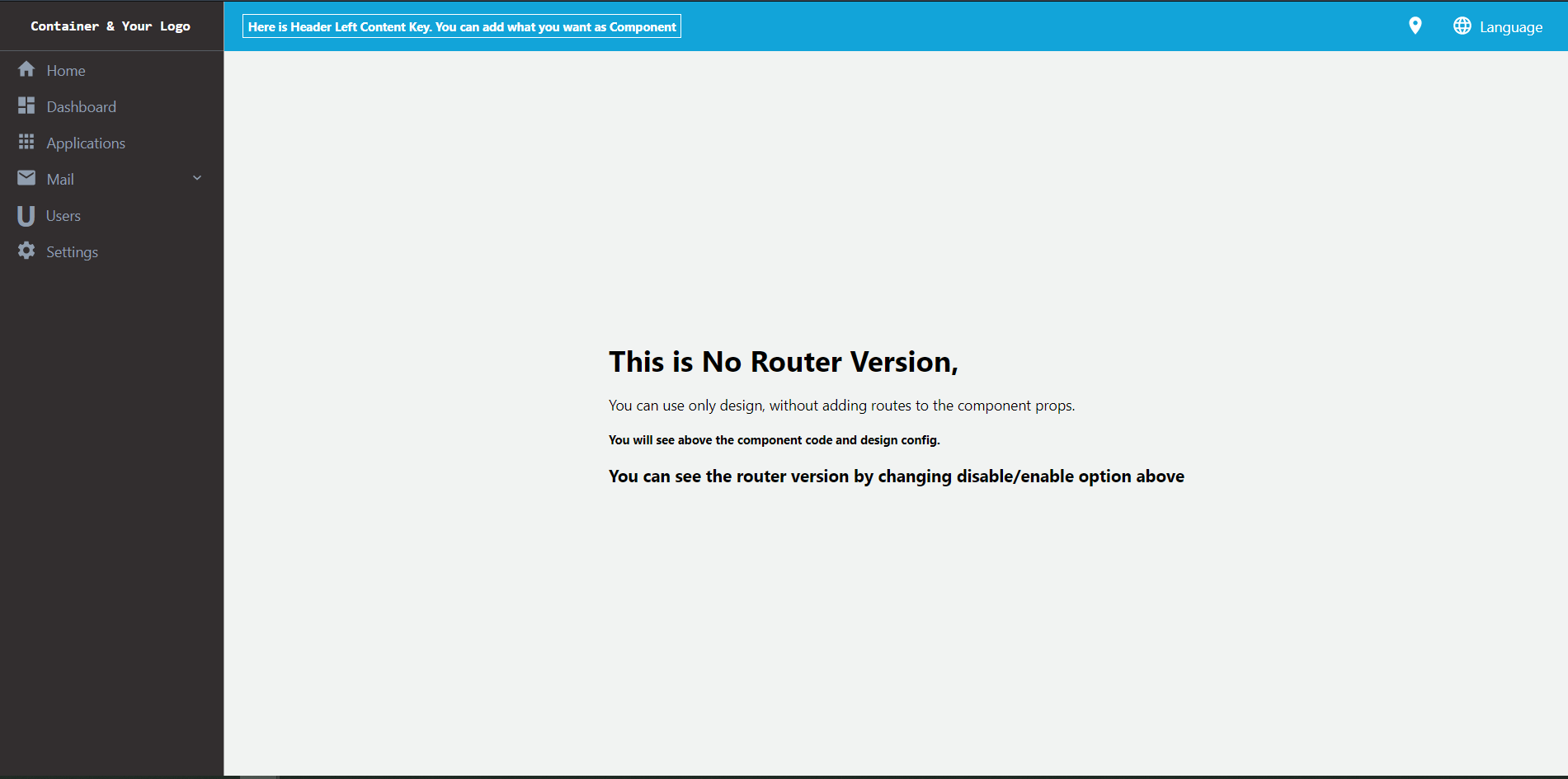
Example Code
import React from 'react';
import ReactAppContainer from 'react-app-container';

const designConfig = {
  sideBarMenu: [
    {
      iconName: "home",
      label: "Home",
    },
    {
      iconName: "dashboard",
      label: "Dashboard",
    },
    {
      iconName: "apps",
      label: "Applications",
    },
    {
      iconName: "mail",
      label: "Mail",
      subMenuItemList: [
        {
          label: "Send Mail",
          iconName: "post_add",
        },
        {
          label: "List Mail",
          iconName: "post_add",
        },
      ],
    },
    {
      iconComp: <h1>U</h1>,
      label: "Users",
      onClick: () => {
        alert("Users Clicked");
      },
    },
    {
      iconName: "settings",
      label: "Settings",
    },
  ],
  headerMenu: [
    {
      iconName: "room",
    },
    {
      iconName: "language",
      label: "Language",
      subMenuItemList: [
        {
          iconComp: <h4>TR</h4>,
          label: "Turkish",
          onClick: () => {
            alert("Turkish Clicked");
        },
        },
        {
          iconComp: <h4>FR</h4>,
          label: "French",
          onClick: () => {
            alert("English Clicked");
        },
        },
      ],
    },
  ],
  headerLeftContent: (
    <h5
      style={{
        color: "white",
        borderStyle: "solid",
        borderColor: "white",
        borderWidth: "1px",
        padding:'5px'
      }}
    >
      {" "}
      Here is Header Left Content Key. You can add what you want as
      Component
    </h5>
  ),
  sideBarHeaderContent : (
    <h3 style={{fontFamily :'monospace'}}>
      Container & Your Logo
    </h3>
  )
}

const App = (props) => {

  return (
    <ReactAppContainer
      designConfig = {designConfig} />
  )

}

export default App;
Available Props
| Prop | Default | Type | Description |
| ------------------------- | ------------ | -------- | ----------------------------------------------------------------------------------------------------------------------------------------------------------------------------------------------------------------------------------------------------------------------------------- |
| designConfig| {} | Design Config| Design Configurations for Container |
| routes | [] | Array<ContainerRoute>| Routes Configuration in Container for React Router
| children| | Object| Content of the container when routes are empty or null
Design Config
| Prop | Default | Type | Description | | ------------------------- | ------------ | -------- | ----------------------------------------------------------------------------------------------------------------------------------------------------------------------------------------------------------------------------------------------------------------------------------- | | headerMenu| [] | Array<MenuItem> | List of menu shown in header| | sideBarMenu| [] | Array<MenuItem> | List of menu shown in sidebar | | sideBarHeaderContent | | Object | Content for left top of container ( Logo vs) | | sideBarFooterContent | | Object | Content for left bottom of container | | headerLeftContent | | Object| Content for left side of header| | headerRightContent | | Object| Content for right side of header|
Menu Item
| Prop | Default | Type | Description | | ------------------------- | ------------ | -------- | ----------------------------------------------------------------------------------------------------------------------------------------------------------------------------------------------------------------------------------------------------------------------------------- | | label| | String | Label for menu item | | routeKey| | String | Key for connect the menu with the router. When click the menu item, if this key is not empty, the container link to route which has the routeKey in the Routes config . | | iconName| | String | Name of one the predefined icons (, 'api', 'apps' , 'code', 'dashboard', 'expand_less', 'expand_more', 'home', 'info', 'language', 'list', 'mail', 'mediation', 'message', 'perm_idenity', 'post_add', 'radio_button_checked', 'room', 'settings'). | | iconComp| | Object | Custom icon component for menu item| | customComp| | Object | Custom whole menu item component | | onClick| | function | Event when click menu item| | subMenuItemList| | Array<MenuItem> | Sub menu list of menu item|
Container Route
| Prop | Default | Type | Description | | ------------------------- | ------------ | -------- | ----------------------------------------------------------------------------------------------------------------------------------------------------------------------------------------------------------------------------------------------------------------------------------- | | path | | String | Route path of your page (Example : '/home' , '/' , '/settings') | | key| | String | Key for connect the menu with the router. This key will be use in the MenuItem for routing. | | label | | String | Label for show on left side of header | | component| | Object | Your page or content which will show when the route active.|