
react-beautiful-modals
v1.0.5
Published
React beautiful modal

Maintainers
 saimundev
Readme
react-beautiful-modals
A lightweight, customizable modal component for web applications. Easy to integrate, responsive, and supports user interactions with customizable responses. Ideal for overlays, alerts, and dialogs without complex setup
🎉🎉 Features
- Simple setup and usage.
- Fully responsive design for all screen sizes.
- Customizable styles and behavior.
- Built-in support for user interactions and responses.
- Lightweight with minimal dependencies.
- Easily customizable via props.
- Typescript support
- Small bundle size
Example
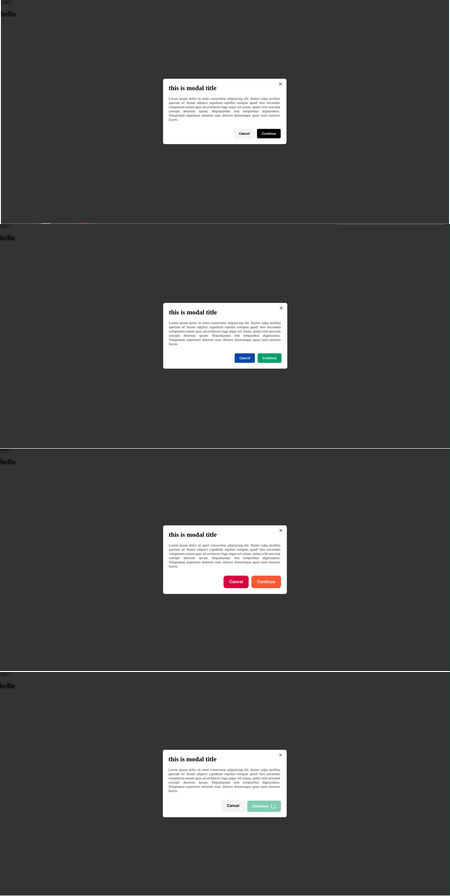
1. Installation
npm install react-beautiful-modals
yarn add react-beautiful-modals
pnpm add react-beautiful-modals
2. Live Demo
3. Simple usage
import React, { useState } from "react";
import { Modal } from "react-beautiful-modals";

const App = () => {
  const [open, setOpen] = useState(false);

  return (
    <Modal open={open} onClose={() => setOpen(false)}>
      <h1>You content here</h1>
    </Modal>
  );
};

export default App;
3.1 With component usage
import React, { useState } from "react";
import {
  Modal,
  ModalCancelButton,
  ModalDescription,
  ModalFooter,
  ModalHeader,
  ModalSuccessButton,
  ModalTitle,
} from "react-beautiful-modals";

const App = () => {
  const [open, setOpen] = useState(false);

  return (
    <Modal open={open} onClose={() => setOpen(false)}>
      <ModalHeader>
        <ModalTitle>This is modal title</ModalTitle>
      </ModalHeader>
      <ModalDescription>This is modal Description</ModalDescription>
      <ModalFooter>
        <ModalCancelButton onClose={() => setOpen(false)}>
          Cancel
        </ModalCancelButton>
        <ModalSuccessButton>Continue</ModalSuccessButton>
      </ModalFooter>
    </Modal>
  );
};

export default App;
Read Documentation
Props
Modal Component
Props
| Prop | Type | Default | Description |
| -------------------------- | --------------------------------------- | ------- | ------------------------------------------------------------------------- |
| open | boolean | | Controls the visibility of the modal or modal content. |
| onClose | () => void | | Callback function to handle closing of the modal. |
| children | React.ReactNode | | Content to be displayed inside the component. |
| size | "sm","md","lg" | "sm" | Size of the modal. |
| animationType | "slide-up","slide-down","fade","zoom" | "zoom" | Type of animation used for the modal. |
| width | number | "25vw" | Custom width for the modal. |
| disableBackdropClick | boolean | false | Disables closing the modal when clicking on the backdrop. |
| customModalOverly | string | | Custom class name to apply additional styles or override existing styles. |
| customModalContent | string | | Custom class name to apply additional styles or override existing styles. |
Title & Description Component
Props
| Prop | Type | Default | Description |
| ---------------------------- | ------------------------------------------- | -------- | ------------------------------------------------------------------------- |
| children | React.ReactNode | | Text content of the title. |
| fontSize | string | | Custom font size for the title. |
| color | string | | Color for the title. |
| textAlign | "left","center" | "left" | Text alignment for the title. |
| fontWidth | "300","400","500","600","700","800","900" | "700" | Font weight for the title. |
| customModalTitle | string | | Custom class name to apply additional styles or override existing styles. |
| customModalDescription | string | | Custom class name to apply additional styles or override existing styles. |
Button Component
Props
| Prop | Type | Default | Description |
| -------------------------------------------------- | ----------------------------------------------------------------------- | ----------- | ----------------------------------------------------------------------------------------------- |
| children | React.ReactNode | | Content displayed inside the button. |
| color | "primary","secondary", "success","error","warning","info","primary" | "secondary" | Color theme for the button. |
| size | "sm","md","lg" | "sm" | Size of the button. |
| animationOnHover | "slide-up","slide-down", "fade","zoom" | "slide-up" | Animation applied when hovering over the button. |
| disabled | boolean | false | Disables the button when set to true. |
| onClose | () => void | | Callback for closing the button (useful if the button is part of a modal or similar component). |
| startIcon | React.ReactNode | | Icon displayed at the start of the button. |
| endIcon | React.ReactNode | | Icon displayed at the end of the button. |
| loading | boolean | false | Shows a loading spinner when true. |
| variant | "contained","outline", "text","contained" | "contained" | Variant style of the button. |
| customModalCancelButton | string | "" | Custom class name to apply additional styles or override existing styles. |
| customModalSuccessButton | string | | Custom class name to apply additional styles or override existing styles. |
| primary,secondary,error,success,warning,info | string | | Custom class name to apply additional styles or override existing styles. |
| btn-sm,btn-md,btn-lg | string | | Custom class name to apply additional styles or override existing styles. |
Divider Component
Props
| Prop | Type | Default | Description |
| ------------------------ | -------- | ------- | ------------------------------------------------------------------------- |
| color | string | | Color of the divider line. |
| height | string | | Height of the divider line. |
| customModalDivider | string | | Custom class name to apply additional styles or override existing styles. |
This documentation helps developers understand the props they can use, along with their types and defaults, including how to apply custom styles through customClass.