
react-candlestick
v1.3.1
Published
This is a switch and stylish React component that create checkbox into toggle switch button.


Readme
React toggle candlestick
Inspired from project Candlestick
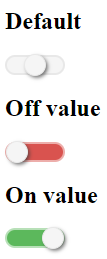
This is a switch and stylish React component that create checkbox into toggle switch button. This plugin allows to choose between three options. The toggle button switch with CSS animation.
Install
npm install react-candlestick --save
Usage
You have to import/require the library like this.
// import usage
import Candlestick from 'react-candlestick';
// OR
// require usage
const Candlestick = require('react-candlestick');
and then use it in react component. It will create an input[type=hidden] with the value.
const options = {
    id: 'candlestick',
    defaultValue: '',
    choices: [1, 0, ''],
    onChange: (value) => {
        console.log(value);
    }
};

<Candlestick { ...options } />
Options
| Name | Type | Default | Usage |
|:-----:|:-----:|:-----:|:-----:|
| id | string | Generate random string | Name for input[hidden] |
| defaultValue | string OR number | empty | Value by default |
| disabled | boolean | false | Disabled the toggle and input[disabled] |
| choices | array<onValue, offValue, neutralValue> | [1, 0, ''] | Different values |
| onChange | function | (value) => {} | Fired after change value |
| readonly | boolean | false | same as disabled and input[readonly] |
Development
Create public/index.html file.
<!DOCTYPE html>
<html lang="en">
  <head>
    <meta charset="utf-8" />
    <meta name="viewport" content="width=device-width, initial-scale=1" />
    <title>Candlestick development</title>
  </head>
  <body>
    <div id="root"></div>
</body>
</html>
Create src/index.js file for development.
import React from 'react';
import ReactDOM from 'react-dom';
import Candlestick from './Candlestick';

const App = () => {
    return (
        <div>
            <form action="" onSubmit={submit}>
                <h2>Default</h2>
                <Candlestick />
            </form>
        </div>
    );
}

ReactDOM.render(<App />, document.getElementById('root'));
npm run start to launch a react localhost to develop.
CHANGELOG
LICENCE
MIT License
Copyright (c) 2020 Tackacoder
Permission is hereby granted, free of charge, to any person obtaining a copy of this software and associated documentation files (the "Software"), to deal in the Software without restriction, including without limitation the rights to use, copy, modify, merge, publish, distribute, sublicense, and/or sell copies of the Software, and to permit persons to whom the Software is furnished to do so, subject to the following conditions:
The above copyright notice and this permission notice shall be included in all copies or substantial portions of the Software.
THE SOFTWARE IS PROVIDED "AS IS", WITHOUT WARRANTY OF ANY KIND, EXPRESS OR IMPLIED, INCLUDING BUT NOT LIMITED TO THE WARRANTIES OF MERCHANTABILITY, FITNESS FOR A PARTICULAR PURPOSE AND NONINFRINGEMENT. IN NO EVENT SHALL THE AUTHORS OR COPYRIGHT HOLDERS BE LIABLE FOR ANY CLAIM, DAMAGES OR OTHER LIABILITY, WHETHER IN AN ACTION OF CONTRACT, TORT OR OTHERWISE, ARISING FROM, OUT OF OR IN CONNECTION WITH THE SOFTWARE OR THE USE OR OTHER DEALINGS IN THE SOFTWARE.
REACT PROJECT
This project was bootstrapped with Create React App.
Available Scripts
In the project directory, you can run:
yarn start
Runs the app in the development mode. Open http://localhost:3000 to view it in the browser.
The page will reload if you make edits. You will also see any lint errors in the console.
yarn test
Launches the test runner in the interactive watch mode. See the section about running tests for more information.