
react-chat-ai-widget
v1.6.14
Published
Enhance user experience with a smart widget that combines AI assistants and live chat. Automate support, stay available 24/7, and boost customer engagement effortlessly.

Maintainers
 jorge_ernesto
Readme
🤖 React Chat AI Widget
React Chat AI Widget is a plug-and-play React component that lets you embed a fully customizable, intelligent chatbot into your app — with zero backend setup required.
It supports Hugging Face or Replicate APIs for real-time AI responses, making it ideal for customer support, onboarding, FAQs, smart documentation bots, and more.



✨ Features
- 🤖 AI chatbot powered by Hugging Face or Replicate
- ⚡ No backend needed – fully client-side with secure token proxy
- 🎯 Behavior-aware via use cases (e.g. support, documentation, etc.)
- 🧩 Built with React + TypeScript
- 🎨 Fully customizable UI and styles
- 🔐 Tokens are secured — never exposed to the client
- 🧪 Ready for testing with Vitest and Cypress
📦 Installation
npm install react-chat-ai-widgetimport { ChatWidget } from "react-chat-ai-widget";
<ChatWidget
title="InsightFlow"
direction="left" // or "right" (default)
huggingface="YOUR_HUGGINGFACE_TOKEN"
Loader={<Loader />}
initialQuestions={[{ question: "What is the price of this product?" }]}
// replicate="YOUR_REPLICATE_TOKEN" (use one or the other)
config={{
temperature: 0.7,
max_tokens: 200,
top_p: 0.9,
frequency_penalty: 0.5,
model: "microsoft/DialoGPT-large",
stop_sequences: ["\n\n", "Human:", "Bot:"],
}}
//replicate and huggingFace has different config
data={{
useCase: "customer-support",
questions: [
{
question: "What are your business hours?",
answer: "We’re open Monday to Friday from 10am to 4pm.",
category: "general",
confidence: 0.98,
},
{
question: "Who wrote Don Quixote?",
answer: "Miguel de Cervantes.",
category: "literature",
confidence: 0.92,
},
],
}}
chatStyles={{}}
formStyles={{
inputStyles: {},
buttonStyles: {},
formStyles: {},
}}
>
<div>open chat</div>
</ChatWidget>;🎨 Styling
To ensure the ChatWidget renders properly, import the style file in your main entry point:
import "react-chat-ai-widget/style.css";You can customize the layout using either class names or inline style objects.
🧩 Component Props
| Prop | Type | Required | Description |
| ----------------- | ------ | ----------- | --------------------------------------------------------- |
| title | string | No | Chat header title. Defaults to "AI Assistant". |
| data | object | Yes | Contains pre-defined Q&A and optional use case. |
| Loader | React | No | Custom loader component. render when the chat is loading. |
| huggingface | string | Conditional | Your Hugging Face API token. Do not use with replicate. |
| replicate | string | Conditional | Your Replicate API token. Do not use with huggingface. |
| direction | string | No | "left" or "right". Default is "right". |
| chatClassName | string | No | Custom class for chat container. |
| chatStyles | object | No | Inline styles for chat container. |
| headerClassName | string | No | Custom class for header. |
| headerStyles | object | No | Inline styles for header section. |
| formStyles | object | No | Object containing style overrides for the form. |
| └ inputStyles | object | No | Styles for the input field. |
| └ buttonStyles | object | No | Styles for the submit button. |
| └ formStyles | object | No | Styles for the entire form container. |
| config | object | No | Configuration for the AI service. |
| children | React | No | Custom children component. render chat opener. |
initialQuestions
An array of objects containing the initial questions to be displayed in the chat interface.
🧠 Data Format
Define a list of questions and answers the chatbot can use, with an optional useCase to control tone or behavior.
{
  useCase: "qa-bot", // or "customer-support", "documentation", "strict-compliance"
  questions: [
    {
      question: "Your question here?",
      answer: "The chatbot response.",
      category: "general",
      confidence: 0.85 // Value between 0 and 1
    },
    // Add as many as needed
  ]
}
Supported useCase values
"customer-support": Friendly, helpful support tone"documentation": Technical, concise answers"qa-bot": Default Q&A with open logic"strict-compliance": Controlled, policy-aware responses
🔐 Token Security
Your API tokens are never exposed to the client.
- ✅ Hugging Face or Replicate tokens are sent securely through a proxy
- ✅ No direct client-to-model communication
- ✅ Fully encrypted and safe
🖼️ Chat Preview
| Chat aligned left | Chat aligned right |
| ----------------------------------------------------------------------------------------------------- | ------------------------------------------------------------------------------------------------------- |
| 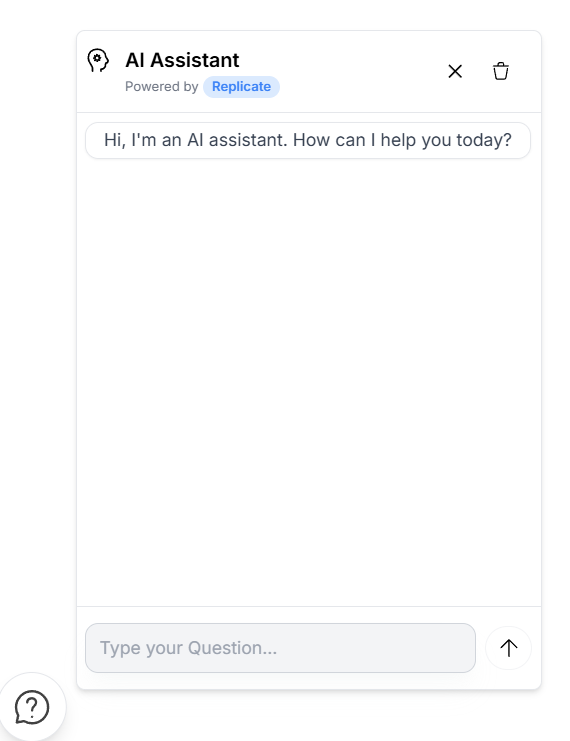 |
| 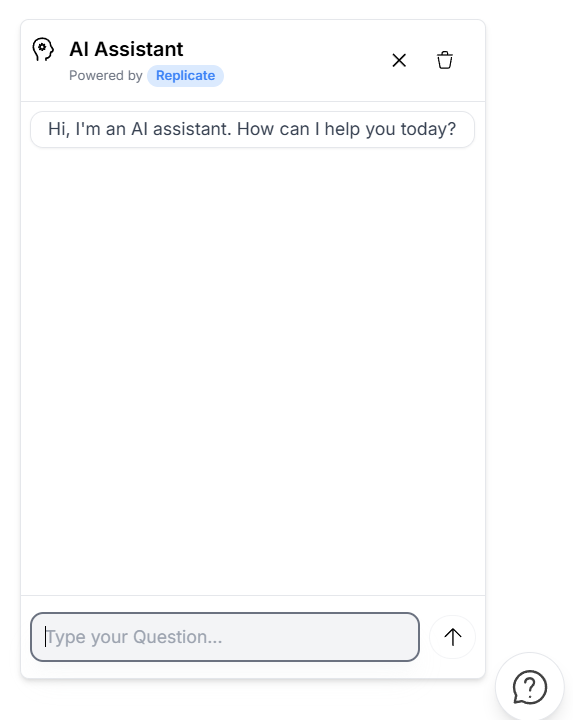 |
|
🔧 Advanced Model Configuration
Take full control of your AI's behavior with comprehensive model customization options:
🎛️ Core Parameters
temperature(0.0 - 2.0) - Controls response creativity and randomness0.1= Focused, deterministic responses0.7= Balanced creativity (recommended)1.5= Highly creative, varied outputsmax_tokens(1 - 4096) - Maximum response length50= Short, concise answers150= Standard responses500+= Detailed, comprehensive replies
🎯 Fine-Tuning Options
top_p(0.0 - 1.0) - Nucleus sampling for response diversityfrequency_penalty(-2.0 - 2.0) - Reduces repetitive contentpresence_penalty(-2.0 - 2.0) - Encourages topic explorationstop_sequences- Custom stop words to control response endingsmodel- Choose specific AI models for different capabilities
💡 Example Configuration
config={{
 temperature: 0.7,
 max_tokens: 200,
 top_p: 0.9,
 frequency_penalty: 0.5,
 model: "microsoft/DialoGPT-large",
 stop_sequences: ["\n\n", "Human:", "Bot:"]
}}
⚠️ Notes
Do not use both
huggingfaceandreplicateprops at the same time.You must import the CSS file for the widget to render correctly.
The
chatStylesandheaderStylesprops override any class-based styles (chatClassName,headerClassName).⚠️ Important Note for Hugging Face Users If you're using this chatbot with Hugging Face and plan to enable mode (or similar streaming indicators), make sure to set max_tokens to at least 500 in your configuration.
is necessary because consumes a significant number of tokens during generation. If max_tokens is too low, the assistant's response might get cut off or fail to generate properly.
🧪 Testing
- Includes support for unit and UI testing using Vitest and Cypress.
- Example test commands:
npm run test        # Vitest
npm run dev         # Local dev mode
npm run lint        # ESLint
npm run build       # Production build
🚧 Upcoming Features
🛍️ Product Recommendation Engine
The chatbot will soon be able to recommend products based on user questions, behavior, and preferences in real time.
🌐 Multi-language support
🌎 Internationalization (i18n)
📊 Analytics Dashboard (Q3 2024) Conversation insights and performance metrics.
🔗 Integration Plugins (Q4 2024) Direct integrations with popular platforms (Shopify, WordPress, etc.).
📄 License
MIT © Jorge Ernesto