
react-customizable-emojibox
v1.0.1
Published
Easy customizable emojibox component for react applications created by vito.mohagheghian

Maintainers
 vito.mohagheghian
Readme
react-customizable-emojibox
easy customizable emojibox component for react applications created by vito.mohagheghian
Demo

Install
npm install react-customizable-emojibox

or

yarn add react-customizable-emojibox
Usage
import React, { useState, useRef } from 'react'

import EmojiBox from 'react-customizable-emojibox'
import 'react-customizable-emojibox/dist/index.css'

const Example = () => {
  const [emoji, setEmoji] = useState(false)

  const emojiHandler = () => {
    setEmoji((prevValue) => !prevValue)
  }

  const inputRef = useRef(null)

  const EmojiClickedHandler = (char) => {
    inputRef.current.value += char
  }

  return (
    <div>
      <input type='text' placeholder='type a messege' ref={inputRef} />
      <div className='emoji-container'>
        <button onClick={emojiHandler} className='emoji_button'>
          emoji
        </button>
        <EmojiBox
          visibility={emoji}
          setVisibility={setEmoji}
          EmojiClickedHandler={EmojiClickedHandler}
        />
      </div>
    </div>
  )
}

export default Example
Accepted props
| Name | Type | Default Value | Required? | Description |
| ------------------- | ---------- | ------------- | --------- | ------------------------------------------------------ |
| className | className | undefined | No | Help you to customize it easily. |
| theme | Object | GlassTheme | No | some predesigned themes which I explained in next part |
| visibility | Boolean | false | Yes | state that manage package display |
| setVisibility | Function | undefined | Yes | function of visibility useState |
| EmojiClickedHandler | Function | undefined | Yes | run on clicking emoji |
| style | Object | undefined | No | like regular style |
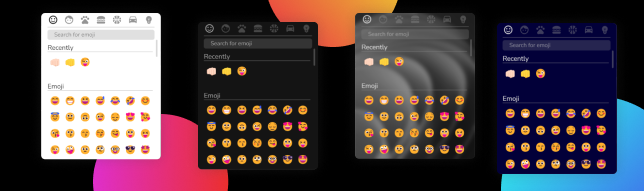
Theme Prop useage
First, you have to import you intended theme from package.
import { DarkTheme } from 'react-customizable-emojibox'themes you import are: DarkTheme - LightTheme - GlassTheme - MaterialTheme
after that you just have set theme prop with the value of imported theme.
Responsive
for make package responsive you have use className prop which is like regular className, and with @media make it resposive.
FAQ
How to change emojibox position?
use className prop and use transform: transalte(X%, Y%) in your css file.
can I have new theme?
yes, as its name you can customize it, or email me to make new theme.
License
MIT © vito-mohagheghian