
react-diff-text
v1.6.0
Published
React components to display text and HTML differences with multiple diff strategies.

Maintainers
 sitefinitysteve
Readme
React Diff Text
React components that show text differences, built on the fantastic jsdiff library by @kpdecker. They highlight changes between text blocks at five levels of detail (characters to sentences), diff HTML, and include unified and side-by-side line views plus a stats badge.
This is a 1:1 port of vue-diff-text: same components, same props (camelCased), same rendered markup and CSS classes.
Also available for: Vue (vue-diff-text) and PHP (php-diff-text). All three live in the diff-text monorepo, follow one behavior contract, and render the same markup, so they share one stylesheet.
⚠️ Important: This library is designed for text and paragraph comparisons, not code diffing. If you need to compare code with syntax highlighting, use a dedicated code diff viewer instead.
What you get
- React 18 and 19 components (function components and hooks)
- Five text strategies (characters, words, words with spaces, lines, sentences) and an HTML diff
- Unified and side-by-side (split) line views with line numbers and expandable unchanged lines
- A stats badge: added / removed / unchanged counts and a similarity percentage
- Three visualizations: a rewrite heatmap, a revision timeline and an animated playback (static HTML + CSS, no JavaScript)
- Moved-block detection in the line views, and a change minimap strip for any diff
- Programmatic navigation:
next(),prev(),goTo(i)andcounton every diff view, through a ref - The pure diff functions, for use outside components
- Themeable with CSS variables, opt-in dark mode
- Full TypeScript support, no runtime dependencies (jsdiff is bundled)
className,style,id,data-*and other<div>props are forwarded to the container
Installation
npm install react-diff-textDemo
Live demo: https://sitefinitysteve.github.io/diff-text/react/
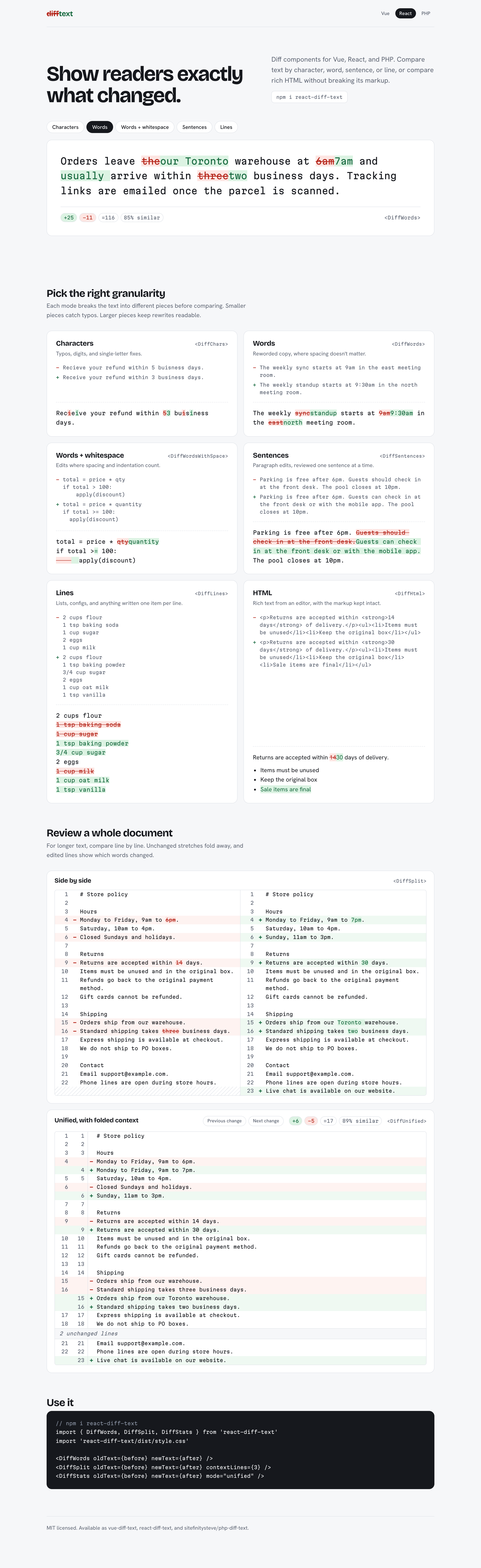
The demo page: every text mode, the HTML diff, side-by-side and unified document views, and the stats badge.
To run it locally:
git clone https://github.com/sitefinitysteve/diff-text.git
cd diff-text && npm install          # the demo imports the library source, which needs the workspace deps
cd packages/react/demo && npm install
npm run dev                          # http://localhost:5175
npm run build followed by npm run preview serves the production build instead. The page's CSS and
sample text come from the monorepo's shared demo/ folder; npm run demo:sync copies them in and runs
automatically before dev and build.
The components
| Component | What it shows |
|-----------|---------------|
| DiffChars | Every character change. Great for typos and small edits. |
| DiffWords | Word-level changes; whitespace between words is not highlighted twice. The best default for prose. |
| DiffWordsWithSpace | Like DiffWords, but whitespace runs are tokens too, so spacing changes show up. Also exported as TextDiff. |
| DiffLines | Whole-line changes, inline. |
| DiffSentences | Sentence-level changes. |
| DiffHtml | A tag-aware HTML diff, with an optional full-replacement mode for rewrites. |
| DiffUnified | A line view with old/new line numbers, +/− signs and collapsible unchanged lines. |
| DiffSplit | A side-by-side line view with word highlights inside changed lines. Stacks on narrow containers. |
| DiffStats | A badge: +A −R =U and N% similar. |
| DiffHeatmap | The new text with each sentence shaded by how much it changed, plus removed sentences and a legend. |
| DiffTimeline | Several versions of a text as CSS-only tabs, one per consecutive pair (stats + diff). |
| DiffPlayback | A text diff whose changes appear one after another (CSS animation), with a Replay toggle. |
How to use it
⚠️ Important: import the stylesheet once. It's not mandatory; you CAN style the classes yourself.
import 'react-diff-text/dist/style.css'
Basic example
import { DiffChars, DiffWords, DiffWordsWithSpace, DiffLines, DiffSentences, DiffHtml } from 'react-diff-text'
import 'react-diff-text/dist/style.css'

const oldText = 'Hello world'
const newText = 'Hello React world'
const oldHtml = '<p>Welcome to our <strong>website</strong>!</p>'
const newHtml = '<p>Welcome to our <strong>amazing website</strong>!</p>'

export default function Example() {
  return (
    <div>
      {/* Pick whichever diff type makes sense for your use case */}
      <DiffChars oldText={oldText} newText={newText} />
      <DiffWords oldText={oldText} newText={newText} />
      <DiffWordsWithSpace oldText={oldText} newText={newText} />
      <DiffLines oldText={oldText} newText={newText} />
      <DiffSentences oldText={oldText} newText={newText} />
      <DiffHtml oldText={oldHtml} newText={newHtml} />
    </div>
  )
}
Line views and stats
const ignoreWhitespace = { ignoreWhitespace: true }

<DiffStats oldText={oldDoc} newText={newDoc} mode="unified" />
<DiffUnified oldText={oldDoc} newText={newDoc} contextLines={2} />
<DiffSplit oldText={oldDoc} newText={newDoc} options={ignoreWhitespace} />
Unchanged lines further than contextLines from a change collapse into a
<button class="diff-row diff-row-collapsed">N unchanged lines</button> row. Clicking it (or pressing
Enter/Space, since it is a real button) expands those lines in place. Expansion is tracked per block and
resets when the inputs change. With no changes at all, the views show a "No changes" message.
Options and memoization
Each component memoizes its diff on its inputs. options is compared by value (a stable serialization),
so an inline object literal (options={{ ignoreCase: true }}) does not recompute the diff or reset the
expanded blocks and current change on unrelated re-renders.
Container props
Anything that isn't a diff prop is passed through to the container <div>. className is appended to the
built-in classes:
<DiffWords oldText={a} newText={b} className="my-diff" data-testid="diff" />
// <div class="text-diff text-diff-words my-diff" data-testid="diff">...</div>
Props
Every component takes oldText and newText (required strings) plus any <div> attribute.
Text components: DiffChars, DiffWords, DiffWordsWithSpace, DiffLines, DiffSentences
| Prop | Type | Default | Description |
|------|------|---------|-------------|
| oldText | string | required | The original text |
| newText | string | required | The new text |
| options | DiffOptions | {} | See below |
| anchors | boolean | false | Put id="{idPrefix}-change-N" on every change, so #…-change-3 links work |
| idPrefix | string | unique per instance | Prefix for emitted ids (see Element ids and SSR) |
| minimap | boolean | false | Show a change minimap next to the diff (implies anchors) |
options:
| Option | Components | Meaning |
|--------|------------|---------|
| ignoreCase | all | Compare case-insensitively (unchanged runs show the new text) |
| maxEditLength | all | Give up past this edit distance and show a whole replacement |
| ignoreWhitespace | DiffLines | Lines are equal if they match after trimming |
| newlineIsToken | DiffLines | Line breaks become separate tokens |
| stripTrailingCr | DiffLines | Treat \r\n as \n |
Other jsdiff options are ignored (see "Changes in 1.6.0").
DiffHtml
| Prop | Type | Default | Description |
|------|------|---------|-------------|
| oldText | string | required | The original HTML |
| newText | string | required | The new HTML |
| similarityThreshold | number \| null | null | 0..1. When both inputs are non-empty and their similarity is below this, render a full replacement (old block removed, new block added) instead of a word-level diff. 0.3 is a good value. null disables it. |
| ignoreFormattingTags | boolean | true | Strip <strong>, <em>, <b>, <i>, <u>, <s>, <mark>, <sub>, <sup> before diffing, so formatting-only changes don't show up |
| options | DiffHtmlOptions | {} | orphanMatchThreshold (default 0.3): absorb unchanged text shorter than this share of the changes around it, so a rewritten sentence reads as one removed and one added run (0 disables it); ignoreCase; maxEditLength |
Curly quotes are normalized to straight quotes before diffing, so quote style alone never shows as a change.
The HTML engine is the same on Vue, React and PHP (byte-identical output). Tags are atomic: markers only
wrap text (and <img>), attribute-only changes show the new tag without a marker, removed elements are
shown only where they are valid (a removed <li> inside its list, a removed row inside its table), and the
output is always balanced HTML. <script>, <style> and other raw-text elements are compared whole and
never marked. Text is compared by its decoded value (é equals é, equals U+00A0) and
unchanged text keeps the new document's spelling; emoji and other multi-code-point characters are never
split. Comments are dropped from the output.
DiffUnified and DiffSplit
| Prop | Type | Default | Description |
|------|------|---------|-------------|
| oldText | string | required | The original text |
| newText | string | required | The new text |
| contextLines | number | 3 | Unchanged lines kept around each change |
| options | { ignoreCase?, ignoreWhitespace?, stripTrailingCr? } | {} | Line comparison options |
| detectMoves | boolean | false | Show lines that moved as moved blocks instead of removed + added |
| minMoveLines | number | 1 | Minimum lines in a moved block |
| moveSimilarity | number | exact | A value strictly between 0 and 1 also matches near-identical lines with at least that similarity |
| anchors | boolean | false | Put id="{idPrefix}-change-N" on the first row of every change |
| idPrefix | string | unique per instance | Prefix for emitted ids (anchors, move links) |
| minimap | boolean | false | Show a change minimap next to the diff (implies anchors) |
DiffSplit pairs removed and added lines and highlights the changed words inside each pair (skipped for
lines over 1000 characters or pairs that are less than 30% similar). Each column shows its own line exactly,
including indentation, tabs and whitespace-only changes.
DiffStats
| Prop | Type | Default | Description |
|------|------|---------|-------------|
| oldText | string | required | The original text |
| newText | string | required | The new text |
| mode | 'chars' \| 'words' \| 'wordsWithSpace' \| 'lines' \| 'sentences' \| 'unified' \| 'split' | 'words' | Text modes count characters (Unicode code points); unified / split count lines |
| showSimilarity | boolean | true | Show the N% similar badge |
| options | DiffOptions & LineOptions | {} | Options for the underlying diff (line modes also take contextLines) |
DiffHeatmap
Shades each sentence of the new text by how much it changed, so a reviewer sees at a glance which
sentences were lightly edited and which were rewritten. Old sentences are aligned to new ones by word
similarity; each new sentence gets a heat bucket from 0 (unchanged) to 4 (rewritten or new), exposed as
data-heat, a title, screen-reader text and the legend (never color alone). Removed sentences show inline,
struck through.
| Prop | Type | Default | Description |
|------|------|---------|-------------|
| oldText | string | required | The original text |
| newText | string | required | The new text |
| options | { ignoreCase? } | {} | Compare sentences case-insensitively |
| showRemoved | boolean | true | Show removed old sentences inline |
| legend | boolean | true | Show the legend with a count per bucket |
| anchors | boolean | false | Put id="{idPrefix}-change-N" on every changed sentence |
| idPrefix | string | unique per instance | Prefix for emitted ids |
<DiffHeatmap oldText={draft} newText={edited} showRemoved={false} />Changed sentences and removed markers carry data-change-index, so navigation works as on the other views.
DiffTimeline
Shows a list of versions as tabs, one per consecutive pair (v1 → v2, v2 → v3, …). Each panel has the caption, a stats badge and the diff; the last step is selected. Switching tabs is pure CSS (radio inputs), so it works in server-rendered pages without JavaScript and the arrow keys move between steps.
| Prop | Type | Default | Description |
|------|------|---------|-------------|
| versions | string[] | required | The versions, oldest first. Fewer than two shows "Nothing to compare" |
| labels | string[] | v1, v2, … | Version labels; missing entries fall back to v{i+1} |
| mode | text mode | 'unified' | 'split' | 'words' | Diff used in every panel (anything else means 'words') |
| options | DiffOptions & LineOptions | {} | Options for every panel's diff; line modes also take contextLines, detectMoves, minMoveLines, moveSimilarity |
| anchors | boolean | false | Anchor the changes in every panel |
| idPrefix | string | unique per instance | Radios get {idPrefix}-rev-K; panel K's diff uses {idPrefix}-rev-K as its own prefix, so ids never collide |
<DiffTimeline versions={[v1, v2, v3]} labels={['Draft', 'Review', 'Final']} mode="split" />The timeline has no navigation API (each panel is its own diff).
DiffPlayback
A text-mode diff whose changes animate in document order: removed text ends struck through and faded,
added text fades in. The Replay control restarts the animation (CSS only). With
prefers-reduced-motion: reduce the final state shows at once and Replay is hidden.
| Prop | Type | Default | Description |
|------|------|---------|-------------|
| oldText | string | required | The original text |
| newText | string | required | The new text |
| mode | 'chars' \| 'words' \| 'wordsWithSpace' \| 'lines' \| 'sentences' | 'words' | The text mode |
| speed | number | 350 (from CSS) | Milliseconds between consecutive changes; overrides --text-diff-playback-step. Floored; values below 1 are ignored |
| options | DiffOptions | {} | Options for the diff |
| anchors | boolean | false | Put id="{idPrefix}-change-N" on every change |
| idPrefix | string | unique per instance | The Replay checkbox is {idPrefix}-replay |
<DiffPlayback oldText={before} newText={after} mode="words" speed={200} />Moved blocks
With detectMoves on DiffUnified / DiffSplit, a run of removed lines that reappears elsewhere
(in a different change region) is shown as one moved block instead of a removal plus an addition. Moved
rows get diff-row-moved-from / diff-row-moved-to, a color slot class diff-move-0 … diff-move-5,
data-move="M", a label such as "line 4 moved to line 9", and a link to the other end
(#{idPrefix}-move-M-to / -from). Stats count moved-from lines as removed and moved-to lines as added.
<DiffUnified oldText={oldDoc} newText={newDoc} detectMoves minMoveLines={2} />Minimap
minimap on a text component, DiffUnified or DiffSplit adds a sticky strip beside the diff with one
link per change, placed where the change sits in the new text. The diff is then rendered with anchors and
the component's outer element becomes <div class="text-diff-with-minimap"> (diff, then
<nav class="text-diff-minimap">); className and other div props go on that outer element.
<DiffSplit oldText={oldDoc} newText={newDoc} minimap />Element ids and SSR
Components that emit ids (anchors, move links, timeline radios, the playback checkbox) take
idPrefix. Pass a string matching [A-Za-z][A-Za-z0-9_-]* when you link to the ids yourself.
Without it, each instance gets a unique default: td- plus
React's useId() with characters that are invalid in ids and CSS selectors removed, which is unique
per instance and identical on the server and during hydration.
All components render the same markup on the server as in the browser (\r\n and \r in the text are
rendered as \n, as the HTML parser does anyway), so hydration does not report mismatches.
Navigation
Every diff view (all components except DiffStats and DiffTimeline) forwards a ref with next(), prev(),
goTo(index) and count. Each change carries data-change-index="N" (0-based, document order; in the
line views, one index per run of changed lines). Navigating scrolls the change into view and gives it the
is-current class.
import { useRef } from 'react'
import { DiffUnified, type DiffNavigation } from 'react-diff-text'

export function Review({ oldDoc, newDoc }: { oldDoc: string; newDoc: string }) {
  const diff = useRef<DiffNavigation>(null)
  return (
    <>
      <button onClick={() => diff.current?.prev()}>Previous</button>
      <button onClick={() => diff.current?.next()}>Next</button>
      <DiffUnified ref={diff} oldText={oldDoc} newText={newDoc} />
    </>
  )
}next()/prev()move one change forward/back and wrap around. The firstnext()goes to change 0; the firstprev()goes to the last change.goTo(i)jumps to changei(wrapped into range).- All three return the new index, or
-1when there are no changes. countis the number of navigable changes. It is a getter, soref.current.countis always the current value; reading it does not trigger a re-render.- The current change (and expanded collapsed blocks) are cleared when the content changes: the texts,
contextLines, or the value ofoptions. A new but equal options object keeps them.
Core functions
The pure functions behind the components are exported too:
import {
  computeDiff, diffHtml, computeSimilarity, buildHunks, buildSplitRows,
  computeStats, lineStats, normalizeQuotes, stripFormattingTags,
} from 'react-diff-text'

computeDiff('words', 'foo bar baz', 'foo qux baz')
// [{ value: 'foo ', added: false, removed: false, count: 1 },
//  { value: 'bar', added: false, removed: true, count: 1 },
//  { value: 'qux', added: true, removed: false, count: 1 },
//  { value: ' baz', added: false, removed: false, count: 1 }]

computeSimilarity('Hello, world!', 'Hello world!') // 0.9565...
| Function | Returns |
|----------|---------|
| computeDiff(mode, old, new, options?) | Change[] for a text mode ('chars' \| 'words' \| 'wordsWithSpace' \| 'lines' \| 'sentences') |
| diffHtml(old, new, options?) | { html, fullReplacement, similarity? }; options takes the DiffHtml props and engine options |
| computeSimilarity(old, new, { html }?) | A number in [0, 1]: tags stripped (only while html is true, the default; pass { html: false } for plain text so < and > count), quotes normalized, whitespace collapsed, then 2 × unchanged / (old + new) over non-whitespace characters of a word diff old → new. Directional: computeSimilarity(a, b) and computeSimilarity(b, a) can differ, because the diff that is scored runs old → new |
| buildHunks(old, new, options?) | Unified blocks: visible hunks and collapsed runs of unchanged lines (options: line options plus contextLines) |
| buildSplitRows(old, new, options?) | The same blocks with rows paired side by side |
| computeStats(changes) | { added, removed, unchanged, unit: 'codepoints' } |
| lineStats(blocks) | { added, removed, unchanged, unit: 'lines' } for buildHunks / buildSplitRows output |
| normalizeQuotes(s), stripFormattingTags(s) | The HTML input normalizers DiffHtml uses |
Types exported: Change, TextMode, DiffOptions, LineOptions, LineViewOptions, LineRow, Hunk,
VisibleHunk, CollapsedHunk, SplitRow, SplitCell, SplitHunk, VisibleSplitHunk,
DiffStatsResult, HtmlDiffOptions, HtmlDiffResult, DiffHtmlOptions, StatsMode, DiffNavigation,
and the props types (DiffCharsProps, ..., DiffHtmlProps, DiffUnifiedProps, DiffSplitProps,
DiffStatsProps).
Security: DiffHtml renders raw HTML
DiffHtml injects its output with dangerouslySetInnerHTML (the React equivalent of Vue's v-html).
The diff result and, in full-replacement mode, your original oldText / newText are inserted as HTML
without escaping.
Only pass trusted HTML. If the content can come from users or any other untrusted source, sanitize it first, for example with DOMPurify:
import DOMPurify from 'dompurify'

<DiffHtml oldText={DOMPurify.sanitize(oldHtml)} newText={DOMPurify.sanitize(newHtml)} />
All other components render text nodes and are safe with any input.
Styling
Import the stylesheet once (in your entry file or a component):
import 'react-diff-text/dist/style.css'CSS variables
Set any of these on :root or any ancestor:
| Variable | Default (light) | Used for |
|----------|-----------------|----------|
| --text-diff-added-bg | #ddfbe6 | Inline added background, added stat |
| --text-diff-added-color | #008000 | Inline added text, added edge |
| --text-diff-added-decoration | none | Inline added text-decoration |
| --text-diff-removed-bg | #fce9e9 | Inline removed background, removed stat |
| --text-diff-removed-color | #c70000 | Inline removed text, removed edge |
| --text-diff-removed-decoration | line-through | Inline removed text-decoration |
| --text-diff-line-added-bg | #f0fbf3 | Added row/cell background (unified, split) |
| --text-diff-line-removed-bg | #fdf3f3 | Removed row/cell background |
| --text-diff-gutter-bg | transparent | Line-number gutters |
| --text-diff-gutter-color | #8a919e | Line numbers |
| --text-diff-sign-added-color | added color | + sign |
| --text-diff-sign-removed-color | removed color | − sign |
| --text-diff-rule-color | #e2e5ea | Borders, dividers, empty-cell hatch |
| --text-diff-collapsed-bg | #f4f6f8 | Collapsed row |
| --text-diff-collapsed-color | #5b6270 | Collapsed row text, neutral stats |
| --text-diff-empty-color | #5b6270 | "No changes" text |
| --text-diff-font-mono | system monospace stack | Unified/split font |
| --text-diff-current-outline | 2px solid currentColor | Current change, :target anchors |
| --text-diff-heat-0-bg … --text-diff-heat-4-bg | transparent #fdf4c8 #fbe38e #f9c27e #f59d8f | Heatmap buckets |
| --text-diff-heat-removed-color | #8a919e | Heatmap removed sentences |
| --text-diff-move-0 … --text-diff-move-5 | #6d4fe0 #0b8aa6 #b86100 #c2256d #2d5fd6 #4d7c0f | Moved-block color slots |
| --text-diff-minimap-width / -height / -top | 14px / 100vh / 0px | Minimap strip size and sticky offset |
| --text-diff-minimap-bg | #f4f6f8 | Minimap background |
| --text-diff-minimap-added / -removed / -modified / -moved | added / removed / #b7791f / move slot 0 | Minimap marks |
| --text-diff-timeline-active-bg / -color | #2f3542 / #ffffff | Selected timeline step |
| --text-diff-playback-step | 350ms | Delay between consecutive changes |
| --text-diff-playback-duration | 400ms | Per-change animation length |
:root {
  --text-diff-added-bg: #e6ffed;
  --text-diff-added-color: #1b7332;
  --text-diff-removed-bg: #ffe6e6;
  --text-diff-removed-color: #d73a49;
}
Dark mode is opt-in: add data-theme="dark" or the class dark to an ancestor, or the class
text-diff-dark to the component. Variables you set yourself always win.
Classes
- Containers:
.text-diffplus.text-diff-chars,-words,-words-with-space,-lines,-sentences,-html,-unifiedor-split; the badge is.text-diff-stats. - Changes:
.diff-added,.diff-removed(withdata-change-index). - Line views:
.diff-row(-equal,-added,-removed,-modified,-collapsed),.diff-cell(-old,-new,-added,-removed,-empty),.diff-gutter,.diff-sign,.diff-line,.diff-empty. - Stats:
.diff-stat(-added,-removed,-unchanged,-similarity),.diff-sr(screen-reader text). - Heatmap:
.text-diff-heatmap,.diff-heat(data-heat="0"…"4"),.diff-heat-removed,.diff-heat-legend,.diff-heat-key. - Moves:
.diff-row-moved-from,.diff-row-moved-to,.diff-cell-moved-from,.diff-cell-moved-to,.diff-move-0…5,.diff-move-link. - Minimap:
.text-diff-with-minimap,.text-diff-minimap,.diff-minimap-mark(-added,-removed,-modified,-moved). - Timeline:
.text-diff-timeline,.diff-rev-input,.diff-rev-label,.diff-rev-panel,.diff-rev-caption. - Playback:
.text-diff-playback-wrap,.text-diff-playback,.diff-replay-input,.diff-replay. - Navigation:
.is-currenton the current change.
Changes in 1.6.0
react-diff-text starts at 1.6.0 to share a version line with vue-diff-text. 1.6.0 moves the diff logic into a shared core used by the Vue, React and PHP packages. Compared with vue-diff-text 1.5.x (and early builds of this port), some output is different:
- jsdiff v8 (was v5). Word diffs attribute the whitespace around a change more precisely: for
foo\nbar baz→foo baz, 1.5 showedbaras removed and lost the line break; 1.6 shows\nbaras removed. Punctuation and whitespace tokenization follow jsdiff v8. - Options are an explicit list (see the tables above). jsdiff options outside that list, such as
ignoreWhitespaceonDiffWords,oneChangePerTokenorintlSegmenter, are now ignored. - Similarity is clamped to [0, 1]. The old metric could exceed 1 (
a bvsa bgave 1.6); it now collapses whitespace and counts non-whitespace characters, so that pair is exactly 1.similarityThresholdbehaves as before for normal text. - DiffHtml full replacement uses
<div>instead of<span>, so block HTML inside it stays valid:<div class="diff-removed" data-change-index="0">OLD</div><div class="diff-added" data-change-index="1">NEW</div>. The output also no longer sits in an extra inner<div>. - DiffHtml has its own engine (shared with PHP) instead of diffblazer. Its output is valid,
balanced HTML in every case (diffblazer lost the content after a
<script>or<style>and could duplicate closing tags), and entities compare by value. The markup may differ in detail from 1.5. The diffblazer-only optionsrepeatingWordsAccuracy,matchGranularity,ignoreWhiteSpaceDifferences,atomicTagsandmarkersare removed (ignored if passed);orphanMatchThresholdkeeps its meaning and default, andignoreCaseandmaxEditLengthare new. WithignoreFormattingTagsoff, text whose formatting changed shows as removed and added. data-change-indexis on every added/removed element, and unchanged spans no longer carry an emptyclass="".- New:
DiffUnified,DiffSplit,DiffStats,DiffHeatmap,DiffTimeline,DiffPlayback, moved-block detection, the minimap, anchors /idPrefix, the navigation API (components now forward refs), and the exported core functions. - Stylesheet: a new shared stylesheet with more variables (all older variables still work) and opt-in dark mode.
- No runtime dependencies: jsdiff is bundled and diffblazer is no longer used (
@types/diffis gone too).
Development
The package lives in an npm workspaces monorepo:
git clone https://github.com/sitefinitysteve/diff-text.git
cd diff-text
npm install
npm test -w react-diff-text
npm run lint -w react-diff-text
npm run build -w react-diff-text
The demo (packages/react/demo) uses Vite aliases that point at the source files, so changes show up
without a build. It renders the shared demo template described in the monorepo's demo/README.md.
npm run build produces dist/react-diff-text.mjs, dist/react-diff-text.umd.js, dist/index.d.ts and
dist/style.css. src/style.css is a copy of packages/core/src/style.css; the build re-syncs it, and
npm run sync-style does it by hand. A test fails if the copy drifts.
The tests include a fixture-parity suite: every case in fixtures/*.json (the canonical output
generated from the shared core) is mounted and compared structurally with the expected markup. The Vue
package runs the same suite, and most other test files are ports of the Vue tests with the same names and
assertions.
packages/react/
├── src/
│   ├── components/      # The React components
│   ├── model.ts         # View models over @diff-text/core (same file in the Vue package)
│   ├── navigation.ts    # next/prev/goTo DOM helpers (same file in the Vue package)
│   ├── __tests__/       # Vitest + Testing Library
│   ├── style.css        # Copy of the core stylesheet, shipped as dist/style.css
│   └── index.ts         # Entry point
├── demo/
└── package.json
Contributing
Found a bug or want to add a feature? Pull requests are welcome!
- Fork it
- Create your feature branch
- Make your changes
- Run the tests and try it in the demo app
- Commit and push
- Open a pull request
License
MIT © Steve McNiven-Scott
Thanks
Huge thanks to @kpdecker for creating and maintaining jsdiff. This library wouldn't exist without his excellent work on the underlying diffing algorithms.
Links
- GitHub repo
- Issues
- React docs
- jsdiff docs
- vue-diff-text - Vue sister package
- php-diff-text - PHP sister package