
react-easy-seo
v1.0.6
Published
A Creative Solution For Your React Seo Problems.

Maintainers
 ahanikotb
Readme
react-easy-seo
a npm package that provides a creative solution for react seo without ssr or preload relies on react-router-dom and react-helmet
Installation
npm install -g react-easy-seo
Setup
1- create a sitemetadata.json in project root/src folder
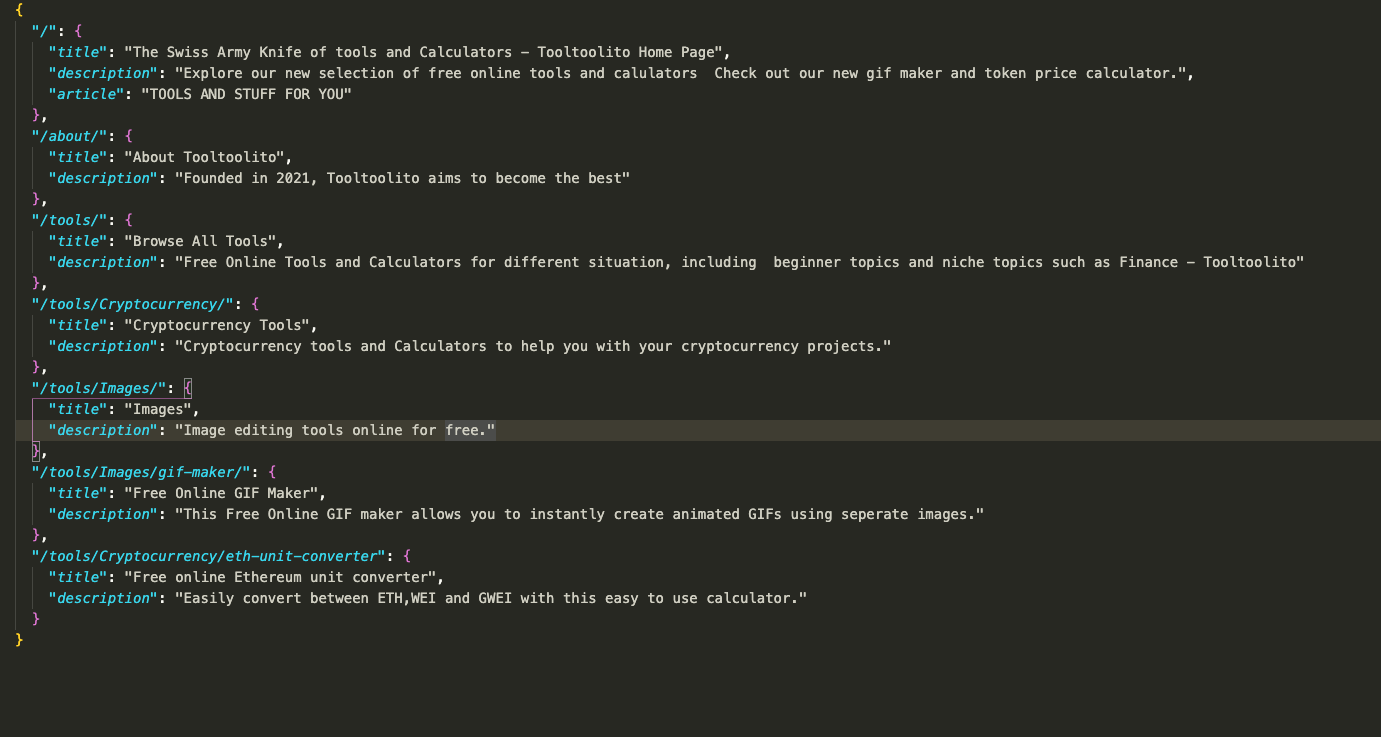
2- add "postbuild":"react-easy-seo" in the scripts section in your package.json .
"scripts":{
.....
"postbuild":"react-easy-seo"
}.
3-Add ReactHelmet to App.js
install react-helmet and react-router-dom
Use the sitemetada.json as a source for dynamic metadata as well
import useLocation
import {useLocation} from 'react-router-dom'get location and make sure it has '/' at the end
`var currentLocation = location.pathname
if (currentLocation[currentLocation.length -1 ] !== "/"){ currentLocation = currentLocation.concat("/") }`
add this in your Component
   <Helmet>
       <meta name='title' content={siteMetadata[currentLocation]['title'] }/>
       <meta name="description" content={siteMetadata[currentLocation]['description']}/>
       <title> {siteMetadata[currentLocation]['title']}</title>
   </Helmet>
4-run your react build normally and the output will be in './output'
How it Works
react-easy-seo transforms your react single page application to the traditional html folder structure using the routes provided in the sitemap.json file you make.
the json is structured as follows:
key value route {metadataname : metadatacontent}
example:{"/":{"title":"react-easy-seo","description":"react-easy-seo is the best way to handle react seo"}} which is converted to =>
"<meta name="title" content="react-easy-seo"></meta>"
"<meta name="description" content="react-easy-seo is the best way to handle react seo"></meta>"
"<title>react-easy-seo</title>"
so for each route you can have as many metadata as you want. another cool feature is having an article metadataname in the route object
{"/":{"article":"react-easy-seo is the best way to handle react seo"}}
this is converted to =>
<p>react-easy-seo is the best way to handle react seo</p>
and is added to the root div so its replaced as soon as your app loads but can really help with seo.