
react-ezy-form
v1.0.1
Published
Easy form generator

Maintainers
 barzin
Readme
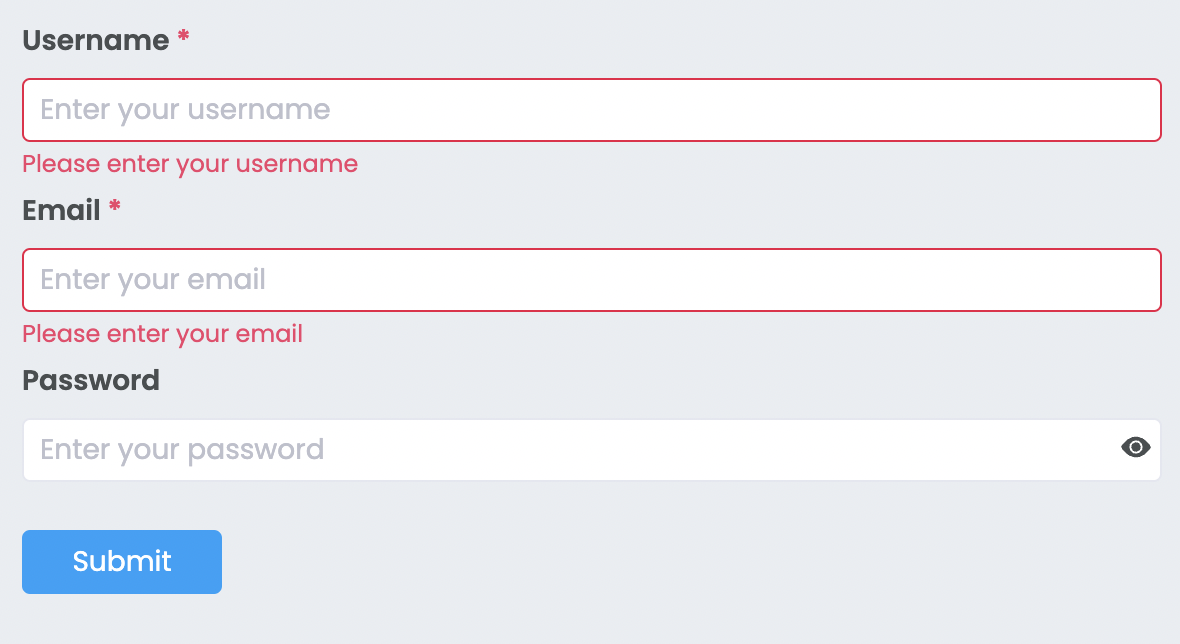
This component will suitable for you if
You want
a form generator ?
a form with validation ?
Run component in storybook
First clone the source then run
npm startInstall via NPM:
npm install --save react-ezy-formUsage
Inside the form tag you should add at least one FormItem and one button with type="submit"
import { Form, FormItem, Input, PasswordInput, ValidationType } from 'react-ezy-form';

//inside the form tag you should add at least one FormItem and one button with type="submit"

<Form onSubmit={(formValues) => console.log(formValues)}>
  <FormItem
    label="Username"
    name="username"
    rules={[
      {
        type: ValidationType.required,
        message: 'Please enter your username',
      },
    ]}
  >
    <Input placeholder="Enter your username" />
  </FormItem>
  <FormItem
    label="Email"
    name="email"
    rules={[
      {
        type: ValidationType.required,
        message: 'Please enter your email',
      },
      {
        type: ValidationType.regex,
        message: 'You have entered an invalid email address',
        regexPattern: /^\w+([\.-]?\w+)*@\w+([\.-]?\w+)*(\.\w{2,3})+$/,
      },
    ]}
  >
    <Input placeholder="Enter your email" />
  </FormItem>
  <FormItem
    label="Password"
    name="password"
    rules={[
      {
        type: ValidationType.custom,
        message: 'Your password is too easy',
        validationFunction: (formValue) => {
          return formValue['password'] !== '123';
        },
      },
    ]}
  >
    <PasswordInput placeholder="Enter your password" />
  </FormItem>
  <div>
    <button type="submit" className="button button--primary">
      Submit
    </button>
  </div>
</Form>;
Form Options
| Option | Type | Description | | :--------: | :------------------: | :-------------------------------------------------------------------: | | onSubmit* | (formValues) => void | when submit button has been clicked, onSubmit callback will be called | | horizontal | boolean | render the form horizental |
FormItem Options
Inside the FormItem tag, you should use a component that accepts these props
id:string
name:string
value:FormValueType
onChange: (name: string, value: FormValueType) => void
FormItem child example
const Input = ({ onChange, name, id, value = '' }: InputProps): JSX.Element => {
  const inputOnChange = (event: FormEvent<HTMLInputElement>): void => {
    const value: string = event.currentTarget.value.trim();
    //call onChange from FormItem
    onChange(name, value);
  };

  return (
    <input
      name={name}
      id={id}
      onChange={inputOnChange}
      value={value}
      type="text"
      placeholder="Username"
    />
  );
};
| Option | Type | Description | | :-----------: | :-----------: | :----------------------------------------------------------------------------------------: | | name* | string | this name is used for creating formValue object that will be returned to onSubmit callback | | valuePropName | string | the key of value that will be sent to your component inside the formItem(Default is Value) | | style | CSSProperties | custom style for FormItem | | rules | Rule[] | array of rules for validate the formItem |
Rule
interface Rule {
  type: ValidationType; // "required" or "regex" or "custom"
  message: string;
  regexPattern?: RegExp; // only for ValidationType.regex
  validationFunction?: (formValue: FormValues) => boolean; // only for ValidationType.custom
}