
react-find
v2.1.0
Published
[English](./README.md) | 简体中文

Maintainers
 xiaoming-meng
Readme
React-find
English | 简体中文
React-find 可以帮助您快速定位文件
演示
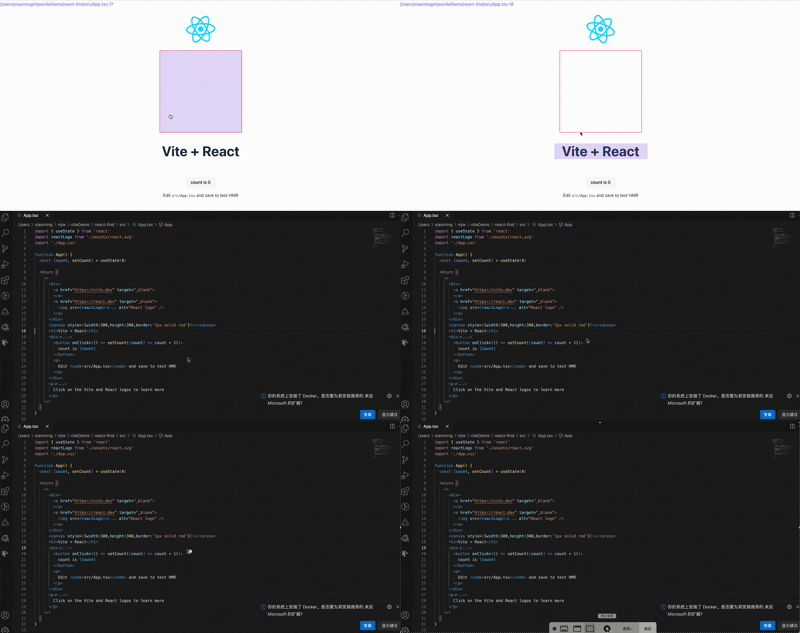
当然,您也可以使用右键菜单来查找当前节点及其父节点
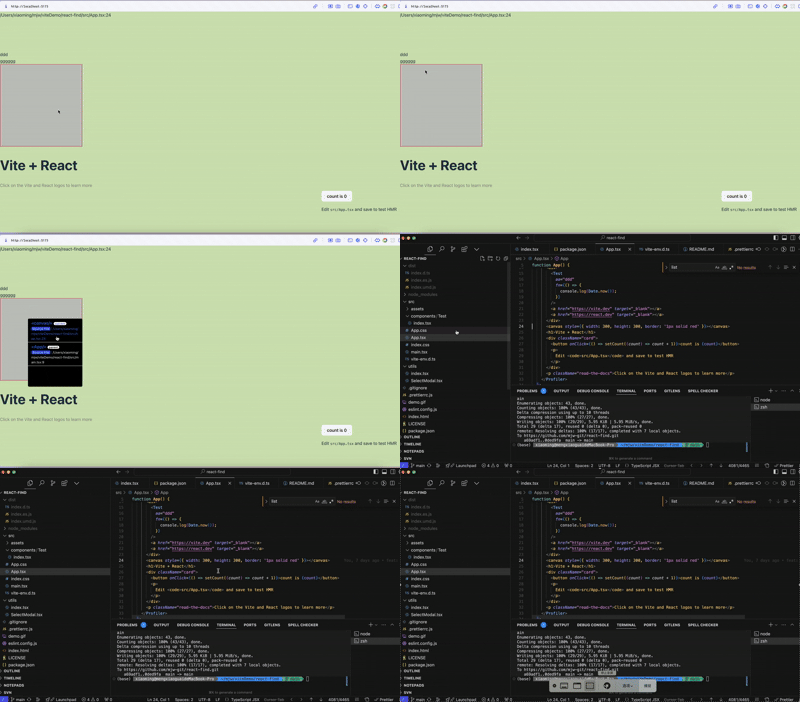
安装
pnpm install react-find开始使用
如果您使用 React 19.x 或更高版本,您应该使用插件
在 Vite 中:
//vite.config.ts
import { defineConfig } from 'vite';
import react from '@vitejs/plugin-react';
// 添加类型声明以解决模块声明文件缺失问题
import { vitePluginReactSource } from 'react-find/vite';
// https://vite.dev/config/
export default defineConfig({
  define: {
    'process.env': process.env,
  },
  plugins: [vitePluginReactSource(), react()],
});
在 Webpack 中:
 {
        test: /\.(ts|tsx|js|jsx)$/,
        exclude: /node_modules/,
        use: [
          {
            loader: 'babel-loader',
            options: {
              presets: [
                '@babel/preset-env',
                '@babel/preset-react',
                '@babel/preset-typescript'
              ]
            }
          },{
            loader: require.resolve('react-find/webpack/webpack-react-source-loader')
          }
        ]
      },
在您的文件中添加脚本,如 pages/app.tsx:
import { init } from 'react-find/next';

init();
如果您使用的是 React 18.x,你不需要使用插件,但你需要引入react-find/next
import { init } from 'react-find/next';

init();
如果您使用 React 17.x 或更低版本,您无需使用插件,直接导入即可
import init from 'react-find';

init();
在 Next.js 中,使用 webpack-react-source-loader
/** @type {import('next').NextConfig} */
const nextConfig = {
  webpack: config => {
    config.module.rules.push({
      test: /\.(ts|tsx|js|jsx)$/,
      exclude: /node_modules/,
      use: [
        {
          loader: 'react-find/webpack/webpack-react-source-loader',
        },
      ],
    });

    return config;
  },
};

export default nextConfig;
如果您使用 turbopack,您可以使用以下配置
import type { NextConfig } from 'next';

const nextConfig: NextConfig = {
  turbopack: {
    rules: {
      '*.tsx': {
        loaders: ['react-find/webpack/webpack-react-source-loader'],
      },

      '*.jsx': {
        loaders: ['react-find/webpack/webpack-react-source-loader'],
      },
    },
  },
};

export default nextConfig;
您应该创建一个客户端组件来初始化它
"use client"

import { PropsWithChildren, useEffect } from "react"
import {init} from 'react-find/next'
const Profile=(props:PropsWithChildren)=>{
    useEffect(()=>{
        init()
    },[])
    return <div>{props.children}</div>

}
export default Profile
然后在您的布局组件中使用它
export default function RootLayout({
  children,
}: Readonly<{
  children: React.ReactNode;
}>) {

  return (
    <html lang="en">
      <body
      >
        <Profile>
            {children}
        </Profile>

      </body>
    </html>
  );
}
然后按下 command(Mac)或 ctrl(Windows)并移动鼠标来尝试,点击块将带您到 IDE
您也可以右键单击来查找当前节点和父节点,这可以找到源文件。
如果您总是使用其他 IDE,您可以这样初始化,或在 localStorage 中设置键 react_find_protocol
init({ protocol: 'cursor' });支持 Remote SSH
如果您使用的是 Remote SSH,您可以使用以下配置
init({ protocol: 'cursor', remoteServerName: 'your-server-name' });提示
- 它只在 process.env.NODE_ENV === 'development' 时工作
选项
| 名称 | 描述 | 类型 | 默认值 | | ---------------- | ---------------------------------------------------------------------------------------------------- | -------- | -------------------- | | protocol | IDE 协议 | string | - | | keyCode | 键盘按键代码 | string[] | ['Meta']/['Control'] | | remoteServerName | Remote server name | string | - |