
react-fusion-state
v1.4.2
Published
Simple, fast React state management with zero dependencies, built-in persistence (localStorage / AsyncStorage), TypeScript inference, and a compact bundle.

Maintainers
 jgerard72
Readme
React Fusion State







🎯 The simplest AND most performant React state management library.
Grade A+ performance vs Redux/Zustand/Recoil in benchmarks.
🎉 v1.4.0 — Multi-store (headless, Zustand-style)
📚 v1.4.1 patch added a secure storage cookbook (Expo SecureStore / react-native-keychain / EncryptedStorage) and modernized the dev stack (Jest 30, TypeScript 6.0.3, 0 vulnerabilities). Tests bumped from 176 → 197. See CHANGELOG.
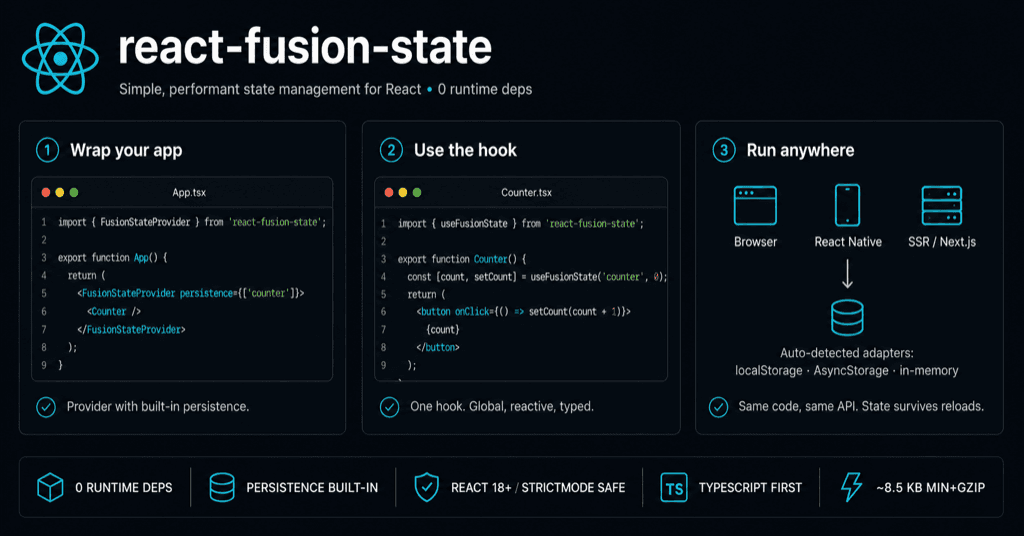
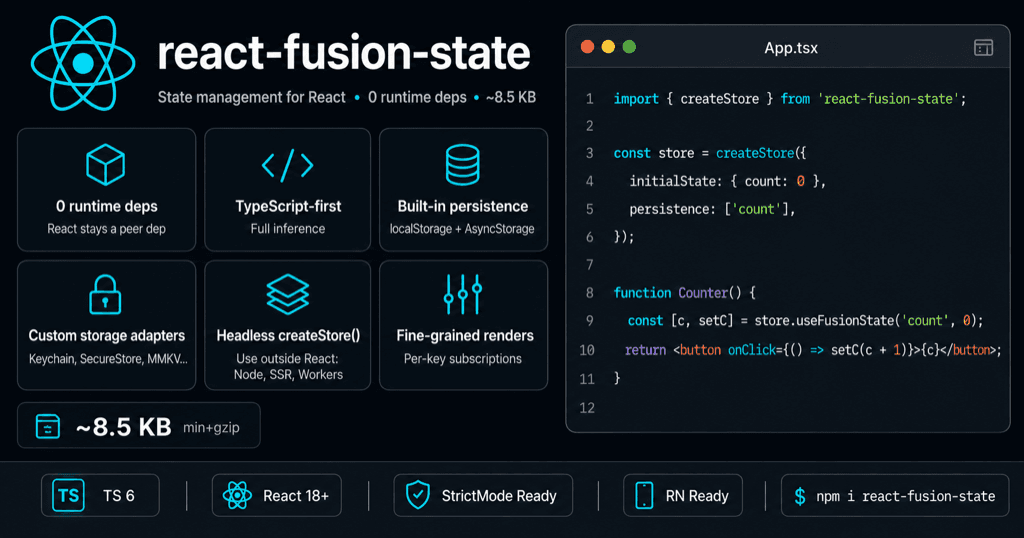
🎨 v1.4.2 patch refreshed the README banners (
hero.png3-step tutorial +quick-start.pngfeature grid) for the v1.4 era and harmonized the "0 runtime deps" wording across user-facing docs. No API change. See CHANGELOG.
- 🏗️ New
createStore()factory — autonomous, framework-agnostic store. Use it inside React (store.Provider+store.useFusionState+store.useFusionStore) or completely outside (store.getState(),store.setState({...}),store.subscribe(cb)). Jump to section - 🔒 Total isolation between stores — instantiate as many as you want; mutating store A never notifies any listener on store B. Perfect for library authors, monorepos with feature stores, and Next.js App Router (one store per request).
- 🧹
store.destroy()— releases all listeners, flushes pending writes, detaches DevTools. SSR-safe. - ⚡ Slightly faster writes — the new headless engine notifies listeners synchronously (batched via
unstable_batchedUpdates/ React 18 auto-batching), shaving one React-commit tick off everysetState. - 🧪 38 new tests (28 zero-React headless + 10 React-bound). Tests grew from 138 → 176. The public-API snapshot test gained exactly one entry (
createStore) — every other 1.3.x export still works identically. - 📦 ~8.5 KB gzipped, 0 runtime deps (+~310 B vs 1.3.0 — refactor removed more code than the new engines added).
All v1.2.x / v1.3.x features remain intact: Selectors API (
useFusionStore), runtime deprecation warnings, Redux DevTools, public API snapshot lock.
🚀 Quick Start
Installation
npm install react-fusion-stateBasic Usage
import { FusionStateProvider, useFusionState } from 'react-fusion-state';

function App() {
  return (
    <FusionStateProvider persistence={['counter']}>
      <Counter />
    </FusionStateProvider>
  );
}

function Counter() {
  const [count, setCount] = useFusionState('counter', 0);

  return (
    <div>
      <h1>Count: {count}</h1>
      <button onClick={() => setCount(count + 1)}>+</button>
      <button onClick={() => setCount(count - 1)}>-</button>
    </div>
  );
}
That's it! 🎉 Your state is now:
- ✅ Globally shared across components
- ✅ Automatically persisted (survives page refresh)
- ✅ Optimally rendered (99.9% fewer re-renders)
- ✅ TypeScript ready with full type inference
🚀 Performance Options
For optimal performance with large object values stored under a single key, use the shallow option on useFusionState:
function UserProfile() {
  const [user, setUser] = useFusionState('user', {
    name: 'John',
    email: '[email protected]',
    preferences: { theme: 'dark' }
  }, { shallow: true }); // ← Only compares top-level properties

  // Skips the commit if `setUser(...)` is called with a shallow-equal object.
  return <div>{user.name}</div>;
}
When to use shallow: true:
- ✅ Large objects with many properties
- ✅ When you only change top-level properties
- ✅ Performance-critical components
When to use default (deep comparison):
- ✅ Nested objects that change frequently
- ✅ Small objects (< 10 properties)
- ✅ When you need precise change detection
Need to derive a value across several keys (totals, joined fields, filtered lists)? Use
useFusionStoreinstead — it re-renders only when the selected value changes, never when unrelated keys move.
🎯 Selectors & Derived State (v1.2.0+)
Beyond useFusionState for per-key access, useFusionStore(selector) lets you compute derived values from the whole store and re-render only when the selected value changes — never when unrelated keys move.
Why selectors
import { useFusionStore } from 'react-fusion-state';

function CartTotal() {
  // Only re-renders when the total changes — not every time `user`, `theme`,
  // or any other unrelated key updates.
  const total = useFusionStore(
    (state) => (state.cart ?? []).reduce((sum, item) => sum + item.price, 0)
  );
  return <strong>${total.toFixed(2)}</strong>;
}
Multi-key selectors with shallow
When your selector returns an object/array (recreated on each call), pass shallow as the second argument so equality is checked at one level of depth:
import { useFusionStore, shallow } from 'react-fusion-state';

function UserBadge() {
  const { name, isAdmin } = useFusionStore(
    (state) => ({
      name: state.user?.name ?? 'Guest',
      isAdmin: state.user?.role === 'admin',
    }),
    shallow,
  );

  return <span>{name} {isAdmin && '👑'}</span>;
}
When to use what
| Need | Use |
|------|-----|
| Read & write one key | useFusionState('key', initial) |
| Read a derived value (computed / filtered / joined) | useFusionStore((s) => …) |
| Read multiple keys as one object | useFusionStore((s) => ({ a: s.a, b: s.b }), shallow) |
| Subscribe to changes without writing | useFusionStore((s) => s.someKey) |
Custom equality functions
You can pass any (prev, next) => boolean as the second argument:
const itemIds = useFusionStore(
  (state) => state.items.map((i) => i.id),
  (a, b) => a.length === b.length && a.every((id, i) => id === b[i]),
);
Performance note — useFusionStore uses a separate React context that never re-renders on state changes. All re-renders are driven by useSyncExternalStore and gated by your equality function. That's why a useFusionStore consumer can sit next to a useFusionState('frequent-key', …) mutator and stay completely idle as long as its selected value doesn't change.
⭐ Why React Fusion State?
🏆 Performance Champion
- 99.9% fewer re-renders than Redux/Zustand/Recoil — backed by
useSyncExternalStore+ per-key subscriptions - ~8.5 KB gzipped, 0 runtime deps (vs 45 KB+ for Redux/Recoil)
- Selectors with custom equality (
useFusionStore+shallow) for derived/multi-key reads with zero unrelated re-renders - Benchmark proven — Grade A+ performance
🎯 Developer Experience
- Zero configuration — works out of the box
- Automatic persistence — localStorage / AsyncStorage built-in
- Full TypeScript support — complete type inference
- React 18+ optimized — built on
useSyncExternalStore - Redux DevTools integration — opt in with
<FusionStateProvider devTools>
🌍 Universal Compatibility
- ✅ React Web (Create React App, Next.js, Vite)
- ✅ React Native (Expo, bare React Native)
- ✅ SSR/SSG (Next.js, Gatsby)
- ✅ All bundlers (Webpack, Vite, Rollup)
- ✅ Pluggable storage — secure storage on mobile (Expo SecureStore, react-native-keychain, react-native-encrypted-storage), MMKV, IndexedDB, cookies, or any custom backend via the 3-method
StorageAdaptercontract
📚 Key Features
🔄 Global State Management
// Component A
const [user, setUser] = useFusionState('user', { name: '', email: '' });

// Component B (anywhere in your app)
const [user] = useFusionState('user'); // Same state, automatically synced
🎯 Cross-Key Selectors (v1.2.0+)
import { useFusionStore, shallow } from 'react-fusion-state';

// Derived value — re-renders only when the total changes
const total = useFusionStore(
  (state) => (state.cart ?? []).reduce((sum, x) => sum + x.price, 0),
);

// Multi-key read with shallow equality
const { user, isAdmin } = useFusionStore(
  (state) => ({ user: state.user, isAdmin: state.user?.role === 'admin' }),
  shallow,
);
See the Selectors & Derived State section for the full guide.
💾 Built-in Persistence
// Granular persistence (RECOMMENDED)
<FusionStateProvider persistence={['user', 'settings']}>

// Persist all keys (use with caution)
<FusionStateProvider persistence={true}>

// Advanced persistence configuration
<FusionStateProvider
  persistence={{
    persistKeys: ['user', 'cart'],
    debounce: 1000,         // Save after 1s of inactivity
    onLoadError: (err) => console.warn('hydration failed', err),
    onSaveError: (err) => console.warn('save failed', err),
    // adapter: customAdapter,  // (optional) override the auto-detected adapter
  }}
>
Need encryption (mobile Keychain / SecureStore), MMKV, IndexedDB, cookies, or any other backend? Any object implementing the 3-method
StorageAdapterinterface plugs in here. Jump to Custom Storage Adapters for ready-to-copy recipes.
🎯 Optimized Re-renders
// Only components using 'counter' re-render when it changes
const [counter] = useFusionState('counter', 0);

// Other components remain untouched — 99.9% fewer re-renders!
🔍 Debug Mode & DevTools
// Provider-level debug: logs every state change diff in the console
<FusionStateProvider debug>
  <App />
</FusionStateProvider>

// Redux DevTools integration (browser extension required)
<FusionStateProvider devTools>
  <App />
</FusionStateProvider>

// Or with a custom name / config
<FusionStateProvider devTools={{ name: 'MyAppState', maxAge: 100 }}>
  <App />
</FusionStateProvider>
🎮 Try the Demo
Interactive demos with zero setup:
# Clone the repo
git clone https://github.com/jgerard72/react-fusion-state.git
cd react-fusion-state

# Open demo in browser
open demo/demo-persistence.html
Or try online: Live Demo
📖 Documentation
📋 Complete Guides
- Getting Started - 5-minute setup guide
- Full Documentation - Complete API reference
- Performance Benchmarks - Detailed performance analysis
🧪 Examples & Demos
- Interactive Demos - Try all features in your browser
- Code Examples - React & React Native examples
- Platform Compatibility - Cross-platform guide
- Custom Storage Adapters - Cookbook for secure storage on mobile (Keychain, SecureStore, EncryptedStorage) + multi-store split pattern
🛠️ Development
- Contributing Guide - How to contribute
- Changelog - Version history
- Security Policy - Security guidelines
🏆 Performance Comparison
| Library | Bundle Size | Re-renders | Dependencies | Setup | |---------|-------------|------------|--------------|--------| | React Fusion State | ~8.5 KB | 99.9% fewer | 0 | Zero | | Redux Toolkit | 45KB+ | Many | 15+ | Complex | | Zustand | 8KB+ | Many | 2+ | Moderate | | Recoil | 120KB+ | Many | 10+ | Complex |
🌟 Real-World Usage
E-commerce App
// Configure persistence for important data only
<FusionStateProvider persistence={['cart', 'user', 'theme']}>
  <App />
</FusionStateProvider>

function App() {
  // Shopping cart state (persisted)
  const [cart, setCart] = useFusionState('cart', []);

  // User preferences (persisted)
  const [theme, setTheme] = useFusionState('theme', 'light');

  // Session data (NOT persisted - temporary)
  const [currentPage, setCurrentPage] = useFusionState('page', 'home');
}
React Native App
import { useFusionState } from 'react-fusion-state';

function UserProfile() {
  // Works identically in React Native with automatic persistence
  const [userProfile, setUserProfile] = useFusionState('profile', {
    name: '',
    settings: {}
  });

  return <ProfileView profile={userProfile} />;
}
Advanced Performance Patterns
import { useFusionState, useFusionStore, shallow } from 'react-fusion-state';

function OptimizedDashboard() {
  // Deep-equality dedup by default — setData with an equivalent object is a no-op.
  const [data, setData] = useFusionState('data', { users: [], settings: {} });

  // Shallow comparison for flat objects.
  const [prefs, setPrefs] = useFusionState('prefs', {
    theme: 'light',
    language: 'en',
  }, { shallow: true });

  // Cross-key derived value: only re-renders when the metric flips.
  const activeUserCount = useFusionStore(
    (s) => (s.data?.users ?? []).filter((u) => u.active).length,
  );

  // Multi-key reads in one shot, with shallow equality.
  const { theme, language } = useFusionStore(
    (s) => ({ theme: s.prefs?.theme, language: s.prefs?.language }),
    shallow,
  );

  // Updates are batched cross-platform (React DOM + React Native) via the
  // internal `batch()` wrapper around notification dispatch.
  const handleUpdate = () => {
    setData({ ...data, users: newUsers });
    setPrefs({ ...prefs, theme: 'dark' });
    // Both updates committed in a single render cycle.
  };

  return <Stats active={activeUserCount} theme={theme} lang={language} />;
}
🏗 Multi-store with createStore() (v1.4.0+)
For the 90 % case, <FusionStateProvider> + useFusionState is all you need. But sometimes you want:
- A private store inside a library that won't collide with the host app's keys.
- Per-feature stores in a monorepo, with independent persistence configs.
- A per-request store in Next.js App Router / SSR so server data doesn't leak between users.
- To read or mutate state outside React — in a Web Worker, an event listener, an init script, a Node CLI.
createStore() covers all four. It returns an autonomous store with two layers of API: a headless one (getState, setState, subscribe) that works anywhere, and a React one (Provider, useFusionState, useFusionStore, useFusionHydrated) bound to this store via closure.
import { createStore, shallow } from 'react-fusion-state';

// Same options as <FusionStateProvider>: initialState, persistence, devTools, debug
export const cartStore = createStore({
  initialState: { items: [], total: 0 },
  persistence: ['items'],          // localStorage key filtering
  devTools: { name: 'cart' },      // separate Redux DevTools panel
});

// React
function Cart() {
  const [items, setItems] = cartStore.useFusionState('items', []);
  const total = cartStore.useFusionStore(
    s => (s.items as Item[]).reduce((sum, it) => sum + it.price, 0),
  );
  return <button onClick={() => setItems([...items, NEW_ITEM])}>{total}€</button>;
}

<cartStore.Provider>
  <Cart />
</cartStore.Provider>;

// Headless — works without any Provider mounted, anywhere
cartStore.getState();                         // { items: [], total: 0 }
cartStore.setState({ items: [{ id: 1 }] });   // merge-style update
cartStore.setState(prev => ({ ...prev, total: 99 })); // updater style
const unsub = cartStore.subscribe(() => console.log(cartStore.getState()));
cartStore.subscribeKey('items', () => console.log('items changed'));

// Cleanup (essential for SSR per-request stores)
cartStore.destroy(); // flush pending writes, release listeners, detach DevTools
Multi-store isolation
Mounting two stores in the same tree keeps state, persistence and re-renders completely isolated. Mutating cartStore never re-renders anything wired to settingsStore:
const cartStore = createStore({ initialState: { items: [] }, persistence: ['items'] });
const settingsStore = createStore({ initialState: { theme: 'light' }, persistence: ['theme'] });

<cartStore.Provider>
  <settingsStore.Provider>
    <App />
  </settingsStore.Provider>
</cartStore.Provider>;
Module-level hooks (useFusionState, useFusionStore, useFusionHydrated) resolve to the nearest provider in the tree — standard React Context semantics. Use the store-bound hooks (cartStore.useFusionState(...)) when you want to be explicit about which store you target.
Next.js App Router / SSR (per-request store)
Server Components require a new store per request — singletons would leak data between users. createStore() is the building block:
// app/store-provider.tsx — runs once per request
'use client';
import { createStore, type Store } from 'react-fusion-state';
import { useRef, useEffect } from 'react';

export function StoreProvider({ children, initialState }) {
  const storeRef = useRef<Store>();
  if (!storeRef.current) {
    storeRef.current = createStore({ initialState });
  }
  useEffect(() => () => storeRef.current?.destroy(), []);
  return <storeRef.current.Provider>{children}</storeRef.current.Provider>;
}
destroy() on unmount guarantees no listener map or pending debounced write survives the request.
When to use createStore() vs FusionStateProvider
| Use case | FusionStateProvider (default) | createStore() |
| --- | :-: | :-: |
| Simple SPA, single state graph | ✔ | also works |
| App built around React, no SSR | ✔ | also works |
| Library author publishing on npm | — | ✔ (private namespace) |
| Monorepo with isolated feature stores | — | ✔ |
| Next.js App Router (per-request) | — | ✔ |
| Read / mutate state from non-React code | — | ✔ |
| Tests that bypass React entirely | — | ✔ |
| Mix sensitive (Keychain / SecureStore) and non-sensitive (AsyncStorage) data | — | ✔ (recipe) |
Backward compat:
FusionStateProvideris now a 5-line wrapper aroundcreateStore()— every 1.0-1.3 API still works exactly as before. The public-API snapshot gained one entry (createStore), nothing was removed or renamed.
🔐 Custom Storage Adapters (Secure Storage, MMKV, ...)
react-fusion-state ships four built-in adapters (createLocalStorageAdapter, createAsyncStorageAdapter, createMemoryStorageAdapter, createNoopStorageAdapter) and auto-detects the right one based on the runtime. But the storage layer is fully pluggable — anything implementing the 3-method StorageAdapter interface works:
export interface StorageAdapter {
  getItem:    (key: string) => Promise<string | null>;
  setItem:    (key: string, value: string) => Promise<void>;
  removeItem: (key: string) => Promise<void>;
}
Below are 4 ready-to-copy recipes for the most common production needs on mobile. None of them ship inside the npm package — that would force a dependency choice on you. Pick the one matching your stack.
Recipe 1 — Expo: expo-secure-store
iOS Keychain + Android EncryptedSharedPreferences, managed by Expo. Best fit for tokens and small secrets (~2 KB max per value on iOS).
npx expo install expo-secure-store// storage/secureStoreAdapter.ts (your app)
import * as SecureStore from 'expo-secure-store';
import type { StorageAdapter } from 'react-fusion-state';
export const createSecureStoreAdapter = (debug = false): StorageAdapter => ({
async getItem(key) {
try {
return await SecureStore.getItemAsync(key);
} catch (e) {
if (debug) console.error('[SecureStore] read', key, e);
return null;
}
},
async setItem(key, value) {
try {
await SecureStore.setItemAsync(key, value);
} catch (e) {
if (debug) console.error('[SecureStore] write', key, e);
}
},
async removeItem(key) {
try {
await SecureStore.deleteItemAsync(key);
} catch (e) {
if (debug) console.error('[SecureStore] delete', key, e);
}
},
});import { FusionStateProvider } from 'react-fusion-state';
import { createSecureStoreAdapter } from './storage/secureStoreAdapter';
const secureAdapter = createSecureStoreAdapter(__DEV__);
export default function App() {
return (
<FusionStateProvider
persistence={{
adapter: secureAdapter,
persistKeys: ['auth.token', 'auth.refreshToken'],
debounceTime: 1000,
onSaveError: (e) => console.warn('SecureStore save failed:', e),
}}
>
<RootNavigator />
</FusionStateProvider>
);
}iOS limit: Keychain values are capped at ~2 KB. Use this adapter for tokens and small secrets only — not for the full state tree. Allowed key chars:
[A-Za-z0-9._-]. Slashes and most punctuation will throw on iOS. Prefer dot-namespaced keys (auth.token, neverauth/token).
Recipe 2 — Bare React Native: react-native-encrypted-storage
The simplest option: its API is already aligned on AsyncStorage's, so you can pass it straight to createAsyncStorageAdapter — with one thin wrapper because getItem resolves to undefined (not null) on missing keys.
npm i react-native-encrypted-storage
cd ios && pod install
import EncryptedStorage from 'react-native-encrypted-storage';
import { FusionStateProvider, createAsyncStorageAdapter } from 'react-fusion-state';
const secureAdapter = createAsyncStorageAdapter({
getItem: async (key) => (await EncryptedStorage.getItem(key)) ?? null,
setItem: (key, value) => EncryptedStorage.setItem(key, value),
removeItem: (key) => EncryptedStorage.removeItem(key),
});
export default function App() {
return (
<FusionStateProvider
persistence={{
adapter: secureAdapter,
persistKeys: ['auth.token', 'biometric.publicKey'],
debounceTime: 800,
}}
>
<RootNavigator />
</FusionStateProvider>
);
}Native backend: iOS Keychain + Android EncryptedSharedPreferences. No biometrics out of the box (use Recipe 3 if you need them).
Recipe 3 — Bare React Native: react-native-keychain (with biometrics)
react-native-keychain's API is credential-oriented (setGenericPassword(username, password, options)). We map one FusionState key to one Keychain service:
npm i react-native-keychain
cd ios && pod install
// storage/keychainAdapter.ts (your app)
import * as Keychain from 'react-native-keychain';
import type { StorageAdapter } from 'react-fusion-state';
export const createKeychainAdapter = (
baseOptions: Keychain.Options = {},
debug = false,
): StorageAdapter => ({
async getItem(key) {
try {
const creds = await Keychain.getGenericPassword({ ...baseOptions, service: key });
return creds ? creds.password : null;
} catch (e) {
if (debug) console.error('[Keychain] read', key, e);
return null;
}
},
async setItem(key, value) {
try {
await Keychain.setGenericPassword('fusion', value, { ...baseOptions, service: key });
} catch (e) {
if (debug) console.error('[Keychain] write', key, e);
}
},
async removeItem(key) {
try {
await Keychain.resetGenericPassword({ ...baseOptions, service: key });
} catch (e) {
if (debug) console.error('[Keychain] delete', key, e);
}
},
});import * as Keychain from 'react-native-keychain';
import { createKeychainAdapter } from './storage/keychainAdapter';
const secureAdapter = createKeychainAdapter({
accessControl: Keychain.ACCESS_CONTROL.BIOMETRY_CURRENT_SET,
accessible: Keychain.ACCESSIBLE.WHEN_UNLOCKED_THIS_DEVICE_ONLY,
});Biometric prompts cost UX. Each
getItemtriggers Face ID / Touch ID / fingerprint. BumpdebounceTimeto 2000–3000 ms and use it strictly for keys the user must unlock on demand (token reveal, payment confirmation). For "remember me until logout" cases, drop theaccessControlflag.
Pattern: split sensitive / non-sensitive with two stores
The idiomatic v1.4 way to mix encrypted and plain storage is two createStore() instances — one wired to your secure adapter, one to AsyncStorage. Each gets its own debounceTime, its own error callbacks, and the React hooks resolve to the correct one because they're closed over the store:
// stores/appStore.ts — non-sensitive (theme, prefs, last route, ...)
import { createStore, createAsyncStorageAdapter } from 'react-fusion-state';
import AsyncStorage from '@react-native-async-storage/async-storage';

export const appStore = createStore({
  initialState: { theme: 'dark', language: 'en' },
  persistence: {
    adapter:      createAsyncStorageAdapter(AsyncStorage),
    persistKeys:  ['theme', 'language', 'lastRoute'],
    debounceTime: 300,
  },
});

// stores/secureStore.ts — sensitive (tokens, refresh tokens, biometric keys)
import { createStore } from 'react-fusion-state';
import { createSecureStoreAdapter } from '../storage/secureStoreAdapter';

export const secureStore = createStore({
  initialState: { token: null, refreshToken: null },
  persistence: {
    adapter:      createSecureStoreAdapter(),
    persistKeys:  ['token', 'refreshToken'],
    debounceTime: 1000,
  },
});
// App.tsx
export default function App() {
return (
<appStore.Provider>
<secureStore.Provider>
<RootNavigator />
</secureStore.Provider>
</appStore.Provider>
);
}
// Inside any component
function LoginScreen() {
const [token, setToken] = secureStore.useFusionState('token', null);
const [theme] = appStore.useFusionState('theme', 'dark');
// ...
}Why this beats a "smart" single adapter that splits keys internally:
- Explicit & greppable.
secureStore.Xreads as "this came from the Keychain" at every call site — no central allow-list of sensitive keys to keep in sync. - Independent tuning. 300 ms debounce for AsyncStorage (cheap), 1000+ ms for SecureStore (expensive, IPC + crypto).
- Independent failure modes.
onSaveErrorfor the secure store can trigger a re-auth flow without polluting the app-state callback. - Zero bundle impact. The pattern uses APIs that already exist — no
createSplitAdapterimport to ship.
Writing your own adapter
Anything that satisfies the 3-method contract works — IndexedDB, MMKV, cookies, a remote KV store, an in-memory mock for tests. The full type lives in src/storage/storageAdapters.ts:
export interface StorageAdapter {
  getItem:    (key: string) => Promise<string | null>;
  setItem:    (key: string, value: string) => Promise<void>;
  removeItem: (key: string) => Promise<void>;
}

// Optional: opt into synchronous hydration on the web (instant first paint).
export interface ExtendedStorageAdapter extends StorageAdapter {
  getItemSync?: (key: string) => string | null;
}
Rules of thumb when implementing one:
- Never throw. Catch internally and return
nullfromgetItem/ no-op fromsetItem/removeItem. The provider must never crash because the disk filled up. - Pass the existing
debugflag down so users can opt into yourconsole.errorcalls via<FusionStateProvider debug>. - Stay synchronous-at-import. No top-level
localStorage.getItem, no synchronousrequire()of native modules — wrap them inside the factory (the lib follows the same pattern insrc/storage/autoDetect.ts). - Implement
getItemSynconly when it's truly sync. It's read by the engine to deliver instant hydration on web — returning a faked value here breaks SSR mismatches.
🗺 Migration to v2 (preview)
The legacy aliases below are marked @deprecated since v1.1 and still work in every 1.x release — your IDE will just show them with a strikethrough. All of them will be removed in v2.0.0. Use the tables below to migrate ahead of time.
Since v1.3.0 — each deprecated alias also emits a single
console.warnon first use, pointing at the replacement name and back to this section. One warning per alias, per session — no log spam, no overhead beyond aSet.haslookup. The warning fires in both development and production builds because the people most at risk of being caught off-guard by v2.0.0 are production users who never opened the IDE warning. Example:[FusionState] The hook `useSharedState` is deprecated and will be removed in v2.0.0. Use `useFusionState` instead — same signature, drop-in replacement. See https://github.com/jgerard72/react-fusion-state#-migration-to-v2-preview
Hooks
| Deprecated (1.x) | Use instead |
| --- | --- |
| useSharedState | useFusionState |
| usePersistentState | useFusionState |
| useAppState | useFusionState |
Provider
| Deprecated (1.x) | Use instead |
| --- | --- |
| GlobalStateProvider | FusionStateProvider |
| StateProvider | FusionStateProvider |
| AppStateProvider | FusionStateProvider |
Storage adapters
| Deprecated (1.x) | Use instead |
| --- | --- |
| createWebStorageAdapter | createLocalStorageAdapter |
| createRNStorageAdapter | createAsyncStorageAdapter |
| createMobileStorageAdapter | createAsyncStorageAdapter |
| createInMemoryAdapter | createMemoryStorageAdapter |
| autoDetectStorage | detectBestStorageAdapter |
| NoopStorageAdapter | createNoopStorageAdapter |
Example key objects
AppKeys and UserKeys were exported as documentation examples only. They will be removed in v2.0.0 — define your own typed keys directly in your app:
import { createKey, createNamespacedKey } from 'react-fusion-state';

const userKey = createKey<{ id: number; name: string } | null>('user');
const themeKey = createKey<'light' | 'dark'>('theme');
const profileKey = createNamespacedKey<{ avatar: string }>('user', 'profile');
Quick codemod
A find-and-replace across your codebase covers the migration — the function signatures are strictly identical:
# Hooks
rg -l 'useSharedState|usePersistentState|useAppState' | xargs sed -i '' 's/useSharedState\|usePersistentState\|useAppState/useFusionState/g'

# Provider
rg -l 'GlobalStateProvider|StateProvider\b|AppStateProvider' | xargs sed -i '' 's/GlobalStateProvider\|StateProvider\|AppStateProvider/FusionStateProvider/g'
Always review the diff before committing —
sedis blunt and may touch unintended occurrences inside comments or strings.
🤝 Community & Support
💬 Get Help
- 🐛 Bug Reports: GitHub Issues
- 💡 Feature Requests: GitHub Discussions
- 📧 Direct Contact: LinkedIn
🚀 Contributing
We welcome contributions! See our Contributing Guide for:
- 🛠️ Development setup
- 📝 Code standards
- 🧪 Testing guidelines
- 📋 Contribution workflow
📄 License
MIT © Jacques GERARD
⭐ Star This Project
If React Fusion State helps your project, please give it a star! ⭐
Every star helps other developers discover this performance-optimized solution.
Happy coding with React Fusion State! 🚀