
react-hierarchy-chart
v1.0.1
Published
`ReactHierarchyChart` is an React Component for Vertical or Horizontal Hierarchy/Tree View. It can be used to show parent child view, Organization structure, Tree view. with your flaxible dynamic template design with controls.

Maintainers
 rushik1992
Readme
ReactHierarchyChart
ReactHierarchyChart is an React Component for Vertical or Horizontal Hierarchy/Tree View. It can be used to show parent child view, Organization structure, Tree view. with your flaxible dynamic template design with controls.
Installation
$ npm install react-hierarchy-chartVertical View
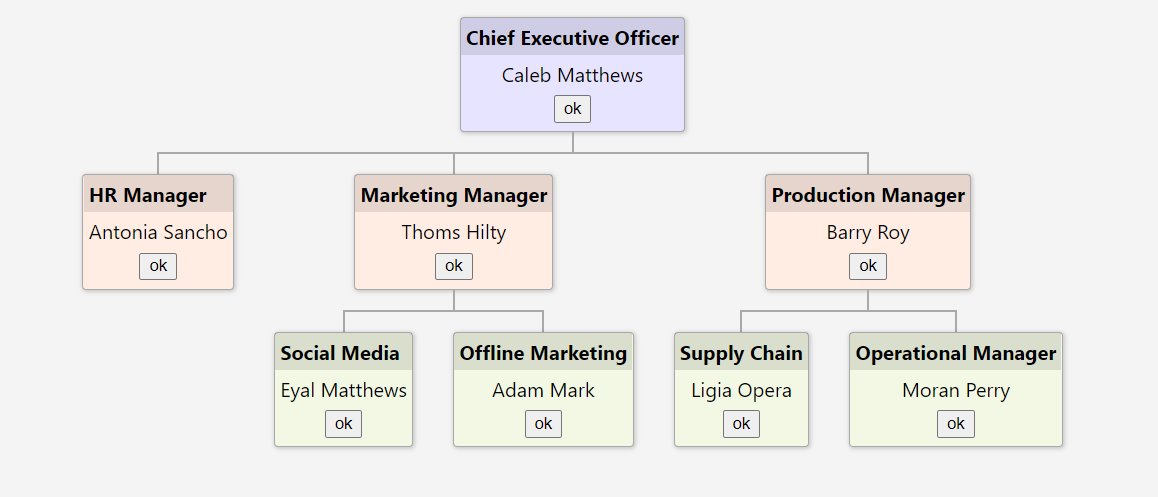
Horizontal View
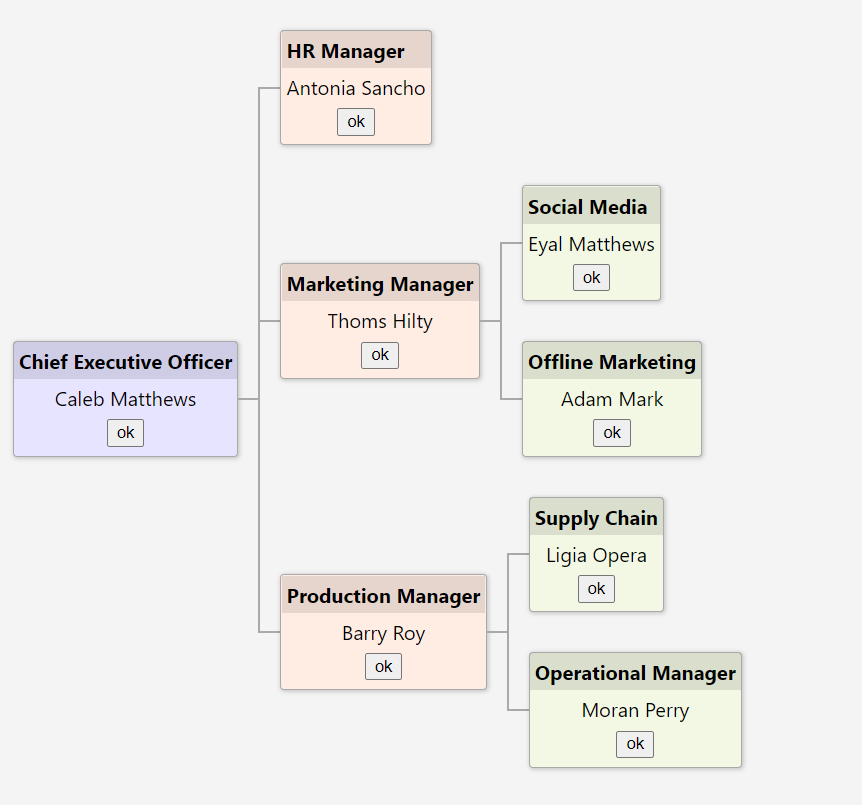
Demo Link
Component Inputs
|Name|Type|Description
|---|---|---|
|nodes|INode object|The INode object that contains node info mentioned below
|direction|vertical or horizontal| Direction of the chart top to bottom or left to right
|randerNode|Function| Callback will be call on each node render. NEed to return ReactDOM to render in each node
INode Details
|Property|Type|Description
|---|---|---
|key|string|(New) Need to be Unique value will be used for react element Key value
|cssClass|string|Custom css class to override or change node style
|childs|INode[]|The array of child nodes
|{otherCustomeProperty}|any or function|You can add any other Property or Function in each node and can use in template
Code App.tsx
import './App.scss';
import { INode, ReactHiererchyChart } from 'react-hierarchy-chart'


interface custNode extends INode {
  name: string;
  position: string;
  childs?: custNode[];
}

function App() {

  const nodes: custNode[] = [
    {
      key:"122",
      name: 'Caleb Matthews',
      cssClass: 'level1',
      position: 'Chief Executive Officer',
      childs: [
        {
          key:"132",
          name: 'Antonia Sancho',
          cssClass: 'level2',
          position: 'HR Manager'
        },
        {
          key:"123",
          name: 'Thoms Hilty',
          cssClass: 'level2',
          position: 'Marketing Manager',
          childs: [
            {
              key:"124",
              name: 'Eyal Matthews',
              cssClass: 'level3',
              position: 'Social Media'
            },
            {
              key:"125",
              name: 'Adam Mark',
              cssClass: 'level3',
              position: 'Offline Marketing'
            }
          ]
        },
        {
          key:"162",
          name: 'Barry Roy',
          cssClass: 'level2',
          position: 'Production Manager',
          childs: [
            {
              key:"127",
              name: 'Ligia Opera',
              cssClass: 'level3',
              position: 'Supply Chain'
            },
            {
              key:"128",
              name: 'Moran Perry',
              cssClass: 'level3',
              position: 'Operational Manager'
            }
          ]
        }
      ]
    }
  ];


  return (
    <div className="App">
      <h1>Vertical View</h1>
      <div className='hierarchy-viewer'>
        <ReactHiererchyChart nodes={nodes} direction='vertical'
          randerNode={(node: custNode) => {
            return <div className="node-template">
              <strong>{node.position} </strong>
              <span>{node.name} </span>
              <button onClick={() => { alert(node.name); }}>ok</button>
            </div>
          }} />
      </div>
      <h1>Horizontal View</h1>
      <div className='hierarchy-viewer'>
        <ReactHiererchyChart nodes={nodes} direction='horizontal'
          randerNode={(node: custNode) => {
            return <div className="node-template">
              <strong>{node.position} </strong>
              <span>{node.name} </span>
              <button onClick={() => { alert(node.name); }}>ok</button>
            </div>
          }} />
      </div>
    </div>
  );
}

export default App;
App.scss
.node-template {
  text-align: center;

  strong {
    display: flex;
    background-color: rgba(0, 0, 0, 0.1);
    padding: 0.25em;
  }

  span {
    display: flex;
    justify-content: center;
    padding: 0.25em;
  }

  button {
    margin-bottom: 0.5em;
  }
}

h1 {
  text-align: center;
  margin-bottom: 10px;
}

.hierarchy-viewer {
  background: #efefef;
  display: block;
  margin: 20px;
  padding: 15px;
  ;
}

.level1{
  background-color: rgb(231, 228, 255);
}
.level2{
  background-color: rgb(255, 237, 227);
}
.level3{
  background-color: rgb(242, 248, 227);
}