
react-hook-form-autosave
v3.3.2
Published
Advanced autosave utilities for React Hook Form with debounce, validation, key mapping, diff handling, and comprehensive testing support.
Downloads
4,098

Maintainers
 ziadeh
Readme
react-hook-form-autosave



Effortless autosave for React Hook Form with smart field tracking, undo/redo, and perfect synchronization.
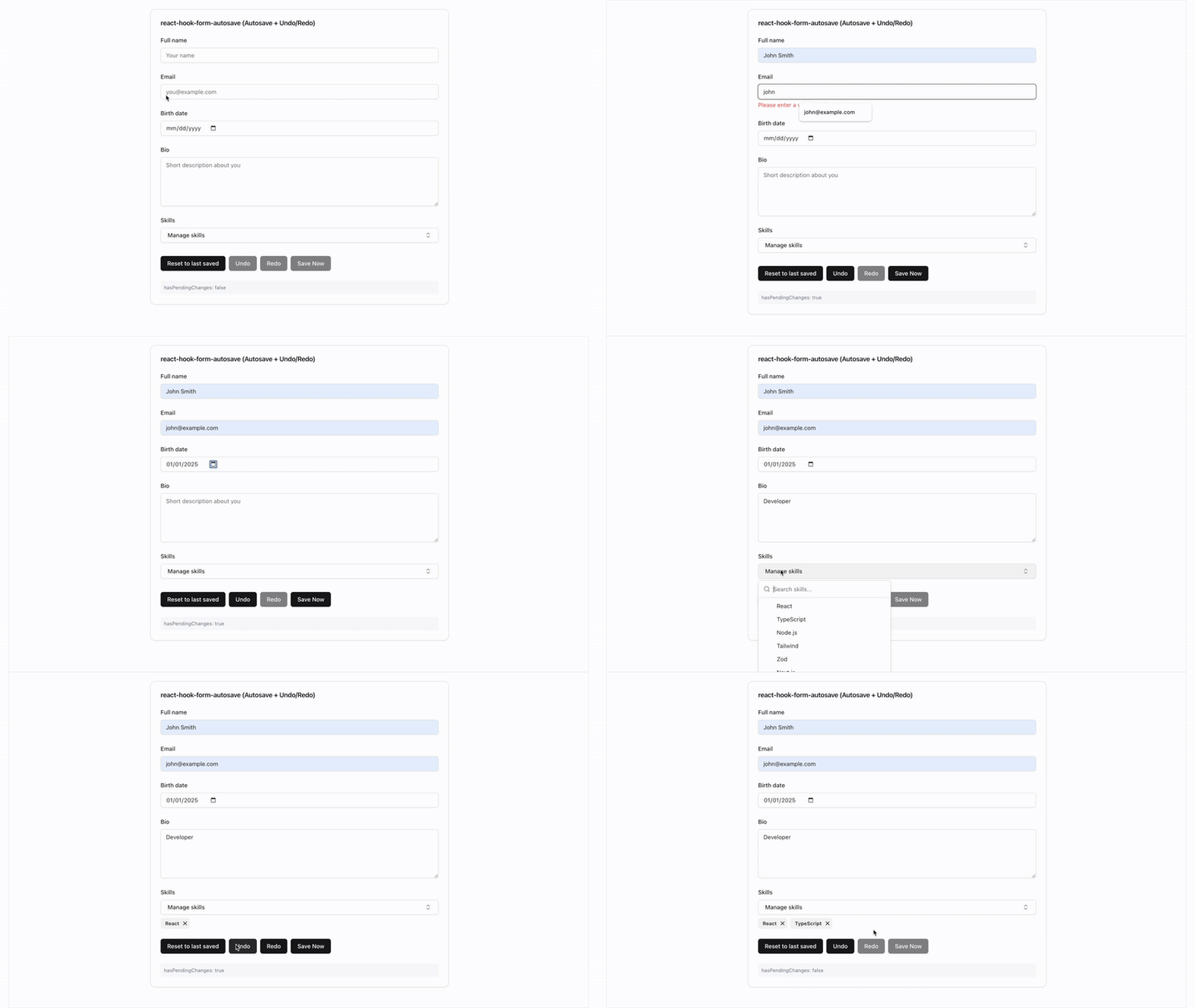
import { useRhfAutosave, fetchTransport, useBeforeUnload } from "react-hook-form-autosave";

const { isSaving, hasPendingChanges, undo, redo } = useRhfAutosave({
  form,
  transport: fetchTransport('/api/save'),
});

useBeforeUnload(hasPendingChanges);
✅ Zero-config transports - fetchTransport, serverActionTransport — no boilerplate
✅ Accurate pending state - Always know if there are unsaved changes
✅ Undo/Redo support - Let users undo mistakes with Cmd/Ctrl+Z
✅ Array field handling - Smart diffing for add/remove operations
✅ Auto-hydration - Seamlessly sync when data loads from API
✅ Nested field utilities - Full support for deeply nested objects and arrays
✅ Production ready - Battle-tested with proper error handling
Table of Contents
- Installation
- Quick Start
- Why Choose This?
- Core Features
- Transport Presets
- Basic Examples
- Common Patterns
- Nested Fields
- Advanced Features
- API Reference
- Framework Integration
- Migration Guide
- Best Practices
📦 Installation
npm install react-hook-form-autosave
# or
pnpm add react-hook-form-autosave
# or
yarn add react-hook-form-autosave
Peer Requirements
| Peer | Version |
|------|---------|
| react | >=18 |
| react-hook-form | >=7 |
# Ensure you have React 18+
npm install react@^18 react-dom@^18
🚀 Quick Start
Step 1: Add the hook to your form
import { useForm } from "react-hook-form";
import { useRhfAutosave, fetchTransport, useBeforeUnload } from "react-hook-form-autosave";

function MyForm() {
  const form = useForm({
    defaultValues: { name: "", email: "" }
  });

  const { isSaving, hasPendingChanges } = useRhfAutosave({
    form,
    transport: fetchTransport("/api/save"),
  });

  // Warn before closing tab with unsaved changes
  useBeforeUnload(hasPendingChanges);

  return (
    <form>
      <input {...form.register("name")} placeholder="Name" />
      <input {...form.register("email")} placeholder="Email" />
      <div>
        {isSaving ? "Saving..." : hasPendingChanges ? "Editing..." : "All saved"}
      </div>
    </form>
  );
}
That's it! Your form now autosaves with accurate pending state tracking and navigation protection.
💡 Why Choose This?
The Problem
- Users lose work when browsers crash or they navigate away
- Form state gets out of sync with server data
- Building reliable autosave from scratch is complex
- Tracking "unsaved changes" accurately is surprisingly hard
The Solution
// Without this library (complex and buggy)
const [saving, setSaving] = useState(false);
const [hasPending, setHasPending] = useState(false);
const lastSavedRef = useRef();

const debouncedSave = useMemo(() => debounce(async (data) => {
  setSaving(true);
  try {
    if (form.formState.isValid) {
      await saveData(data);
      lastSavedRef.current = data;
      setHasPending(false);
    }
  } catch (error) {
    // handle error...
  } finally {
    setSaving(false);
  }
}, 600), []);

useEffect(() => {
  const isDifferent = !deepEqual(form.getValues(), lastSavedRef.current);
  setHasPending(isDifferent);
  if (form.formState.isDirty && isDifferent) {
    debouncedSave(form.getValues());
  }
}, [form.watch()]);

// With this library (simple and reliable)
const { isSaving, hasPendingChanges } = useRhfAutosave({ form, transport: saveData });
🎯 Core Features
1. Accurate Pending State Tracking
The hasPendingChanges boolean accurately tracks whether there are unsaved changes, even after:
- Data loads from the API
- Successful saves
- Undo/redo operations
- Array field modifications
const { hasPendingChanges } = useRhfAutosave({ form, transport });

// Use it to show save status
{hasPendingChanges ? "You have unsaved changes" : "All changes saved"}

// Or to warn before navigation
useEffect(() => {
  const handleBeforeUnload = (e: BeforeUnloadEvent) => {
    if (hasPendingChanges) {
      e.preventDefault();
      e.returnValue = '';
    }
  };
  window.addEventListener('beforeunload', handleBeforeUnload);
  return () => window.removeEventListener('beforeunload', handleBeforeUnload);
}, [hasPendingChanges]);
2. Undo/Redo Support
Built-in undo/redo with keyboard shortcuts:
const { undo, redo, canUndo, canRedo } = useRhfAutosave({
  form,
  transport,
  undo: { enabled: true }
});

// Keyboard shortcuts work automatically (Cmd/Ctrl+Z, Shift+Cmd/Ctrl+Z)
// Or add buttons:
<button onClick={undo} disabled={!canUndo}>Undo</button>
<button onClick={redo} disabled={!canRedo}>Redo</button>
3. Auto-Hydration
Automatically syncs when data loads from your API:
function MyForm() {
  const form = useForm();
  const { data } = useQuery(['form-data'], fetchFormData);

  const { hasPendingChanges } = useRhfAutosave({
    form,
    transport,
    autoHydrate: true // Enabled by default
  });

  // When data loads, the form automatically syncs
  useEffect(() => {
    if (data) {
      form.reset(data); // This triggers auto-hydration
    }
  }, [data]);

  // hasPendingChanges will be false after data loads
  // and true only when user makes changes
}
4. Array Field Diffing
Handle array fields intelligently with add/remove operations:
const { isSaving } = useRhfAutosave({
  form,
  transport,
  diffMap: {
    tags: {
      idOf: (tag) => tag.id,
      onAdd: async (tag) => {
        await api.addTag(postId, tag.id);
      },
      onRemove: async (tag) => {
        await api.removeTag(postId, tag.id);
      },
    },
  },
});

// Now when users add/remove tags, only the changes are sent
// The form properly tracks these as saved after success
🚌 Transport Presets
Zero-config transport factories so you never write fetch boilerplate again.
fetchTransport — REST APIs
import { useRhfAutosave, fetchTransport, withRetry } from "react-hook-form-autosave";

const { isSaving } = useRhfAutosave({
  form,
  transport: fetchTransport("/api/save"),
});

// With options:
const transport = fetchTransport("/api/save", {
  method: "PATCH",
  headers: { Authorization: `Bearer ${token}` },
  credentials: "include",
  mapBody: (payload) => ({ data: payload, updatedAt: Date.now() }),
});

// Compose with retry:
const reliableTransport = withRetry(
  fetchTransport("/api/save"),
  { maxRetries: 3 }
);
Handles JSON serialization, Content-Type headers, AbortSignal passthrough, and non-2xx error wrapping automatically.
serverActionTransport — Next.js Server Actions
// app/actions.ts
'use server';
export async function saveForm(data: unknown) {
  await db.form.update({ data });
}

// app/components/MyForm.tsx
import { useRhfAutosave, serverActionTransport } from "react-hook-form-autosave";
import { saveForm } from "./actions";

const { isSaving } = useRhfAutosave({
  form,
  transport: serverActionTransport(saveForm),
});

// With custom result interpretation:
const transport = serverActionTransport(saveForm, {
  mapResult: (result: any) =>
    result.success ? { ok: true } : { ok: false, error: new Error(result.message) },
});
Calls the server action directly. Wraps thrown errors as TransportError.
useBeforeUnload — Navigation Guard
import { useRhfAutosave, useBeforeUnload } from "react-hook-form-autosave";

const { hasPendingChanges } = useRhfAutosave({ form, transport });

// Warn before closing tab with unsaved changes
useBeforeUnload(hasPendingChanges);
onStatusChange — Lifecycle Callback
const { isSaving } = useRhfAutosave({
  form,
  transport,
  onStatusChange: (status) => {
    // status.state: 'idle' | 'saving' | 'saved' | 'error'
    if (status.state === "saved") toast.success("Saved!");
    if (status.state === "error") Sentry.captureException(status.error);
  },
});
Fires on state transitions only, not on every render.
📖 Basic Examples
Simple Status Display
function MyForm() {
  const form = useForm({ defaultValues: { title: "" } });

  const { isSaving, lastError, hasPendingChanges } = useRhfAutosave({
    form,
    transport: async (data) => {
      await api.save(data);
      return { ok: true };
    },
  });

  return (
    <form>
      <input {...form.register("title")} />

      {/* Clean status indicator */}
      <div className="status">
        {isSaving && "💾 Saving..."}
        {!isSaving && hasPendingChanges && "✏️ Editing..."}
        {!isSaving && !hasPendingChanges && "✅ All changes saved"}
        {lastError && `❌ Error: ${lastError.message}`}
      </div>
    </form>
  );
}
Configuration Options
const { isSaving } = useRhfAutosave({
  form,
  transport,
  config: {
    debounceMs: 1000,      // Wait 1 second after user stops typing
    debug: true,           // Enable debug logging (default: false)
    enableMetrics: true,   // Track performance metrics
    maxRetries: 3,         // Retry failed saves
    enableCache: true,     // Cache validation results
  }
});
Validation Control
const { isSaving } = useRhfAutosave({
  form,
  transport,
  shouldSave: ({ isDirty, isValid }) => isDirty && isValid,
  validateBeforeSave: "payload", // Only validate changed fields
});
🔧 Common Patterns
Manual Save Button
Sometimes you want both autosave AND a manual save button:
function MyForm() {
  const form = useForm();
  const { isSaving, flush, hasPendingChanges } = useRhfAutosave({
    form,
    transport,
    config: { debounceMs: 2000 } // Auto-save after 2 seconds
  });

  const handleManualSave = async () => {
    const result = await flush(); // Save immediately
    if (result.ok) {
      toast.success("Saved!");
    }
  };

  return (
    <form>
      <input {...form.register("title")} />

      <button
        type="button"
        onClick={handleManualSave}
        disabled={!hasPendingChanges || isSaving}
      >
        {isSaving ? "Saving..." : "Save Now"}
      </button>
    </form>
  );
}
Form Submission Integration
Ensure all changes are saved before final submission:
function MyForm() {
  const form = useForm();
  const { flush, hasPendingChanges } = useRhfAutosave({
    form,
    transport
  });

  const onSubmit = async (data) => {
    // Save any pending autosave changes first
    if (hasPendingChanges) {
      await flush();
    }
  };

  return (
    <form onSubmit={form.handleSubmit(onSubmit)}>
      <input {...form.register("title")} />
      <button type="submit">Submit</button>
    </form>
  );
}
Server Data Synchronization
Handle server data updates properly:
function MyForm() {
  const form = useForm();
  const { data, isLoading } = useQuery(['form-data'], fetchData);

  const { hasPendingChanges, hydrateFromServer } = useRhfAutosave({
    form,
    transport,
    autoHydrate: true // Auto-detect and sync server data
  });

  // Option 1: Auto-hydration (recommended)
  useEffect(() => {
    if (data) {
      form.reset(data); // Auto-hydration handles the rest
    }
  }, [data]);

  // Option 2: Manual hydration
  const handleRefresh = async () => {
    const freshData = await fetchData();
    hydrateFromServer(freshData); // Manually sync
  };

  return (
    <div>
      {!isLoading && (
        <div>
          {hasPendingChanges
            ? "You have unsaved changes"
            : "Synced with server"}
        </div>
      )}
    </div>
  );
}
🏗️ Nested Fields
Overview
Full support for deeply nested form structures with utilities for path manipulation, key mapping, array diffing, and deep merging.
Path Utilities
Work with nested field paths using dot and bracket notation:
import { getByPath, setByPath, getAllPaths } from 'react-hook-form-autosave';

const formData = {
  profile: { firstName: 'John', lastName: 'Doe' },
  address: { city: 'NYC', zip: '10001' },
  tags: ['react', 'typescript']
};

// Get nested values safely
getByPath(formData, 'profile.firstName'); // 'John'
getByPath(formData, 'tags[0]');           // 'react'

// Set nested values immutably
const updated = setByPath(formData, 'profile.firstName', 'Jane');

// Get all paths in an object
getAllPaths(formData); // ['profile.firstName', 'profile.lastName', 'address.city', ...]
Nested Key Mapping
Transform nested form fields to match your API structure:
import { mapNestedKeys } from 'react-hook-form-autosave';

const { isSaving } = useRhfAutosave({
  form,
  transport: async (payload) => {
    // Transform nested paths to API keys
    const apiPayload = mapNestedKeys(payload, {
      'profile.firstName': 'first_name',
      'profile.lastName': 'last_name',
      'address.zipCode': 'postal_code',
      'settings.notifications': 'notify_enabled',
    }, { preserveUnmapped: true });

    // Form: { profile: { firstName: 'John' } }
    // API:  { first_name: 'John' }

    await api.save(apiPayload);
    return { ok: true };
  },
});
Array Change Detection
Detect what changed in arrays of objects:
import { detectNestedArrayChanges } from 'react-hook-form-autosave';

const { isSaving } = useRhfAutosave({
  form,
  transport: async (payload) => {
    // Compare with baseline to find changes
    const changes = detectNestedArrayChanges(
      baseline,
      payload,
      ['teamMembers', 'items'],
      { identityKey: 'id', trackFieldChanges: true }
    );

    if (changes.teamMembers?.hasChanges) {
      const { added, removed, modified } = changes.teamMembers;
      console.log(`+${added.length} added, -${removed.length} removed, ${modified.length} modified`);
    }

    await api.save(payload);
    return { ok: true };
  },
});
Custom Payload Selection for Nested Forms
Handle React Hook Form's dirtyFields for nested structures:
const { isSaving } = useRhfAutosave({
  form,
  transport,
  selectPayload: (values, dirtyFields) => {
    // Helper to check if any nested value is dirty
    const hasAnyDirty = (obj) => {
      if (obj === true) return true;
      if (Array.isArray(obj)) return obj.some(hasAnyDirty);
      if (obj && typeof obj === 'object') {
        return Object.values(obj).some(hasAnyDirty);
      }
      return false;
    };

    // Extract only dirty values, handling nested structures
    const extractDirty = (vals, dirty) => {
      if (dirty === true) return vals;
      if (Array.isArray(dirty) && hasAnyDirty(dirty)) return vals;
      if (typeof dirty === 'object') {
        const result = {};
        for (const key of Object.keys(dirty)) {
          const extracted = extractDirty(vals?.[key], dirty[key]);
          if (extracted !== undefined) result[key] = extracted;
        }
        return Object.keys(result).length > 0 ? result : undefined;
      }
      return undefined;
    };

    return extractDirty(values, dirtyFields) || {};
  },
});
Deep Merge Utilities
Merge nested objects with various strategies:
import { deepMerge, deepUpdate, isDeepEqual } from 'react-hook-form-autosave';

// Deep merge with options
const merged = deepMerge(target, source, {
  arrayMergeStrategy: 'replace', // or 'concat', 'byId'
  immutable: true,
});

// Update at a specific path
const updated = deepUpdate(obj, 'user.settings.theme', 'dark');

// Deep equality check
if (!isDeepEqual(oldData, newData)) {
  // Data has changed
}
All Nested Field Utilities
import {
  // Path utilities
  parsePath,        // Parse 'user.name' → ['user', 'name']
  joinPath,         // Join ['user', 'name'] → 'user.name'
  getByPath,        // Get value at path
  setByPath,        // Set value at path (immutable)
  deleteByPath,     // Delete value at path
  hasPath,          // Check if path exists
  getAllPaths,      // Get all paths in object

  // Key mapping
  mapNestedKeys,           // Transform keys for API
  createNestedKeyMapper,   // Create reusable mapper
  reverseNestedKeyMap,     // Reverse mapping direction
  flattenObject,           // Flatten to dot notation
  unflattenObject,         // Unflatten from dot notation

  // Array diffing
  diffArrays,                  // Diff two arrays
  detectNestedArrayChanges,    // Detect changes in nested arrays
  findArrayFields,             // Find array fields in object
  applyArrayDiff,              // Apply diff to array

  // Deep merge
  deepMerge,      // Merge objects deeply
  deepUpdate,     // Update at path
  cloneDeep,      // Deep clone
  isDeepEqual,    // Deep equality
  getDiff,        // Get differences
  applyDiff,      // Apply differences
} from 'react-hook-form-autosave';
📖 For comprehensive documentation, see docs/NESTED_FIELDS.md
🚀 Advanced Features
Field Name Mapping
Transform form field names to match your API:
const { isSaving } = useRhfAutosave({
  form,
  transport,
  keyMap: {
    // Simple rename
    fullName: "name",

    // Rename + transform value
    age: ["age_years", Number],

    // Complex transformation
    isActive: ["status", (value) => value ? "active" : "inactive"],
  },
});

// Form has: { fullName: "John", age: "25", isActive: true }
// API gets: { name: "John", age_years: 25, status: "active" }
Undo to Last Save
Let users revert all changes since the last save:
const { undoLastSave, hasPendingChanges } = useRhfAutosave({
  form,
  transport,
  undo: { enabled: true }
});

<button onClick={undoLastSave} disabled={!hasPendingChanges}>
  Discard Changes
</button>
Performance Monitoring
const { getMetrics } = useRhfAutosave({
  form,
  transport,
  config: {
    enableMetrics: true,
    debug: false // Keep debug off in production
  }
});

// Monitor performance
useEffect(() => {
  const interval = setInterval(() => {
    const metrics = getMetrics();
    analytics.track('autosave_metrics', {
      successRate: (metrics.successfulSaves / metrics.totalSaves * 100),
      avgSaveTime: metrics.averageSaveTime,
      totalSaves: metrics.totalSaves
    });
  }, 60000); // Every minute
  return () => clearInterval(interval);
}, []);
📚 API Reference
Hook Signature
const result = useRhfAutosave<FormData>(options)Options
| Option | Type | Required | Description |
|--------|------|----------|-------------|
| form | UseFormReturn<T> | ✅ | React Hook Form instance |
| transport | (data) => Promise<SaveResult> | ✅ | Function to save data |
| config | AutosaveConfig | ❌ | Configuration options |
| undo | UndoOptions | ❌ | Undo/redo configuration |
| diffMap | Record<string, DiffHandler> | ❌ | Array field handlers |
| validateBeforeSave | "none" \| "payload" \| "all" | ❌ | Validation strategy |
| shouldSave | (ctx) => boolean | ❌ | Custom save condition |
| selectPayload | (values, dirty) => Partial<T> | ❌ | Select fields to save |
| onSaved | (result, payload) => void | ❌ | Save callback |
| onStatusChange | (status: AutosaveStatus) => void | ❌ | Lifecycle callback (idle/saving/saved/error) |
| keyMap | KeyMap | ❌ | Field name mapping |
| autoHydrate | boolean | ❌ | Auto-sync server data (default: true) |
Configuration
interface AutosaveConfig {
  debug: boolean;          // Debug logging (default: false)
  debounceMs: number;      // Delay before save (default: 600)
  maxRetries: number;      // Retry attempts (default: 3)
  enableMetrics: boolean;  // Track metrics (default: false)
  enableCache: boolean;    // Cache validation (default: true)
  cacheSize: number;       // Cache entries (default: 100)
  cacheTtlMs: number;      // Cache TTL (default: 5 min)
}
Return Value
interface AutosaveReturn {
  // Status
  isSaving: boolean;                    // Currently saving
  lastError: Error | null;              // Last error
  hasPendingChanges: boolean;           // Unsaved changes exist

  // Actions
  flush: () => Promise<SaveResult>;     // Save immediately
  abort: () => void;                    // Cancel pending saves
  forceSave: () => Promise<SaveResult>; // Force save

  // Undo/Redo
  undo: () => void;                     // Undo last change
  redo: () => void;                     // Redo change
  undoLastSave: () => void;            // Revert to last save
  canUndo: boolean;                     // Can undo
  canRedo: boolean;                     // Can redo

  // Advanced
  hydrateFromServer: (data: T) => void; // Manual sync
  getMetrics: () => AutosaveMetrics;    // Performance data
  getPendingChanges: () => any;         // View pending data
}
🔗 Framework Integration
Next.js + tRPC
import { api } from "~/utils/api";
import { trpcTransport } from "react-hook-form-autosave";

function MyForm() {
  const form = useForm();
  const mutation = api.posts.update.useMutation();

  const { isSaving, hasPendingChanges } = useRhfAutosave({
    form,
    transport: trpcTransport(mutation),
  });

  return (
    <div>
      {hasPendingChanges ? "Unsaved changes" : "All saved"}
    </div>
  );
}
Next.js + Server Actions
import { serverActionTransport } from "react-hook-form-autosave";
import { saveFormData } from "./actions"; // Your server action

const { isSaving } = useRhfAutosave({
  form,
  transport: serverActionTransport(saveFormData),
});
Next.js + REST API
import { fetchTransport } from "react-hook-form-autosave";

const { isSaving } = useRhfAutosave({
  form,
  transport: fetchTransport("/api/save"),
});
Remix
import { useFetcher } from "@remix-run/react";

function MyForm() {
  const form = useForm();
  const fetcher = useFetcher();

  const { isSaving, hasPendingChanges } = useRhfAutosave({
    form,
    transport: async (data) => {
      fetcher.submit(data, {
        method: "POST",
        encType: "application/json"
      });
      return { ok: true };
    },
  });

  return <>{/* form fields */}</>;
}
📦 Migration Guide
From v2.x to v3.x
1. Debug flag moved to config:
// Before (v2.x)
useRhfAutosave({
  form,
  transport,
  debug: true
});

// After (v3.x)
useRhfAutosave({
  form,
  transport,
  config: { debug: true }
});
2. hasPendingChanges is now accurate:
- Properly tracks array field changes
- Correctly syncs after server data loads
- Works with undo/redo operations
3. Auto-hydration enabled by default:
// Opt-out if needed
useRhfAutosave({
  form,
  transport,
  autoHydrate: false
});
🎯 Best Practices
⚡ Performance
// ✅ Good: Reasonable debounce
config: { debounceMs: 600 }

// ✅ Good: Disable debug in production
config: { debug: false }

// ✅ Good: Only save valid data
shouldSave: ({ isDirty, isValid }) => isDirty && isValid
🔒 Error Handling
const transport = async (data) => {
  try {
    const response = await fetch('/api/save', {
      method: 'POST',
      body: JSON.stringify(data)
    });

    if (!response.ok) {
      throw new Error(`Save failed: ${response.status}`);
    }

    return { ok: true };
  } catch (error) {
    console.error('Autosave error:', error);
    return { ok: false, error };
  }
};
🧹 Cleanup
// The hook automatically cleans up on unmount
// For special cases:
const { abort } = useRhfAutosave({ form, transport });

useEffect(() => {
  return () => {
    abort(); // Cancel any pending saves
  };
}, [abort]);🙋♀️ FAQ
const { isSaving } = useRhfAutosave({
  form,
  transport,
  shouldSave: ({ isDirty, isValid }) => isDirty && isValid,
  validateBeforeSave: "payload" // Only validate changed fields
});
const { isSaving } = useRhfAutosave({
form,
transport,
selectPayload: (values, dirtyFields) => {
// Only save name and email fields
return { name: values.name, email: values.email };
}
});const { isSaving } = useRhfAutosave({
form,
transport,
config: {
debounceMs: 1000, // Wait longer before saving
maxRetries: 5, // More retry attempts
}
});This is a client-side hook that requires React Hook Form, so it needs to be used in client components. Use serverActionTransport to call server actions:
'use client';

import { useRhfAutosave, serverActionTransport } from 'react-hook-form-autosave';
import { saveFormData } from './actions'; // Server action

const { isSaving } = useRhfAutosave({
  form,
  transport: serverActionTransport(saveFormData),
});
🤖 AI-Assisted Development
This library ships with a Claude Code skill at skills/rhf-autosave/SKILL.md. Point your AI coding assistant at it for full API reference, usage examples, and common patterns — no docs tab-switching needed.
📄 License
MIT © Ziad Ziadeh
⭐ Star this repo if it helped you build better forms!