
react-images-trimming-tool-tb
v1.1.4
Published
Images trimming tool built using React.

Maintainers
 tusharbhatt0303
Readme
React Images Trimming Tool TB
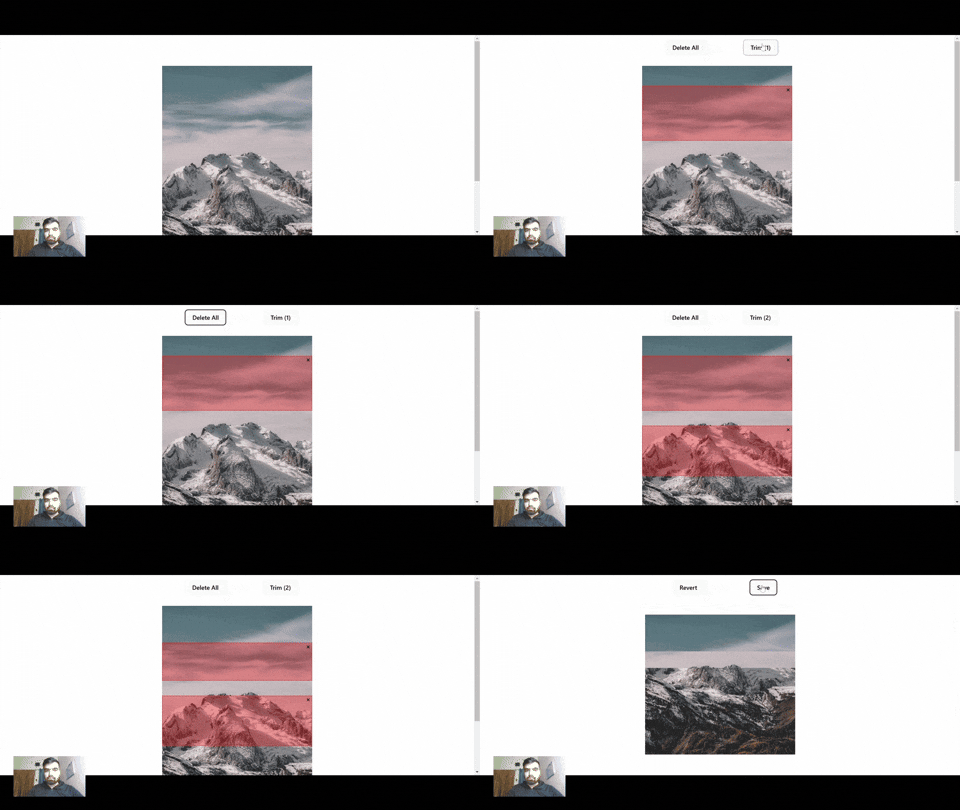
react-images-trimming-tool-tb is a React package designed to simplify image trimming by using the canvas HTML element and allowing users to create selections directly on the image .
Problem it solves
It eliminates the need for multiple backend trimming operations, reducing API calls, S3 storage usage, and associated costs.
Features
- Interactive Image Trimming: Enables users to select and trim images directly in the browser using the mouse.
- Efficient Rendering: Uses
imgtags for rendering images andcanvasfor trimming operations. - Cost Optimization: Reduces API calls and minimizes cloud storage usage by trimming images client-side.
- Customizable: Offers flexibility to handle multiple image trimming operations seamlessly.
Installation
Install the package using npm or yarn:
npm install react-images-trimming-tool-tb

Or

yarn add react-images-trimming-tool-tb
Usage
Here’s a basic example of how to use the package:
import React, { useState } from 'react';
import ImagesTrimmingTool  from 'react-images-trimming-tool-tb';

const App = () => {

  const handleSave = ({ trimSections, canvasRefs }) => {
    console.log("Trim Sections:", trimSections);
    console.log("Canvas References:", canvasRefs);
  };

  return (
    <div>
      <h1>React Images Trimming Tool</h1>
      <ImagesTrimmingTool
        images=["https://example.com/sample-image.jpg"]
        onSave={handleSave}
      />
    </div>
  );
};

export default App;
Make Sure
For accurate results, ensure that all images inside the array have the exact same widths.
Example of trimSection Object
  {
    startY: 10,          // Starting Y coordinate of the selection
    endY: 40,            // Ending Y coordinate of the selection
    imageIndex: 0,       // Index of the image in the images array
    id: 185545           // Unique identifier for the trim section
  }
Important Note
The trimSections object received in the onSave callback corresponds to the actual dimensions of the image, not the rendered image size (which defaults to 400px or the value set in the width prop).
This means that all coordinates (startX, startY, endX, endY) are calculated relative to the original image size, ensuring accurate trimming when applied on the original image.
Example
If the actual image width is 800px and you provide the width prop as 400px (which is the default):
- Rendered image: 400px width
- Actual image: 800px width
Let’s say you select a section with the following coordinates on the rendered image:
- startY: 10
- endY: 40
These coordinates represent the rendered image of 400px. However, since the actual image width is 800px, the coordinates will be scaled based on the ratio of the actual image width to the rendered image width.
- Scale factor =
800 / 400 = 2
This means that the same section in the actual image will have the following coordinates:
- startY:
10 * 2 = 20 - endY:
40 * 2 = 80
So, the coordinates in the callback will be for the actual image size, ensuring accurate trimming when applied to the original image.
Props
| Prop | Type | Required | Default | Description |
| ----------------------- | ---------- | -------- | ------------------------ | ------------------------------------------------------------------- |
| images | array | Yes | [] | Array of image URLs to load into the trimming tool. |
| onSave | function | No | () => {} | Callback function triggered when saving trims. |
| onTrim | function | No | () => {} | Callback function triggered when a trimming operation is performed. |
| onRevert | function | No | () => {} | Callback function triggered when reverting a trimming operation. |
| width | number | No | 400 | Width of the image to be rendered. |
| selectionColor | string | No | 'rgba(255, 0, 0, 0.3)' | Background color for inactive selections. |
| selectionBorder | string | No | '2px dotted red' | Border style for inactive selections. |
| activeSelectionColor | string | No | 'rgba(0, 0, 255, 0.3)' | Background color for the active selection. |
| activeSelectionBorder | string | No | '1px solid pink' | Border style for the active selection.
Contact
For any questions or feedback, feel free to reach out via [email protected].