
react-inline-markdown-editor
v2.1.0
Published
A React markdown editor with live preview, built on CodeMirror 6 — syntax markers reveal only on the active line.

Maintainers
 anasyd
Readme
react-inline-markdown-editor
A React markdown editor with live preview, built on CodeMirror 6. Syntax markers (**, #, `) stay hidden while you read and reveal only on the line your cursor is on — so the document looks rendered, but every character is still directly editable.
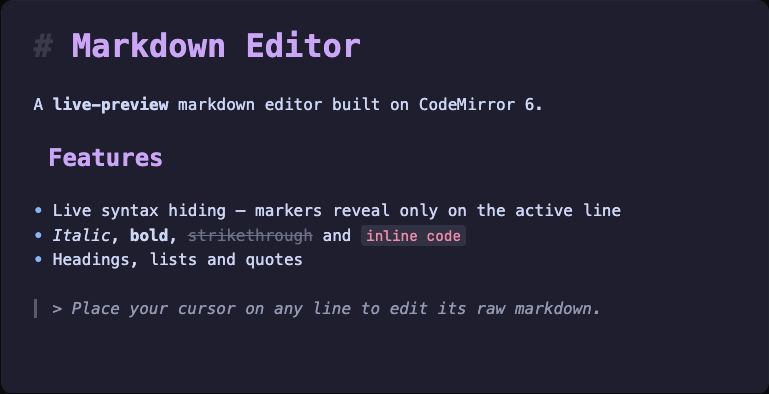
Features
- Live preview — headings, bold, italic, ~~strikethrough~~,
inline code, links, images, blockquotes, lists and fenced code render in place - Syntax markers reveal on the active line and hide everywhere else
- Bullet lists render with a
•marker - Dark and light themes, swappable at runtime without remounting
- GitHub Flavored Markdown
- Controlled component — you own the markdown string
- CodeMirror is a peer-installed dependency, not bundled (keeps your build lean)
Install
npm i react-inline-markdown-editorPeer deps: react and react-dom (>= 18). CodeMirror 6 packages install automatically.
Quick start
import React from "react";
import { InlineMarkdownEditor } from "react-inline-markdown-editor";

export default function App() {
  const [value, setValue] = React.useState(`# Heading\n\nSome **bold** text.\n\n- a list item`);

  return (
    <InlineMarkdownEditor
      value={value}
      onChange={setValue}
      theme="dark"
      height="400px"
    />
  );
}
Props
export type InlineMarkdownEditorProps = {
  /** Controlled markdown content. */
  value: string;
  /** Called on every change with the full new markdown string. */
  onChange: (next: string) => void;
  /** Visual theme. Defaults to "dark". */
  theme?: "dark" | "light";
  /** Class applied to the outer container div. */
  className?: string;
  /** Inline styles for the outer container div. */
  style?: React.CSSProperties;
  /** Editor height. Defaults to "100%". Accepts any CSS length. */
  height?: string;
};
Keyboard behavior
Standard CodeMirror editing keymaps: arrow-key navigation, undo/redo, Tab to indent, and the usual text-editing shortcuts.
Theming
theme switches between bundled dark and light palettes. Changing the prop at runtime swaps the theme via a CodeMirror compartment — no remount, no loss of focus or content. Wire it to your app's theme however you like:
<InlineMarkdownEditor value={value} onChange={setValue} theme={isDark ? "dark" : "light"} />Security
The editor renders text as text — markdown is never converted to HTML and never injected into the DOM. Pasting <script> or any HTML shows it as literal characters. To display the markdown elsewhere, render it yourself with a sanitizing pipeline (e.g. marked + DOMPurify).
Build & publish (maintainers)
npm run build
npm publish --access public
License
MIT