
react-inp-blame
v0.13.0
Published
INP (Interaction to Next Paint) attribution for React: which component made an interaction slow, from Event Timing and Long Animation Frames joined to the fiber tree, with tracks in Chrome's Performance panel.

Maintainers
 adityareddy1231
Readme
react-inp-blame
When a click, tap or key press in your React app is slow, this names the component or the handler behind it and says where the time went.
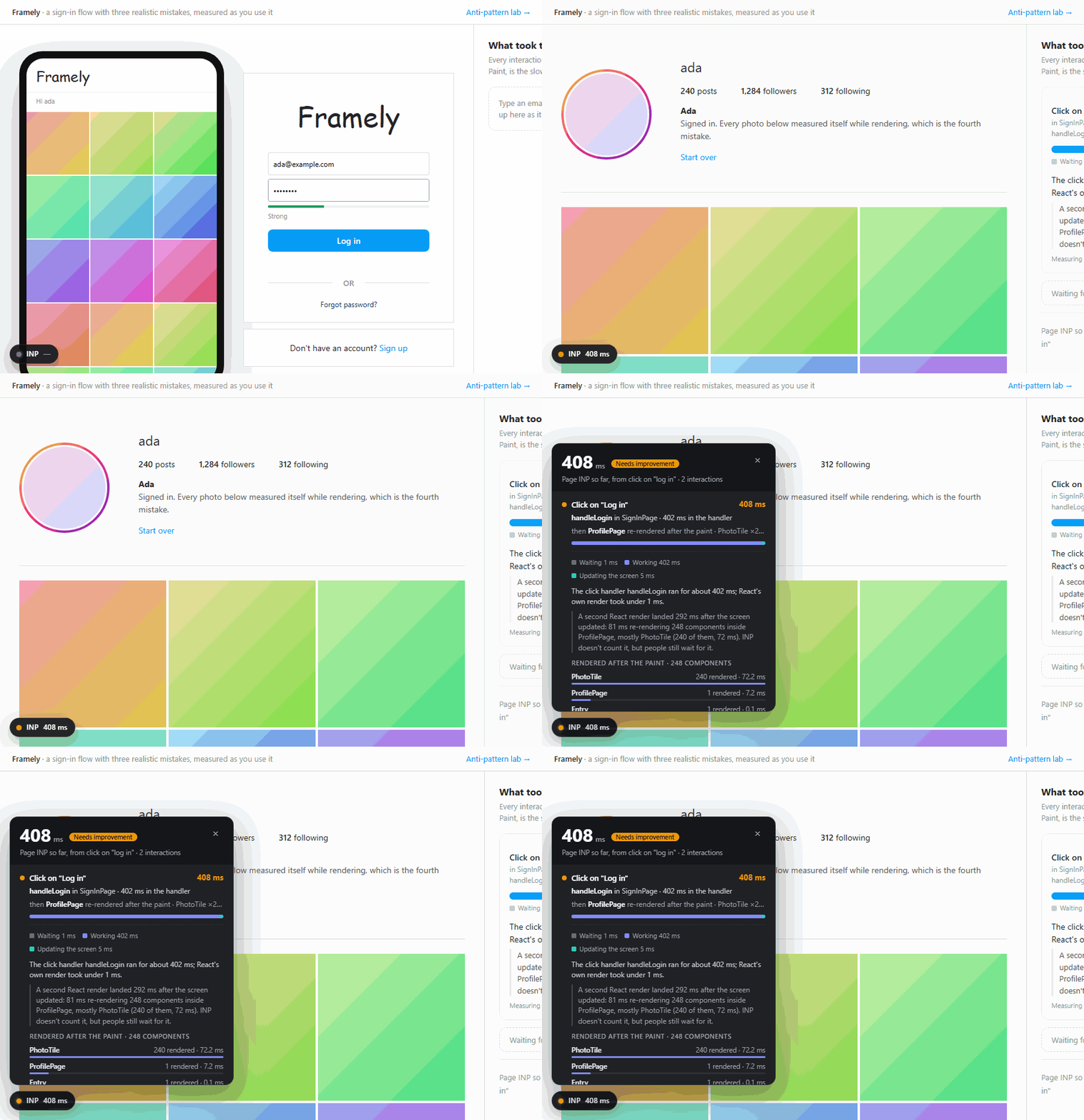
Try the demo. Every scenario there is slow on purpose. Click something and read what the badge blames.
npm install react-inp-blameStart with Next.js 14.2 or later
// next.config.ts
import type { NextConfig } from 'next';
import { withInpBlame } from 'react-inp-blame/next';

const nextConfig: NextConfig = {
  /* config options here */
};

// Your config first, this library's options second. They are not Next.js config keys.
export default withInpBlame(nextConfig, { runtime: { overlay: true } });
On Next.js 15.3 to 16.2, add one line to instrumentation-client.ts as well. withInpBlame prints it
until the file has it (14.2 to 15.2 need nothing more):
// instrumentation-client.ts
export { onRouterTransitionStart } from 'react-inp-blame/next-client';
Next.js 14.2 reads no next.config.ts, since that came in 15, so there the same setup goes in
next.config.mjs, as plain JavaScript:
// next.config.mjs
import { withInpBlame } from 'react-inp-blame/next';

/** @type {import('next').NextConfig} */
const nextConfig = {
  /* config options here */
};

// Your config first, this library's options second. They are not Next.js config keys.
export default withInpBlame(nextConfig, { runtime: { overlay: true } });
Start with Vite
// vite.config.ts
import { defineConfig } from 'vite';
import react from '@vitejs/plugin-react';
import { inpBlame } from 'react-inp-blame/vite';

export default defineConfig({ plugins: [react(), inpBlame({ runtime: { overlay: true } })] });
React Router in framework mode, Remix, TanStack Start and Astro write their own HTML, which this plugin never sees on its own, so each has a setup of its own: React Router, Remix, TanStack Start, Astro.
What you will see. Reload the page. A small dark badge sits in the corner, bottom-right by
default, and reads INP — until you interact. Click something slow and it shows the page's INP so far
in milliseconds: green at 200 or under, amber up to 500, red above. INP, Interaction to Next Paint, is
the Core Web Vital for responsiveness: how long a click, tap or key press took to reach the next frame
drawn, at the page's slowest. Click the badge for a panel of the recent slow interactions, newest
first, and click a row for the whole explanation. A click, tap or key press of 40 ms or more gets a
row (the threshold option), so a 150 ms click has one, though the badge stays green and the panel
says Good: INP counts anything up to 200 ms as good. The demo above sets position: 'bottom-left',
which is why its badge sits on the left: its own explanation column has the right-hand side. From the
demo's sign-in page, in development:
408 ms click on button "Log in" in SignInPage. The click handler handleLogin ran for
about 402 ms; React's own render took under 1 ms. A second React render landed 285 ms
after the screen updated: 84 ms mounting 256 components from SignInDemo down, 241 of them
inside ProfilePage, mostly PhotoTile (240 of the 256, 73 ms). INP doesn't count it, but
people still wait for it.
overlay takes true (always shown), 'query' (shown only when the URL has ?inp-blame or
#inp-blame, or localStorage has react-inp-blame set to overlay, which is how to open it on a
production page) or { position, open, max }. Both snippets above are development-only: enabled
defaults to 'development', so a production build carries nothing from either plugin until you say
enabled: true or enabled: 'production'. So vite preview and next start, which serve a
production build, show no badge by default, and the build prints a line saying it left the library
out. The one exception is the line on Next.js 15.3 to 16.2: its code is in every build, and in the
ones enabled leaves out it ships unused and installs nothing.
The design notes, the demos and the browser matrix are in the repository.
A report that names the wrong component or handler, or a slow interaction with no report at all, is
worth an issue: the wrong or missing blame form
says what to include. The report as JSON matters most: add debugGlobal: true to runtime (or to
install()) and run JSON.stringify(__REACT_INP_BLAME__.last(), null, 2) in the console right after
the slow interaction. It carries the page's URL and the label of the element you clicked, so read it
through before you paste it.
Each warning the library prints ends with a link to its entry under Troubleshooting in the repository.
Reference
No dependencies. React 17 to 19 (react-dom). Browsers with Event Timing's interactionId
(Chrome 96, Firefox 144, Safari 26.2); only Chromium has Long Animation Frames, the API that says
which scripts ran in a slow frame and how much style and layout work they forced. Anywhere else install() installs
nothing, and stats() says why.
Next.js
// next.config.ts
import { withInpBlame } from 'react-inp-blame/next';
export default withInpBlame({ /* your config */ }, { enabled: true, runtime: { overlay: 'query' } });
That is the whole setup on Next.js 16.3 or later; from 15.3 to 16.2 it takes the line above as well.
The Next.js config is the first argument and this library's options are the second; passing the
options first throws, because Next.js has no enabled or runtime config key and would drop them
without installing anything.
withInpBlame adds react-inp-blame/next-client
to instrumentationClientInject, so Next.js installs the library before hydration, which the
library needs, and a loader, under Turbopack and webpack, that stamps displayName on components
so their names survive the production minifier. The stamp is a guarded assignment after the module's
code, which costs a module its tree shaking in some bundlers: a component nobody imported is kept,
because the assignment names it and a bundler cannot always prove a property store is safe to drop.
Measured on seven exports with two imported, Rollup drops the unused ones and esbuild keeps them;
terser and SWC keep whatever the bundler handed them. Leave enabled at 'development' to keep the names out of the production build entirely. enabled decides which runs get both:
'development' (next dev, the default), 'production' (next build), true for both, false
for neither; a run it leaves out gets the config back untouched. runtime defaults to true, which
is install() with its default options; it also takes those options, such as { overlay: 'query' }.
They reach the browser inlined through env, so they are plain data. runtime: false leaves the
client module out, for an app that calls install() itself in its own instrumentation-client.ts,
without the next-client line; the navigation join below goes with it, since the client module is
what hears navigations.
Next.js added instrumentationClientInject in 16.3. From 15.3 to 16.2 the line in
instrumentation-client.ts (beside next.config or in src/) does the install, with the options
given to the wrapper, and the wrapper prints it in the runs enabled covers (next dev by default)
until the file has it. Next.js imports that file before hydration, which is early enough. In a build
enabled leaves out, or with runtime: false, the module the line loads installs nothing, though
its code still ships there. After an upgrade to 16.3, delete the line: kept, it goes on doing the
install and no second copy is injected, but production builds keep carrying its code. If the file
already exports an onRouterTransitionStart, as Sentry's setup has it do, call this one from yours:
import { onRouterTransitionStart as inpBlame } from 'react-inp-blame/next-client';

export const onRouterTransitionStart: typeof inpBlame = (url, navigationType, event) => {
  inpBlame(url, navigationType, event);
  Sentry.captureRouterTransitionStart(url, navigationType);
};
TypeScript finds the types of the subpaths under moduleResolution bundler (the one
create-next-app sets), node16 and nodenext, which read the package's exports, and under
node (node10), which ignores exports and reads its typesVersions instead. Whether they then
pass depends on module. module node16 and node18, and nodenext before TypeScript 5.8,
stand for a Node that cannot require() an ES module, so in an app whose package.json has no
"type": "module" an import that takes a name from the package gives TS1479 (TS1541 for an
import type, from TypeScript 5.7), except from /next and /display-names-loader, whose types
are CommonJS. nodenext from 5.8 and node20 from 5.9 pass. The same settings, in any app, find
an error inside the /next types, which take InstallOptions from the package's ES-module types,
so there /next also needs skipLibCheck: true, as create-next-app sets it. Below 15.3 there is
no instrumentation-client: from 14.2 the wrapper puts the install first in webpack's client entries
instead, and below 14.2 it warns and hands the config back as it was.
On the App Router the client module also hears each navigation, meaning each route change the
framework makes in the page with no new document: every report carries
navigationURL and navigationType, a click that started a navigation names it in
startedNavigation, and inp() starts over at each soft navigation. The Pages Router gets attribution
without the navigation join. On next dev from 15.3 its entry loads react-dom before
instrumentation-client and the injected module, so there the wrapper also puts the install first in
that entry, in webpack's main and, under Turbopack, through a loader on next-dev-turbopack.js.
Vite
// vite.config.ts
import { defineConfig } from 'vite';
import react from '@vitejs/plugin-react';
import { inpBlame } from 'react-inp-blame/vite';

export default defineConfig({ plugins: [react(), inpBlame({ enabled: true, runtime: { overlay: 'query' } })] });
inpBlame takes one argument, its own options, and returns an array of plugins. Those for the runtime
add a module script ahead of the page's own that calls install(), so React registers with the
library's hook whatever the entry module imports first; in most builds the call gets a chunk of its
own, which a separate script tag loads. The last one stamps displayName on the app's components,
and is all that runtime: false leaves. They go beside the React plugin, not instead of it.
enabled and runtime work as they do for Next.js, with 'development' meaning the dev server and
'production' meaning vite build, and pages picks the HTML pages that get the script.
React Router in framework mode, Remix and TanStack Start write their own HTML, so no page reaches
the plugin. For them, entry names a module of the app, by its path from the project root, that
gets the install as its first import, in the browser's copy only. In a build the install is a
chunk of its own, holding everything the install imports and marked as having side effects, so it
survives a "sideEffects": false in the app's package.json and an app's vendor chunk rule. Under Rollup (Vite 7 and before) the module's first chunk import is evaluated
first, so the install runs before the chunk that holds react-dom; Rolldown (Vite 8) orders a
chunk's imports itself, and the apps CI builds with it come out right, which is not a promise.
A build in which no module has that path fails.
// vite.config.ts, React Router or Remix; under TanStack Start, entry: 'src/client.tsx'
inpBlame({ runtime: { overlay: true }, entry: 'app/root.tsx' })
That shows the badge on the dev server. To keep the library in production builds too, add
enabled: true and make the overlay 'query', so a visitor sees the badge only with ?inp-blame
in the URL.
CI runs this on React Router 8.4, on React Router 7.18 with React 18.3, on Remix 2.17 and on TanStack Start 1.168, each under its dev server and a production build. The repository README has each app's whole config.
A manualChunks rule sending all of node_modules to one vendor chunk used to put this library
in that chunk with react-dom, so the install script ran after react-dom. When manualChunks is a
function the plugin now takes the library out into a chunk of its own; CI builds that on Vite 7.3
with React 18.3. Vite 8's codeSplitting (or advancedChunks) groups get a group of the plugin's
own ahead of theirs, which takes the library the same way; CI builds that on Vite 8.3 with React
18.3 and a vendor group that also holds Radix's Portal, which imports react-dom. A manualChunks
object is left as it is, so keep react-inp-blame out of it; with @vitejs/plugin-legacy, keep
react-dom, and the libraries that import it, out of a vendor rule as well. A build whose install chunk imports a chunk that connects react-dom to React's DevTools
hook as it loads gets a warning naming both and the module that does it.
A build with no HTML page, as under Laravel, Rails, Django or any backend that writes the page from
manifest.json, gives the plugin nowhere to put its script, so it installs nothing, on the dev
server or in a build; when every input is a script it warns that it will not. entry, naming the
script every page loads first, may be all it needs (not tried on a real backend). Or keep the plugin for names with
inpBlame({ runtime: false }), and give the install an entry of its own that each page loads first:
a file such as inp-blame.ts holding import 'react-inp-blame/auto' or the app's own install()
call. List it first in the build's inputs (build.rollupOptions.input, or the backend plugin's,
such as laravel({ input: [...] })) and first in the page, as
@vite(['resources/js/inp-blame.ts', 'resources/js/app.tsx']) does. Module scripts run in document
order, which is what the plugin's own script relies on. enabled then decides only where names are
stamped: that entry installs in every run that loads it. A first import inside the app's own entry is
not enough once a second entry shares react-dom with it. Keep react-inp-blame out of a node_modules
vendor rule there too, because that entry imports the vendor chunk as the plugin's script would.
None of this has been tried on a real backend yet. Astro has an integration of its own, below.
Astro writes its own pages too, and imports one script in every island before it loads the island's
component and renderer. react-inp-blame/astro puts install() there, so it runs before
@astrojs/react loads react-dom, and adds the displayName transform. It takes enabled and
runtime as the Vite plugin does, with 'development' meaning astro dev and 'production'
meaning astro build; list it after react():
// astro.config.mjs
import { defineConfig } from 'astro/config';
import react from '@astrojs/react';
import { inpBlame } from 'react-inp-blame/astro';

export default defineConfig({ integrations: [react(), inpBlame({ runtime: { overlay: true } })] });
The install runs as soon as the page's first island has been parsed, whatever its client:
directive, and React may load much later or not at all; the library warns about a late install only
where React has rendered without registering with it. CI runs this in Astro 7.3's minimal template
under astro dev and on astro preview of a production build.
Without the Vite plugin or the Next.js wrapper, make import 'react-inp-blame/auto' the first
import of the entry module: it installs with the default options before react-dom loads. Under
webpack or Rspack that holds even with a splitChunks vendor chunk, because they run a module when
it is first required, not when its chunk loads (not tried with either). With another bundler it is
the right shape in a production build but not a guarantee, because a bundler may put react-dom in a
chunk that evaluates before the entry's body does, and React looks for the hook only while it
evaluates. Two builds where that happens are a second HTML page sharing a chunk with the first, and a
manualChunks rule sending node_modules to a vendor chunk. The Vite plugin and the Next.js wrapper
put the install in a file the page loads before its own. That settles the shared chunk, though not
the vendor rule, as above. With any other bundler, check stats().mode and debug.hook().renderers
in a built page once.
For component names in a production build, react-inp-blame/display-names-loader is a webpack-style
loader with a stamp(code) export. It is written for the source before Babel or TypeScript compiles
it, so under webpack or Rspack give it enforce: 'pre', as withInpBlame does:
// webpack.config.js or rspack.config.js, in module.rules
{ test: /\.[jt]sx$/, exclude: /node_modules/, enforce: 'pre', use: ['react-inp-blame/display-names-loader'] }
With web-vitals
react-inp-blame/web-vitals gives the web-vitals package React component names, in one option. It
imports nothing from web-vitals, and generateTarget needs no install(): it only reads the fiber
React leaves on the node. generateTarget needs web-vitals 5.1 or later: 5.0 types the option as
always returning a string, and puts an undefined in interactionTarget rather than falling back to
its own selector.
import { onINP } from 'web-vitals/attribution';
import { generateTarget } from 'react-inp-blame/web-vitals';

onINP(send, { generateTarget });
// attribution.interactionTarget: 'ProfilePage > PhotoTile (button.tile)'
Next.js reports the build without attribution, so there the React side is added to the metric:
'use client';
import { useReportWebVitals } from 'next/web-vitals';
import { attributeINP } from 'react-inp-blame/web-vitals';

export function WebVitals() {
  useReportWebVitals((metric) => {
    send(metric.name === 'INP' ? { ...metric, attribution: attributeINP(metric) } : metric);
  });
  return null;
}
The component path goes into attribution.interactionTarget, where web-vitals otherwise puts a CSS
selector, so it shows up wherever that field is already collected. A path names at most four
components, the four nearest the element whose names a reader could search their code for, so a deep
tree loses the page and the layout rather than the component that renders what was clicked. generateTarget returns undefined when the
node has no React fiber or no named component above it, which is web-vitals' signal to fall back to
its own selector, and it never throws. attributeINP(metric) returns the
metric's attribution ({} where there is none) with a frozen react field added, from this
library's report for that interaction: the blame with its confidence, the handler, the hot path, the
heaviest commit's components, and what React rendered before and after the paint. It is null when
nothing is installed and when there is no report for that interaction, one that stayed under
threshold or one already pushed out of the 50 a page keeps (never one of the ten slowest or one INP
can still point at); it never guesses, and a metric it cannot
read gives react: null rather than throwing in the callback. web-vitals keeps
which interaction is INP, the percentile, the back/forward cache and soft navigations.
In production the component names need the displayName transform above; without it the minifier
has renamed them and the path reads a > b (button.tile).
The blame can go to Sentry as a metric, with its fields as attributes. Sentry's own INP span carries
no interaction id, so nothing ties this library's report to it. web-vitals reports INP again, higher,
each time the page is hidden after a slower interaction, and a distribution can't take a value back,
so this sends the first report for each metric.id, one per page view. Metrics need Sentry 10.25 or
later, and @sentry/react and @sentry/nextjs export the same metrics:
import * as Sentry from '@sentry/browser'; // or @sentry/react, @sentry/nextjs
import { onINP } from 'web-vitals/attribution';
import { attributeINP, generateTarget } from 'react-inp-blame/web-vitals';

const sent = new Set<string>();
onINP((metric) => {
  if (sent.has(metric.id)) return; // the same page view, reported again as it was hidden again
  sent.add(metric.id);
  const { interactionTarget, react } = attributeINP(metric);
  Sentry.metrics.distribution('inp', metric.value, {
    unit: 'millisecond',
    attributes: {
      rating: metric.rating,
      target: interactionTarget,                    // 'ProfilePage > PhotoTile (button.tile)'
      'blame.kind': react?.blame.kind,              // 'render', 'handler', 'layout', 'waiting', ...
      'blame.name': react?.blame.name ?? undefined, // Sentry sends a null as the string "null"
      'blame.confidence': react?.blame.confidence,  // 'measured' or 'inferred'
    },
  });
}, { generateTarget });
For Google Analytics 4 it is web-vitals' own example, debug_target and all, with the blame in two
more parameters. GA4 reports show a parameter once it is registered as an event-scoped custom
dimension, and take at most 100 characters of its value, where generateTarget allows 120.
navigationURL came in web-vitals 6, so on 5.x leave out page_location:
import { onINP } from 'web-vitals/attribution';
import { attributeINP, generateTarget } from 'react-inp-blame/web-vitals';

onINP((metric) => {
  const { interactionTarget, react } = attributeINP(metric);
  // gtag() is the global the Google tag defines, typed by @types/gtag.js
  gtag('event', metric.name, {
    value: metric.delta, // delta, so the values can be summed
    metric_id: metric.id,
    metric_value: metric.value,
    metric_delta: metric.delta,
    page_location: metric.navigationURL,
    debug_target: interactionTarget, // 'ProfilePage > PhotoTile (button.tile)'
    debug_blame_kind: react?.blame.kind,
    debug_blame_name: react?.blame.name ?? undefined,
  });
}, { generateTarget });
On Next.js the body of either onINP callback goes in the useReportWebVitals one above, for
metric.name === 'INP', with the Sentry one's sent at the top of that module, and
interactionTarget and navigationURL are undefined there.
Neither recipe sends a label or a sentence: a report's target.label, verdict and other sentences
can hold text the page shows, under labels: 'text' and by default in a development build, so forward
those only from an app installed with labels: 'attributes'. page_location keeps its query string,
and so can blame.name, which for a script can be its URL, or the page's for an inline script.
API
// Any module the browser runs: instrumentation-client.ts on Next.js, the entry module on Vite
import { onInteraction } from 'react-inp-blame';

// Hears a report again, revision one higher, each time later data joins it: key on report.interactionId
onInteraction((report) => {
  const { blame, rating } = report.explanation;                // data: kind, name, ms, confidence
  console.log(blame.kind, blame.name, rating, report.verdict); // the verdict is display text, reworded in any version
});install(options?)installs once per page and returns the API; every later call, from any copy of the package on the page, returns the same one.react-inp-blame/autocalls it on import, and the Vite plugins and the Next.js wrapper call it with theirruntimeoptions. Options:overlay(false),threshold(40 ms),labels('auto'),hook('auto'),sampleRate(1),walkBudget(5000 component fibers per commit, so one huge render cannot cost more than that),inputWindow(1500 ms, how long after an interaction a render can still join it),devtoolsTrack(true),debugGlobal(false; set it totrueto put the API onwindow.__REACT_INP_BLAME__, or to a string to name the property).onInteraction(fn)hears each report, and each later revision of it, in a task after the one that published it, and returns the unsubscribe. It is the one way to hear reports. A panel that renders what it hears is safe: the update your listener makes while it runs is never read as part of an interaction. One it schedules for later, with setTimeout or an await, is an ordinary render.- The API:
reports()(up to 50, keeping the ten slowest and those INP can still point at past that),last(),inp()(the INP of the navigation the page is on, estimated the way web-vitals does, chosen again when the page is hidden; it starts over at each soft navigation and each restore from the back/forward cache),clear(),stats()(the mode, why a page is unsupported, what the library has cost),dispose(), anddebug.commits()anddebug.hook(), which are for debugging and may change in any version. mountOverlay(options?)shows the on-page badge and panel; their code loads when shown.
target.handler is the name of the function on the element's event prop, or the prop's own name when
that function has no name worth printing. An inline onClick={() => ...} therefore reads as
onClick, and so does a handler the minifier renamed. Naming the function helps on the dev server
only: a production build's minifier renames handleLogin too, so there it reads as onClick
unless the build keeps function names (terser's keep_fnames, esbuild's keepNames).
target.component and the prop still say where to look.
Reports are frozen and carry schemaVersion: 3. When a late Event Timing entry, a long animation
frame or a later render joins one, the next revision arrives as a new object with revision
bumped. explanation.blame, rating, the phases' milliseconds and the report's own numbers are
data; verdict and the other sentences are display text. navigationURL and navigationType say
which page the interaction happened on, with web-vitals' names and values, and startedNavigation
names the soft navigation it started, if it started one.
A report's target.label names the clicked element, or the control it sits in, by its tag and a name of
at most 40 characters. A control is a button, link, summary, label or form field, or an element with a
control's ARIA role such as button, link or tab, within five ancestors of the click, so a click on
the path of an icon button is labelled by the button; target.selector stays the element the click
landed on. Under a production build of React the name comes only from what the page's code wrote on the
element it names: its aria-label, a form field's placeholder, name or type, or its data-testid or
data-test. The text an element shows can be someone's name or email, and reports are made to be
forwarded, so reading it is opt-in there: install({ labels: 'text' }). Development builds read it by
default.
Clicks that land before hydration
Every App Router page is server-rendered, so a click can land on HTML React has not hydrated yet. The
browser reports a slow click, React DevTools shows nothing, and the element has no fiber to be named
after. When the library can see which piece of server-rendered HTML the click landed on,
report.hydration says so and which of the two things happened:
hydration: { kind: 'waited' | 'not-hydrated'; scope: 'root' | 'boundary';
             owner: string | null; ms: number | null } | null
React hydrated it inside the click (kind: 'waited'). On React 18 and 19 a discrete event that lands
on a boundary waiting to hydrate makes React hydrate that boundary synchronously, inside the event's own
dispatch, before the event reaches any handler. That wait is working time, and the report names it:
264 ms click on button "Add to cart". The click landed on server-rendered HTML that had not been hydrated yet, so React hydrated the Suspense boundary in ProductPage first: 208 ms of the 236 ms of working time.
blame.kind is then 'hydration' and blame.name is the boundary. The hydrating time is a named part of
the Working phase (phases[1].parts), not a fourth phase beside it, so the three phases go on adding up
to the interaction. A hydration too small to be the story keeps report.hydration and its place in the
phase bar but leaves the blame where it belongs, with a note beside it: 8 ms of hydrating in front of a
400 ms handler is not why the click was slow. Under 5 ms, where React's own render is too small for this
library to call it the story at all, only report.hydration and the note say it happened.
It was still waiting (kind: 'not-hydrated'). React 18 and 19 stop the propagation of a discrete event
they could not unblock instead of dispatching it, so no React handler runs. Almost no working time goes by,
so the blame stays on where the time actually went, and the hydration leads the sentence:
This click landed on server-rendered HTML that React had not hydrated yet, so React did not dispatch it and no React handler ran for it. The click waited 380 ms before its handler could start: the main thread was busy with something else.
A Suspense boundary has no name of its own, so owner is the nearest component holding it; write that
boundary inside a client component if you want a name you recognise. scope: 'root' is a whole root that
had not hydrated, which has no component above it and reads as "the page".
What it does not say. A click that lands before hydrateRoot has run at all: nothing on the page
carries a mark of React yet, so there is nothing to read and report.hydration is null. A boundary React gave up on and rendered on the client instead, where the
server HTML the click landed on was thrown away: that is not a hydration and is not reported as one.
Whether the element had a handler at all, which is why the sentence says no React handler ran rather than
that a click was lost.
In a production build React records no render durations, so ms is null: which boundary hydrated, and
how many components it took, are measured; how long it took is not. next build --profile gives the
durations back. React 17 is left out altogether: it has no dehydrated Suspense state, and the one hydration
flag it keeps is cleared before it calls the hook, so nothing there is ever reported as a hydration.
Size
Measured on this version's build by scripts/size.mjs in the repository, which CI runs to keep this table
current:
| Bundle (rolldown 1.2.8, minified ESM, gzip at zlib's default level) | Minified | Gzip |
| --- | --- | --- |
| react-inp-blame/auto: everything that loads with the page | 69.6 KB | 24.8 KB |
| The badge and panel, a chunk loaded by import() only when shown | 15.1 KB | 5.9 KB |
| Of /auto, what has to run before react-dom: the hook, the fiber reading, the observers | 25.2 KB | 9.4 KB |
| react-inp-blame/web-vitals, on top of /auto | 1.4 KB | 0.7 KB |
react-inp-blame/web-vitals pulls in none of the hook, the observers or the badge: an app that only wants
component names in its web-vitals attribution pays for the fiber reading and nothing else.
Under the react-server condition, react-inp-blame, react-inp-blame/auto,
react-inp-blame/next-client and react-inp-blame/web-vitals resolve to a module whose exports do
nothing, so a Server Component that imports them adds no browser code to the server bundle.
MIT