
react-j-page
v2.0.0-bate8
Published
json 2 page


Readme
react-jpage
JSON 2 Page
API
| 参数名 | 说明 | 必填 | 类型 | 默认值 | 备注 |
| ------ | ---- | ---- | ---- | ------ | ---- |
| PageContext | 全局上下文信息,在每个组件里面可以通过this.props.PageContext进行获取,只读,不可写 | 否 | Object | 无 | |
| components | 所有被渲染的组件 | 是 | [key: string]: React.ReactType | 无 | |
| schema | 描述组件结构的schema | 是 | OBS_Schema<Components, AllComponents> | 无 | https://www.yuque.com/jinci/mb5rax/wwnpig |
功能说明
布局
内置了布局组件Layout,内部把描述转换成css grid进行布局实现,组件文档。
举个例子
使用Layout组件进行以下布局描述:
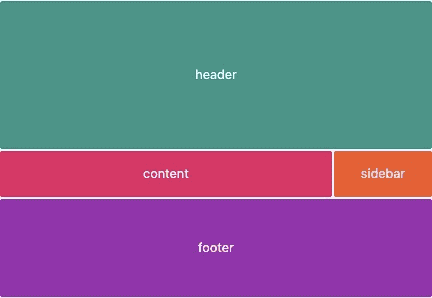
<ReactJpage
  components={{header,content,sidebar,footer}}
  schema={{
    data: {
      Layout$1: {
        fields: {
          // 容器宽高
          style: {
            width: "430px",
            height: "300px"
          },
          // 每列列宽
          columns: ["1fr","100px"],
          // 每行行高
          rows: ["150px","1fr","100px"],
          // 边距大小
          gap: "1px",
          // 布局描述
          template: [
            // 三行两列
            ["header",  "header"],
            ["content", "sidebar"],
            ["footer",  "footer"]
          ]
        }
      }
    },
    hierarchy: {
      componentDetail: {},
      // 根组件
      root: "Layout$1",
      structure: {
        // 子元素组件
        Layout$1: ["header","content","sidebar","footer"],
      }
    }
  }}></ReactJpage>
联动属性
默认支持了两种联动形式的描述:主动式联动描述、被动式联动描述。
主要讲讲 被动式联动描述 的使用方法。
// 组件A
function CompoenntA(props){
  return <div>{props.data.count}</div>
}

// 组件B
function CompoenntB(props){
  return <button onClick={()=>{
    // 通过Jpage注入的方法 changeContext 触发联动
    props.changeContext({
      count: Date.now()
    })
  }}> 点击联动 CompoenntA </button>
}


<ReactJpage
  components={{CompoenntA,CompoenntB,CompoenntC}}
  schema={
    {
      //组件数据
      data: {
        CompoenntA: {
          // 被联动的数据
          effectFields: {
            /*
            * $Context 为联动的上下文对象,CompoenntB 将会被识别,收集为
            * CompoenntA 的依赖,当 CompoenntB 组件里调用 this.props.changeContext({count: 1}) 的时候,CompoenntA 的 this.props.data.count 将会变化
            */
            "data.count": "$Context.CompoenntB.count + 1"
          },
          // 静态数据
          fields: {
            data: {
              a: 1
            }
          }
        },
        CompoenntB: {
          fields: {
            count: 2
          }
        },
        Layout: {
          fields: {
            template:[["CompoenntA","CompoenntB"]]
          }
        }
      },
      // 组件结构
      hierarchy: {
        // (选填)所包括的所有组件名
        component: [],
        // (选填)同类组件的共同数据
        componentDetail: {},
        // 顶层组件名
        root: "Layout",
        // 所包括的子组件
        structure: {
          Layout: ["CompoenntA","CompoenntB"]
        }
      }
    }
  }
></ReactJpage>
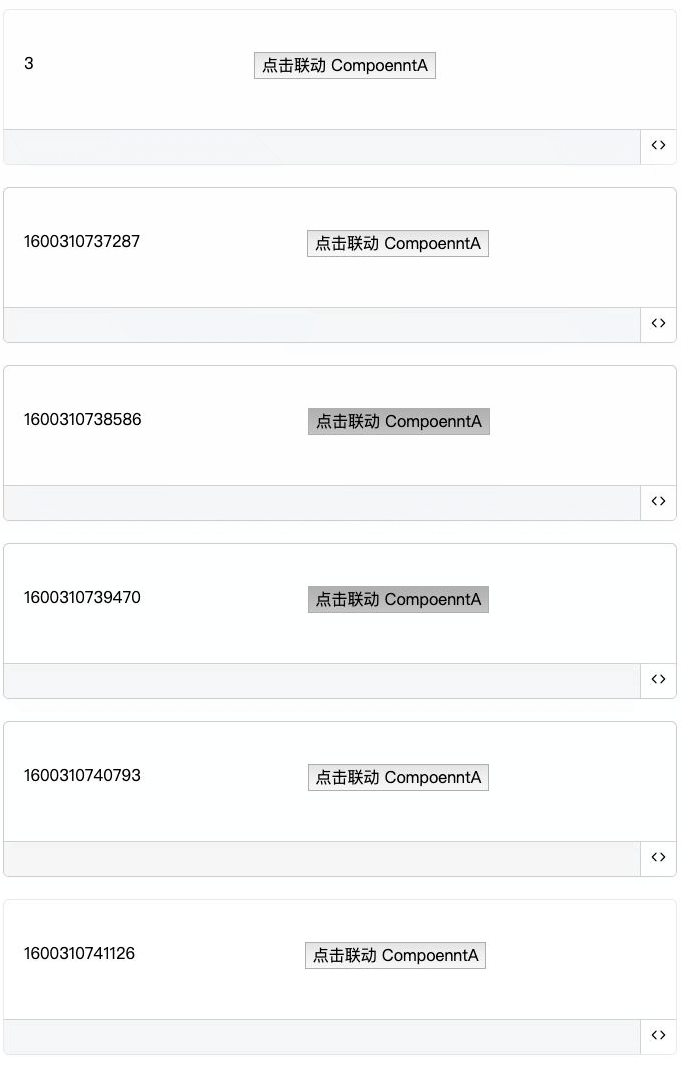
效果:
表达式属性
<ReactJpage
  components={{CompoenntA}}
  PageContext={{
    fetchData: {
      count: 100,
      size: 2
    }
  }}
  schema={
    {
      //组件数据
      data: {
        CompoenntA: {
          // 被联动的数据
          scriptFields: {
            // $Context => PageContext
            "data.count": "$Context.fetchData.count * $Context.fetchData.size"
          },
          // 静态数据
          fields: {
            data: {
              a: 1
            }
          }
        }
      },
      // 组件结构
      hierarchy: {
        // (选填)所包括的所有组件名
        component: [],
        // (选填)同类组件的共同数据
        componentDetail: {},
        // 顶层组件名
        root: "CompoenntA",
        // 所包括的子组件
        structure: {
          CompoenntA: []
        }
      }
    }
  }
></ReactJpage>