
react-jrate
v0.1.2
Published
Generate SVG based Rating with various customized fancy features using ReactJS

Maintainers
 senthilporunan
Readme
react-jrate - React based Rating Component
=======================================
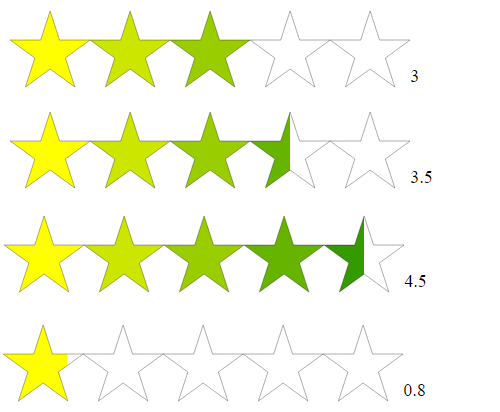
This react component helps to generate SVG based RATING with various fancy features. Download and include this component in your html file.
Demo Page

Installation
You can install using npm package manager.
npm install react-jrate --saveJSFiddle Working Example
Including it on your page
You can install react-jrate component from NPM.
<script type="text/javascript" src="lib/react-jrate.js"></script>

  var ReactRating = require('react-jrate');
	//es6 style
	import React from 'react'
	import ReactRating from '../lib/react-jrate.js'
Basic Usage
<div id="jRate"></div>
React.render(<ReactRating  id="jrate"/>,document.getElementById('jrate'));
Features
Start Color and End Color
Set your favourite start and end color. By giving value in the form of hex value, rgb value or standard color name. We can use one color format also by giving same start and end color.
var newSettings = {
  startColor: "cyan",
  endColor: "blue"
};
React.render(<ReactRating settings={newSettings} id="jrate"/>,document.getElementById('jrate'));
Initial Value
Set your own default initial value.
var newSettings = {
  rating:2
};
React.render(<ReactRating settings={newSettings} id="jrate"/>,document.getElementById('jrate'));
Width and Height
We can customize our own value for width and height.
var newSettings = {
  width: 70,
  height: 70
};
React.render(<ReactRating settings={newSettings} id="jrate"/>,document.getElementById('jrate'));
Shape
We can chooose shape from available list. If you need more shapes, raise feature request in github. Available shapes are STAR, RECTANGLE, SQUARE, CIRCLE, RHOMBUS, TRIANGLE, TWITTER, BASKET.
var newSettings = {
  shape: 'BASKET'
});
React.render(<ReactRating settings={newSettings} id="jrate"/>,document.getElementById('jrate'));
Width and Height Growth
Make the shapes from smaller to bigger. We can use growth field to make this happen.
var newSettings = {
  widthGrowth: 0.2,
  heightGrowth: 0.2
};
React.render(<ReactRating settings={newSettings} id="jrate"/>,document.getElementById('jrate'));
Count
Number of shapes was decided by the count parameter. We can customize own numeric value for it.
var newSettings = {
  count: 10
};
React.render(<ReactRating settings={newSettings} id="jrate"/>,document.getElementById('jrate'));
Background Color
Set your favourite background color. By giving value in the form of hex value, rgb value or standard color name.
var newSettings = {
  backgroundColor: 'black'
};
React.render(<ReactRating settings={newSettings} id="jrate"/>,document.getElementById('jrate'));
Color Transparency
Set transparency value between 0 and 1.
var newSettings = {
  transparency: 0.5
};
React.render(<ReactRating settings={newSettings} id="jrate"/>,document.getElementById('jrate'));
Gap
We can set our own gap between two shapes. We can customize our own values in it.
var newSettings = {
  shapeGap: '10px'
};
React.render(<ReactRating settings={newSettings} id="jrate"/>,document.getElementById('jrate'));
Opacity
Set opacity value.
var newSettings = {
  opacity: 0.3
};
React.render(<ReactRating settings={newSettings} id="jrate"/>,document.getElementById('jrate'));
Minimum and Maximum Value
Set a desired minimum and maximum value.
var newSettings = {
  min: 10,
  max: 15
};
React.render(<ReactRating settings={newSettings} id="jrate"/>,document.getElementById('jrate'));
Precision
Set the precision value.
var newSettings = {
  precision: 0
};
React.render(<ReactRating settings={newSettings} id="jrate"/>,document.getElementById('jrate'));
Stroke Width
Set the stroke width for STAR, CIRCLE, RECTANGLE, RHOMBUS, TRIANGLE only.
var newSettings = {
  strokeWidth: '25px'
};
React.render(<ReactRating settings={newSettings} id="jrate"/>,document.getElementById('jrate'));
Horizontal
We can set a boolean variable to make horizontal or vertical. And, set a boolean value for reverse.
var newSettings = {
  horizontal: false
};
React.render(<ReactRating settings={newSettings} id="jrate"/>,document.getElementById('jrate'));
Reverse
We can set a boolean variable to make reverse or not.
var newSettings = {
  reverse: true
};
React.render(<ReactRating settings={newSettings} id="jrate"/>,document.getElementById('jrate'));
ReadOnly
Set the readonly value.
var newSettings = {
  readOnly: true
};
React.render(<ReactRating settings={newSettings} id="jrate"/>,document.getElementById('jrate'));
onChange
Write your own methods to do own action when the rating value change action occurs.
var newSettings = {
  onChange: function(rating) {
    $('#demo-onchange-value').text("Your Rating: "+rating);
  }
});
React.render(<ReactRating settings={newSettings} id="jrate"/>,document.getElementById('jrate'));
onSet
Write your own methods to do own action when the rating value click or set action occurs.
var newSettings = {
  onSet: function(rating) {
    $('#demo-onset-value').text("Selected Rating: "+rating);
  }
};
React.render(<ReactRating settings={newSettings} id="jrate"/>,document.getElementById('jrate'));
License
This plugin is licensed under the MIT license.
Copyright (c) 2015 Senthil Porunan