
react-json-chunked
v0.3.9
Published
A React component for streaming JSON using chunked Transfer-Encoding


Readme
React JSON Chunked
A React library for streaming and processing JSON data using chunked Transfer-Encoding. This library provides a hook that allows you to consume partial JSON as it streams from a server, enabling real-time updates and efficient handling of large datasets.
Demo
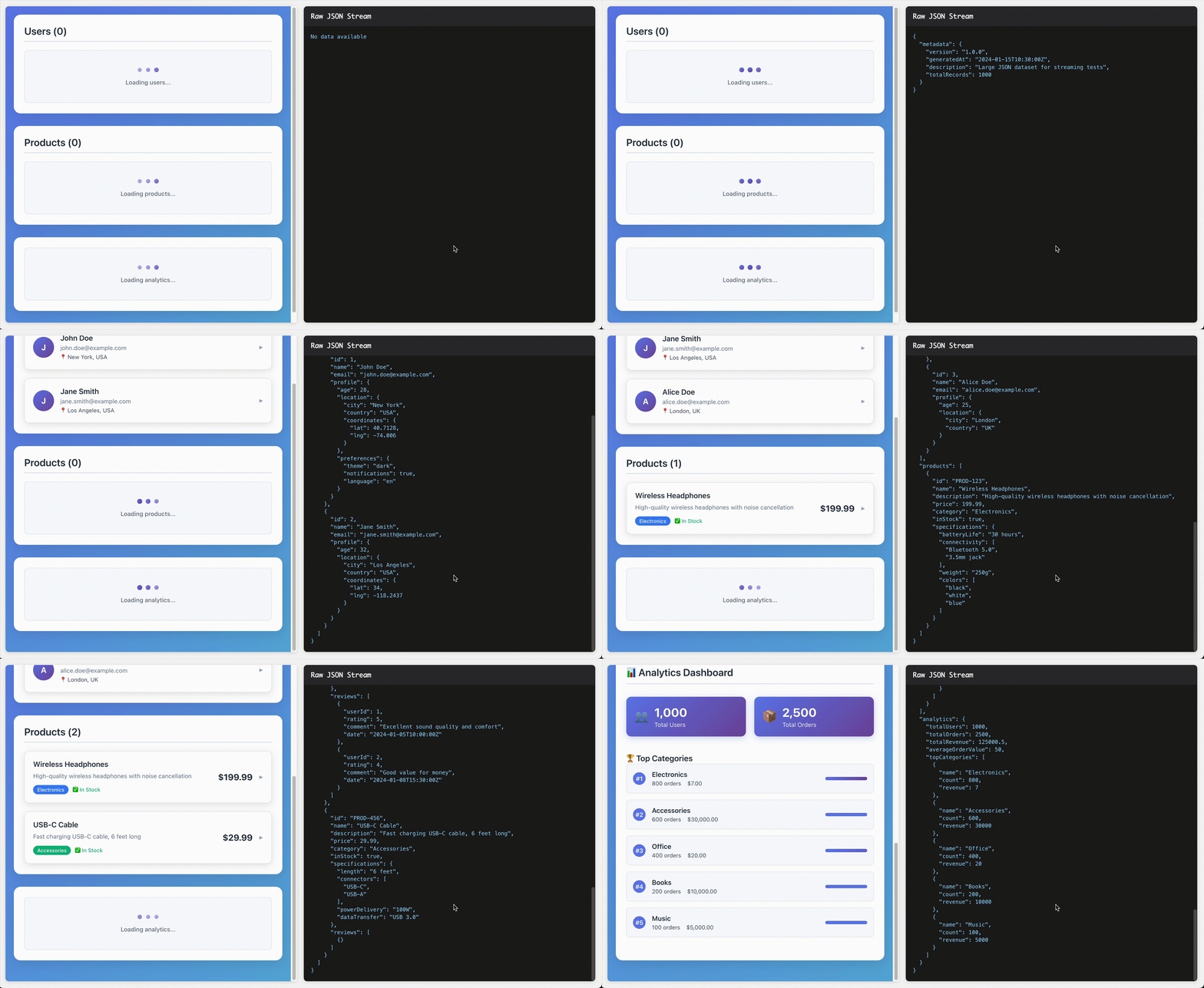
Features
- 🎣 Custom Hook: Exports a custom
useJsonStreamhook for consuming JSON chunks - ⚛️ React Integration: Built with native
useSyncExternalStorehook for optimal rendering - 🎨 Streaming UI: Render UI using partial JSON, without waiting for the complete response
- 🧠 Memory Efficient: Processes large datasets incrementally to minimize memory usage
- 🎯 Event-Driven: Leverages EventTarget and CustomEvent for propagating JSON chunks
- 📦 TypeScript Support: Full TypeScript support with generic type parameters
- 🔄 Error Handling: Built-in retry logic and error handling
Installation
npm install react-json-chunkedQuick Start
import React from 'react';
import { useJsonStream } from 'react-json-chunked';

interface MyData {
  users: Array<{
    id: number;
    name: string;
    email: string;
  }>;
  metadata: {
    total: number;
    page: number;
  };
}

function App() {
  const jsonStream = useJsonStream<MyData>('http://localhost:3001/stream-json');

  if (!jsonStream) {
    return <div>Loading...</div>;
  }

  return (
    <div>
      <h1>Users ({jsonStream.metadata?.total || 0})</h1>
      {jsonStream.users?.map(user => (
        <div key={user.id}>
          <h3>{user.name}</h3>
          <p>{user.email}</p>
        </div>
      ))}
    </div>
  );
}
API Reference
useJsonStream<T>(url: string)
A React hook that streams JSON data from the specified URL.
Parameters:
url(string): The URL to fetch JSON data from
Returns:
T | undefined: The current state of the JSON data (initiallyundefined)
Generic Type:
T: The expected shape of your JSON data
How It Works
The library consists of several key components:
Core Architecture
- JsonStreamReader: Handles the low-level streaming and parsing of JSON data
- SimpleJsonTokenizer: Tokenizes incoming JSON chunks into parseable events
- JsonEventStore: Manages the state and provides React integration
- useJsonStream: The React hook that ties everything together
Server Requirements
Your server should support chunked Transfer-Encoding. Here's a Node.js simulation:
app.get('/stream-json', (req, res) => {

  // Set streaming headers
  res.writeHead(200, {
    'Content-Type': 'application/json',
    'Cache-Control': 'no-cache',
    'Connection': 'keep-alive',
    'Access-Control-Allow-Origin': '*',
    'Access-Control-Allow-Headers': 'Cache-Control',
    'Transfer-Encoding': 'chunked'
  });

  // Create a readable stream from the file with smaller chunks
  const fileStream = createReadStream(largeJsonFilePath, {
    encoding: 'utf8',
    highWaterMark: 64 // 64 bytes chunk
  });

  let chunkCount = 0;
  const delayMs = 100; // 100ms delay between chunks

  // Handle stream events
  fileStream.on('data', (chunk) => {
    chunkCount++;

    // Add delay before writing each chunk
    setTimeout(() => {
      res.write(chunk);
    }, chunkCount * delayMs);
  });

  fileStream.on('end', () => {
    // Wait for the last chunk to be sent before ending
    setTimeout(() => {
      res.end();
    }, (chunkCount + 1) * delayMs);
  });
});
TypeScript Support
The library is written in TypeScript and provides full type safety:
interface ApiResponse {
  data: Array<{
    id: string;
    title: string;
    content: string;
  }>;
  pagination: {
    page: number;
    totalPages: number;
  };
}

const streamData = useJsonStream<ApiResponse>('/api/stream');
// streamData is typed as ApiResponse | undefined
License
MIT
Author
Alek Merani
Contributing
Contributions are welcome! Please feel free to submit a Pull Request.