
react-json-explorer
v1.11.4-rjv
Published
Interactive react component for displaying javascript arrays and JSON objects.

Maintainers
 mac-s-g
Readme


react-json-view
This namespace is a reference to react-json-view.
RJV is a react component for displaying and editing javascript arrays and JSON objects.
RJV provides a responsive interface for displaying arrays or JSON in a web browser. NPM offers a distribution of the source that's transpiled to ES5; so you can include this component with any web-based javascript application.
Check out the Interactive Demo
Implementation Example
// import the react-json-view component
import ReactJson from 'react-json-view'

// use the component in your app!
<ReactJson src={my_json_object} />
Output Examples
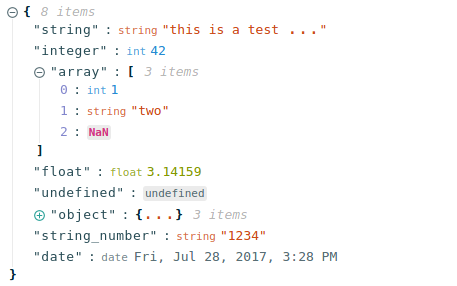
Default Theme
Hopscotch Theme, with Triangle Icons:
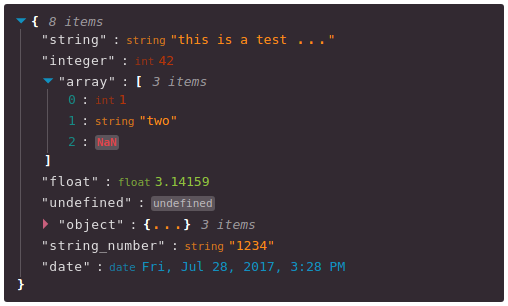
Installation Instructions
Install this component with NPM.
npm install --save react-json-viewOr add to your package.json config file:
"dependencies": {
    "react-json-view": "latest"
}
Props
Name|Type|Default|Description
|:---|:---|:---|:---
src|JSON Object|None|This property contains your input JSON
name|string or false|"root"|Contains the name of your root node. Use null or false for no name.
theme|string|"rjv-default"|RJV supports base-16 themes. Check out the list of supported themes in the demo. A custom "rjv-default" theme applies by default.
style|object|{}|Style attributes for react-json-view container. Explicit style attributes will override attributes provided by a theme.
iconStyle|string|"circle"| Style of expand/collapse icons. Accepted values are "circle", triangle" or "square".
indentWidth|integer|4|Set the indent-width for nested objects
collapsed|boolean or integer|false|When set to true, all nodes will be collapsed by default. Use an integer value to collapse at a particular depth.
collapseStringsAfterLength|integer|false|When an integer value is assigned, strings will be cut off at that length. Collapsed strings are followed by an ellipsis. String content can be expanded and collapsed by clicking on the string value.
enableClipboard|boolean|true|When set to true, the user can copy objects and arrays to clipboard
displayObjectSize|boolean|true|When set to true, objects and arrays are labeled with size
displayDataTypes|boolean|true|When set to true, data type labels prefix values
onEdit|(edit) => {}|false|When a callback function is passed in, edit functionality is enabled. The callback is invoked before edits are completed. Returning false from onEdit will prevent the change from being made. see: onEdit docs
onAdd|(add) => {}|false|When a callback function is passed in, add functionality is enabled. The callback is invoked before additions are completed. Returning false from onAdd will prevent the change from being made. see: onAdd docs
onDelete|(delete) => {}|false|When a callback function is passed in, delete functionality is enabled. The callback is invoked before deletions are completed. Returning false from onDelete will prevent the change from being made. see: onDelete docs
Features
onEdit,onAddandonDeleteprops allow users to edit thesrcvariable- Object, array, string and function values can be collapsed and expanded
- Object and array nodes display length
- Object and array nodes support a "Copy to Clipboard" feature
- String values can be truncated after a specified length
- Base-16 Theme Support
Customizing Style
Stock Themes
RJV now supports base-16 themes!
You can specify a theme name or object when you instantiate your rjv component.
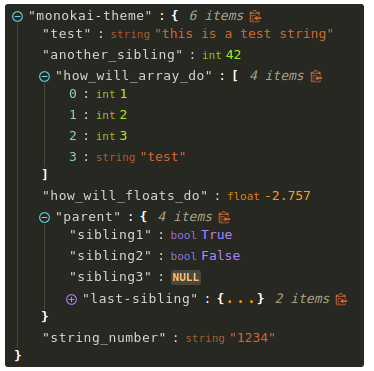
<ReactJson src={my_important_json} theme="monokai" />Check out the list of supported themes in the component demo.
Monokai theme example
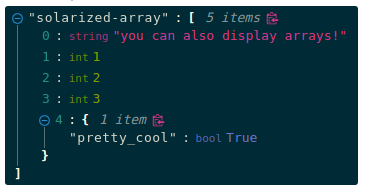
Solarized theme example
Use Your Own Theme
You can supply your own base-16 theme object.
To better understand custom themes, take a look at my example implementation and the base-16 theme styling guidelines.
onEdit, onAdd and onDelete Interaction
Pass callback methods to onEdit, onAdd and onDelete props. Your method will be invoked when a user attempts to update your src object.
The following object will be passed to your method:
{
    updated_src: src, //new src value
    name: name, //new var name
    namespace: namespace, //list, namespace indicating var location
    new_value: new_value, //new variable value
    existing_value: existing_value, //existing variable value
}
Returning false from a callback method will prevent the src from being affected.
Contributing to the source code
Linux and Docker (Recommended)
Use Docker to run the source code in a local development environment:
- Clone this repo
- Build the docker image
docker build -t react-json-view .- note: you may need to use
sudoto run docker commands
- Run the docker container on port 2000. This will run the webpack-dev-server with hot-reloading enabled.
cd react-json-view./docker/dev-server.sh- note: you may need to use
sudoto run the server file
- Open port 2000 in your browser
- navigate to localhost:2000
Your source code will be mounted inside the docker container. The container is built on the latest Node:slim image.
Webpack-dev-server is running in the container and hot-reloading when changes are made locally.
All node modules are installed within the container, so make sure to rebuild your container if you make changes to package.json (see step 2, above).
Standard Workflow
Development workflow is setup for linux users with Docker installed. You can contribute with other configurations but I have not tested them.
- Clone this repo
- Install npm dependencies
cd react-json-view
npm install- Run webpack to start webpack-dev-server with hot-reloading enabled
npm run dev:hot
- Open port 2000 in your browser
- navigate to localhost:2000
Inspiration
I drew a ton of design ideas from react-json-tree. Thanks to the RJT contributors for putting together an awesome component!
I'm also inspired by users who come up with interesting feature requests. Reach out to me with ideas for this project or other projects you want to collaborate on. My email address is listed on my github user page.
To-Do's
- Improve documentation for
onEdit,onAddandonDeleteprops - Improve style organization
- Continue size analysis and remove larger dependencies from build where possible
- As always, improve test quality and coverage
- update screenshots and docs in README