
react-liquid-glass-view
v1.0.8
Published
A beautiful glass morphism effect component for React applications

Maintainers
 joitaro
Readme
Liquid Glass View
A beautiful glass morphism effect component for React applications. This component creates a stunning liquid glass effect that can be animated and interacted with.
Demo
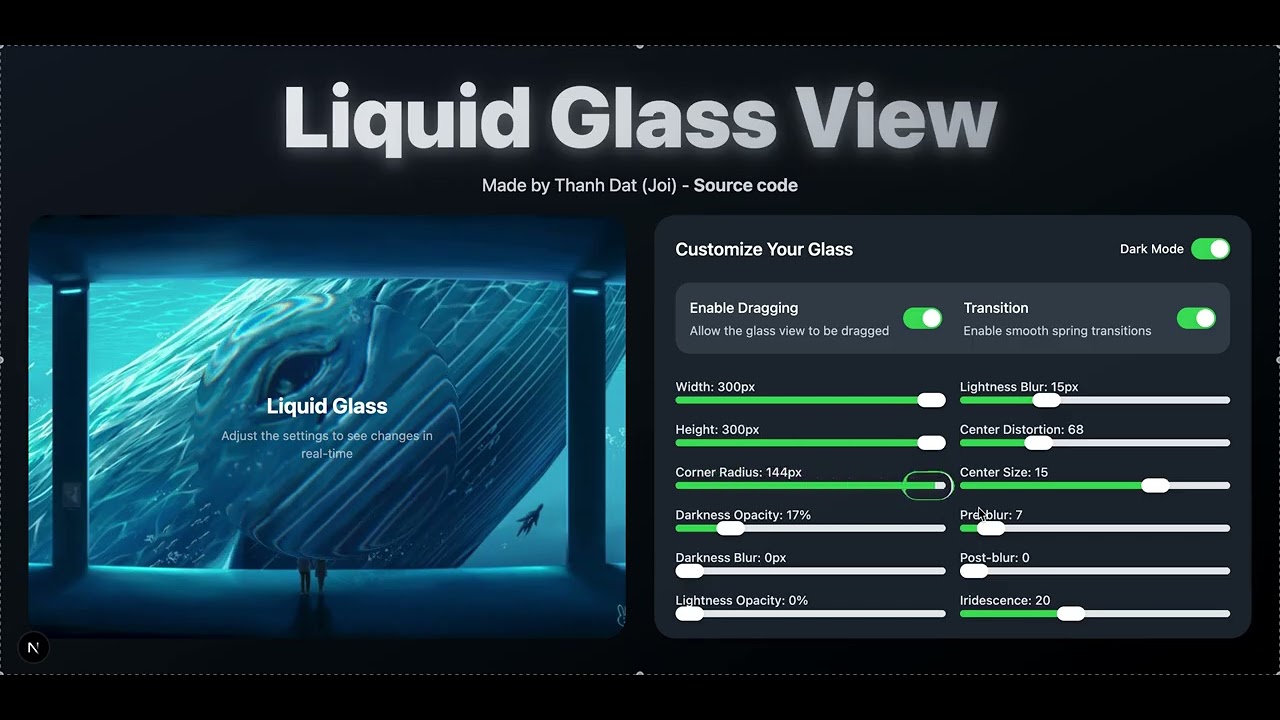
Features
- 🎨 Beautiful glass morphism effect
- 🎭 Smooth animations
- 🖱️ Draggable support
- 📱 Responsive design
- 🎯 Highly customizable
- 🔧 Easy to use
- 🎪 Spring animations support
Installation
npm install react-liquid-glass-view
# or
yarn add react-liquid-glass-view
# or
pnpm add react-liquid-glass-view
Usage
import { LiquidGlassView } from 'react-liquid-glass-view';

function App() {
  return (
    <LiquidGlassView
      width={300}
      height={200}
      cornerRadius={25}
      draggable={true}
      transitionAnimationSpring={true}
    >
      <h1>Hello World!</h1>
    </LiquidGlassView>
  );
}
Props
| Prop | Type | Default | Description | |------|------|---------|-------------| | width | number | 100 | Width of the component | | height | number | 100 | Height of the component | | cornerRadius | number | 25 | Border radius of the component | | darknessOpacity | number | 17 | Opacity of the dark overlay | | darknessBlur | number | 5 | Blur amount of the dark overlay | | lightnessOpacity | number | 17 | Opacity of the light overlay | | lightnessBlur | number | 15 | Blur amount of the light overlay | | centerDistortion | number | 68 | Amount of center distortion | | centerSize | number | 15 | Size of the center effect | | preBlur | number | 7 | Pre-effect blur amount | | postBlur | number | 0 | Post-effect blur amount | | iridescence | number | 20 | Amount of iridescence effect | | className | string | "" | Additional CSS classes | | style | object | {} | Additional inline styles | | draggable | boolean | false | Whether the component can be dragged | | dragAnimation | boolean | true | Whether to animate while dragging | | transitionAnimationSpring | boolean | false | Whether to use spring animations for transitions |
Example
import { LiquidGlassView } from 'react-liquid-glass-view';

function Card() {
  return (
    <LiquidGlassView
      width={400}
      height={300}
      cornerRadius={30}
      darknessOpacity={20}
      lightnessOpacity={20}
      iridescence={25}
      draggable={true}
      transitionAnimationSpring={true}
      style={{ margin: '20px' }}
    >
      <div style={{ color: 'white', textAlign: 'center' }}>
        <h2>Glass Card</h2>
        <p>This is a beautiful glass effect card that you can drag around!</p>
      </div>
    </LiquidGlassView>
  );
}
Requirements
- React 16.8.0 or later
License
MIT © [Thanh Dat (Joi)]