npm package discovery and stats viewer.

Discover Tips

  • General search

    [free text search, go nuts!]

  • Package details

    pkg:[package-name]

  • User packages

    @[username]

Sponsor

Optimize Toolset

I’ve always been into building performant and accessible sites, but lately I’ve been taking it extremely seriously. So much so that I’ve been building a tool to help me optimize and monitor the sites that I build to make sure that I’m making an attempt to offer the best experience to those who visit them. If you’re into performant, accessible and SEO friendly sites, you might like it too! You can check it out at Optimize Toolset.

About

Hi, 👋, I’m Ryan Hefner  and I built this site for me, and you! The goal of this site was to provide an easy way for me to check the stats on my npm packages, both for prioritizing issues and updates, and to give me a little kick in the pants to keep up on stuff.

As I was building it, I realized that I was actually using the tool to build the tool, and figured I might as well put this out there and hopefully others will find it to be a fast and useful way to search and browse npm packages as I have.

If you’re interested in other things I’m working on, follow me on Twitter or check out the open source projects I’ve been publishing on GitHub.

I am also working on a Twitter bot for this site to tweet the most popular, newest, random packages from npm. Please follow that account now and it will start sending out packages soon–ish.

Open Software & Tools

This site wouldn’t be possible without the immense generosity and tireless efforts from the people who make contributions to the world and share their work via open source initiatives. Thank you 🙏

© 2025 – Pkg Stats / Ryan Hefner

react-magic-search-params

v1.2.0

Published

#️⃣ A React Hook for advanced, typed management of URL search parameters, providing built-in TypeScript autocomplete.

Readme

Version Downloads License: MIT React TypeScript Issues

react-magic-search-params 🪄

Installation

To install this library, run:

npm install react-magic-search-params

Índice 📑

  1. Introducción General
    1.1 Propósito del Hook
    1.2 Contexto de Implementación

  2. Tipos de Parámetros que Acepta
    2.1 mandatory (Obligatorios)
    2.2 optional (Opcionales)
    2.3 defaultParams
    2.4 forceParams
    2.5 omitParamsByValues 2.6 arraySerialization

  3. Recomendación de Uso con Archivo de Constantes

  4. Funciones Principales
    4.1 getParams
    4.2 updateParams
    4.3 clearParams

  5. Características Clave y Beneficios

  6. Ejemplo de Uso & Explicaciones

  7. Serialización de Arrays en la URL(nuevo)

  8. Buenas Prácticas y Consideraciones

  9. Pruebas Unitarias con Vitest

  10. Conclusión 🎯


Introducción General

Propósito del Hook 🎯

El hook useMagicSearchParams habilita un manejo avanzado y centralizado de parámetros en la URL.
Permite definir y unificar lógica para filtrar, paginar o realizar cualquier otra operación que dependa de parámetros en la cadena de consulta (ej. ?page=1&page_size=10).

Antes (sin autocompletado ni tipado) En esta sección se ilustra rápidamente cómo cambiaba el manejo de parámetros antes de usar el hook y cómo se simplifica con useMagicSearchParams.

// filepath: /example/BeforeHook.tsx

export const BeforeHookExample = () => {
  const [searchParams, setSearchParams] = useSearchParams()

  // Extraer valores manualmente (sin tipado ni validación)
  const page = parseInt(searchParams.get('page') || '1', 10)
  const pageSize = parseInt(searchParams.get('page_size') || '10', 10)
  const search = searchParams.get('search') || ''

  const handleChangePage = (newPage: number) => {
    searchParams.set('page', newPage.toString())
    setSearchParams(searchParams)
  }

  return (
    <div>
      <p>Página: {page}</p>
      <p>page_size: {pageSize}</p>
      <p>search: {search}</p>
      {/* Botón para cambiar de página */}
      <button onClick={() => handleChangePage(page + 1)}>Siguiente página</button>
    </div>
  )
}
// filepath: /example/AfterHook.tsx
import { useMagicSearchParams } from "react-magic-search-params";
import { paramsUsers } from "@/constants/DefaultParamsPage";

export const AfterHookExample = () => {
  // contexto de Api externa...
  const { searchParams, getParams, updateParams } = useMagicSearchParams({
    ...paramsUsers,
    forceParams: { page_size: paramsUsers.mandatory.page_size }, // se limita a 10
    omitParamsByValues: ["all", "default"],
  });

  useEffect(() => {
    const paramsUser = getParams();

    async function loadUsers() {
      toast.loading("Cargando...", { id: "loading" });

      console.log({ paramsUser });
      const { success, message } = await getUsersContext(paramsUser);
      if (success) {
        toast.success(message ?? "Usuarios obtenidos", { id: "loading" });
        setLoading(false);
      } else {
        toast.error(message ?? "Error inesperado al obtener los usuarios", {
          id: "loading",
        });
      }
    }
    loadUsers();
  }, [searchParams]);

  // getParams devuelve datos convertidos y tipados con autocompletado
  const { page, page_size, search } = getParams({ convert: true });

  const handleNextPage = () => {
    const nextPage = { page: (page ?? 1) + 1 };
    updateParams({ newParams: nextpage }); // por defecto se mantienen los otros parámetros de consulta
  };

  return (
    <div>
      {/* Nota: normalmente el input será de tipo "no controlado" debido a que normalmente se utilizar una técnica de "debounce" para demorar la actualización */}
      <input
        defaultValue={search}
        placeholder="Buscar por..."
        onChange={handleSearchChange}
      />
      <p>Página actual: {page}</p>
      <p>Tamaño de página: {page_size}</p>
      <p>Búsqueda: {search}</p>
      <button onClick={handleNextPage}>Siguiente página</button>
    </div>
  );
};

Información Adicional 📋

  1. Tipado Estricto
  • Al definir “mandatory” y “optional” desde un archivo de constantes, TypeScript infiere las claves disponibles en la URL.
  1. Control en la URL
  • “forceParams” refuerza valores fijos (evitando sobrecargas innecesarias de la API). “omitParamsByValues” limpia parámetros como “all” o “default” que no aportan información real.
  1. Reutilización en Distintas Vistas
  • Cada vista puede tener su propio mandatory y optional. Se evita duplicar lógica de extracción y validación de parámetros.
  1. Orden Uniforme en la URL
  • sortParameters garantiza un orden predecible (primero “page”, luego “page_size”, etc.).

Contexto de su Implementación

  1. Evita múltiples fuentes de la verdad: Al separar la lógica en un hook único, no se repite código en cada archivo.
  2. Asegura un Estándar Común Todos los parámetros (obligatorios u opcionales) se definen en un mismo lugar
  3. Controlar la URL: Evita inyecciones de parámetros no deseados y mantiene un orden consistente (ej. ?page=1&page_size=10 en vez de ?page_size=10&page=1).

Tipos de Parámetros Aceptados

  1. Mandatory:(Obligatorios)
  • Ejemplo típico: Paginación (page, page_size)
  • Siempre deben existir en la URL para que la vista funcione.
  1. Optional:(Opcionales)
  • Ejemplo: Filtros de búsqueda (search, order).
  • No afectan la ruta si no están presentes.
  1. DefaultParams:(parámetros por defecto)
  • Se establecen automáticamente al cargar un componente.
  • Útiles para filtros por defecto o configuraciones iniciales.
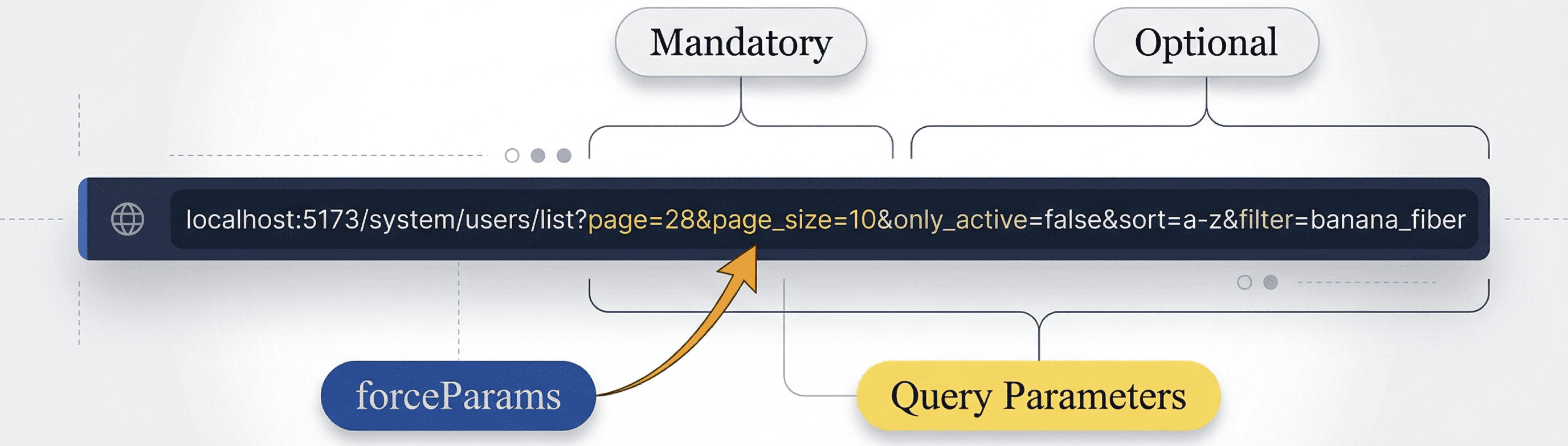
  • A diferencia de los parámetros agregados en enlaces ej: sistema/lista?page=1&page_size=10, estos se cargan según el componente (página) que se este visitando, asegurando que la página visitada siempre tenga parámetros por defecto, aunque el usuario los elimine, esto asegura que las llamadas a una API que útiliza los párametros de la URL devuelva los datos correctos.
  1. ForceParams:(Parámetros forzados)
  • Fuerzan valores que no se pueden sobrescribir (ej: page_size=10).
  • Garantizan una máxima seguridad, mientras que mejoran la experiencia del usuario (evitar page_size=1000)
  1. OmitParamsByValues:(Parámetros omitidos por Valores)
  • Lista de valores que, si se detectan, se omiten de la URL (ej. 'all', 'default')
  • Simplifica URLS, omitiendo parámetros que no aportan información real
  • Reserva espacio para otros parámetros de consulta por la limitación de los mismos en la url Dependiendo del Navegador que se utilize.
  1. arraySerialization:(Serialización de Arrays)
  • Permite Serializar arrays en la URL con 3 distintos métodos (csv, repeat, brackets)
  • Posibilidad de actualizarlos a través de 2 metodos, toggle (agregar, eliminar) y pasando un array de valores ej tags: ['nuevo1', 'nuevo2']
  • Es accesible a través del metodo getParams para obtener sus valores de tipo string ej:tags=uno,dos,tres o convertido a su tipo original ej: tags: ['uno', 'dos','tres']

Recomendación de uso de un Archivo de Constantes📁

  • Definir los parámetros obligatorios y opcionales en un único archivo (ej. defaultParamsPage.ts)
  • Beneficios:
    • Mayor consistencia: Todo queda centralizado, lo que significa tener una única fuente de la verdad de los párametros de cada página.
    • Tipado seguro: Garantiza autocompletado y reduce errores de escritures

[!NOTE] De esta forma Typescript Podrá inferir los tipos de los párametros de consulta y sus valores por defecto a manejar.

type UserTagOptions = 'tag1' | 'tag2' | 'react' | 'node' | 'typescript' | 'javascript';
type OrderUserProps = 'role' | 'date';
// Puedes especificar los valores para ayudar a que typescript te de más tipado
export const paramsCrimesDashboard = {
  mandatory: {
    days: 7,
  },
  optional: {},
};
export const paramsUsers = {
  mandatory: {
    page: 1,
    page_size: 10 as const,
    only_is_active: false,
  },
  optional: {
    order: "", as OrderUserProps
    search: "",
    tags: ['tag1', 'tag2'] as Array<UserTagOptions>
  },
};

[!TIP] Al declarar explícitamente los tipos (en lugar de basarse únicamente en la inferencia de tipos), se permite que TypeScript proporcione una comprobación de tipos más estricta. Esto garantiza que solo se permitan los valores definidos para cada parámetro, lo que ayuda a evitar la asignación accidental de valores no válidos.

Funciones Principales ⚙️

1. getParams

Obtiene los parámetros tipados y opcionalmente convertidos desde la URL.
Útil para recuperar “page”, “order”, “search”, etc., sin lidiar con valores nulos o tipos incorrectos.

[!NOTE] Por defecto el hook useSearchParams de react-router-dom devuelve los parámetros en string, haunque los hayamos definido con otro tipo ej: number, esto lo soluciona el metodo getParams gracias a que guarda una referencia de su tipo original.

// Obteniendo valores convertidos
const { page, search } = getParams({ convert: true });

// Ejemplo: mostrar parámetros en consola
console.log("Página actual:", page); // number
console.log("Búsqueda:", search); // string | undefined

2. updateParams

Modifica de forma controlada los parámetros en la URL, respetando valores obligatorios; puedes reiniciar un valor sin perder el resto (ej. setear page=1 y mantener search).

// Cambiar de página y conservar orden actual
updateParams({
  newParams: { page: 2 },
  keepParams: { order: true },
});

// Establecer un nuevo filtro y reiniciar la página
updateParams({ newParams: { page: 1, search: "John" } });

3. clearParams

Reinicia los parámetros de la URL, manteniendo (o no) los obligatorios. Permite “limpiar” los filtros y volver al estado inicial.

// Limpia todo y conserva obligatorios
clearParams();

// Limpia incluso los obligatorios
clearParams({ keepMandatoryParams: false });

Ejemplo de Uso & Explicaciones 🖥️💡

En el siguiente ejemplo, se combinan:

mandatory: Necesarios para la paginación. optional: Parámetros de búsqueda y orden. forceParams: Parámetros que no deben cambiar (p. ej. “page_size=1”). omitParamsByValues: Se omiten valores como “all” o “default”.

// filepath: /c:/.../FilterUsers.tsx
import { useMagicSearchParams } from "@/hooks/UseMagicSearchParams";
import { paramsUsers } from "@constants/DefaultParamsPage";

export const FilterUsers = (props) => {
  const { searchParams, updateParams, clearParams, getParams } =
    useMagicSearchParams({
      ...paramsUsers,
      defaultParams: paramsUsers.mandatory,
      forceParams: { page_size: 1 },
      omitParamsByValues: ["all", "default"],
    });

  // Recuperar parámetros convertidos a sus tipos originales
  const { page, search, order } = getParams({ convert: true });

  // Actualizar: setear página = 1 y cambiar búsqueda
  const handleChangeSearch = (evt) => {
    updateParams({ newParams: { page: 1, search: evt.target.value } });
  };

  // Limpiar todo y conservar mandatorios por defecto
  const handleReset = () => {
    clearParams();
  };

  // ...
};

En este componente:

paramsUsers define los objetos “mandatory” y “optional”. forceParams evita que “pagesize” sea modificado por el usuario. **_omitParamsByValues** descarta valores que no aporten datos reales (“all”, “default”). getParams devuelve valores tipados (números, booleanos, strings, etc.). updateParams y **clearParams** simplifican los flujos de actualización en la URL.

7 Serialización de Arrays en la URL 🚀

El hook useMagicSearchParams ahora permite gestionar parámetros de tipo array de forma avanzada y flexible, enviándolos de forma óptima al backend según el formato requerido. Esto se logra mediante la opción arraySerialization, que admite tres técnicas:

Métodos de Serialización 🔄

  • csv:
    Serializa el array en una única cadena separada por comas.
    Ejemplo:
    tags=tag1,tag2,tag3
    Ideal cuando el backend espera un solo string.

  • repeat:
    Envía cada elemento del array como un parámetro separado.
    Ejemplo:
    tags=tag1&tags=tag2&tags=tag3
    Perfecto para APIs que manejan múltiples entradas con la misma clave.

  • brackets:
    Utiliza la notación con corchetes en la clave para cada elemento.
    Ejemplo:
    tags[]=tag1&tags[]=tag2&tags[]=tag3
    Útil para frameworks que esperan este formato (ej. PHP).

[!TIP] Al extraer los valores de tags con getParams({ convert: true }) obtendrás:

  • String si no se especifica conversión (ej:csv): "tags=tag1,tag2,tag3"
  • Array si se convierte: tags=['tag1', 'tag2', 'tag3']
    Esto mejora la consistencia y tipado en tu aplicación.

Ventajas y Beneficios 🌟

  • Flexibilidad de Envío:
    Elige el método que mejor se adapte a las necesidades del backend.
    Mayor compatibilidad con distintos sistemas.

  • Normalización Automática:
    Las claves que llegan en formato tags[] se normalizan a tags para facilitar su manejo.
    Más fácil iterar y convertir a tipos originales.

  • Control Total de la URL:
    El hook gestiona la reescritura de la URL de forma consistente, reduciendo errores y manteniendo la legibilidad.
    🔒 Mejora la seguridad y el control de los parámetros.

Ejemplos de Uso en Código 👨‍💻

import { useMagicSearchParams } from "../src/hooks/useMagicSearchParams";
import { paramsUsers } from "../src/constants/defaulParamsPage";

export default function App() {
  const { searchParams, getParams, updateParams, clearParams } = useMagicSearchParams({
    ...paramsUsers,
    defaultParams: paramsUsers.mandatory,
    arraySerialization: 'repeat', // Puedes cambiar a 'csv' o 'brackets' según prefieras.
    omitParamsByValues: ["all", "default"],
  });

  // Obtener parámetros convertidos (por ejemplo, tags se obtiene como array)
  const { tags, page } = getParams({ convert: true });

 const availableTags = ['react', 'node', 'typescript', 'javascript']

  // Ejemplo: Actualizar el array de tags con toggle
  const handleTagToggle = (newTag: string) => {
    // si ya existe se elimina, sino se agrega
    updateParams({ newParams: { tags: newTag } });
  };
  // pasar un array de tags, útil para agregar múltiples filtros a la vez
  const handleTagToggleArray = (newTags: string[]) => {
    // el hook se encarga de que no existán valores repetidos en el array haciendo
    // merge con los anteriores
    updateParams({ newParams: { tags: [...tags, ..newTags] } });
  };
  return (
    <div>
      <div>
        <h3 className='text-lg font-semibold mb-3'>Selecciona Tags:</h3>
          {availableTags.map(tag => {
            const isActive = Array.isArray(tags) && tags.includes(tag)
            return (
              <button
                key={tag}
                onClick={() => handleTagToggle(tag)}
                className={`px-4 py-2 rounded-md border ${
                  isActive ? 'bg-blue-500 text-white' : 'bg-gray-200 text-gray-700'
                }`}
              >
                {tag}
              </button>
            )
          })}
      </div>
      <p>Tags actuales: {JSON.stringify(tags)}</p>
      {/* Resto del componente */}
    </div>
  );
}

En este ejemplo, al utilizar la serialización repeat, la URL resultante se verá así:

  • Modo (repeat): ?page=1&page_size=10&only_is_active=false&tags=tag1&tags=tag2&tags=tag3
  • Modo (csv): ?page=1&page_size=10&only_is_active=false&tags=tag1,tag2,tag3
  • Modo (brackets): ?page=1&page_size=10&only_is_active=false&tags[]=tag1&tags[]=tag2&tags[]=tag3

Esta nueva funcionalidad permite:

  • Enviar arrays de forma que se ajusten a las expectativas del backend.
  • Gestionar de forma centralizada la conversión y serialización, reduciendo la complejidad en componentes individuales.
  • Mantener la URL limpia y consistente, independientemente del método de serialización elegido.
  • Dar control total al desarrollador sobre cómo transformar o enviar los parámetros, permitiendo operaciones personalizadas en función del backend.

¿Por Qué Esta Funcionalidad Es Clave? 🎯

  • Enviar arrays al backend de forma adaptable: Se ajusta a diversos formatos que los servidores pueden esperar.
  • Reducción de complejidad en componentes: Centraliza la lógica de serialización, evitando redundancia en el código.
  • Mejor experiencia para el usuario: Una URL limpia y consistente facilita la depuración y mejora la usabilidad.

8 Buenas Prácticas y Consideraciones ✅

  1. Validar parámetros sensibles en backend: Aunque el hook protege en frontend, el servidor debe imponer límites.
  2. Mantener los tipos actualizados: A medida que cambian los requisitos, actualizar “mandatory” y “optional” para evitar descalces.
  3. Archivo de constantes por vista: Permite organizar mejor cada pantalla o sección, manteniendo claridad y orden.

9 Pruebas Unitarias 🔬

Este proyecto cuenta con pruebas automatizadas para asegurar su robustez y fiabilidad.

Ejecuta tus pruebas con Vitest 🧪

Para validar el funcionamiento de este hook (y de los demás), puedes dirigirte al directorio de tests y ejecutar el siguiente comando en la terminal:

npm run test ./test/useMagicSearchParams.test.ts

[!WARNING] Nota: Asegúrate de tener Vitest configurado en tu proyecto para que estas pruebas se ejecuten correctamente, puedes ver la versión con npm list

10 Conclusión 🎉

El hook useMagicSearchParams aporta:

  • Legibilidad y Mantenibilidad al centralizar la lógica.
  • Robustez en la gestión de parámetros, limitando valores inseguros y permitiendo un flujo coherente.

Se recomienda ajustarlo o expandirlo según las necesidades de cada proyecto, añadiendo, por ejemplo, validaciones avanzadas o conversiones adicionales de tipos.


[!TIP] Puede encontrar ejemplos prácticos de cómo implementar este Hook en *proyectos grandes, en el archivo de ejemplo.

Si encontraste esta libreriá útil, porfavor dale una ⭐️ al GitHub!

Table of Contents 📑

  1. General Introduction
    1.1 Hook Purpose
    1.2 Implementation Context

  2. Accepted Parameter Types
    2.1 mandatory (Required)
    2.2 optional (Optional)
    2.3 defaultParams
    2.4 forceParams
    2.5 omitParamsByValues
    2.6 arraySerialization

  3. Usage Recommendation with a Constants File

  4. Main Functions
    4.1 getParams
    4.2 updateParams
    4.3 clearParams

  5. Key Features and Benefits

  6. Usage Example & Explanations

  7. Array Serialization in the URL (new)

  8. Best Practices and Considerations

  9. Unit Tests with Vitest

  10. Conclusion


General Introduction

Hook Purpose 🎯

The useMagicSearchParams hook enables advanced and centralized management of URL parameters.
It allows you to define and unify logic to filter, paginate, or perform any other operation that depends on query parameters (e.g. ?page=1&page_size=10).

Before (no autocomplete or typing) This section quickly illustrates how parameter handling changed before using the hook and how it simplifies with useMagicSearchParams.

// filepath: /example/BeforeHook.tsx

export const BeforeHookExample = () => {
  const [searchParams, setSearchParams] = useSearchParams()

  // Manually extract values (no typing or validation)
  const page = parseInt(searchParams.get('page') || '1', 10)
  const pageSize = parseInt(searchParams.get('page_size') || '10', 10)
  const search = searchParams.get('search') || ''

  const handleChangePage = (newPage: number) => {
    searchParams.set('page', newPage.toString())
    setSearchParams(searchParams)
  }

  return (
    <div>
      <p>Page: {page}</p>
      <p>page_size: {pageSize}</p>
      <p>search: {search}</p>
      {/* Button to move to the next page */}
      <button onClick={() => handleChangePage(page + 1)}>Next page</button>
    </div>
  )
}
// filepath: /example/AfterHook.tsx
import { useMagicSearchParams } from "react-magic-search-params";
import { paramsUsers } from "@/constants/DefaultParamsPage";

export const AfterHookExample = () => {
  // context of an external API...
  const { searchParams, getParams, updateParams } = useMagicSearchParams({
    ...paramsUsers,
    forceParams: { page_size: paramsUsers.mandatory.page_size }, // limited to 10
    omitParamsByValues: ["all", "default"],
  });

  useEffect(() => {
    const paramsUser = getParams();

    async function loadUsers() {
      toast.loading("Loading...", { id: "loading" });

      console.log({ paramsUser });
      const { success, message } = await getUsersContext(paramsUser);
      if (success) {
        toast.success(message ?? "Users retrieved", { id: "loading" });
        setLoading(false);
      } else {
        toast.error(message ?? "Unexpected error retrieving the users", {
          id: "loading",
        });
      }
    }
    loadUsers();
  }, [searchParams]);

  // getParams returns typed and converted data with autocomplete
  const { page, page_size, search } = getParams({ convert: true });

  const tags = getParam("tags", { convert: false })

  const handleNextPage = () => {
    const nextPage = { page: (page ?? 1) + 1 };
    updateParams({ newParams: nextPage }); // by default, the rest of the query parameters are preserved
  };

  return (
    <div>
      {/* Note: typically this input will be “uncontrolled,” as you often use a “debounce” approach to delay updates */}
      <input
        defaultValue={search}
        placeholder="Search by..."
        onChange={handleSearchChange}
      />
      <p>Current page: {page}</p>
      <p>Page size: {page_size}</p>
      <p>Search: {search}</p>
      <button onClick={handleNextPage}>Next page</button>
    </div>
  );
};

[!NOTE] Since this hook utilizes react-router-dom, make sure your application is wrapped in <BrowserRouter> or <RouterProvider> (the modern version in React Router v6.4+) so that routing works correctly.

Additional Information 📋

  1. Strict Typing_
  • By defining “mandatory” and “optional” from a constants file, TypeScript infers the available keys in the U
  1. Control en la URL
  • “forceParams” enforces fixed values (preventing unnecessary API overloads). “omitParamsByValues” removes “all” or “default” parameters that don’t add real information..
  1. Reuse in Different Views
  • Each view can have its own mandatory and optional. This prevents code duplication for extracting and validating parameters.
  1. Uniform URL Order
  • ensures a predictable order (first “page”, then “page_size”, etc.)

Implementation Context

  1. Avoid multiple sources of truth: By centralizing logic in a single hook, code does not repeat in every file.
  2. Guarantee a Common Standard All parameters (required or optional) are defined in a single place and reused in multiple places.
  3. Control the URL: Prevents unwanted parameter injections and maintains a consistent order(ej. ?page=1&page_size=10 en instead ?page_size=1000&page=1).

Accepted Parameter Typess

  1. Mandatory:(Required)
  • Typical example: Pagination (page, page_size)
  • They must always exist in the URL for the view to work.
  1. Optional:
  • Example: Search filters (search, order).
  • They do not affect the route if they are not present.
  1. DefaultParams:
  • Automatically set when loading a component.
  • Useful for “default filters” or initial settings.
  • Unlike parameters added in links, e.g. sistema/lista?page=1&page_size=10, , these load depending on the component (page) being visited, ensuring that the visited page always has default parameters, even if the user removes them. This ensures that API calls depending on URL parameters return correct data.
  1. ForceParams:
  • Enforce values that cannot be overwritten (e.g. page_size=10).
  • Provides maximum safety while enhancing user experience (avoid page_size=1000).
  1. OmitParamsByValues:(Parameters Omitted by values)
  • A list of values that, if detected, are omitted from the URL (e.g. ‘all’, ‘default’).
  • Simplifies URLs by removing parameters that do not provide real information.
  • Reserves space for other query parameters given potential URL limitations (depending on the browser in use).
  1. arraySerialization:
  • Allows arrays to be serialized in the URL through three different methods (csv, repeat, brackets).
  • Enables updating them via two methods: toggle (add or remove) and passing an array of values (e.g. tags: [‘new1’, ‘new2’])
  • Accessible through the getParams method to obtain string-type values (e.g. tags=one,two,three) or converted to their original type (e.g. tags: [‘one’, ‘two’, ‘three’]).

3 Usage Recommendation with a Constants File 📁

  • Define the required and optional parameters in a single file (e.g. defaultParamsPage.ts).
  • optionally add typing (normally you'll let typescript infer)
  • Beneficios:
    • Greater consistency: Everything is centralized, meaning a single source of truth for the parameters of each page.
    • Safe typing: Guarantees autocomplete and reduces typos.

[!NOTE] This way TypeScript can infer the types of the query parameters and their default values to manag

type UserTagOptions = 'tag1' | 'tag2' | 'react' | 'node' | 'typescript' | 'javascript';
type OrderUserProps = 'role' | 'date';
// you can specify the values ​​to help typescript give you more typed
export const paramsCrimesDashboard = {
  mandatory: {
    days: 7,
  },
  optional: {},
};
export const paramsUsers = {
  mandatory: {
    page: 1,
    page_size: 10 as const,
    only_is_active: false,
  },
  optional: {
    order: "" as OrderUserProps;
    search: "",
    tags: ['tag1', 'tag2'] as Array<UserTagOptions>
  },
};

[!TIP] By explicitly declaring the types (instead of relying solely on type inference), you enable TypeScript to provide stricter type checking. This ensures that only the defined values are allowed for each parameter, helping to avoid accidental assignment of invalid values.

4 Main Functions ⚙️

4.1 getParams

Retrieves typed parameters from the URL and optionally converts them. Useful to pull “page”, “order”, “search”, etc. without dealing with null values or incorrect types.

[!NOTE] By default, the react-router-dom useSearchParams hook returns parameters as string, even if defined with another type (e.g. number). The getParams method solves this by keeping a reference to their original type.

// Retrieving converted values
const { page, search } = getParams({ convert: true });
const tags = getParam("tags")
// tags = [tag1, tag2]

// Example: displaying parameters in console
console.log("Current page:", page); // number
console.log("Search:", search); // string | undefined

4.2 updateParams

Safely modifies URL parameters, respecting mandatory values; you may reset one value without losing the rest (e.g. set page=1 while keeping search).

// Change page and keep the current order
updateParams({
  newParams: { page: 2 },
  keepParams: { order: true },
});

// Set a new filter and reset the page
updateParams({ newParams: { page: 1, search: "John" } });

4.3 clearParams

Resets the URL parameters, optionally keeping mandatory ones. Allows you to “clear” the filters and return to the initial state.

// Clear everything and keep mandatory parameters
clearParams();

// Clear everything, including mandatory parameters
clearParams({ keepMandatoryParams: false });

4.4 onChange

The onChange function allows you to subscribe to changes in specific URL parameters. Each time the parameter changes, the associated callbacks will be executed. This is useful when you need to trigger updates or actions (such as API calls, validations, etc.) after a particular value changes.

[!NOTE] Although you will usually want to call an API or trigger other events as soon as changes are detected in any of the URL parameters (by adding searchParams to the dependency array of useEffect), there are occasions where you may prefer more granular control and only react to specific parameters.

Basic use

useEffect(() => {
  function fetchData() {
   
    // can be an call to API or any other operation  
    return new Promise((resolve) => {
      setTimeout(() => resolve('Information recibed'), 1500)
    })
  }

  function showData(data: string) {
    alert(`Data recibed: ${data}`)
  }

  function notifyChange() {
    console.log('Change detected in the parameter search')
  }

  onChange('search', [
    async () => {
      const data = await fetchData()
      showData(data)
    },
    notifyChange
  ])
}, [])
  // otr

Usage Example & Explanations 🖥️💡

In the following example, we combine:

mandatory: Needed for pagination. optional: Search and order parameters. forceParams: Parameters that must not change omitParamsByValues: Omits all or default values.

// filepath: /c:/.../FilterUsers.tsx
import { useMagicSearchParams } from "@/hooks/UseMagicSearchParams";
import { paramsUsers } from "@constants/DefaultParamsPage";

export const FilterUsers = (props) => {
  const { searchParams, updateParams, clearParams, getParams } =
    useMagicSearchParams({
      ...paramsUsers,
      defaultParams: paramsUsers.mandatory,
      forceParams: { page_size: 1 },
      omitParamsByValues: ["all", "default"],
    });

   // Retrieve parameters converted to their original types
  const { page, search, order } = getParams({ convert: true });

  
  // Update: set page = 1 and change search
  const handleChangeSearch = (evt) => {
    updateParams({ newParams: { page: 1, search: evt.target.value } });
  };

 // Clear everything and keep mandatory parameters by default
  const handleReset = () => {
    clearParams();
  };
  const handleChangeOrder = (value) => {
    // if value is equal to 'all' it will be ommited 
    updateParams({ newParams: { order: value }, keepParams: { search: false }})
  }
  // ...
  return (
  <>
    {/** rest.. */}
    <select name="order" onChange={e => handleChangeOrder(e)}>
      <option value="all">Select tag</option>

      {/** map of tags..*/}
    </select>
      
  </>
  )
};

En este componente:

paramsUsers: defines the mandatory and optional objects. forceParams: prevents “page*size” from being changed by the user. _omitParamsByValues: discards values that do not provide real data (“all”, “default”) getParams: returns typed values (numbers, booleans, strings, etc.). updateParams and clearParams simplify URL update flows.

7 Serialización de Arrays en la URL 🚀

The useMagicSearchParams hook now allows for advanced and flexible handling of aarray-type parameters, sending them to the backend in the format required. This is done via the arraySerialization option, which supports three techniques:

Métodos de Serialización 🔄

  • csv:
    Serializes the array into a single comma-separated string. Ejemplo:
    tags=tag1,tag2,tag3
    Ideal when the backend expects a single string.

  • repeat:
    Sends each array element as a separate parameter. Ejemplo:
    tags=tag1&tags=tag2&tags=tag3
    Perfect for APIs that handle multiple entries under the same key.

  • brackets:
    Uses bracket notation in the key for each element. Ejemplo:
    tags[]=tag1&tags[]=tag2&tags[]=tag3
    Useful for frameworks expecting this format (e.g. PHP).

[!TIP] When extracting tags with getParams({ convert: true }) you get:

  • Am String if not conversion is specified (e.g, csv): "tags=tag1,tag2,tag3"
  • An Array if conversion is used: tags=['tag1', 'tag2', 'tag3']
    This improves consistency and typing in your application.

dvantages and Benefits 🌟

  • Flexible Submission:
    Choose the method that best suits backend requirements. ✅ Better compatibility with various systems.

  • Automatic Normalization:
    Keys arriving tags[] format normalize to tags to simplify handling.
    Easier iteration and conversion to original types.

  • Full URL Control:
    The hook consistently manages URL rewriting, reducing errors and keeping it readable. 🔒 Improves parameter security and control.

Code Usage Examples 👨‍💻

import { useMagicSearchParams } from "useMagicSearchParams";
import { paramsUsers } from "../src/constants/defaulParamsPage";

export default function App() {
  const { searchParams, getParams, updateParams, clearParams } = useMagicSearchParams({
    ...paramsUsers,
    defaultParams: paramsUsers.mandatory,
    arraySerialization: 'repeat', // You can switch to 'csv' or 'brackets' as needed.
    omitParamsByValues: ["all", "default"],
  });

  // Get converted parameters (for example, tags is retrieved as an array)
  const { tags, page } = getParams({ convert: true });

  const availableTags = ['react', 'node', 'typescript', 'javascript'];

  // Example: Update the tags array with toggle
  const handleTagToggle = (newTag: string) => {
    // if it exists, remove it; otherwise, add it
    updateParams({ newParams: { tags: newTag } });
  };

  // Pass an array of tags, useful for adding multiple filters at once
  const handleTagToggleArray = (newTags: string[]) => {
    // the hook ensures no duplicates by merging with existing ones
    updateParams({ newParams: { tags: [...tags, ...newTags] } });
  };

  return (
    <div>
      <div>
        <h3 className='text-lg font-semibold mb-3'>Select Tags:</h3>
        {availableTags.map(tag => {
          const isActive = Array.isArray(tags) && tags.includes(tag);
          return (
            <button
              key={tag}
              onClick={() => handleTagToggle(tag)}
              className={`px-4 py-2 rounded-md border ${
                isActive ? 'bg-blue-500 text-white' : 'bg-gray-200 text-gray-700'
              }`}
            >
              {tag}
            </button>
          );
        })}
      </div>
      <p>Current tags: {JSON.stringify(tags)}</p>
      {/* Rest of the component */}
    </div>
  );
}

In this example, when using repeat serialization the URL result look like this:

  • (repeat) Mode: ?page=1&page_size=10&only_is_active=false&tags=tag1&tags=tag2&tags=tag3
  • (csv) Mode: ?page=1&page_size=10&only_is_active=false&tags=tag1,tag2,tag3
  • (brackets) Mode: ?page=1&page_size=10&only_is_active=false&tags[]=tag1&tags[]=tag2&tags[]=tag3

This new functionality allows you to:

  • Send arrays in a format that matches backend expectations.
  • Centrally manage conversion and serialization, reducing complexity in individual components.
  • Keep the URL clean and consistent, no matter which serialization method you choose.
  • Provide total control to the developer: On how to transform or send parameters, allowing custom operations based on the backend.

Why Is This Functionality Key? 🎯

  • Adaptable array submission to the backend: Fits various formats servers may expect.
  • Reduced complexity in components: Centralizes serialization logic, preventing code duplication.
  • Better user experience: A clean, consistent URL makes debugging easier and improves usability.

8 Best Practices and Considerations ✅

  1. Validate sensitive parameters in the backend: Even though the hook protects on the frontend, the server must enforce its own limits.
  2. Keep types updated:: As requirements change, update mandatory and optional to avoid mismatches.
  3. One constants file per view: Helps organize each screen or section, keeping clarity and consistency.

9 Unit Tests 🔬

This project includes automated tests to ensure its robustness and reliability.

Run your tests with Vitest 🧪

To validate this hook (and others), go to the test directory and run the following command in your terminal:

npm run test ./test/useMagicSearchParams.test.ts

[!WARNING] Note: Make sure you have Vitest configured in your project so these tests can run correctly; you can check the version with npm list

10 Conclusion 🎉

The useMagicSearchParams hook provides:

  • Readability and Maintainability: By centralizing logic:
  • Robustess: in parameter management, limiting insecure values and enabling a coherent flow.

It’s recommended to adjust or expand it based on each project’s needs, for example by adding advanced validations or additional type conversions.


[!TIP] You can find practical examples of how to implement these hooks, saving you hundreds of lines of code in *large projects, in the example file.

If you found this library helpful, please give it a ⭐️ on GitHub!