react-markdown-pro
v1.0.11
Published
An enhanced React markdown component with image, code, and LaTeX support.

Maintainers
 ehteshamnasim
Readme
react-markdown-pro
react-markdown-pro is an enhanced React component for rendering Markdown content with support for images, syntax-highlighted code blocks, and LaTeX math equations rendered via KaTeX. It is designed as an all-in-one solution for projects that require rich, interactive Markdown rendering.
Features
Rich Markdown Rendering:
Supports standard Markdown syntax—including headings, lists, links, blockquotes, and more—with customizable styles.GitHub Flavored Markdown:
Enhanced support through remark-gfm, enabling tables, task lists, strikethrough, and other GFM features.LaTeX Math Support:
Render inline and block math expressions using KaTeX, making it easy to display complex mathematical notation.Syntax Highlighting:
Code blocks are beautifully rendered and syntax highlighted using react-syntax-highlighter, complete with line numbering and customizable themes.Image Support:
Automatically render images via Markdown with responsive styling, ensuring they display correctly on all devices.Clipboard Integration:
Built-in copy-to-clipboard functionality for code snippets, making it simple to copy and share code.Raw HTML Support:
Supports rendering of raw HTML within Markdown (with proper security considerations), allowing the integration of custom HTML elements.Automatic Heading IDs:
Generates unique IDs for headings (based on their line numbers), which aids in deep linking and navigation.Inline Mode Rendering:
Offers an inline mode via a dedicated prop, allowing Markdown content to be rendered within a single text flow.Automatic Line Break Handling:
Converts newline characters and<br>tags into proper line breaks, ensuring your content is displayed as intended.Plugin Extensibility:
Integrates with powerful remark and rehype plugins (such as remark-math, rehype-slug, and rehype-raw) to extend Markdown functionality and customize rendering behavior.TypeScript Support:
Built entirely in TypeScript with well-defined interfaces, ensuring better type safety and developer experience in modern React projects.
Installation
Install via npm:
npm install react-markdown-proHow to Use
Using react-markdown-pro is straightforward:
import React from 'react';
import MarkdownPro from 'react-markdown-pro';

function Example() {
  // You can use simple string content
  const simpleExample = "# Hello World\n\nThis is **bold** text and *italic* text.";

  // Or more complex content with math equations
  const mathExample = "Solve for $x$: $2x + 3 = 7$.\n\nThe quadratic formula is: $$x = \\frac{-b \\pm \\sqrt{b^2 - 4ac}}{2a}$$";

  return (
    <div className="container">
      <MarkdownPro>{simpleExample}</MarkdownPro>

      <h2>Math Example:</h2>
      <MarkdownPro>{mathExample}</MarkdownPro>
    </div>
  );
}

export default Example;
Real-world Example
Perfect for educational applications with math equations:
import React from 'react';
import MarkdownPro from 'react-markdown-pro';

const questions = [
  { id: 1, question: "Solve for $x$: $2x + 3 = 7$." },
  { id: 2, question: "Differentiate $f(x)=x^2 + 3x + 5$ with respect to $x$." },
  { id: 3, question: "Evaluate the integral $\\int_0^1 x^2\\, dx$." },
  { id: 4, question: "Express Ohm's law: $V = IR$" }
];

const QuestionList = () => {
  return (
    <div className="questions-container">
      <h1>Math Problems</h1>
      <ul>
        {questions.map((q) => (
          <li key={q.id}>
            <strong>Question {q.id}:</strong> <MarkdownPro>{q.question}</MarkdownPro>
          </li>
        ))}
      </ul>
    </div>
  );
};

export default QuestionList;
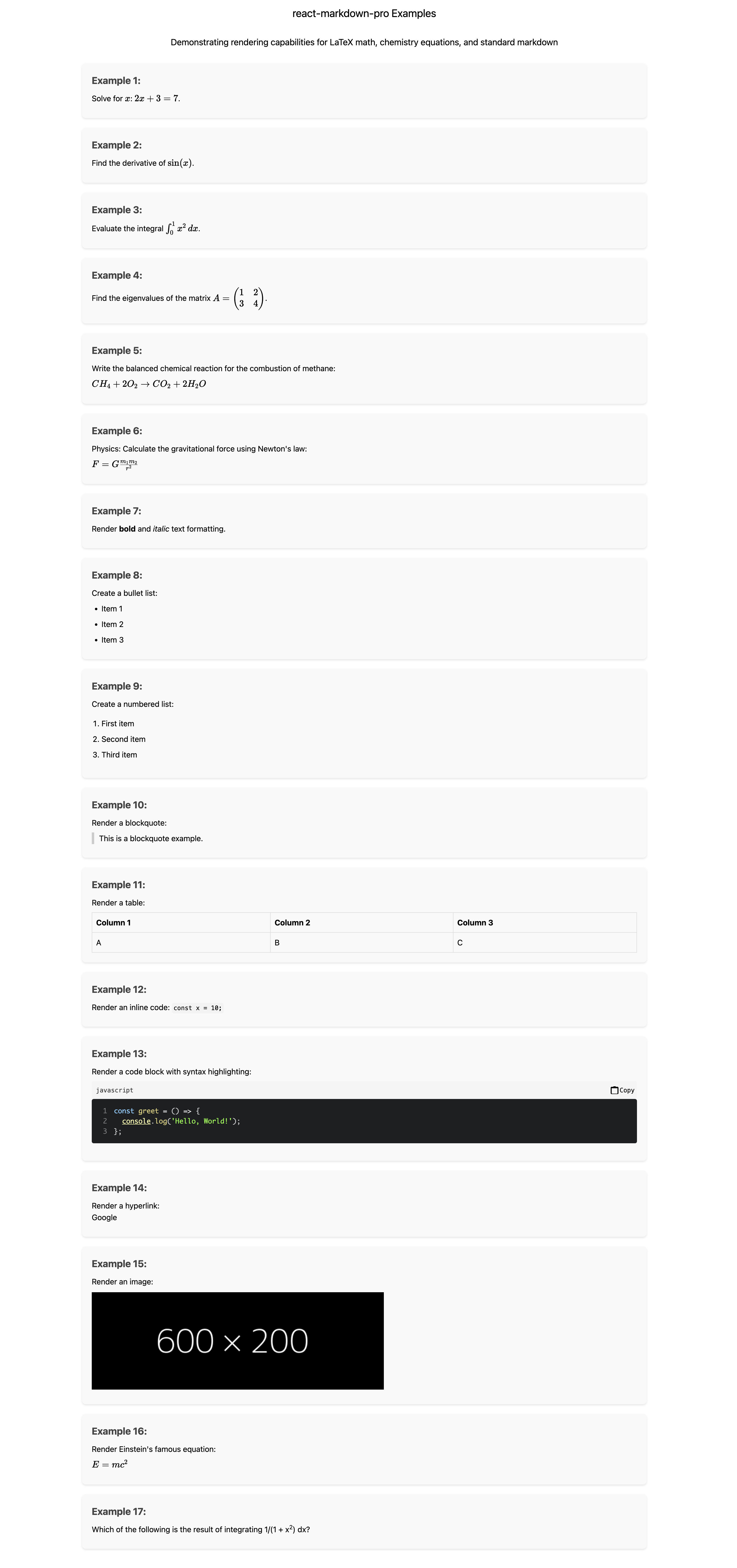
Example Screenshot