
react-metrc-link
v1.0.9
Published
A modal that a backend url can be passed into to verify Metrc credentials


Readme
React Metrc Link
A React button and modal designed to take in Metrc User Key and State and output those credentials if they are accurate.
Pairs with a python package metrc-client-python for the backend.
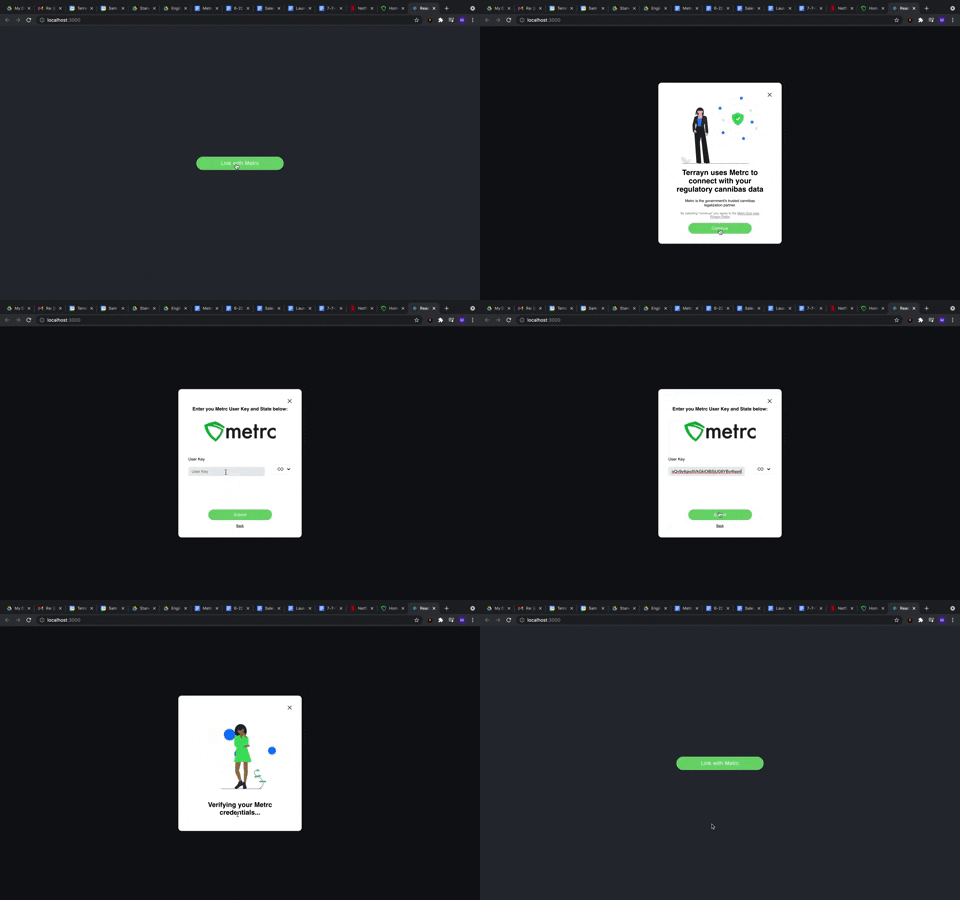
Getting Started
Install package in React app using
npm i react-metrc-link
In desired component, import the Metrc component
import {MetrcLink} from 'react-metrc-link'Then add the component to the render method with the required props
<MetrcLink
  callback={handleCallback}
  states={states}
  backendUrl='http://127.0.0.1:5000/user_key'
  companyName= 'Terrayn'
/>
Required Props
- Callback - function with 1 arguement - pass in a function that can recieve back a response object example:
const handleCallback = (resp) =>{
  console.log(resp.state, resp.user_key)
}
where resp will be
{
  user_key:'...',
  state:'CO'
}
States - array of strings - The states that you have Metrc Vendor Keys for in the backend server. Use state initials in uppercase format.
Backend Url - string - The url to send the user_key and state object to in order to verify credentials
Company Name - string - The app name or company name you want the modal copy to refer to
Non Required Props
Privacy Policy Link - string - a link to an end user privacy policy. Will add text to first screen that by continuing user agrees to linked privacy policy.
Label - string - Button text
Background Color - string - Button background color
Color - string - Button text color
Font Family - string - Button Font (only takes websafe fonts)
Font Weight - number - Button font weight
Border - string - Button border
Border Radius - string - Button border radius
Line Height - number - Button text line height
Letter Spacing - string - Button text letter spacing
Font Size - string - Button font size
Padding - string - Button padding
Margin - string - Button margin
Example Component with all available props
import React from 'react';
import './App.css';
import {MetrcLink} from 'react-metrc-link'

function App() {

  const handleCallback = (resp) =>{
    console.log(resp.state, resp.user_key)
  }

  const states =['CO','OR','CA','AK']

  return (
    <div>
      <MetrcLink
        callback={handleCallback}
        states={states}
        backendUrl='http://127.0.0.1:5000/user_key'
        companyName='Terrayn'
        privacyPolicyLink='https://www.google.com'
        label='Link with Metrc'
        backgroundColor='#68c86b'
        color='#fff'
        fontFamily='Helvetica, sans-serif'
        fontWeight='40'
        border='none'
        borderRadius='3em'
        lineHeight='1'
        letterSpacing='0.5px'
        fontSize='16px'
        padding='12px 74px'
        margin='0px'
      />
    </div>
  );
}

export default App;
Response
If request is successful response will be a 200 with a body of
 {
    user_key:'...',
    state:'CO'
  }
where user_key and state are the values the user entered.
Otherwise the response will be a 500 and the modal will send the user to re-enter their credentials.
Attributions
Package created by partnership between Terrayn and Lendica
Designs by Anna Stapor
Illustrations by Undraw