
react-minimalist-toolbar
v1.0.6
Published
React Minimalist Toolbar


Readme
react-minimalist-toolbar
A Minimalist toolbar react component

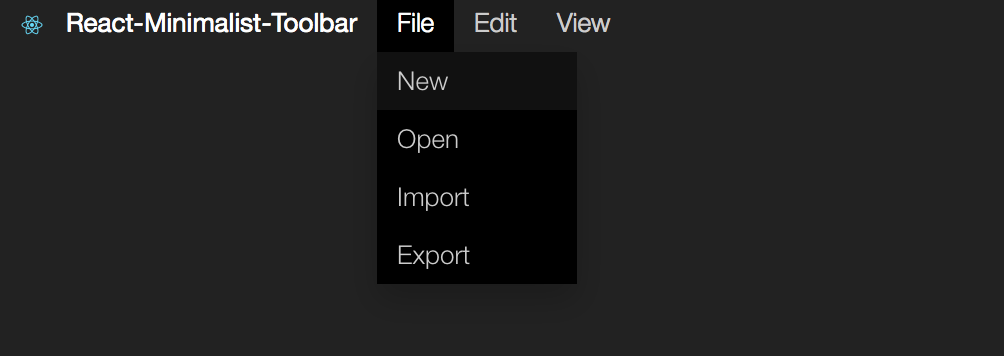
Install
npm install --save react-minimalist-toolbarImport
import Toolbar from 'react-minimalist-toolbar'Example
import Toolbar from 'react-minimalist-toolbar'

//...

newFile(){
    //open new file here
}
//implement all callback functions

//...

newFile(){
    //create file methods
}

openFile(){
    //open modal ...
}

//...

render() {

    var menu = [
        {
            text: "file",
            items: [
            {
                text: "New",
                callback: this.newFile
            },
            {
                text: "Open",
                callback: this.openFile
            }
            ]
        },
        {
            text: "edit",
            items: [
            {
                text: "Undo",
                callback: this.undo
            },
            {
                text: "Redo",
                callback: this.redo
            }
            ]
        },
    ];

        return (
             <Toolbar menu={menu} logo={logo}  brand="React-Minimalist-Toolbar"></Toolbar>
        );

}
##Customizing The UI components can be customized by overwriting css classes:(see lib/index.css)
    :root {
        --main-color: #000;
        --main-color-high:#222;
        --text-color:#cccccc;
        --text-hover: #fff;
    }

    .minimalist-toolbar{

    }
    .minimalist-toolbar .dropdown{

    }
    .minimalist-toolbar .dropdown-content{

    }
Contributing
There are still many things to be added to this component, e.g. svg icons for each option or shortcuts.
This component was created using Yeoman Generator : generator-create-react-component:
npm install -g yo
npm install -g generator-create-react-component
create a new component:
yo create-react-componentStoryboard
This component has storyboard -- check it to see an example of how to use this component. To do that clone this repository:
npm install
npm start