
react-multi-segment-circle-progress
v1.0.3
Published
A reusable multi-segment progress circle for React

Maintainers
 ehsanmolaei991
Readme
React Multi-Segment Progress
A flexible and reusable circular progress component with multiple segments, customizable colors, and a smooth UI. Ideal for visualizing segmented progress bars with gaps and labels inside the circle.
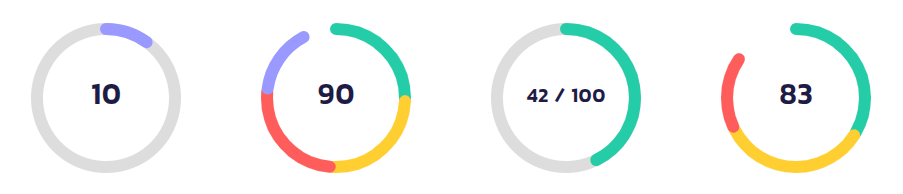
🚀 Installation
Install the package via npm or yarn:
npm install react-multi-segment-circle-progressor
yarn add react-multi-segment-circle-progress🔧 Usage
Import and use the MultiSegmentAuto component in your project:
import React from "react";
import { MultiSegmentAuto } from "react-multi-segment-circle-progress";

const App = () => {
  return (
    <MultiSegmentAuto
      size={150}
      strokeWidth={12}
      totalValue={80}
      maxValue={100}
      segmentsCount={4}
      segmentColors={["#24CCA7", "#FFCE31", "#FF5C5C", "#9999FF"]}
      gap={3}
      label={80}
      showBackgroundCircle
      backgroundCircleColor="#eee"
    />
  );
};

export default App;
🎨 Examples
1️⃣ Basic Usage
<MultiSegmentAuto
  size={120}
  totalValue={60}
  segmentsCount={3}
  segmentColors={["#FF0000", "#00FF00", "#0000FF"]}
/>
2️⃣ With Gaps & Custom Stroke Width
<MultiSegmentAuto
  size={180}
  strokeWidth={15}
  totalValue={90}
  segmentsCount={5}
  gap={5}
  segmentColors={["#FFD700", "#DC143C", "#32CD32", "#1E90FF", "#8A2BE2"]}
/>
3️⃣ With Custom Label
<MultiSegmentAuto
  size={150}
  totalValue={70}
  label={<span style={{ fontSize: "20px", fontWeight: "bold" }}>70%</span>}
/>
4️⃣ With Background Circle
<MultiSegmentAuto
  size={150}
  strokeWidth={12}
  totalValue={42}
  maxValue={100}
  showBackgroundCircle={true}
  backgroundCircleColor="#ddd"
  label={<b>42 / 100</b>}
/>
🎛️ Props
| Prop | Type | Default | Description |
|------|------|---------|-------------|
| size | number | 120 | Diameter of the circle (px) |
| strokeWidth | number | 10 | Thickness of the progress stroke |
| totalValue | number | 80 | The current value of the progress |
| maxValue | number | 100 | The maximum value for progress calculation |
| segmentsCount | number | 4 | Number of segments in the progress circle |
| segmentColors | string[] | [#24CCA7, #FFCE31, #FF5C5C, #9999FF] | Colors for each segment |
| gap | number | 2 | Gap size between segments (px) |
| label | React.ReactNode | "" | Custom label in the center of the circle |
| outerPadding | number | 0 | Padding between SVG boundary and outermost stroke |
| innerPadding | number | 0 | Padding inside the progress ring |
| strokeLinecap | "butt" \| "round" \| "square" | "round" | Shape of segment ends |
| showBackgroundCircle | boolean | false | Show a background track circle |
| backgroundCircleColor | string | "#ddd" | Color of the background track |
| className | string | "" | Custom class for styling |
| style | React.CSSProperties | {} | Inline styles for the SVG |
| onClick | function | undefined | Click event handler |
| onMouseEnter | function | undefined | Mouse enter event handler |
| onMouseLeave | function | undefined | Mouse leave event handler |
📌 Notes
- Ensure
totalValue <= maxValueto avoid unexpected behavior. segmentColorswill cycle through if there are fewer colors than segments.- Use
strokeLinecap="round"for smooth segment ends. - The
labelprop accepts text or JSX elements, so you can pass icons, numbers, or custom designs.
🌎 Links
- GitHub Repository: github.com/react-multi-segment-circle-progress
- NPM Package: npmjs.com/package/react-multi-segment-circle-progress
📜 License
MIT © 2025 ehsanmolaei991