
react-native-api-logger
v1.0.3
Published
A simple API logger for React Native applications
Downloads
20

Maintainers
 atik-shaikh96
Readme
React Native API Logger
A simple, lightweight API logging utility for React Native applications.
🚀 Game-changer for QA teams and developers — easily debug network calls, inspect API responses, and test standalone features without extra setup.
🔍 Preview
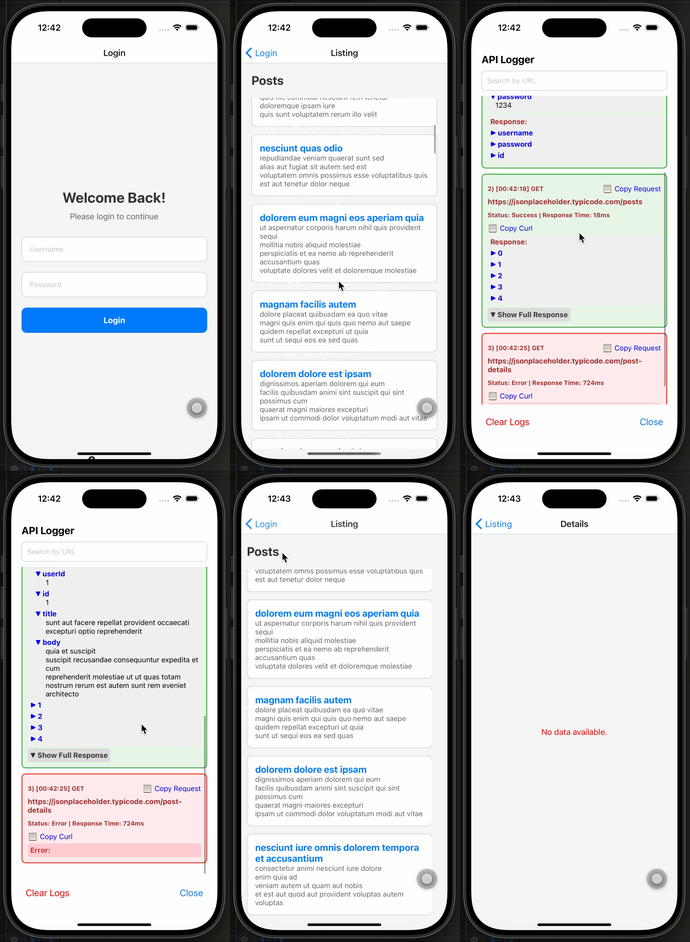
✨ Features
- 🔍 Floating button to view API logs
- 📥 Logs both requests and responses
- 🧠 Search through logged API requests by URL
- 📋 Copy request/response as JSON or cURL
- 🧹 Clear all logs
- ⚙️ Works with default and custom Axios instances
📦 Installation
npm install react-native-api-logger
# or
yarn add react-native-api-logger
🚀 Usage
1️⃣ Setup Axios Interceptors
In your main file (e.g. App.js or App.tsx), set up Axios with the provided interceptor:
import axios from "axios";
import { setupAxiosInterceptors } from "react-native-api-logger";

// Setup default axios instance
setupAxiosInterceptors(axios);

// OR setup a custom axios instance
const api = axios.create({ baseURL: "https://api.example.com" });
setupAxiosInterceptors(api);
2️⃣ Add the Logger UI Component
Place the logger component somewhere in your UI tree (usually at the root level):
import React from "react";
import LoginScreen from "./LoginScreen";
import ReactNativeApiLogger from "react-native-api-logger";

const App = () => {
  return (
    <>
      <LoginScreen />
      <ReactNativeApiLogger />
    </>
  );
};

export default App;
✅ You can safely use it alongside other navigation or UI components like
SafeAreaProvider.
📚 Example
import React, { useEffect } from "react";
import axios from "axios";
import LoginScreen from "./LoginScreen";
import ReactNativeApiLogger, {
  setupAxiosInterceptors,
} from "react-native-api-logger";

const App = () => {
  setupAxiosInterceptors(axios);

  useEffect(() => {
    const fetchData = async () => {
      try {
        await axios.get("https://jsonplaceholder.typicode.com/posts");
      } catch (error) {
        console.error("Error fetching data:", error);
      }
    };
    fetchData();
  }, []);

  return (
    <>
      <LoginScreen />
      <ReactNativeApiLogger />
    </>
  );
};

export default App;
🔗 Dependencies
This package requires the following peer dependencies to be installed in your project:
reactreact-native
Clipboard functionality is handled internally — no need to install @react-native-clipboard/clipboard separately.
📄 License
MIT