
react-native-barcode-android
v1.0.2
Published
A barcode scanner component for react native

Maintainers
 mygu
myguReadme
react-native-barcode-android
A barcode scanner component for React Native Android. For iOS you can use https://github.com/lwansbrough/react-native-camera. The library depends on https://github.com/dm77/barcodescanner and https://github.com/zxing/zxing.
Breaking change
React native 0.19 changed the ReactProps class which led to problems with updating native view properties (see https://github.com/facebook/react-native/issues/5649). These errors are corrected in react-native-barcode-android version 1.0.1. Use version 1.0.1 and larger for react native >=0.19 and for earlier react native versions use version 0.1.4.
Installation
npm i --save react-native-barcode-androidAdd it to your android project
In
android/settings.gradle... include ':ReactNativeBarcodescanner', ':app' project(':ReactNativeBarcodescanner').projectDir = new File(rootProject.projectDir, '../node_modules/react-native-barcode-android/android')In
android/app/build.gradle... dependencies { ... compile project(':ReactNativeBarcodescanner') }register module (in MainActivity.java)
Add the following import statement:
import com.eguma.barcodescanner.BarcodeScanner;...and then add
BarcodeScannerto exported package list (MainActivity.java#getPackages):public class MainActivity extends ReactActivity { // (...) @Override protected List<ReactPackage> getPackages() { return Arrays.<ReactPackage>asList( new MainReactPackage(), new BarcodeScanner() ); } }
Example
import React, {
  AppRegistry,
  Component,
} from 'react-native';
import BarcodeScanner from 'react-native-barcode-android';

class BarcodeScannerExampleApp extends Component {
  constructor(props) {
    super(props);

    this.state = {
      torchMode: 'off',
      cameraType: 'back',
    };
  }

  barcodeReceived(e) {
    console.log('Barcode: ' + e.data);
    console.log('Type: ' + e.type);
  }

  render() {
    return (
      <BarcodeScanner
        onBarCodeRead={this.barcodeReceived}
        style={{ flex: 1 }}
        torchMode={this.state.torchMode}
        cameraType={this.state.cameraType}
      />
    );
  }
}

AppRegistry.registerComponent('BarcodeScannerExampleApp', () => BarcodeScannerExampleApp);
Properties
onBarCodeRead
Will call the specified method when a barcode is detected in the camera's view.
Event contains data (barcode value) and type (barcode type).
The following barcode types can be recognised:
BarcodeFormat.UPC_A
BarcodeFormat.UPC_E
BarcodeFormat.EAN_13
BarcodeFormat.EAN_8
BarcodeFormat.RSS_14
BarcodeFormat.CODE_39
BarcodeFormat.CODE_93
BarcodeFormat.CODE_128
BarcodeFormat.ITF
BarcodeFormat.CODABAR
BarcodeFormat.QR_CODE
BarcodeFormat.DATA_MATRIX
BarcodeFormat.PDF_417
torchMode
Values:
on,
off (default)
Use the torchMode property to specify the camera torch mode.
cameraType
Values:
back (default),
front
Use the cameraType property to specify the camera to use. If you specify the front camera, but the device has no front camera the back camera is used.
Viewfinder properties
The following properties can be used to style the viewfinder:
viewFinderBackgroundColor,
viewFinderBorderColor,
viewFinderBorderWidth,
viewFinderBorderLength,
viewFinderDrawLaser,
viewFinderLaserColor
All color values are strings and must be specified as #AARRGGBB (alpha, red, green, blue). viewFinderBorderWidth and viewFinderBorderLength are numbers, viewFinderDrawLaser is either true or false (default).
For a better overview of the viewfinder see
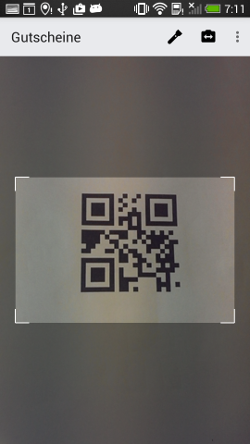 .
.