
react-native-booksnap
v0.2.5
Published
Extract text from a photo of a book page taken on a mobile device (Android, iOS, React Native)

Maintainers
 nhaldimann
Readme
BookSnap
BookSnap reliably extracts text from a photo of a book page taken on a mobile device. It handles the surprising number of problems that come up in the process:
- Detecting page boundaries
- Correcting perspective, skew, rotation
- Text recognition with native platform capabilities
- Assembling paragraphs
- Spell checking and fixing common text recognition problems
- Detecting a page number
The current version of BookSnap has been trained on and optimised for book pages in English, French, German and Italian. It may work for other languages, just not as well.
BookSnap is currently bundled as a React Native (Expo) library, with the core logic implemented natively, separately for Android and iOS. All processing happens on-device, the code makes no use of the network or any backend services.
Installation (React Native)
npx expo install react-native-booksnapRequires Android minSdkVersion 26 or higher (the config plugin sets this automatically).
Usage (React Native)
import { scanPage } from "react-native-booksnap";

const result = await scanPage(photoUri);

console.log(result.text);         // extracted text with paragraph breaks
console.log(result.pageNumber);   // page number if detected
Result
This is the type returned from scanPage:
interface ScanResult {
  /** Clean extracted text with paragraph breaks. */
  text: string;
  /** Bounding box of the body text region in the input image (pixels). */
  textBounds: BoundingBox;
  /** Page number if detected (e.g. from top/bottom margin). */
  pageNumber?: number;
  /** Bounding box of the page number in the original image (pixels). */
  pageNumberBounds?: BoundingBox;
}

interface BoundingBox {
  x: number;
  y: number;
  width: number;
  height: number;
}
Options
The second argument to scanPage is an options dictionary, as in:
const result = await scanPage(photoUri, { spellCheck: false });Supported options:
| Option | Type | Default | Description |
| ------------ | --------- | ------- | ------------------------------ |
| spellCheck | boolean | true | Enable/disable spell correction. You may want to disable this to conserve processing time and memory (as dictionaries may need to be loaded into memory). |
Spell check configuration (Android only)
BookSnap downloads Hunspell dictionaries at Android build time for spell correction. By default, only English is included. To add more languages, configure the Expo plugin in your app.json:
{
  "plugins": [
    ["react-native-booksnap", { "languages": ["en", "fr", "de", "it"] }]
  ]
}
BookSnap has been tested with en, en-GB, fr, de, it but any language code from the wooorm/dictionaries repository can be used.
Note on dictionary licenses: Each dictionary has its own license (e.g. MIT/BSD for English, MPL-2.0 for French, GPL for German and Italian). These dictionaries are downloaded at build time and bundled into your (Android) app. Check the license for each dictionary you include to ensure compliance with your distribution requirements. See the individual dictionary directories for details.
Development
Autoresearch Lab
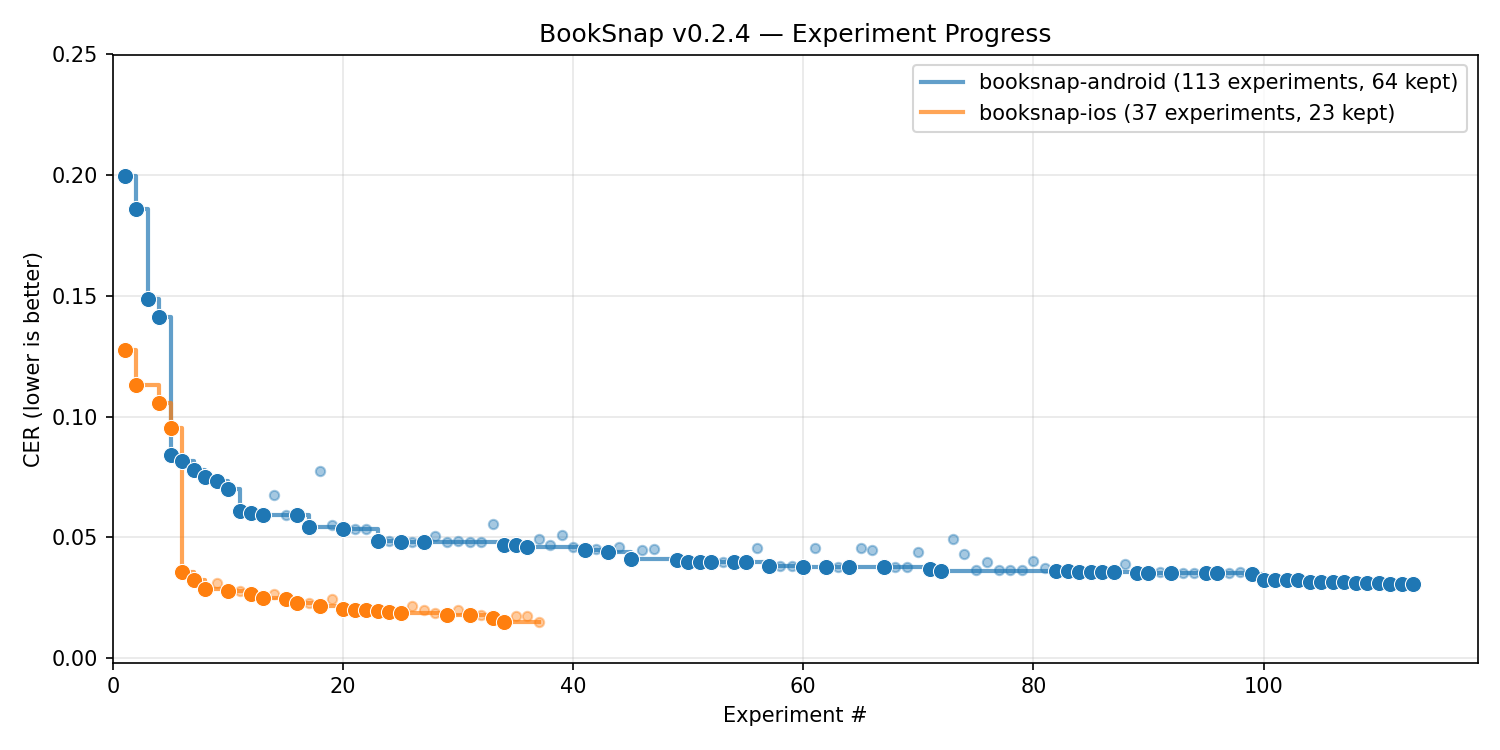
The native text recognition pipelines are developed using Autoresearch Lab. Instead of hand-tuning preprocessing, OCR parameters and postprocessing, AI agents iterate on the pipeline code autonomously, evaluating their progress against a ground truth dataset.
Each platform has its own lab in android/lab/ and ios/lab/. A lab consists of:
- AGENT.md — the agent's instructions: scoring formula, constraints, available libraries, and research directions
- lab.toml — configuration pointing at the pipeline source, backend, and sandbox
- A backend — connects the lab to a platform-specific build and evaluation environment (Android emulator or iOS simulator via a daemon)
- results.tsv - a record of kept and discarded experiments so far
Metrics & quality control
Current experiment progress plot:
Per-sample accuracy reports for each release are published at nikhaldi.github.io/booksnap.
During development you can generate a report yourself when inside a lab:
uv run diff-report --data ../../datasets/booksnap-base --boundsOperating a lab
Prerequisites (yes, there are many):
- Install Node.js and pnpm (package management for the JS part)
- Install uv (package management for the Python-based labs)
- Install Docker (sandboxing the research loop)
- Install an Android SDK (compileSdk 34) and JDK 17 (for Android development)
- Install Xcode (for iOS development - only possible on OS X)
- An Anthropic API key set as environment variable
ANTHROPIC_API_KEY(or on OS X you can pass--use-oauth-osxtoarl runto use credentials from a recent Claude Code session - this is much cheaper than an API key if you are on a Claude Pro or Max plan)
# One-time setup of the development environment
pnpm run setup

# Get the dataset currently used for training in the labs
pnpm run dataset:download booksnap-base 0.2.0

# Switch onto a lab branch and create your own local branch from it
git checkout lab-android
git checkout -b mylab-android

cd android/lab/
# or: cd ios/lab/

# Run evaluation against the training dataset
uv run arl eval --data ../../datasets/booksnap-base

# Generate a report in ./viz/report.html for visual inspection
# and debugging of individual samples
uv run diff-report --data ../../datasets/booksnap-base --bounds

# Kick off a research loop
uv run arl run --data ../../datasets/booksnap-base

# Continue the research loop with a prompt to focus its attention
uv run arl run --data ../../datasets/booksnap-base --prompt "Prioritise improving paragraph hyphentation"
Autoresearch Lab's arl run has a lot of flags that you may care about, e.g., to select an AI model or set stopping conditions for the research loop. Run uv run arl run --help to see them.
Lab branches
Aside from main this repo has 3 significant branches:
lab-base: Starting point for new lab runs. Contains the pipeline scaffolding, test harness, and evaluation infrastructure, but with minimal pipeline logic. Create a branch off of this if you want to run a new research loop from scratch (e.g., with a new dataset or new agent instructions or just because a new AI model came out that may do better (!)). Maintainers will do their best to keep this branch in sync withmain.lab-android: The Android pipeline as developed by the research agent. Each commit is a kept experiment with its score improvements noted in the commit message. There may be human-authored commits interleaved where human intervention was necessary during development.lab-ios: Same as above for the iOS pipeline.
Guidelines for working with branches:
- Only run the research loop on a branch you created yourself off a lab branch (never on
mainor one of the 3 lab branches above) as the loop will create a commit for each successful experiment. - To publish changes developed on your lab branch, create a PR that merges changes into the appropriate lab branch (
lab-androidorlab-ios). Then create a PR that squashes & merges changes from the lab branch ontomain. The commit history on lab branches is preserved as a record of what actually happened during research.
If you're running a research loop off of lab-base to generate something for your own use case, you should probably just fork this repo and live with the fork, rather than trying to get your changes merged back. Forking is perfectly fine!
Tests
# TypeScript unit tests
pnpm test

# Android unit tests (Robolectric)
pnpm run test:android

# iOS unit tests (OS X only)
pnpm run test:ios
Datasets
Datasets are collections of book page photos with ground truth text, used to evaluate the text recognition pipeline.
Each dataset must contain images and a ground_truth.json manifest conforming to datasets/schema.json.
Releasing
See RELEASING.md.
License
BookSnap is distributed under an MIT license.