
react-native-camera-tflite
v0.0.3
Published
A Camera component for React Native. Also reads barcodes.

Maintainers
 ilanetnamar
Readme
Related blog article
For more information, see react-native-camera. All react-native-camera props/features should also work with this.
Real time image classification with React Native
Earlier attempts at Image classification over React Native involved sending image data to the model classifier by sending the image over the bridge or storing the image to disk and accessing the image on the native side. Here's an attempt at live image classification by processing from the camera feed on the native side and getting the output as a byte stream on the JS side using the react-native-camera-tflite library.
Huge shout-out to the people over at react-native-camera. This is essentially just a fork of their awesome work.
Note: This is currently developed only for Android but could be implemented for iOS. (See here for a CoreML implementation on iOS).
To start, let's create an empty react native project:
react-native init mobilenetapp
cd mobilenet-app
Let's add our dependencies:
npm i react-native-camera-tflite
react-native link react-native-camera-tflite
Follow the install instructions (for android. Same as react-native-camera):
- Insert the following lines inside the dependencies block in android/build.gradle:
    ...
    allprojects {
        repositories {
            maven { url "[https://jitpack.io](https://jitpack.io)" }
            maven { url "[https://maven.google.com](https://maven.google.com)" }

    ...
    ...
    ext {
        compileSdkVersion           = 26
        targetSdkVersion            = 26
        buildToolsVersion           = "26.0.2"
        googlePlayServicesVersion   = "12.0.1"
        supportLibVersion           = "27.1.0"
    }
Insert the following lines inside android/app/build.gradle
android { ... aaptOptions { noCompress "tflite" noCompress "lite" } ...
Now let's use the download our model file from here, decompress it, and copy over the mobilenet_v1_1.0_224_quant.tflite file over to our project.
    mkdir -p ./android/app/src/main/assets
    cp mobilenet_v1_1.0_224_quant.tflite ./android/app/src/main/assets
Add this file to your project root directory as Output.json
Replace the content of App.js in your project root directory with the following:
    import React, {Component} from 'react';
    import {StyleSheet, Text, View } from 'react-native';
    import { RNCamera } from 'react-native-camera-tflite';
    import outputs from './Output.json';
    import _ from 'lodash';

    let _currentInstant = 0;

    export default class App extends Component {
      constructor(props) {
        super(props);
        this.state = {
          time: 0,
          output: ""
        };
      }

    processOutput({data}) {
        const probs = _.map(data, item => _.round(item/255.0, 0.02));
        const orderedData = _.chain(data).zip(outputs).orderBy(0, 'desc').map(item => [_.round(item[0]/255.0, 2), item[1]]).value();
        const outputData = _.chain(orderedData).take(3).map(item => `${item[1]}: ${item[0]}`).join('\n').value();
        const time = Date.now() - (_currentInstant || Date.now());
        const output = `Guesses:\n${outputData}\nTime:${time} ms`;
        this.setState(state => ({
          output
        }));
        _currentInstant = Date.now();
      }

      render() {
        const modelParams = {
          file: "mobilenet_v1_1.0_224_quant.tflite",
          inputDimX: 224,
          inputDimY: 224,
          outputDim: 1001,
          freqms: 0
        };
        return (
          <View style={styles.container}>
            <RNCamera
                ref={ref => {
                    this.camera = ref;
                  }}
                style = {styles.preview}
                type={RNCamera.Constants.Type.back}
                flashMode={RNCamera.Constants.FlashMode.on}
                permissionDialogTitle={'Permission to use camera'}
                permissionDialogMessage={'We need your permission to use your camera phone'}
                onModelProcessed={data => this.processOutput(data)}
                modelParams={modelParams}
            >
              <Text style={styles.cameraText}>{this.state.output}</Text>
            </RNCamera>
          </View>
        );
      }
    }

    const styles = StyleSheet.create({
      container: {
        flex: 1,
        flexDirection: 'column',
        backgroundColor: 'black'
      },
      preview: {
        flex: 1,
        justifyContent: 'center',
        alignItems: 'center'
      },
      cameraText: {
        color: 'white',
        fontSize: 18,
        fontWeight: 'bold'
      }
    });
We're done! Run your app with the following command.
react-native run-android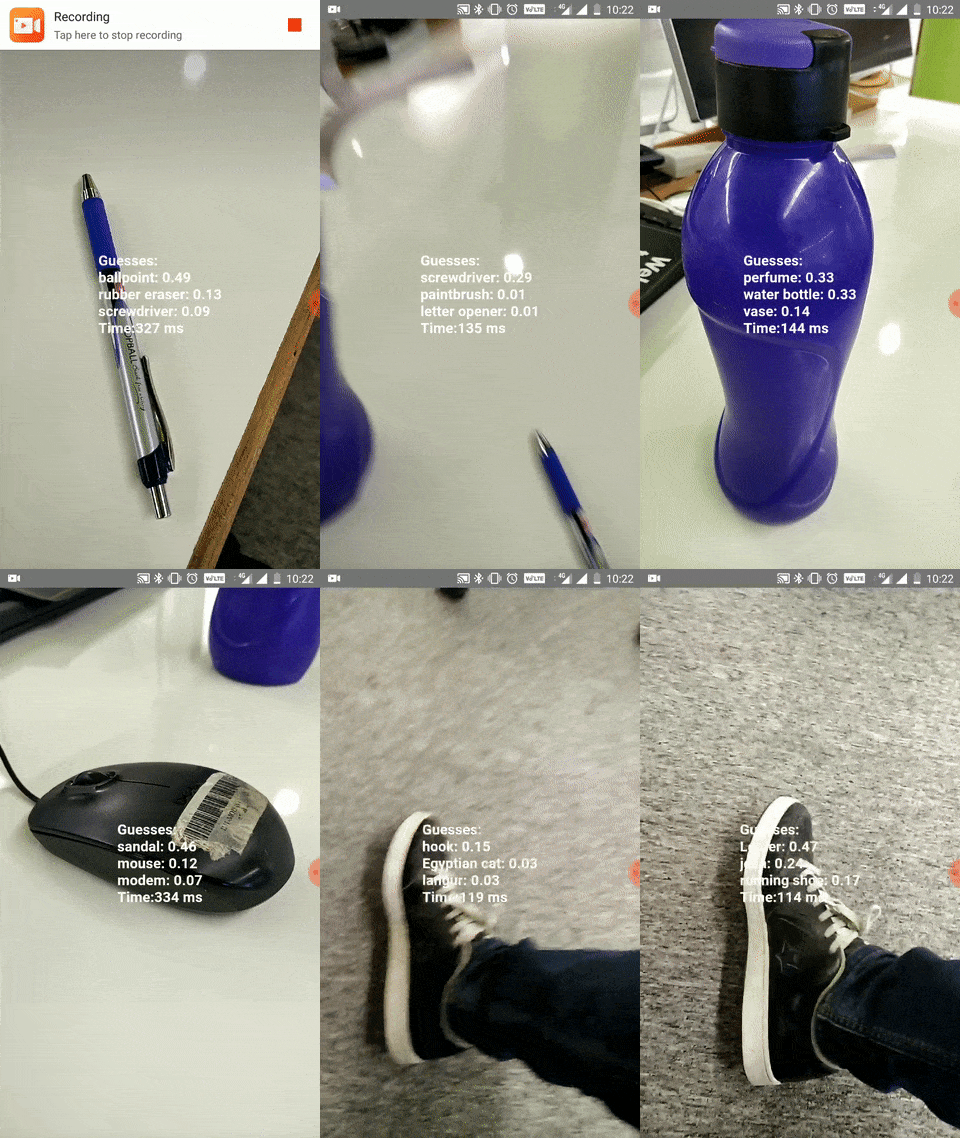 Image Classification FTW!
To convert this to a hotdog not-hotdog app, just replace the processOutput function above with the following:
    processOutput({data}) {
      const isHotDogProb = data[935];
      const isHotDog = isHotDogProb > 0.2 ? "HotDog" : "Not HotDog";
      const time = Date.now() - (_currentInstant || Date.now());
      const output = `${isHotDog}\nTime:${time} ms`;
      this.setState(state => ({
       output
      }));
     _currentInstant = Date.now();
    }
Run your app with the following command.
react-native run-android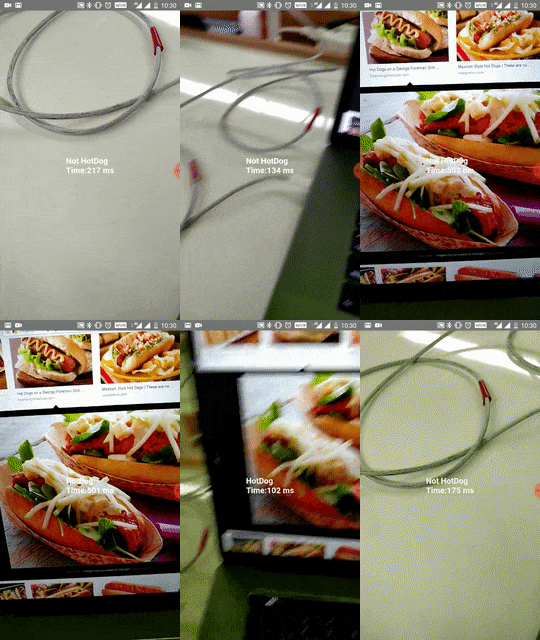 It’s HotDog
Jian Yang would be proud :)
This project has a lot of rough edges. I hope to clean up this up a lot more in the coming days. The rest of the features are the same as react-native-camera.