
react-native-dotgrid
v0.3.2
Published
Animated dot-matrix display component for React Native using Skia, Reanimated, and an optional SVG fallback.
Downloads
515

Maintainers
 tristanmanchester
Readme
react-native-dotgrid

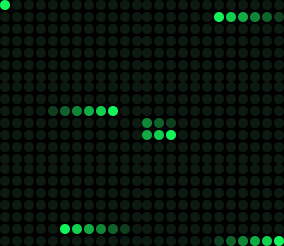
Animated dot-matrix display component for React Native, inspired by ElevenLabs UI Matrix. The default renderer is now a native-first Skia path with a memoized background and worklet-safe Picture foreground, plus an explicit lazy SVG fallback when you need parity or regression comparison.


Features
- Skia by Default - Native-first
Picturerendering with a static background and UI-thread foreground updates - SVG Fallback - Lazy compatibility path available via
renderer="svg" - UI Thread Animations - Smooth 60fps animations via Reanimated
- VU Meter Mode - Real-time audio visualization support
- Customizable - Full control over colors, sizing, and timing
- Pre-built Presets - Wave, loader, pulse, snake, ripple animations
- Cross-Platform - iOS, Android, and Web support
- Accessible - Screen reader support with ARIA labels
Showcase
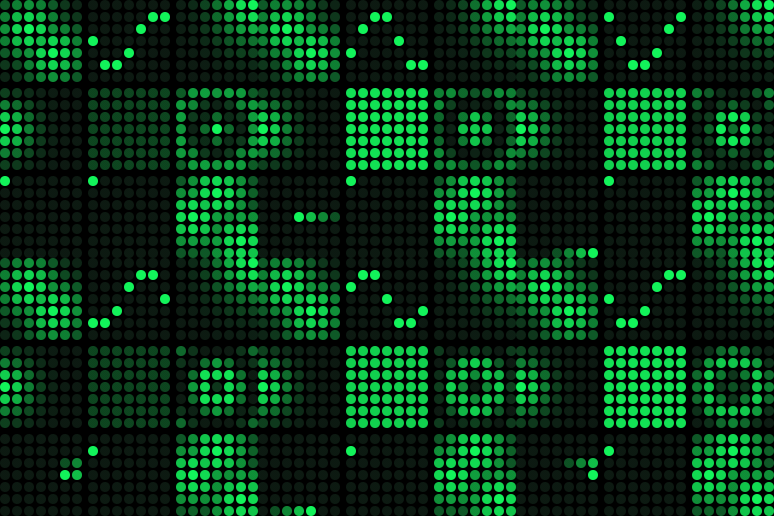
Multiple patterns and animations running simultaneously.
Installation
npm install react-native-dotgrid @shopify/react-native-skia react-native-reanimated react-native-workletsIf you want the compatibility renderer as well:
npm install react-native-svgConfiguration
Install Reanimated and Skia with your platform tooling so versions stay compatible with your app. For Expo projects:
npx expo install @shopify/react-native-skia react-native-reanimated react-native-workletsIf your app still requires manual Reanimated Babel setup, keep the plugin last:
// babel.config.js
module.exports = {
  presets: ['module:@react-native/babel-preset'],
  plugins: [
    // ... other plugins
    'react-native-reanimated/plugin' // ← Must be last
  ]
};
For Expo projects, see example/babel.config.js for a working setup.
For web, Skia requires CanvasKit setup. Follow the official React Native Skia web instructions.
Quick Start
import React from 'react';
import { View } from 'react-native';
import { Matrix, waveFrames, digits } from 'react-native-dotgrid';

export default function App() {
  return (
    <View style={{ flex: 1, alignItems: 'center', justifyContent: 'center' }}>
      {/* Static digit */}
      <Matrix rows={7} cols={5} pattern={digits[5]} />

      {/* Animated wave */}
      <Matrix rows={7} cols={7} frames={waveFrames} fps={20} loop />

      {/* Force the SVG fallback if needed */}
      <Matrix rows={7} cols={7} frames={waveFrames} fps={20} loop renderer="svg" />
    </View>
  );
}
Usage Examples
Static Patterns
Display a single static pattern:
import { Matrix, digits, chevronLeft } from 'react-native-dotgrid';

// Display number 5
<Matrix rows={7} cols={5} pattern={digits[5]} />

// Direction indicator
<Matrix rows={7} cols={7} pattern={chevronLeft()} />
Animated Presets
Use pre-generated animations for common patterns:
import { Matrix, waveFrames, loaderFrames, snakeFrames } from 'react-native-dotgrid';

// Wave animation
<Matrix rows={7} cols={7} frames={waveFrames} fps={20} loop />

// Loading spinner
<Matrix rows={7} cols={12} frames={loaderFrames} fps={18} loop />

// Snake with fading tail
<Matrix rows={7} cols={12} frames={snakeFrames} fps={20} loop />
Dynamic Generation
Generate patterns with custom dimensions:
import { Matrix, generateWaveFrames, pulse, ripple } from 'react-native-dotgrid';

// Custom wave size
const customWave = generateWaveFrames(10, 10, { length: 30 });
<Matrix rows={10} cols={10} frames={customWave} fps={20} loop />

// Pulse effect
<Matrix rows={8} cols={8} frames={pulse(8, 8, 16)} fps={16} loop />

// Ripple effect with options
const rippleFrames = ripple(9, 9, {
  length: 48,
  wavelength: 3.5,
  damping: 0.06
});
<Matrix rows={9} cols={9} frames={rippleFrames} fps={24} loop />
VU Meter Mode
Create audio visualizations with real-time level updates:
import { Matrix } from 'react-native-dotgrid';
import { useEffect, useState } from 'react';

function AudioVisualizer() {
  const [levels, setLevels] = useState(Array(12).fill(0));

  useEffect(() => {
    // Update levels from audio input
    const interval = setInterval(() => {
      setLevels(Array.from({ length: 12 }, () => Math.random()));
    }, 80);
    return () => clearInterval(interval);
  }, []);

  return (
    <Matrix
      rows={7}
      cols={12}
      mode="vu"
      levels={levels}
      palette={{
        on: '#00ff00',
        off: '#003300',
        background: '#000'
      }}
    />
  );
}
Static VU Pattern
Create static VU meter displays using the vu() helper:
import { Matrix, vu } from 'react-native-dotgrid';

// Display static levels
const levels = [0.2, 0.5, 0.8, 1.0, 0.7, 0.4, 0.1];
<Matrix rows={7} cols={7} pattern={vu(7, levels)} />
Custom Styling
Customize colors, sizing, and spacing:
<Matrix
  rows={7}
  cols={7}
  frames={waveFrames}
  renderer="skia"    // Default renderer
  size={12}          // Dot diameter in pixels
  gap={3}            // Space between dots
  brightness={0.8}   // Global brightness multiplier
  palette={{
    on: '#00ffff',   // Active dot color
    off: '#001122',  // Inactive dot color
    background: 'transparent'
  }}
  fps={30}
  loop
/>
API Reference
Matrix Component Props
| Prop | Type | Default | Description |
| ---- | ---- | ------- | ----------- |
| rows | number | required | Number of rows in the grid |
| cols | number | required | Number of columns in the grid |
| renderer | 'skia' \| 'svg' | 'skia' | Rendering backend |
| pattern | Frame | - | Single frame to display (static) |
| frames | Frame[] | - | Array of frames for animation |
| fps | number | 12 | Animation frames per second |
| autoplay | boolean | true | Start animation on mount |
| loop | boolean | true | Loop animation continuously |
| paused | boolean | false | Pause or resume animation |
| size | number | 10 | Dot diameter in pixels |
| gap | number | 2 | Space between dots in pixels |
| palette | Palette | See below | Color configuration |
| brightness | number | 1 | Global brightness from 0 to 1 |
| mode | 'default' \| 'vu' | 'default' | Rendering mode |
| levels | number[] | - | VU meter levels from 0 to 1 per column |
| onFrame | (index: number) => void | - | Frame change callback |
| accessibilityLabel | string | - | Screen reader label |
Types
type Frame = number[][];  // 2D array, values 0-1 (brightness)

type Palette = {
  on: string;         // Active dot color
  off: string;        // Inactive dot color
  background?: string; // Optional background
};
Pre-generated Constants
All pre-generated at 7×7 dimensions for consistency:
digits- Array of 10 digit patterns (0-9), each 7×5waveFrames- 24-frame sine wave animationloaderFrames- Perimeter loading spinnerpulseFrames- 16-frame global brightness pulsesnakeFrames- 49-frame snake with fading tailrippleFrames- 24-frame concentric ripple effectchevronLeftFrame- Static left arrowchevronRightFrame- Static right arrow
Generator Functions
Create patterns at any dimensions:
// Animations
generateWaveFrames(rows, cols, options?)
generateLoaderFrames(rows, cols)
generatePulseFrames(rows, cols, frameCount?)
generateSnakeFrames(rows, cols, tailLength?)
generateRippleFrames(rows, cols, options?)

// Static patterns
chevronLeft(rows?, cols?)
chevronRight(rows?, cols?)
vu(cols, levels)
empty(rows, cols)

// Convenience aliases
wave(rows, cols)     // → generateWaveFrames
loader(rows, cols)   // → generateLoaderFrames
pulse(rows, cols)    // → generatePulseFrames
snake(rows, cols)    // → generateSnakeFrames
ripple(rows, cols)   // → generateRippleFrames
Performance
- Compiled Frames - Frame data is flattened once per prop change before hitting the hot path
- UI Thread Driver - Animation stepping stays on the UI thread via Reanimated/worklets
- Skia
PicturePath - The shipping renderer keeps geometry stable and redraws the active foreground on the UI thread - Lazy SVG Compatibility Path -
renderer="svg"stays available for parity checks without affecting Skia startup
Web Support
This library works on web via react-native-web. The default Skia renderer requires CanvasKit on web. For Expo web:
// app.json
{
  "expo": {
    "web": {
      "bundler": "metro"
    }
  }
}
Demo Generation
Generate the GIF/WebP animations seen in this README:
npm run generate:demosThis creates optimized GIF and WebP animations in the demos/ directory using the actual frame data from the presets. You can generate specific formats using --gif or --webp flags.
Acknowledgments
This library is inspired by the Matrix component from ElevenLabs UI, reimagined for React Native with cross-platform support and additional animation capabilities.
Contributing
Contributions are welcome. In this repository, install dependencies from the workspace root so the package and Expo example share one dependency graph during development.
License
MIT © Tristan Manchester
Made with love for the React Native community.