
react-native-fields-form
v1.1.6
Published
react native render fields form
Downloads
30

Maintainers
 nguyenphi990
Keywords
Readme
react-native-fields-form


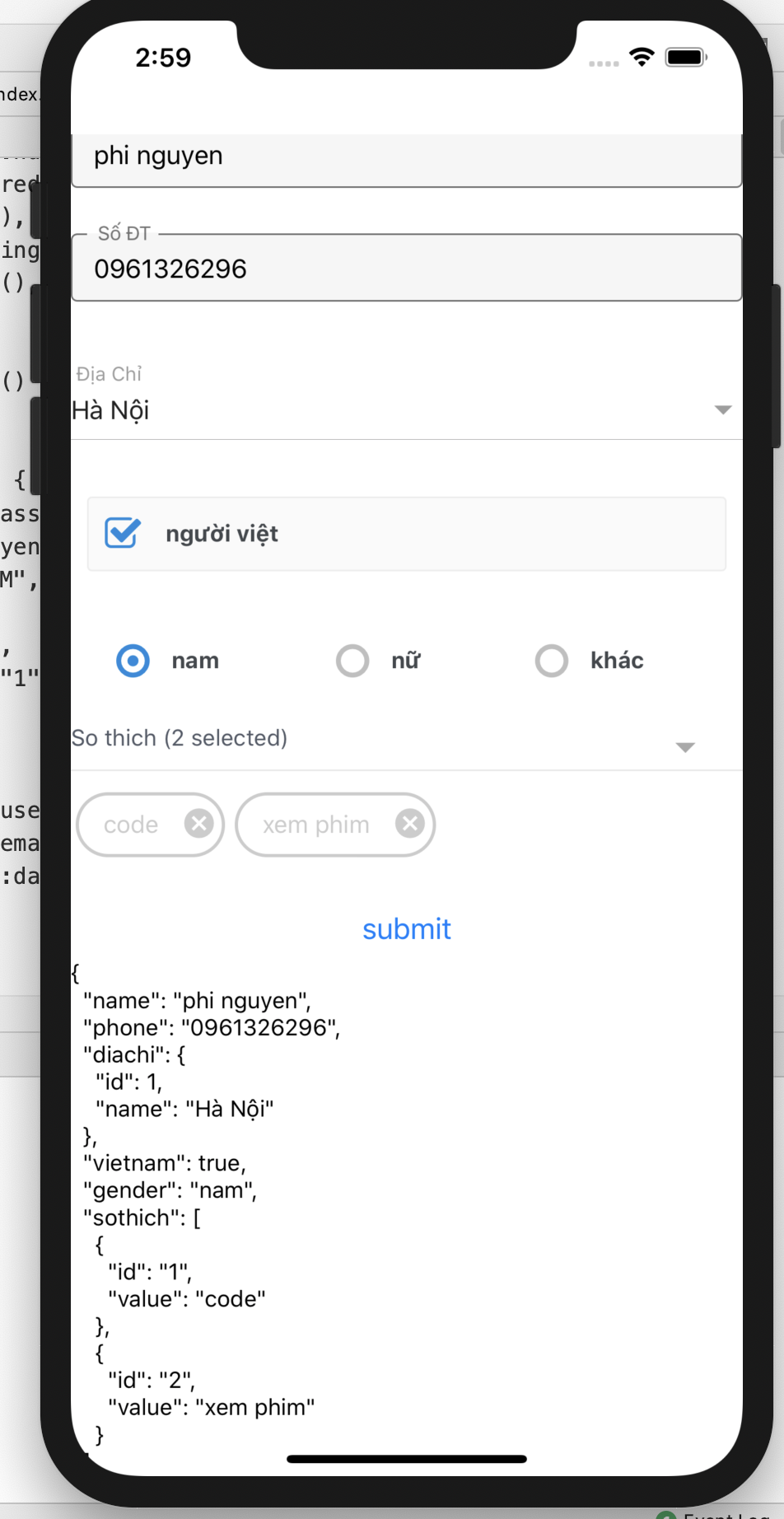
Install
npm install --save react-native-fields-form
or
yarn add react-native-fields-form
Usage
import {renderFields} from 'react-native-fields-form'
renderFields(settings, methods)
settings: {fieldName: attributes}:
fieldName (string): Tên của trường.
attributes (object): thuộc tính của trường (extends tất cả thuộc tính của react-native-paper )
methods:
các methods của useForm // xem ví dụ bên dưới
export default function App() {
    const [data, setData] = useState(null)
    const [diachi, setDiaChi] = useState('')
    const validator = yup.object().shape({
        name: yup.string()
            .required("bắt buộc nhập ")
            .min(6, "tối thiểu 6 ký tự"),
        // diachi: yup
        //     .string()
        //     .required(),
        // phone: yup.number()
            // .required()
            // .min(9),
        // gender: yup.string()
        //     .required(),
        // sothich:yup
        //     .array()
        //     .required()

    })
    const dataProps = {
        email:"[email protected]",
        name:"phi nguyen",
        diachi:{value:3},
        vietnam:true,
        // male:"nam",
        // sothich:[{id:"1",value:'code'}]
    }


    const medthods = useForm({
        validationSchema: validator,
        defaultValues:dataProps

    })


    const fields = {
        "name": {label: " Họ và Tên ",
            onChangeValue : value =>console.log(value)
        },
        "phone":{label:" Số ĐT",},
        "diachi":{ label: " Địa Chỉ " ,values:[{value:1,label:"Hà Nội" }, {value:2,label:"HCM"}, {value:3,label: "Thanh Hoa"}] , isSelectBox:true ,
            displayKey:"label" , // default : label,
            valueKey:'value' , //default ": value,
            value:diachi,
            onChangeValue : value =>setDiaChi(value)
        },
        "vietnam":{isCheckBox:true, title : " người việt " ,
        },
        "gender":{isRadio: true, values:['nam', "nữ","khác"],
            flexDirection:'row'
        },
        sothich:{isMultipleSelect:true,
            selectText: "So thich" , // default : "Pick Items"
            values:[{id:"1", value:'code'},{id:"2",value:'xem phim'},{id:"3",value:'doc sach'}],
            displayKey:"value" , // default : value
            uniqueKey:"id" // default : id,

        }
    }

    const onSubmit = data => {
        console.log(data)
        setData(data)
    }

    return (
        <View style={styles.container}>

            <ScrollView style={{
                // flex:1
            }}>
                {renderFields(fields, medthods)}
                <Button onPress={medthods.handleSubmit(onSubmit)} title={'submit'}/>
                <View>
                    <Text>
                        {data ? JSON.stringify(data, null, 2) : null}
                    </Text>
                </View>
            </ScrollView>
        </View>
    );
}

const styles = StyleSheet.create({
    container: {
        marginTop: 70,
        // flex:1
    },
});
API
- isSelectBox (bool):
render box lựa chọn các giá trị của trường values- labelExtractor : func args (item) : ({ label }) => label
- valueExtractor : func args (item) : ({ value }) => value
- isCheckBox (bool):
render check box - isRaido (bool) :
render radio group các giá trị của trường values - isMultipleSelect :
render box lựa chọn các giá trị trong trường values với nhiều lựa chon
Xem thêm react-hook-form tại https://github.com/react-hook-form/react-hook-form
License
MIT