
react-native-gifted-chat-txm
v0.1.5
Published
The most complete chat UI for React Native

Maintainers
 al3xand3r
Readme
Gifted Chat
The most complete chat UI for React Native (formerly known as Gifted Messenger)

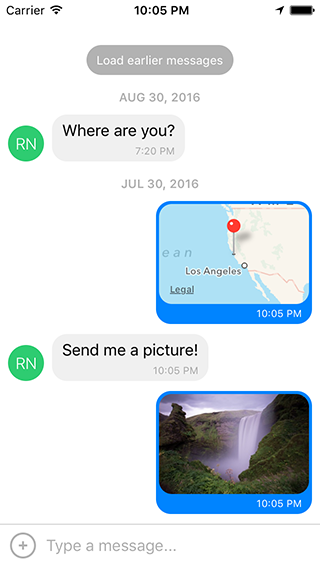
Dependency
Use 0.0.10 for RN < 0.40.0
Use 0.1.0 for RN >= 0.40.0
Installation
npm install react-native-gifted-chat --save
Android installation
- Add
android:windowSoftInputMode="adjustResize"to your Android Manifestandroid/app/src/main/AndroidManifest.xml
<!-- ... -->
<activity
  android:name=".MainActivity"
  android:label="@string/app_name"
  android:windowSoftInputMode="adjustResize"
  android:configChanges="keyboard|keyboardHidden|orientation|screenSize">
<!-- ... -->- If you plan to use
GiftedChatinside aModal, see #200
Example
import { GiftedChat } from 'react-native-gifted-chat';

class Example extends React.Component {
  constructor(props) {
    super(props);
    this.state = {messages: []};
    this.onSend = this.onSend.bind(this);
  }
  componentWillMount() {
    this.setState({
      messages: [
        {
          _id: 1,
          text: 'Hello developer',
          createdAt: new Date(Date.UTC(2016, 7, 30, 17, 20, 0)),
          user: {
            _id: 2,
            name: 'React Native',
            avatar: 'https://facebook.github.io/react/img/logo_og.png',
          },
        },
      ],
    });
  }
  onSend(messages = []) {
    this.setState((previousState) => {
      return {
        messages: GiftedChat.append(previousState.messages, messages),
      };
    });
  }
  render() {
    return (
      <GiftedChat
        messages={this.state.messages}
        onSend={this.onSend}
        user={{
          _id: 1,
        }}
      />
    );
  }
}
Advanced example
See example/App.js
Message object
{
  _id: 1,
  text: 'My message',
  createdAt: new Date(Date.UTC(2016, 5, 11, 17, 20, 0)),
  user: {
    _id: 2,
    name: 'React Native',
    avatar: 'https://facebook.github.io/react/img/logo_og.png',
  },
  image: 'https://facebook.github.io/react/img/logo_og.png',
  // additional custom parameters
}
Props
messages(Array) - messages to displaymessageIdGenerator(Function) - generate id for new message. By default is a UUID v4 generated by uuid.user(Object) - user sending the messages{_id, name, avatar}onSend(Function) - function to call when sending a messagelocale(String) - localize the datesisAnimated(Bool) - animates the view when the keyboard appearsloadEarlier(Bool) - enables the load earlier message buttononLoadEarlier(Function) - function to call when loading earlier messagesisLoadingEarlier(Bool) - display an ActivityIndicator when loading earlier messagesrenderLoading(Function) - render a loading view when initializingrenderLoadEarlier(Function) - render the load earlier buttonrenderAvatar(Function) - renders the message avatar. Set tonullto not render any avatar for the messageonPressAvatar(Function(user)) - callback when a message avatar is tappedrenderAvatarOnTop(Bool) - render the message avatar, on top of consecutive messages. The default value isfalse.renderBubble(Function) - render the message bubbleonLongPress(Function(context,message)) - callback when a message bubble is long-pressed (default is to show action sheet with "Copy Text"). See code for example usingcontext.actionSheet().showActionSheetWithOptions().renderMessage(Function) - render the message containerrenderMessageText(Function) - render the message textrenderMessageImage(Function) - render the message imageimageProps(Object) - extra props to be passed to the<Image>component created by the defaultrenderMessageImagelightboxProps(Object) - extra props to be passed to the MessageImage's LightboxrenderCustomView(Function) - render a custom view inside the bubblerenderDay(Function) - render the day above a messagerenderTime(Function) - render the message timerenderFooter(Function) - renders a fixed bottom view. Can be used for 'is typing message', see example/App.jsrenderInputToolbar(Function) - render the composer containerrenderActions(Function) - renders an action button on the left of the message composerrenderComposer(Function) - render the text input message composerrenderSend(Function) - render the send buttonrenderAccessory(Function) - renders a second line of actions below the message composeronPressActionButton(Function) - callback to perform custom logic when the Action button is pressed (the defaultactionSheetwill not be used)bottomOffset(Integer) - distance of the chat from the bottom of the screen, useful if you display a tab barminInputToolbarHeight(Integer) - minimum height of the input toolbar. The default value is44.listViewProps(Object) - extra props to be passed to the<ListView>, some props can not be override, see the code inrendermethod ofMessageContainerfor detailkeyboardShouldPersistTaps(Enum) - determines when the keyboard should stay visible after a tap<ScrollView>onInputTextChanged(Function) - function that will be called when input text changesmaxInputLength(Integer) - max Composer TextInput length
Features
- Custom components
- InputToolbar avoiding keyboard
- Multiline TextInput
- Load earlier messages
- Avatar as initials
- Touchable links using react-native-parsed-text
- Localized dates
- Copy text messages to clipboard
License
Feel free to ask me questions on Twitter @FaridSafi !