
react-native-ios-controls
v0.1.0
Published
Control Center, Lock Screen and Action Button controls for React Native — iOS 18 ControlWidget bridged with state sync, press handling and a setup CLI

Maintainers
 paulnguyen98
Readme
react-native-ios-controls



Control Center, Lock Screen and Action Button controls for React Native — the iOS 18
ControlWidget, driven from JavaScript.
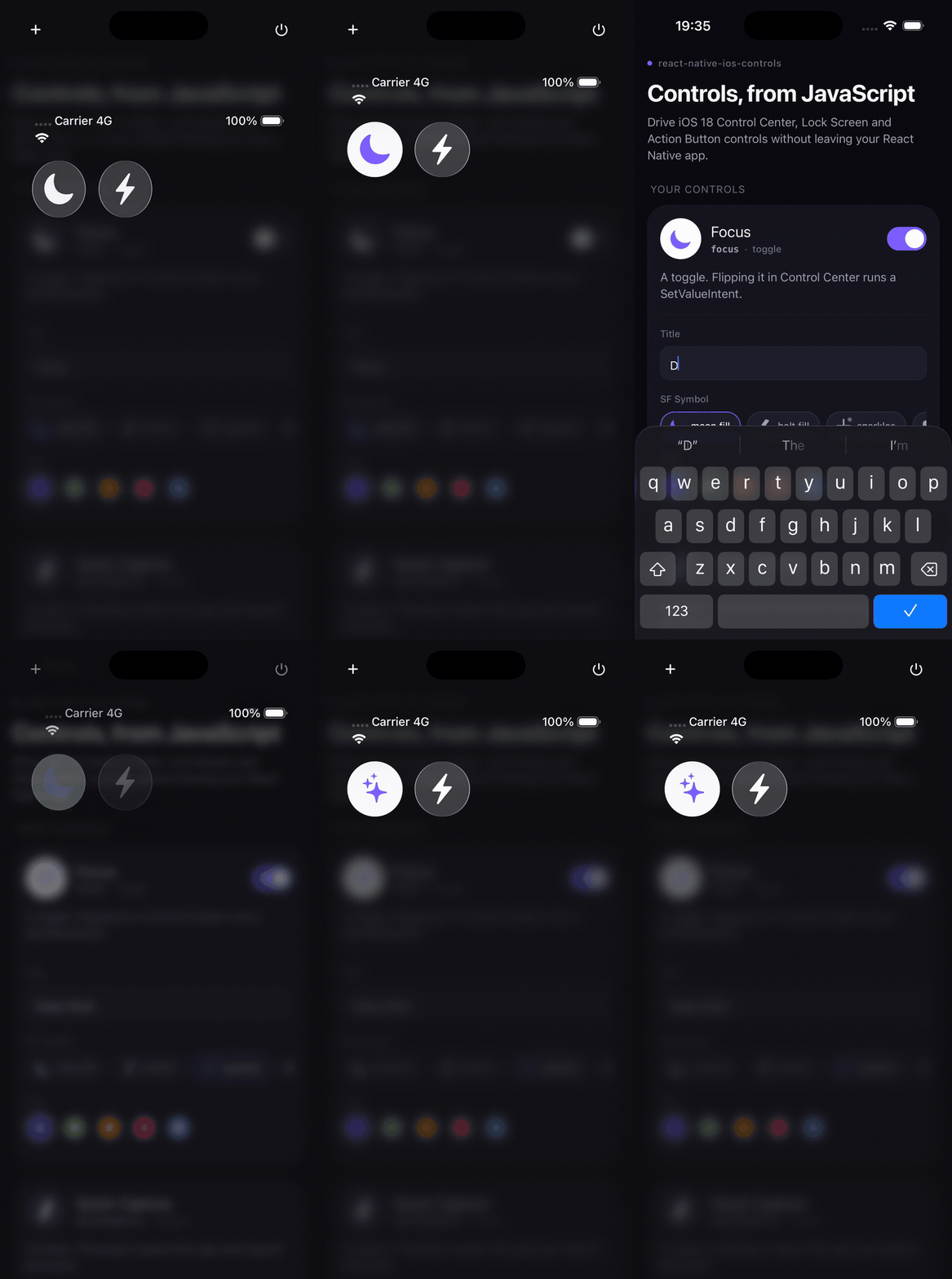
Why
iOS 18 let every app put a button or a toggle in Control Center, on the Lock Screen, and behind the Action Button. It is the shortest path that exists between a user and one action in your app — no unlock, no app switch, no navigation.
There was no React Native or Expo package for it. Controls are declared in Swift inside a widget extension, so an RN team had to write WidgetKit code, hand-roll an App Group bridge, and add an Xcode target by hand before shipping a single button.
This library keeps the parts that genuinely must be Swift as a small drop-in you do not have to write, and moves everything that changes at runtime — a control's title, symbol, tint and value, plus the events it emits — into JavaScript.
await configure({ appGroup: 'group.com.acme.app' });

await setControlState('focus', { title: 'Deep Work', sfSymbol: 'moon.fill', value: true });
await reloadControls('focus');

addControlEventListener((event) => {
  console.log(event.kind, event.action, event.value);
});
Requirements
| | | | --- | --- | | iOS | 18.0+ for controls; the package itself installs on any supported iOS version | | React Native | New Architecture (TurboModules) | | Xcode | 16+ | | Android | Installs and runs, every call is a no-op |
Installation
npm install react-native-ios-controls
cd ios && pod install
Then run the setup step below — a control cannot exist without a widget extension.
Setup
This is the part that matters. Controls live in a widget extension target, which your React Native app does not have yet. One command adds it:
npx react-native-ios-controls initRun it from your app root. It will:
- create a
ControlsExtensiontarget with acom.apple.widgetkit-extensionInfo.plist - write entitlements for both the app and the extension containing the App Group
- copy the library's Swift sources onto the right targets
- back up
project.pbxprojfirst, and refuse to run a second time
Then cd ios && pod install, and call configure once on app start:
import { configure } from 'react-native-ios-controls';

await configure({ appGroup: 'group.com.acme.app' });
The App Group defaults to group.<your app bundle id>. Pass --app-group to choose
another, --name to rename the target, and --dry-run to preview every change.
Prefer to do it by hand, or have an unusual project layout? docs/setup.md
has the manual steps, and example/ is a complete working integration.
Ship-blocking detail: the generated
RNControlsShared.swiftbelongs to both targets. AnAppIntentthat opens your app must exist in the app binary too — otherwise iOS rejects the press with "openAppWhenRun is not supported in extensions" and the button silently does nothing. The CLI sets this up correctly; if you wire it manually, do not skip it.
Declaring controls
init writes a Controls.swift you own. Add a control by declaring one struct and
listing it in the bundle — everything else comes from the App Group at runtime:
@available(iOS 18.0, *)
struct FocusControl: ControlWidget {
  var body: some ControlWidgetConfiguration {
    rnToggleControl(
      kind: "focus",
      displayName: "Focus",
      description: "Turn Focus on or off.",
      defaultState: RNControlState(value: false, title: "Focus", sfSymbol: "moon.fill")
    )
  }
}
Three templates ship with the package:
| Helper | Control | Press behaviour |
| --- | --- | --- |
| rnToggleControl | toggle | runs a SetValueIntent, emits toggle |
| rnButtonControl | button | opens your app, emits press |
| rnSilentButtonControl | button | emits press, app stays closed |
There is no cap on how many controls you declare. kind is the only contract between
Swift and JavaScript.
Quick start
import { useEffect, useState } from 'react';
import { Text } from 'react-native';
import {
  addControlEventListener,
  configure,
  getControlState,
  reloadControls,
  setControlState,
  type ControlEvent,
} from 'react-native-ios-controls';

export function FocusPanel() {
  const [events, setEvents] = useState<ControlEvent[]>([]);

  useEffect(() => {
    const subscription = addControlEventListener((event) => {
      setEvents((previous) => [event, ...previous]);
    });
    configure({ appGroup: 'group.com.acme.app' });
    return () => subscription.remove();
  }, []);

  async function goDeep() {
    await setControlState('focus', {
      value: true,
      title: 'Deep Work',
      sfSymbol: 'moon.stars.fill',
      tint: '#7C5CFF',
    });
    await reloadControls('focus');
    const state = await getControlState('focus');
    console.log(state?.title);
  }

  return <Text onPress={goDeep}>{events.length} control events</Text>;
}
API
| Export | Signature | Notes |
| --- | --- | --- |
| configure | (options: ConfigureOptions) => Promise<void> | Call once on start. Throws if appGroup is missing or not group.-prefixed. |
| setControlState | (kind: string, state: ControlState) => Promise<void> | Merges into stored state; omitted fields keep their value. |
| getControlState | (kind: string) => Promise<ControlState \| null> | null if the control was never written. |
| reloadControls | (kind?: string) => Promise<void> | Omit kind to reload every control. |
| getInitialControlEvent | () => Promise<ControlEvent \| null> | The press that launched the app, or null. Clears once read. |
| addControlEventListener | (cb: (e: ControlEvent) => void) => EventSubscription | Replays events buffered before the first listener attached. |
| refreshControlEvents | () => Promise<void> | Drains the queue now instead of on next foreground. |
| isSupported | boolean | false on Android and iOS < 18. |
type ConfigureOptions = { appGroup: string };

type ControlState = {
  value?: boolean;
  title?: string;
  subtitle?: string;
  sfSymbol?: string;
  tint?: string; // #RGB, #RRGGBB or #RRGGBBAA
};

type ControlEvent = {
  kind: string;
  action: 'press' | 'toggle';
  value?: boolean;
  id: string;
  timestamp: number;
};
Full reference: docs/API.md.
How it works
Your app and the widget extension are separate processes that share one App Group container. Everything crosses through it as JSON.
flowchart LR
subgraph app["Your app"]
JS["JavaScript<br/>react-native-ios-controls"]
TM["TurboModule<br/>RNIosControlsStore"]
JS <--> TM
end
subgraph group["App Group UserDefaults"]
S["rnic.state.<kind>"]
Q["rnic.events"]
L["rnic.launchEvent"]
end
subgraph ext["ControlsExtension"]
W["ControlWidget<br/>+ ControlValueProvider"]
I["AppIntents"]
end
TM -->|"setControlState"| S
S -->|"render"| W
TM -->|"reloadControls"| CC["ControlCenter.shared"]
CC -->|"re-render"| W
I -->|"record press / toggle"| Q
I -->|"opening press"| L
Q -->|"drain on foreground"| TM
L -->|"getInitialControlEvent"| TMEvents reach your app in two ways, both through the App Group queue:
- App running or foregrounded again — the queue drains when the app becomes active, which includes dismissing Control Center over it. Listeners fire then.
- App launched by a press — a
rnButtonControlpress opens the app and also records the event as the launch event, reported bygetInitialControlEvent(). The same event is delivered to listeners; de-duplicate onevent.idif you consume both.
More detail: docs/how-controls-work.md.
Platform matrix
| | Controls render | Events delivered | Calls resolve | | --- | --- | --- | --- | | iOS 18+ | yes | yes | yes | | iOS 15–17 | no | no | yes, as no-ops | | Android | no | no | yes, as no-ops |
getControlState resolves to null and listeners never fire on unsupported
platforms, so you can call the API unconditionally and branch on isSupported only
where it changes your UI.
Limitations
Worth reading before you plan around this library.
- Controls are declared statically in Swift. WidgetKit discovers them at install
time from the extension binary. You can restyle a control at runtime and change its
value, but you cannot create a new
kindfrom JavaScript, and a control that is not inControls.swiftcannot appear in the gallery. - A widget extension target is mandatory. There is no way to host a
ControlWidgetinside the app binary. That is why this package ships a CLI. reloadControlsis a request, not a command. WidgetKit coalesces and budgets reloads; a burst of calls will not produce a burst of re-renders. Batch your state writes and reload once.- Events are not real-time push. A toggle flipped while your app is suspended sits in the App Group queue until the app is active again. The queue holds the 32 most recent events; older ones are dropped.
- iOS 18.0+ only, and controls need Xcode 16 to build.
- The App Group must be identical in the app entitlements, the extension
entitlements,
RNControlsConfig.swift, and yourconfigure()call. Three of the four are generated together; the fourth is yours. - On a real device the App Group must exist in your Apple Developer account and be enabled on both bundle IDs. The Simulator does not enforce this.
Troubleshooting
The control does not appear in the Add a Control gallery.
Build and run once, then look under your app's name in the gallery. If it is still
missing, the extension target probably is not embedded — check that the app target has
an "Embed Foundation Extensions" phase containing ControlsExtension.appex.
The control renders as a blank circle.
The extension cannot read the App Group. On the Simulator this is almost always a
build with CODE_SIGNING_ALLOWED=NO, which strips entitlements — the group silently
falls back to a private, unshared store. Build with normal simulator signing.
Pressing a button control does nothing, and the log says "openAppWhenRun is not
supported in extensions".
RNControlsShared.swift is not a member of your app target. Add it there as well.
configure rejects with E_APP_GROUP_UNAVAILABLE.
The identifier does not match the entitlements, or the entitlements are not applied.
Confirm with xcrun simctl get_app_container <udid> <bundle id> groups.
State changes do not show up in Control Center.
Call reloadControls() after writing, and remember WidgetKit may coalesce reloads.
Contributing
See CONTRIBUTING.md. The example/ app is the integration test —
run it on an iOS 18+ simulator and add the controls to Control Center.
License
MIT © Bao Nguyen