
react-native-money-field
v0.1.0
Published
Locale-aware money and number input for React Native, with a precision-safe value model and a significant-character caret that never jumps on mid-string edits.

Maintainers
 nadeem.iqbal
Readme
react-native-money-field
Locale-aware money and number input for React Native, with a precision-safe value model and a significant-character caret that never jumps while you type.
It probes the platform's own Intl data, so grouping, decimal marks, localized digit glyphs (Arabic-Indic, Indian lakh grouping, and so on), and currency symbol placement all come straight from the locale. No bundled locale tables, and no native modules to link: it is pure TypeScript.
| iOS | Android |
| --- | --- |
| 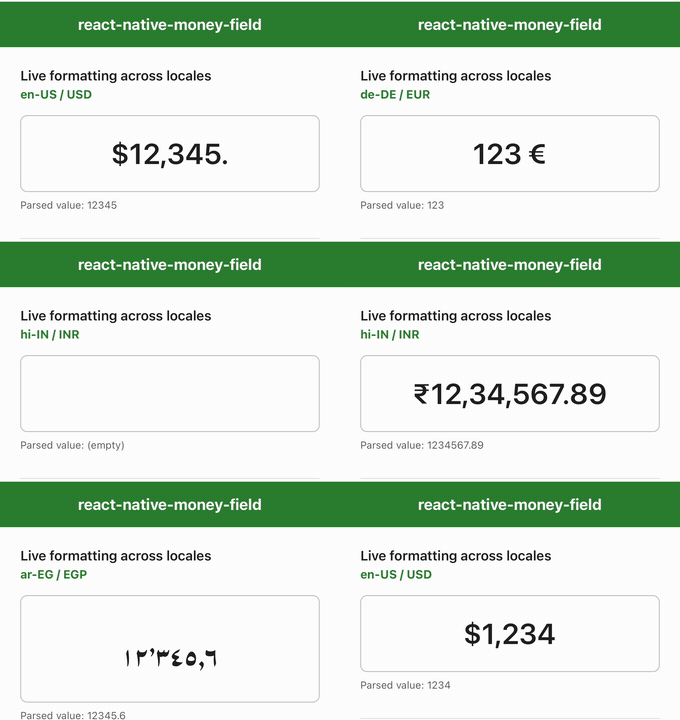 |
| 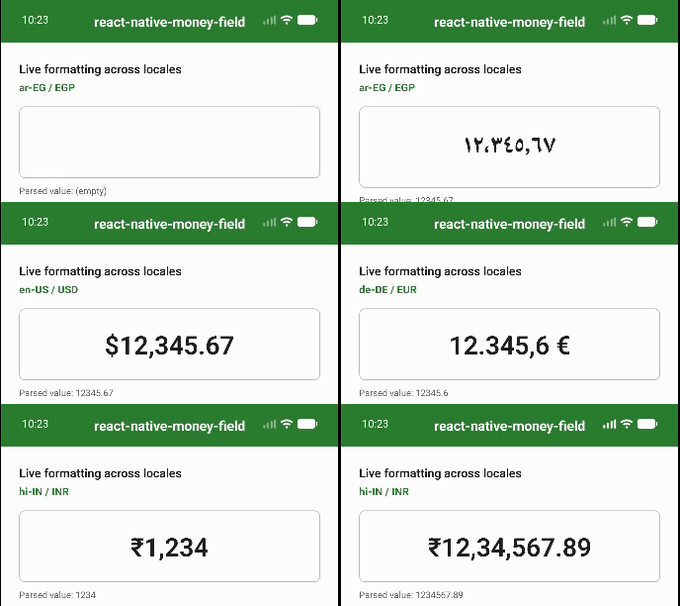 |
|
Features
- Live locale formatting while typing: grouping separators, decimal mark, currency symbol, and digit glyphs are inserted as you go.
- Precision-safe
MoneyValuebacked bybigintminor units plus a scale, so amounts never drift the way an IEEE-754numberwould. Never round-trips money throughnumber. - A caret that stays put. The cursor tracks the significant character you were editing, so it never jumps to the end when grouping shifts mid-string.
- Separator-aware backspace. Deleting a grouping separator removes the digit before it, the way a person expects.
- Bounds and limits. Optional inclusive
min/maxand a fixed fraction-digit count; edits that break a rule are rejected and the field keeps its prior content. - Layered API. Pure functions, a headless hook, and a drop-in component, so you can adopt exactly as much as you need.
- Currency or plain number mode. Provide a
currencyfor currency mode, or leave it off for a grouped number field.
Installation
npm install react-native-money-field
# or
yarn add react-native-money-field
react and react-native are peer dependencies (React 18+, React Native 0.70+). There is nothing to link and no pod install step: the library is pure JavaScript and relies only on the JavaScript engine's built-in Intl.
Locale data comes from the runtime. Modern React Native ships Hermes with full ICU, so the locales below work out of the box. If you target an engine built without full ICU, install an
Intlpolyfill.
Quick start
import { MoneyInput, type MoneyValue } from 'react-native-money-field';

export function PriceField() {
  return (
    <MoneyInput
      config={{ locale: 'en-US', currency: 'USD' }}
      onChangeValue={(value: MoneyValue | null) => {
        console.log(value?.decimalString); // e.g. "1234.56"
      }}
      placeholder="Amount"
      style={{ fontSize: 22 }}
    />
  );
}
MoneyInput accepts every TextInput prop except value, onChangeText, onChange, and defaultValue (it owns those), plus:
| Prop | Type | Description |
| --- | --- | --- |
| config | MoneyConfig | Locale and behaviour. Defaults to plain number mode in the runtime locale. |
| initialValue | MoneyValue \| null | Amount shown when the field mounts. |
| onChangeValue | (value: MoneyValue \| null) => void | Called with the parsed amount on every edit. |
Configuration
Every field on MoneyConfig is optional and the object is treated as immutable.
| Field | Type | Default | Description |
| --- | --- | --- | --- |
| locale | string | runtime locale | BCP-47 id, e.g. en-US, de-DE, hi-IN, ar-EG. |
| currency | string | none | ISO 4217 code, e.g. USD. When omitted the field is a plain number input. |
| fractionDigits | number | currency default | Forces a fixed number of fraction digits. |
| allowNegative | boolean | true | Whether a leading sign / negative values are accepted. |
| min | MoneyValue | none | Inclusive lower bound; edits below it are rejected. |
| max | MoneyValue | none | Inclusive upper bound; edits above it are rejected. |
| symbolPosition | 'prefix' \| 'suffix' | locale default | Overrides where the currency symbol sits. |
| groupingEnabled | boolean | true | Whether grouping separators are inserted. |
| currencySymbol | string | locale symbol | Overrides the glyph used for the currency symbol. |
Going headless: useMoneyField
When you want to render your own TextInput (custom styling, adornments, animation), drop down to the hook. It returns the formatted text, the controlled selection, the parsed value, and the handlers to wire on.
import { TextInput } from 'react-native';
import { useMoneyField } from 'react-native-money-field';

function Field() {
  const money = useMoneyField({
    config: { locale: 'de-DE', currency: 'EUR' },
    onChangeValue: (v) => console.log(v?.decimalString),
  });

  return (
    <TextInput
      value={money.text}
      selection={money.selection}
      onChangeText={money.onChangeText}
      onSelectionChange={money.onSelectionChange}
      keyboardType="numbers-and-punctuation"
    />
  );
}
useMoneyField also returns value (the current MoneyValue | null) and setValue(next) to imperatively reset the field to the canonical formatting of an amount.
Going lower: pure functions
The formatting engine is a handful of pure functions with no React dependency, ready for tests, validation, or your own controller:
import {
  formatMoney,
  parseMoney,
  applyMoneyEdit,
  isMoneySignificant,
  MoneyValue,
} from 'react-native-money-field';

const config = { locale: 'en-US', currency: 'USD' };

formatMoney(MoneyValue.fromMinorUnits(123456n, 2), config); // "$1,234.56"
parseMoney('$1,234.56', config)?.decimalString;             // "1234.56"

// Apply one keystroke at a caret offset and get back the reformatted
// text plus the repositioned caret.
const edit = applyMoneyEdit('1234', 4, config);
edit.text;      // "$1,234"
edit.selection; // 6
edit.rejected;  // false
formatMoney(value, config)renders aMoneyValueas canonical, padded locale text.parseMoney(text, config)tolerantly reads user text into aMoneyValue, ornull.applyMoneyEdit(rawText, caret, config)applies a single edit and returns{ text, selection, value, rejected }. This is the heart of the caret behaviour.isMoneySignificant(ch, config)reports whether a character is a digit, sign, or decimal mark (versus a grouping separator or symbol).
The value model: MoneyValue
MoneyValue stores a signed bigint count of minor units plus a scale (the number of fraction digits), so 1234.56 is minorUnits = 123456n, scale = 2. This stays exact at any magnitude.
MoneyValue.fromMinorUnits(123456n, 2).decimalString; // "1234.56"
MoneyValue.fromDecimalString('-0.05').isNegative;     // true
MoneyValue.fromDecimalString('1.5').equals(MoneyValue.fromDecimalString('1.50')); // true

const a = MoneyValue.fromDecimalString('19.99');
a.rescale(0).decimalString;  // "20"  (half-up)
a.lt(MoneyValue.fromMinorUnits(2000n, 2)); // true
Highlights: fromMinorUnits, fromDecimalString, zero; getters isNegative, decimalString; rescale (half-up), compareTo / lt / lte / gt / gte, equals (ignores trailing-zero scale), and toNumber (lossy, interop only).
Extending
The library is built in layers so it grows with you:
- Pure functions (
formatMoney,parseMoney,applyMoneyEdit) hold the locale and caret logic. useMoneyFieldwraps them into controlledTextInputstate.MoneyInputis a thin component over the hook.
Override locale defaults through MoneyConfig (symbolPosition, currencySymbol, groupingEnabled, fractionDigits) without forking, or compose the pure functions into your own controller when you need something the hook does not cover.
License
Apache-2.0 (c) Nadeem Iqbal