
react-native-multi-radio
v1.0.3
Published
React Native radio group
Downloads
22

Maintainers
 parvejmallick
Readme
Basics Usage
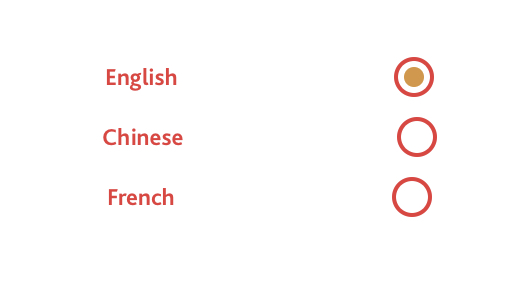

Import
import { RadioGroup } from 'react-native-multi-radio';State Example
this.state = {
    options: [{
        label: 'English',
        value: 'english',
      },
      {
        label: 'Chinese',
        value: 'chinese',
      },
      {
        label: 'French',
        value: 'french',
      }],
    options1: ['English', 'Chinese', 'French'],
    //options2: { 'english' : true, 'chinese': true } Does't Support
}
Pass state option/option1 to RadioGroup options props, array and array of object both supported.
Function on value change
radioChange = (val) => {
    console.log('radioChange', val);
}
Render
<RadioGroup
    name="Language"
    options={options}
    textLeft={true}
    onChange={this.radioChange}
    size={20} color={'#eb383a'}
    //value={'EXAMPLE'}
    viewStyle={{flexDirection: 'column'}}
    radioContainer={{justifyContent: 'space-evenly'}}
    radioText={{ color: '#eb383a' }}
    radioDot={{ backgroundColor:"#db943d" }}
/>- pass name to get the value by name makes the radio group unique ex. { "key": "Language", "value": "chinese", }
Props
| Key | Type (Default) | Value(example) | | ------ | ------| ------ | | name | String | language | options | array/array of objects | ['English', 'Chinese', 'French'] | textLeft | bool (true) | true/false | onChange | function | this.radioChange | size | number (22) | 18 | color | hex(#1976D2) | #eb383a | viewStyle | StyleSheet | {{flexDirection: 'column'}} | radioContainer | StyleSheet | {{justifyContent: 'space-evenly'}} | radioText | StyleSheet | {{ color: '#eb383a' }} | radioDot | StyleSheet | {{ backgroundColor:"#db943d" }}
License
MIT
Free Package, Hell Yeah!