
react-native-option-switch
v1.2.2
Published
Options switch component for React Native. It can be used as radio button or boolean switch.

Maintainers
 zarincheg
Readme
react-native-option-switch
The React Native component to provide UI with option selection like radio button or yes/no choice.
Demo:
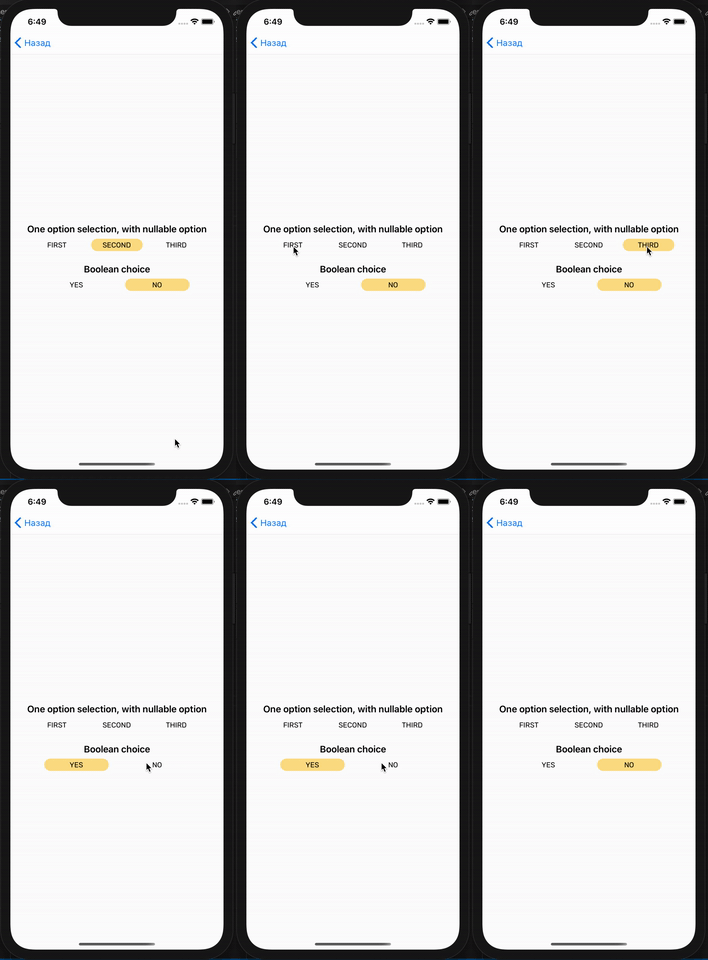
Install
npm i --save react-native-option-switch
Params
| Param | Description |
|--------|------------|
| options (required) | An array of options, each option is an object with particular fields: key(don't use with isBool={true}), title, value, isDefault (optional).|
| onChange | A handler of the value change event. A function that accepts a new value as the first param.|
| styles | Object with custom styles for the component. You can use these fields to customize whole component (container field), items (item and selectedItem) and item labels (label).|
| isNullable | Default is false. Set true in case of nothing to select.|
Usage
<View style={{ flex: 1, justifyContent: 'center' }}>
	<Text style={{
		fontWeight: '600',
		fontSize: 18,
		margin: 16,
		marginBottom: 8,
		textAlign: 'center'
	}}>One option selection, with nullable option</Text>
	<OptionSwitch
		isNullable={true}
		styles={{
			item: {
				width: 100,
				height: 24,
				borderRadius: 12,
				marginHorizontal: 8,
				alignItems: 'center',
			},
			selectedItem: {
				width: 100,
				height: 24,
				borderRadius: 12,
				marginHorizontal: 8,
				backgroundColor: '#FDE08C',
				alignItems: 'center',
			},
		}}
		options={[
			{
				label: 'First',
				value: 'first'
			}, {
				label: 'Second',
				value: 'second',
				isDefault: true,
			}, {
				label: 'Third',
				value: 'third',
			}
		]}
	/>
	<Text style={{
		fontWeight: '600',
		fontSize: 18,
		margin: 24,
		marginBottom: 8,
		textAlign: 'center'
	}}>Boolean choice</Text>
	<OptionSwitch
		onChange={(value) => {

		}}
		options={[
			{
				label: 'Yes',
				value: false
			}, {
				label: 'No',
				value: true,
				isDefault: true,
			}
		]}
	/>
  </View>