
react-native-panel
v1.0.4
Published
React Native Panel

Maintainers
 dwicao
Readme
react-native-panel
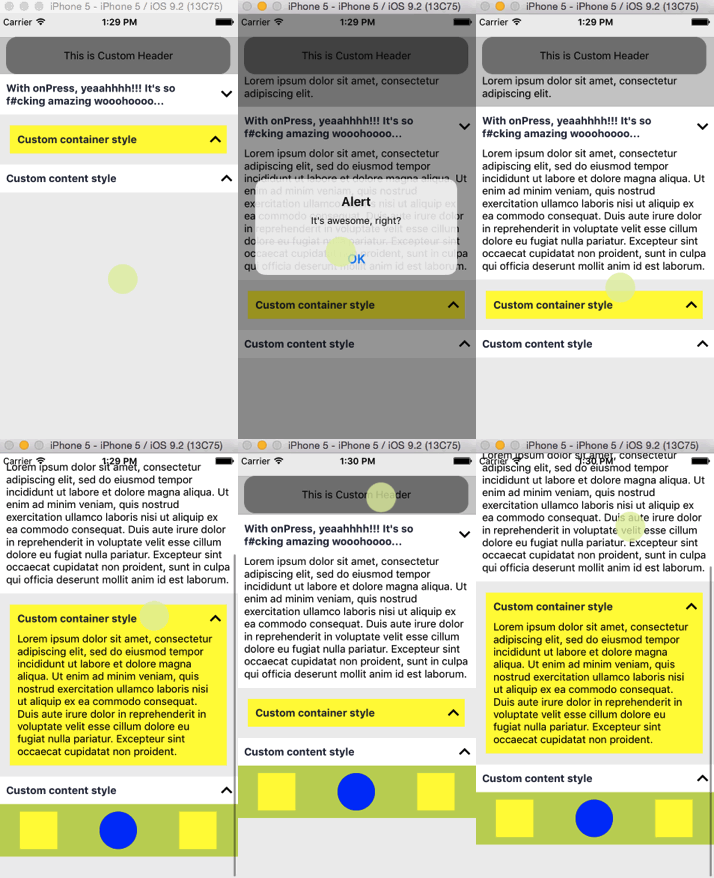
A Customizable React Native Panel for Android and iOS
- note: It's lag due to gif recorder app, actually it works more smooth.
Installation
npm install --save react-native-panel
Usage
- Just import
Panelfrom the package and use your own component to render Header or Content. - Don't forget to wrap your
Panelcomponent insideScrollVieworListView. - To render a content, you must wrap your component inside
Panel(as a children). - See Example below for more details.
Example
import React, { Component } from 'react';
import {
  StyleSheet,
  Text,
  View,
  ScrollView,
} from 'react-native';
import Panel from 'react-native-panel';

class MyExample extends Component {
  renderFirstHeader() {
    return (
      <View style={styles.firstHeader}>
        <Text>This is Custom Header</Text>
      </View>
    );
  }

  render() {
    return (
      <ScrollView
        style={styles.container}
        contentContainerStyle={styles.contentContainerStyle}
      >
        <Panel
          style={styles.firstHeaderContainer}
          header={this.renderFirstHeader}
        >
          <Text style={styles.myDescription}>
            Lorem ipsum dolor sit amet,
            consectetur adipiscing elit.
          </Text>
        </Panel>
        <Panel
          header="With onPress, yeaahhhh!!! It's so f#cking amazing wooohoooo..."
          onPress={() => alert("It's awesome, right?")}
        >
          <Text style={styles.myDescription}>
            Lorem ipsum dolor sit amet,
            consectetur adipiscing elit,
            sed do eiusmod tempor incididunt ut
            labore et dolore magna aliqua.
            Ut enim ad minim veniam, quis nostrud exercitation
            ullamco laboris nisi ut aliquip ex ea
            commodo consequat. Duis aute irure dolor in reprehenderit
            in voluptate velit esse cillum dolore eu
            fugiat nulla pariatur. Excepteur sint occaecat
            cupidatat non proident, sunt in culpa qui
            officia deserunt mollit anim id est laborum.
          </Text>
        </Panel>
        <Panel
          style={styles.thirdHeaderContainer}
          header="Custom container style"
        >
          <Text style={styles.myDescription}>
            Lorem ipsum dolor sit amet,
            consectetur adipiscing elit,
            sed do eiusmod tempor incididunt ut
            labore et dolore magna aliqua.
            Ut enim ad minim veniam, quis nostrud
            exercitation ullamco laboris nisi ut
            aliquip ex ea commodo consequat.
            Duis aute irure dolor in reprehenderit
            in voluptate velit esse cillum dolore
            eu fugiat nulla pariatur. Excepteur sint
            occaecat cupidatat non proident.
          </Text>
        </Panel>
        <Panel header="Custom content style">
          <View style={styles.customContent}>
            <View style={styles.square} />
            <View style={styles.circle} />
            <View style={styles.square} />
          </View>
        </Panel>
      </ScrollView>
    );
  }
}

const styles = StyleSheet.create({
  contentContainerStyle: {
    paddingTop: 30,
    paddingBottom: 20,
  },
  container: {
    flex: 1,
    backgroundColor: '#eee',
  },
  firstHeaderContainer: {
    backgroundColor: '#ccc',
  },
  firstHeader: {
    marginHorizontal: 10,
    backgroundColor: 'gray',
    alignItems: 'center',
    justifyContent: 'center',
    borderRadius: 15,
    height: 50,
  },
  thirdHeaderContainer: {
    margin: 15,
    backgroundColor: 'yellow',
  },
  myDescription: {
    padding: 10,
    paddingTop: 0,
  },
  customContent: {
    backgroundColor: '#bada55',
    flexDirection: 'row',
    justifyContent: 'space-around',
    alignItems: 'center',
    paddingVertical: 10,
  },
  square: {
    backgroundColor: 'yellow',
    width: 50,
    height: 50,
  },
  circle: {
    backgroundColor: 'blue',
    width: 50,
    height: 50,
    borderRadius: 25,
  },
});

export default MyExample;
Properties
| props | type | description | | --- | --- | --- | | header | String / Function | Use String or Function that render a React Element | | onPress | Function | Invoke a function when the Panel header is pressed | | style | Object | Custom wrapper style for Panel |
License
MIT