
react-native-pixie
v1.0.1
Published
In-app element inspector for React Native: tap any element, inspect it Chrome-DevTools-style, live-edit styles and text, jump to the source in your editor, and send annotations to an AI coding agent that applies the change.

Maintainers
 deepak_kumar_meena
Readme
react-native-pixie
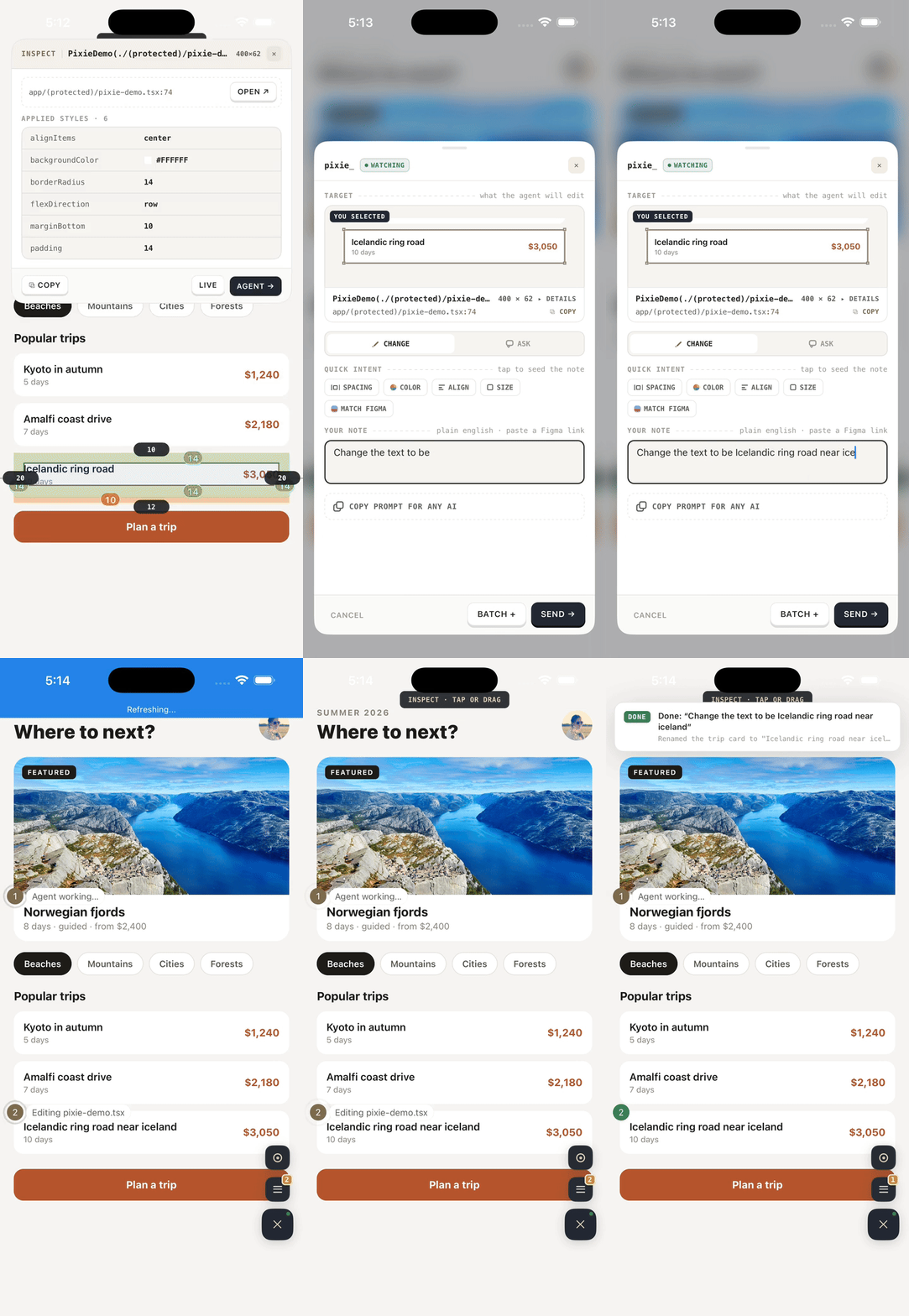
pixie is an in-app element inspector for React Native. Tap any element in your running app, inspect it Chrome-DevTools-style, live-edit styles and text on the device, and jump straight to the source in your editor — all on its own, no AI required.
Want the change made for you? Point it at an AI coding agent — Claude Code, Cursor, or Codex CLI — describe what you want, and watch it land in your source while the app hot-reloads.
Dev-only: it renders nothing and ships nothing in production builds.
Install
npm install react-native-pixie -D
npx expo run:ios   # one native rebuild — links react-native-view-shot (screenshots);
                   # (or run:android / your usual native build) — skip if your
                   # app already includes view-shot
Installing changes your lockfile — eyeball the diff. If unrelated packages (e.g.
react-native-reanimated/react-native-worklets) floated to new versions, pin them back or rebuild the dev client so JS and native match.
Install via your AI agent
Skip the manual steps — tell your agent:
Install react-native-pixie in this app by following AGENT_INSTALL.md.
It installs the package, checks your lockfile for drift, wraps the app root,
wires your coding agent, decides whether you need a native rebuild, and
verifies the pipeline with npx pixie status. (npx pixie init auto-detects
your agent — Claude Code, Cursor, or Codex — or pass --agent.)
Usage
Wrap your app root once, behind __DEV__:
const PixieProvider = __DEV__
  ? require('react-native-pixie').PixieProvider
  : ({ children }) => children

export default function App() {
  return (
    <PixieProvider config={{ ignoreSourcePaths: ['/design-system/'] }}>
      <YourApp />
    </PixieProvider>
  )
}
Then wire up the project for your AI agent (auto-detects Claude Code / Cursor / Codex and merges into each, never clobbers):
npx pixie init                      # auto-detect + confirm
npx pixie init --agent cursor       # or target one/many: claude,cursor,codex (or "all")
npx pixie status                    # verifies config, bridge, Metro, editor CLI
Run your app, then start the watch loop in your agent:
- Claude Code —
claudein a terminal, then/pixie-watch - Cursor — tell Cursor "start pixie watch"
- Codex CLI — tell Codex "start the pixie watch loop" (needs Codex ≥ v0.115.0)
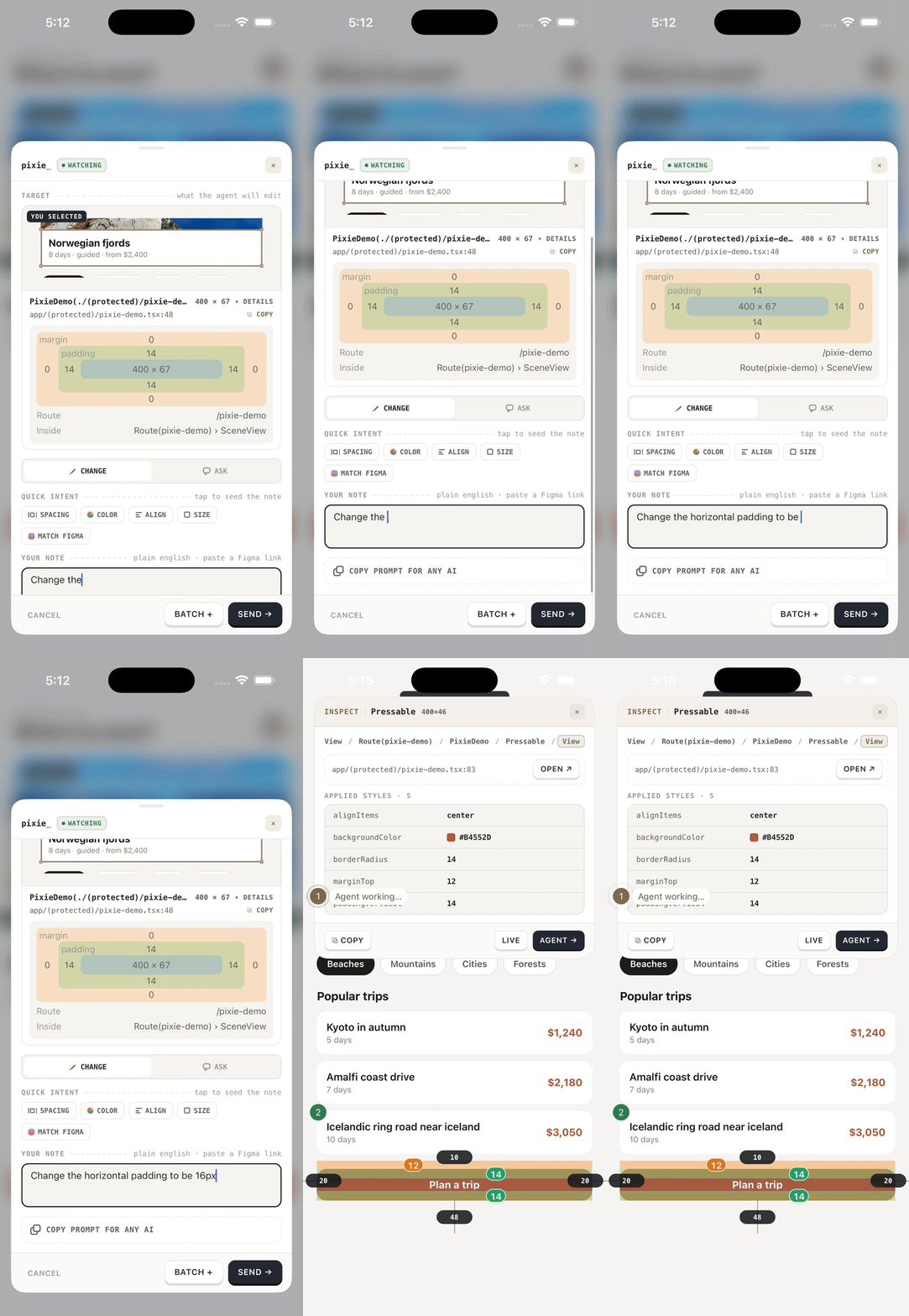
In the app: tap the ✎ handle → tap any element → describe the change → Send.
Features
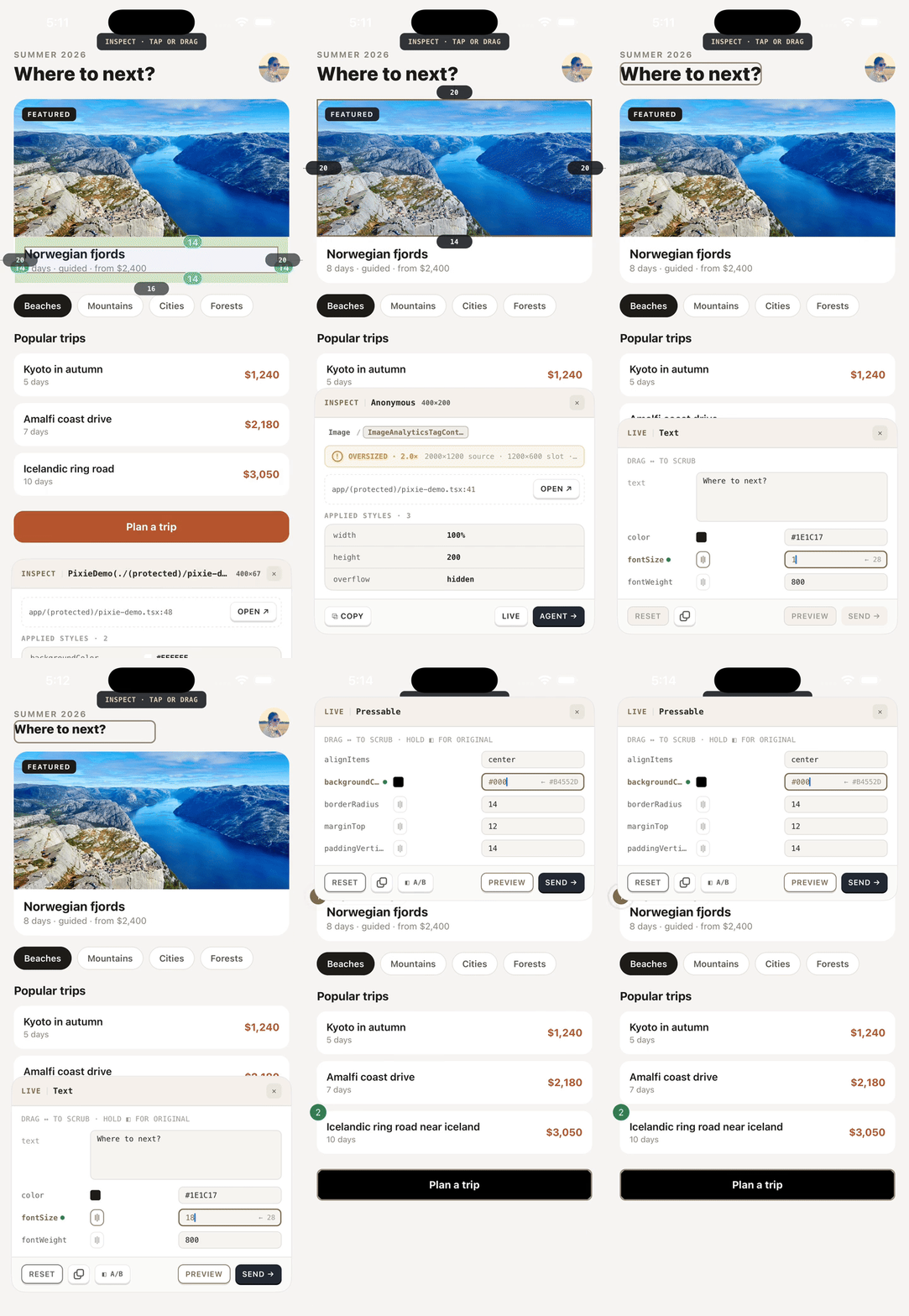
- Tap or drag to select — pick any element, or drag a region to measure the space between elements; a breadcrumb retargets to any ancestor
- DevTools-style inspection — box model, margins/paddings, sibling gaps,
flattened styles in a spec-sheet grid, and the exact source
file:lineof the JSX call site - Live edit — drag-to-scrub numeric values, edit text and colors on the running app, hold ◧ A/B to compare with the original — nothing touches source until you send
- Send to an AI agent — annotations arrive in a watching agent session (Claude Code, Cursor, or Codex) with screenshots, component stack, box model, and your note; the agent edits your source and Fast Refresh shows the result
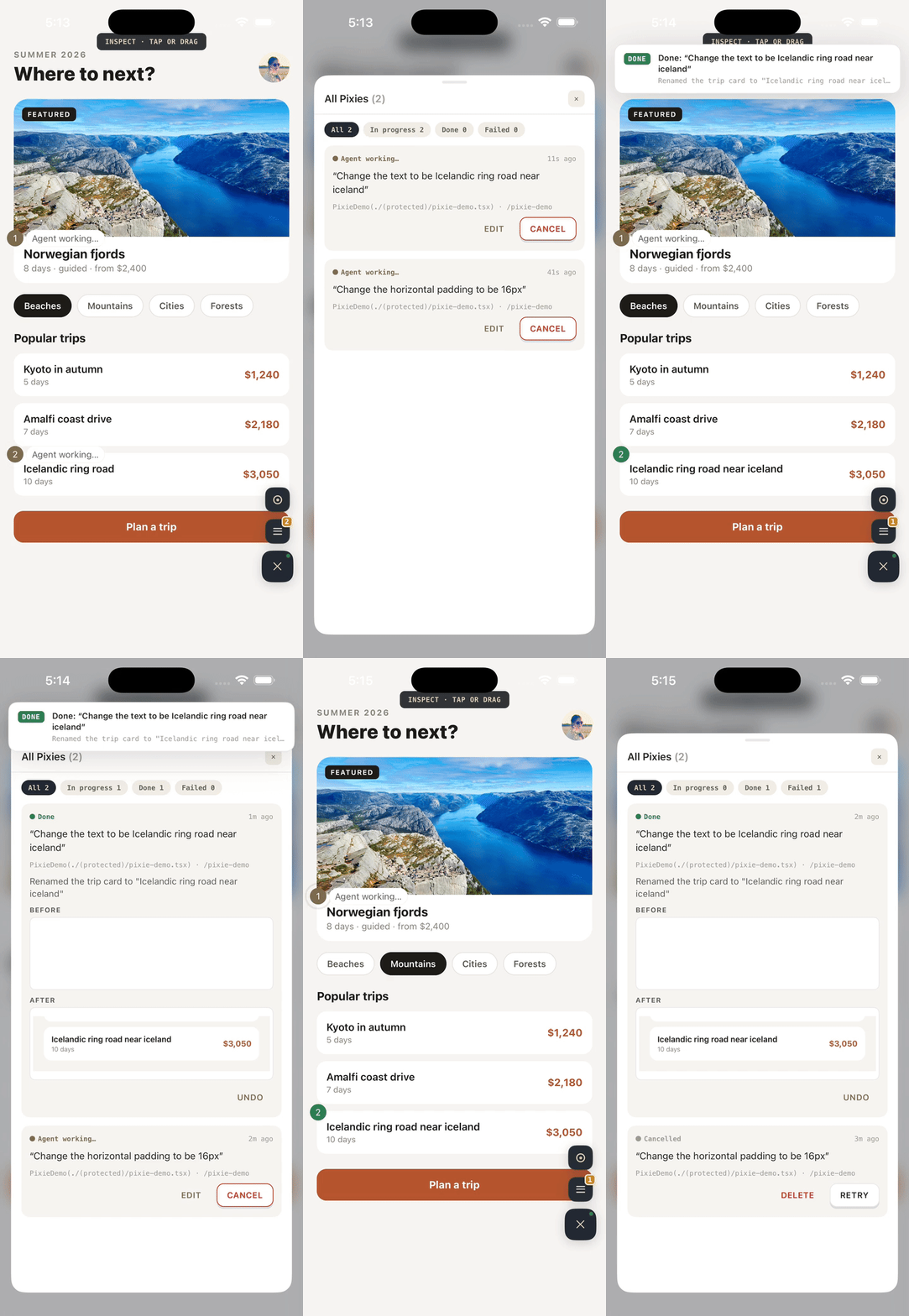
- Live progress on pins — see what the agent is doing ("Editing ProfileCard.tsx…") right on the pin, a DONE toast with the summary, and one-tap undo after it resolves (stacked before/after shots on the task)
- Ask mode — point at an element and ask why it looks the way it does instead of requesting a change
- Match Figma — paste a Figma link: the agent gets the node as design reference and the app shows an onion-skin overlay to compare against
- Image audit — select any
<Image>(Expo or bare RN): ✓ right-sized, or ⚠ oversized/low-res with source-vs-slot pixels and download weight - Manage the queue — batch drafts, then filter/cancel/edit/retry/delete every pixie in the All Pixies sheet
- Jump to editor — open the selected element's source at the exact line in Cursor / VS Code / Windsurf / Zed / WebStorm
- Works with any AI — no agent watching? ⧉ COPY PROMPT FOR ANY AI emits a self-contained prompt with the same context
Config
| Prop | Type | Default | Purpose |
|---|---|---|---|
| bridgePort | number | 4747 | Port of the local bridge (match PIXIE_PORT if you changed it) |
| bridgeToken | string | — | Auth token for physical devices (the bridge prints it at boot) |
| ignoreSourcePaths | string[] | [] | Path substrings to skip when picking the JSX call site — point at your design-system dir so annotations land on screen-level code |
CLI
npx pixie init [--agent <ids>]   wire up this project (auto-detects, or claude,cursor,codex/all)
npx pixie status                 health-check the whole pipeline
npx pixie help                   usage + troubleshooting
The bridge daemon starts automatically with your agent session. To run it by
hand (from your project root): node node_modules/react-native-pixie/bridge/server.js.
A session from a newer install automatically replaces a stale daemon on the port.
Requirements
- React Native 0.81+ with the New Architecture, React 19 (dev builds)
- One native dependency,
react-native-view-shot— autolinks on your next dev-client rebuild; until then everything works except screenshots - Node ≥ 20 on the dev machine
- An MCP-capable coding agent — Claude Code, Cursor, or Codex CLI (Codex needs ≥ v0.115.0 for screenshots) — or any AI via copy-prompt
- Works in Expo and bare RN. Optional niceties when the host app has them:
expo-blur(frosted backdrop),expo-haptics(feedback),expo-clipboard(copy actions),expo-constants(pin rehydration across reloads),expo-image-manipulator(cropped after-shots)
Simulators and emulators work out of the box (the bridge binds loopback). To
annotate from a physical device: start your agent session with
PIXIE_HOST=0.0.0.0, copy the token the bridge prints at boot, and pass it
in the provider config — config={{ bridgeToken: '<token>' }}.
Troubleshooting
| Symptom | Fix |
|---|---|
| "NO AGENT" chip in the composer | Start the watch loop in your agent (Claude: /pixie-watch; Cursor/Codex: "start pixie watch") — restart the session after init |
| "OFFLINE" chip | npx pixie status — is the bridge running? Same machine/Wi-Fi? |
| Screenshots missing on pins | Your build predates the install — rebuild the dev client so react-native-view-shot links |
| Crash on boot after install (worklets/reanimated errors) | Lockfile drift: git diff yarn.lock, pin drifted packages back or rebuild |
| ↗ Open does nothing | Install your editor's shell command (cursor/code/windsurf/zed) or set PIXIE_EDITOR |
| Toast says the daemon is a stale build | Restart your agent session — new sessions replace stale daemons automatically |
License
MIT