
react-native-reel-list
v1.0.1
Published
Reel list component for React Native

Maintainers
 bilal_0214
Readme
react-native-reel-list
react-native-reel-list is a customizable React Native component designed to provide an intagram/tiktok like optimized video list experience. It offers a variety of features and options to ensure smooth and efficient video playback in your React Native applications.
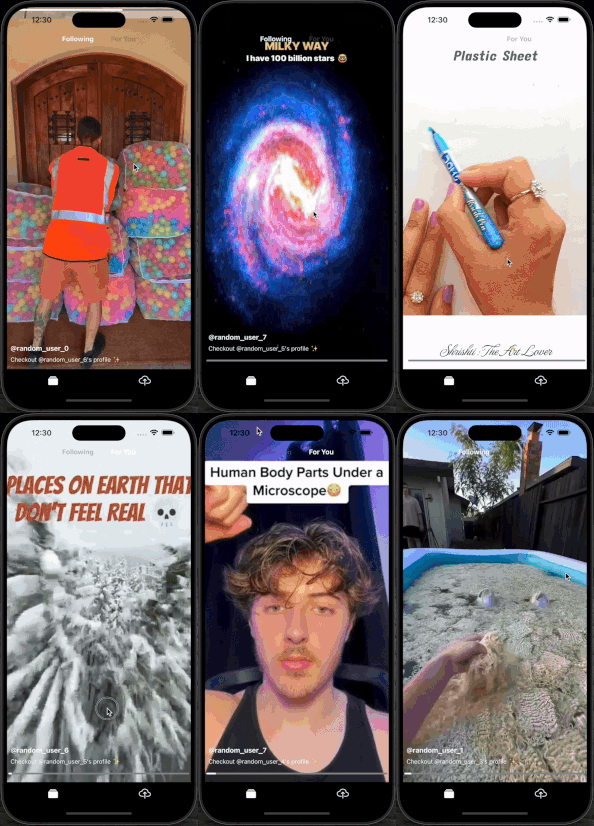
Features
- Optimized video list for smooth performance
- Customizable video height
- Tap to mute functionality
- Hold to pause functionality
- Seekbar support
- Loading indicator
- Custom overlay components
- Playback status updates
Installation
Install the package via npm:
npm install react-native-reel-listor via yarn:
yarn add react-native-reel-listNote: This package uses expo-av for video playback, expo-av is required to be installed in your project. Follow these installation instructions..
Usage
Here's an example of how to use the ReelList component in your React Native application:
import { useCallback, useContext } from "react";
import { VIEWPORT_HEIGHT } from "@/constants";
import { useBottomTabBarHeight } from "@react-navigation/bottom-tabs";
import ReelsList, { VideoItemType } from "react-native-reel-list";
import { MuteContext } from "@/context";
import { AVPlaybackStatus } from "expo-av";

const videos = [
  { key: '1', uri: 'https://example.com/video1.mp4', thumbnail: 'https://example.com/thumbnail1.jpg', ...otherProperties},
  { key: '2', uri: 'https://example.com/video2.mp4', thumbnail: 'https://example.com/thumbnail4.jpg', ...otherProperties},
  // Add more videos as needed
];

const App = () => {
  const tabBarHeight = useBottomTabBarHeight();
  const { isMuted, handleMuteToggle } = useContext(MuteContext);
  const [currentVideoIndex, setCurrentVideoIndex] = useState(0);
  const [status, setStatus] = useState<AVPlaybackStatus | null>(null);

  const videoHeight = VIEWPORT_HEIGHT - tabBarHeight;

 const onViewableItemsChanged = useCallback(
    (info: {
      viewableItems: ViewToken<VideoItemType>[];
      changed: ViewToken<VideoItemType>[];
    }) => {
      // Update the current video index when the viewable items change
      setCurrentVideoIndex(
        (prev) => info.changed.find((item) => item.isViewable)?.index ?? prev
      );
      // If required, add your custom logic here
    },
    []
  );

  const handleGetItemLayout = useCallback(
    (data: ArrayLike<VideoItemType> | null | undefined, index: number) => {
      return {
        length: videoHeight,
        offset: videoHeight * index,
        index,
      };
    },
    [videoHeight]
  );

   const overlayComponent = useCallback(
    ({ item }: { item: VideoItemType, index:number }) => (
      // Custom overlay component for each video item. Add your custom UI with position: 'absolute' here.
      <View style={styles.overlay}>
        <Link href={`/profile/${item.username}`} asChild>
          <Pressable>
            <Text>@{item.username}</Text>
          </Pressable>
        </Link>
      </View>
    ),
    []
  );

  return (
    <ReelsList
      videoHeight={videoHeight}
      currentVideoIndex={currentVideoIndex}
      handleGetItemLayout={handleGetItemLayout}
      onViewableItemsChanged={onViewableItemsChanged}
      videos={videos}
      isMuted={isMuted}
      handleMuteToggle={handleMuteToggle}
      showSeekbar={true}
      showLoadingIndicator={true}
      holdToPause={true}
      overlayComponent={overlayComponent}
      onCurrentPlaybackStatusUpdate={(status) => setStatus(status)}
      refreshing={refreshing}
      onRefresh={() => {
        // Refresh the video list
      }}
      onEndReached={() => {
        // Fetch more videos
      }}
    />
  );
};

export default FollowingTopTab;


const styles = StyleSheet.create({
  container: {
    flex: 1,
    justifyContent: "center",
    alignItems: "center",
  },
  overlay:{
    position: "absolute",
    bottom: 40,
    left: 8,
    zIndex: 2,
  }
});

export default App;
Props
The ReelsList component accepts the following props:
| Prop | Type | Description | Default | Required |
| ------------------------------- | ---------------------------------------------------------------------------------------------------- | --------------------------------------------------------------------------------------------------------------------------------------------------------------------------------------------------------------------------------------- | ------- | -------- |
| currentVideoIndex | number | The index of the current video being played. | - | Yes |
| handleGetItemLayout | function | Function to get the layout of each item in the list. | - | Yes |
| onViewableItemsChanged | function | Callback function when viewable items change. | - | Yes |
| videos | Array<{ key: string, uri: string, thumbnail: string, ...otherProperties }> | Array of video items to be displayed in the list. | - | Yes |
| videoHeight | number | Height of each video in the list. | - | Yes |
| isMuted | boolean | Flag to mute/unmute videos. | false | No |
| handleMuteToggle | function | Callback function to handle mute toggle. | - | No |
| showSeekbar | boolean | Flag to show/hide the seekbar. | false | No |
| showLoadingIndicator | boolean | Flag to show/hide the loading indicator. | false | No |
| useNativeControls | boolean | Flag to use native video controls. | false | No |
| holdToPause | boolean | Flag to enable hold-to-pause functionality. | false | No |
| bottomOffset | number | Offset from the bottom of the screen for the default seekbar and buffering indicator. | 0 | No |
| overlayComponent | ({ item, index }) => ReactNode | Function to render a custom overlay component for each video. | - | No |
| onCurrentPlaybackStatusUpdate | (status: AVPlaybackStatus) => void | A function to be called regularly with the AVPlaybackStatus of the currently playing video. Helps in tracking the playback status of the video for custom UI updates. | - | No |
Additionally, the component accepts all other FlatList props for added customizations.
Performance Metrics
| Device | Max CPU Usage* | Idle CPU Usage | Avg. RAM Usage | Initial Load Time (Lazy Loading On) | Initial Load Time (Lazy Loading Off) | | ------------------------------------ | --------------- | -------------- | -------------- | ----------------------------------- | ------------------------------------ | | Two Video Lists (Two Top Tabs) | | | | | | | Samsung Galaxy A22 (6 GB RAM) | 70% | 13% | 650 MB | 1-2 Seconds | 18 Seconds | | Samsung Galaxy S22 Ultra (12 GB RAM) | 37% | 10% | 770 MB | 1-2 Seconds | 13 Seconds | | Samsung Galaxy A21s (4 GB RAM) | 75% | 18% | 698 MB | 4-5 Seconds | 30-40 Seconds | | One Video List (Single Top Tab) | | | | | | | Samsung Galaxy A22 (6 GB RAM) | 48% | 12% | 515 MB | 1-2 Seconds | - | | Samsung Galaxy S22 Ultra (12 GB RAM) | 32% | 10% | 635 MB | 1-2 Seconds | - | | Samsung Galaxy A21s (4 GB RAM) | 71% | 16% | 532 MB | 4-5 Seconds | - |
*Note: The maximum CPU usage values represent occasional spikes and should not be a cause for concern.
Usage Tips
- If you are using multiple simultaneously running video lists, load the lists lazily for improved performance.
- On lower-end devices, if you encounter
java.lang.OutOfMemoryError, setandroid:largeHeap="true"in the Android manifest.
Contributing
Contributions are welcome! Please open an issue or submit a pull request for any improvements or bug fixes.
Author
Developed by Bilal Ahmed Toor.
Acknowledgments
Special thanks to all the contributors and the React Native community for their support and inspiration.