
react-native-search-filter
v0.1.5
Published
React Native search component with filter function.
Downloads
2,712

Maintainers
 mjsolidarios
Readme
React Native Search Filter
React Native search component with filter function.
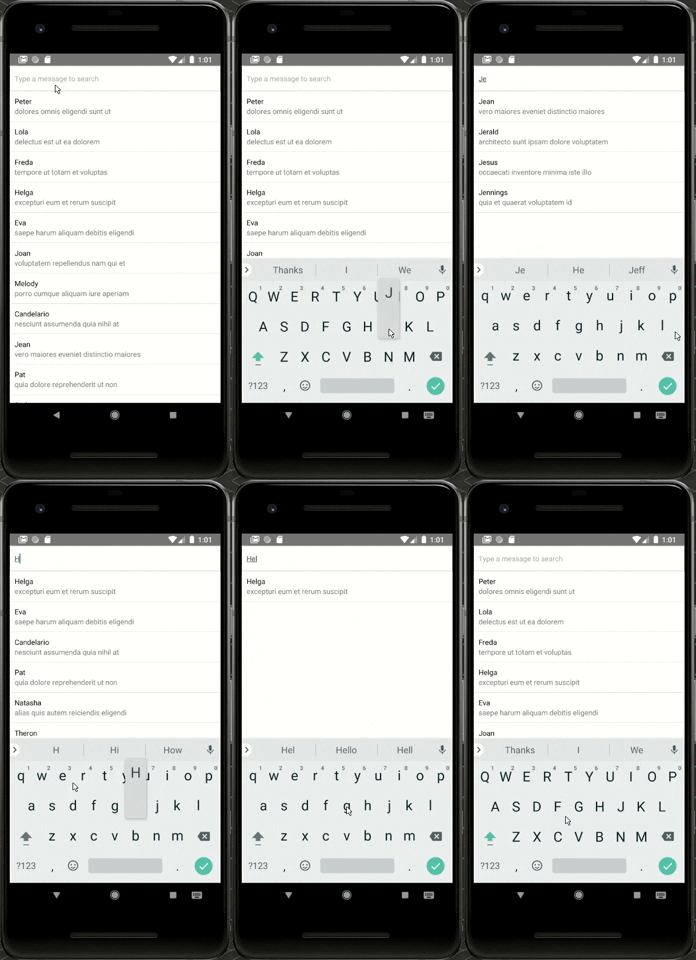
Getting Started
Installation
Using npm:
$ npm install react-native-search-filter --save
Using yarn:
$ yarn add react-native-search-filter
Example Usage
Complete example available here.
import React, { Component } from 'react';
import { StyleSheet, Text, View, ScrollView, TouchableOpacity } from 'react-native';
import SearchInput, { createFilter } from 'react-native-search-filter';
import emails from './emails';
const KEYS_TO_FILTERS = ['user.name', 'subject'];

export default class App extends Component<{}> {
 constructor(props) {
    super(props);
    this.state = {
      searchTerm: ''
    }
  }
  searchUpdated(term) {
    this.setState({ searchTerm: term })
  }
  render() {
    const filteredEmails = emails.filter(createFilter(this.state.searchTerm, KEYS_TO_FILTERS))
    return (
      <View style={styles.container}>
        <SearchInput
          onChangeText={(term) => { this.searchUpdated(term) }}
          style={styles.searchInput}
          placeholder="Type a message to search"
          />
        <ScrollView>
          {filteredEmails.map(email => {
            return (
              <TouchableOpacity onPress={()=>alert(email.user.name)} key={email.id} style={styles.emailItem}>
                <View>
                  <Text>{email.user.name}</Text>
                  <Text style={styles.emailSubject}>{email.subject}</Text>
                </View>
              </TouchableOpacity>
            )
          })}
        </ScrollView>
      </View>
    );
  }
}

const styles = StyleSheet.create({
  container: {
    flex: 1,
    backgroundColor: '#fff',
    justifyContent: 'flex-start'
  },
  emailItem:{
    borderBottomWidth: 0.5,
    borderColor: 'rgba(0,0,0,0.3)',
    padding: 10
  },
  emailSubject: {
    color: 'rgba(0,0,0,0.5)'
  },
  searchInput:{
    padding: 10,
    borderColor: '#CCC',
    borderWidth: 1
  }
});
API and Configuration
| Property | Type | Default | Description |
|-------------|----------|--------------|----------------------------------------------------------------|
|caseSensitive|boolean|false|Define if the search should be case sensitive.|
|clearIcon|Node|null|Optional clear icon. |
|clearIconViewStyles|Style|{position:absolute',top: 18,right: 22}|Optional styles for the clear icon view.|
|filterKeys|string or [string]||Will be use by the filter method if no argument is passed there.|
|fuzzy|boolean|false|Define if the search should be fuzzy.|
|inputViewStyles| Style | |Optional styles for the input container. |
| onChangeText | Function | Required| Function called when the search term is changed (will be passed as an argument).
|sortResults|boolean|false|Define if search results should be sorted by relevance (only works with fuzzy search).|
|throttle|number|200|Reduce call frequency to the onChange function (in ms).|
|onSubmitEditing|function|() => {}|Defines a function for the keyboard search button onPress.|
|inputFocus|boolean|false|Defines whether the field receives focus.|
|returnKeyType|string|done|Determines how the return key should look. The following values work across platforms: done, go, next, search, send|
Methods
filter([keys])
Return a function which can be used to filter an array. keys can be string, [string] or null.
If an array keys is an array, the function will return true if at least one of the keys of the item matches the search term.
Static Methods
filter(searchTerm, [keys], [{caseSensitive, fuzzy, sortResults}])Return a function which can be used to filter an array. searchTerm can be a regex or a String. keys can be string, [string] or null.
If an array keys is an array, the function will return true if at least one of the keys of the item matches the search term.
Known Issues
Hide clearIcon if search input is empty.
Provided you have a custom icon package, a short toggle method for the property will do: clearIcon={this.state.searchTerm!==''&&<Icon name="x"/>}.
Fuse.js: Unknown plugin "babel-plugin-add-module-exports"
Add babel-plugin-add-module-exports as a dev dependency. Fuse.js #154.
npm i babel-plugin-add-module-exports babel-preset-es2015 babel-preset-stage-2 --save-dev
Acknowledgement
enkidevs - Simple react.js component for a search input, providing a filter function .