
react-native-simple-tablayout
v0.0.5
Published
A tablayout or tab navigation in which you can customize its tabs property and its indicator by passing appropriate props

Maintainers
 npm-kishan
Readme
React native tablayout with optimized performance
Almost 60fps on ios and android
Installation
npm i react-native-simple-tablayout
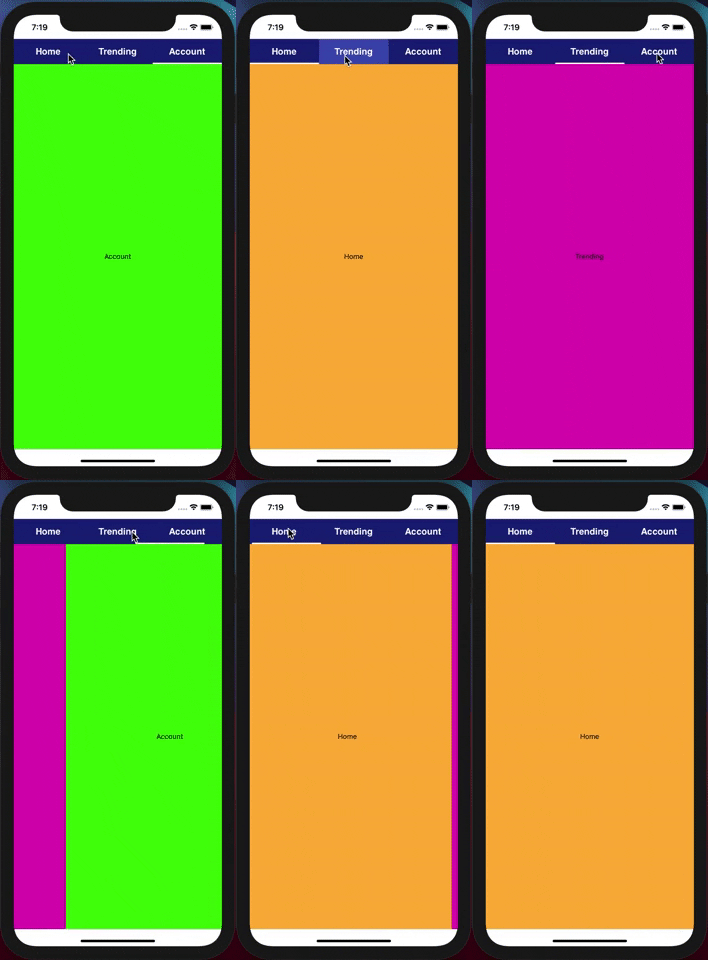
import React  from 'react';
import {View,Text, Dimensions, SafeAreaView} from 'react-native';
import TabLayout from 'react-native-simple-tablayout';

const {width}=Dimensions.get('window');


const Screen1=(props)=>{
  return (
    <View style={{flex : 1,alignItems:'center',width,backgroundColor:props.color,justifyContent:'center'}}>
      <Text>{props.text}</Text>
    </View>
  )
}

const Screen2=(props)=>{
  return (
    <View style={{flex : 1,alignItems:'center',width,backgroundColor:props.color,justifyContent:'center'}}>
      <Text>{props.text}</Text>
    </View>
  )
}
const Screen3=(props)=>{
  return (
    <View style={{flex : 1,alignItems:'center',width,backgroundColor:props.color,justifyContent:'center'}}>
      <Text>{props.text}</Text>
    </View>
  )
}

//(Recommendations )
// Make screens components seperately and use React.memo for better performance.

const App=()=>{

  // tab name passed as array of string
  const tabName=["Home","Trending","Account"]

  //tab screen passed as array of screens
  const data=[
    <Screen1 text="Home" color="#ffb338"/>,
    <Screen2 text="Trending" color="#e307b7"/>,
    <Screen3 text="Account" color="#3ae307"/>,
  ];

  return (
    <SafeAreaView style={{flex : 1}}>
       <TabLayout
             screens={data}
             tabName={tabName}
             indicatorHeight={3}
             indicatorRadius={5}
             titleFontSize={18}
             titleColor="white"
             tabHeight={50}
        />
    </SafeAreaView>
  )
}
export default App;
Props | Types ------------ | ------------- screens | Array of screens (screens must passed as jsx i.e ) tabName | Array of string i.e ['home','profile','trending'] tabHeight (optional) | Integer indicatorColor (optional) | color i.e either hex value , rgb , rgba indicatorHeight (optional) | Integer indicatorRadius (optional) | Integer indicatorColor (optional) | color i.e either hex value , rgb , rgba tabPressedColor (optional) | color i.e either hex value , rgb , rgba (just after clicking the tab) tabColor (optional) | color i.e either hex value , rgb , rgba (background color of tab) titleFontSize (optional) | Integer titleFontWeight (optional) | string i.e "normal" or "italic" or "bold" titleColor (optional) | color i.e either hex value , rgb , rgba titleFontFamilyAndroid (optional) | string (any font family for android) titleFontFamilyIos (optional) | string (any font family for ios) titleFontStyle (optional) | string (any font style)