
react-native-sms-otp-autofill
v0.2.0
Published
SMS verification code autofill for React Native. Zero-tap via the Android SMS Retriever API, one-tap via the Android SMS User Consent API, iOS Security Code AutoFill, and an Android + iOS clipboard path that needs no app hash and no consent sheet.

Maintainers
 vidur-joshi
Readme
react-native-sms-otp-autofill



SMS verification code autofill for React Native, with no READ_SMS permission on Android and no native code to write on iOS.
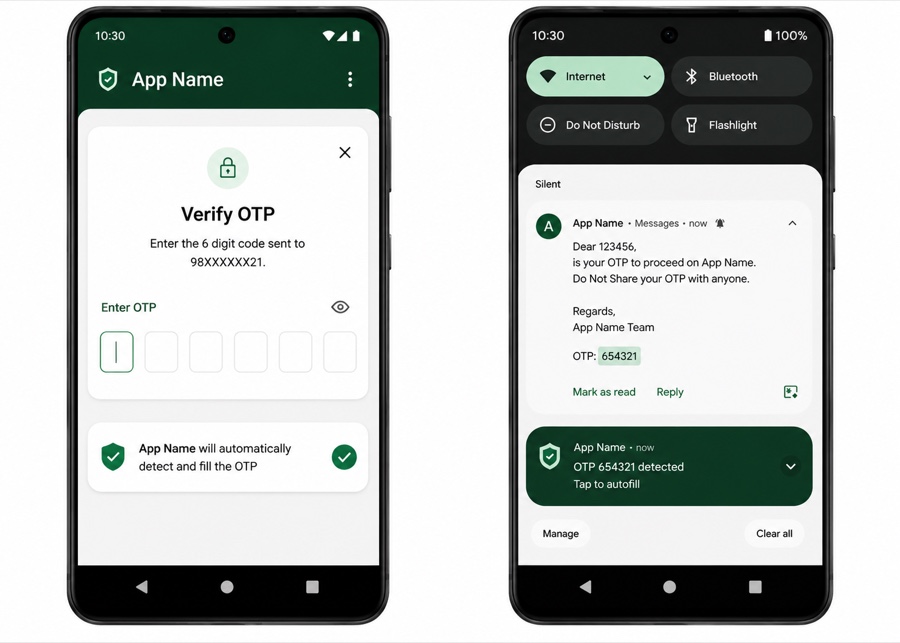
Four mechanisms, one API:
| Platform | Mechanism | UX | Needs an SMS template change? | | --- | --- | --- | --- | | Android | SMS Retriever API | zero-tap, silent | Yes — 11-char app hash | | Android | SMS User Consent API | one-tap system sheet | No | | iOS | Security Code AutoFill | one-tap keyboard suggestion | No | | Android + iOS | Clipboard | zero-tap, or a paste suggestion | No |
The first three read the message. The clipboard path does not — which is exactly why it is the one that works with no app hash, no consent sheet, no permission and no Play services, on both platforms.
iOS has no programmatic SMS access at all — the OS parses the message and offers the code in the QuickType bar. That half is delivered entirely by otpAutofillInputProps().
Install
npm install react-native-sms-otp-autofill
cd android && ./gradlew clean
cd ../ios && pod install
Autolinked on both platforms — no MainApplication edit, no AppDelegate edit, no manifest change, and the Play services dependency comes transitively. Rebuild the app; a JS reload is not enough.
Usage
import { useOtpAutofill, otpAutofillInputProps } from 'react-native-sms-otp-autofill';

function VerifyScreen({ onVerify }) {
  const [code, setCode] = useState('');

  const { restart } = useOtpAutofill({
    length: 6,
    clipboard: true,
    onCode: setCode,
  });

  return (
    <>
      <TextInput
        value={code}
        onChangeText={setCode}
        keyboardType="number-pad"
        maxLength={6}
        {...otpAutofillInputProps()}
      />
      <Button title="Resend" onPress={() => { sendOtp(); restart(); }} />
    </>
  );
}
Two rules worth internalising:
- Call
restart()on every resend. Each Play services session lasts five minutes and is consumed by a single message. - Scope the listener with
enabled. Listening outside the code-entry step risks a consent sheet appearing for an SMS the user is not waiting on. clipboardis opt-in. The clipboard belongs to the user, not the app, so nothing is written or read until you ask. See Clipboard.
onCode also receives the text the code came from and where it came from, which is worth branching on for anything beyond a straight fill:
onCode: (code, text, source) => {
  if (source === 'sms') setCode(code);      // matched a message the user was waiting for
  else setSuggestion(code);                 // came off the clipboard — offer it instead
}
useOtpAutofill({ enabled: step === 'verify', onCode: setCode });Choosing a mode
useOtpAutofill({ mode: 'both', onCode: setCode }); // default| Mode | Behaviour | Use when |
| --- | --- | --- |
| 'both' | hashed SMS read silently, anything else falls back to the sheet | default — the only mode that degrades gracefully |
| 'auto' | SMS Retriever only. Zero-tap, and nothing at all if the template does not match | you control the template and want no sheet, ever |
| 'consent' | SMS User Consent only. Always one tap | you will never change the template, or you want a predictable UX |
| 'none' | no SMS listener at all | you want the clipboard path on its own — no hash, no sheet |
With 'both', adding the hash to your SMS template upgrades existing installs from one-tap to zero-tap with no app release.
Clipboard
The clipboard is the only route to a code that needs no app hash, no consent sheet, no permission and no Play services — and the only one that exists on both platforms. It is off by default, because the clipboard belongs to the user rather than to the app.
useOtpAutofill({ clipboard: true, onCode: setCode });                 // read and copy
useOtpAutofill({ clipboard: { read: true }, onCode: setCode });       // read only
useOtpAutofill({ mode: 'none', clipboard: true, onCode: setCode });   // clipboard only, no SMS listener
What this cannot do
Neither platform lets an app read an SMS it was not handed. Putting a code on the clipboard means knowing the code first, and there are only three ways to learn one: the app hash, the consent tap, or Android's READ_SMS permission — which Play policy does not permit for verification codes. iOS has no SMS-reading API at all, at any privilege level.
So copy: true writes a code the library already captured. It cannot conjure one. read: true is the half that covers "no hash and no sheet", and it works by reading a code that something else already put on the clipboard.
read: true — a code with no hash and no sheet
Codes land on the clipboard constantly without your app doing anything. Google Messages puts a Copy code action straight on the SMS notification, iOS Messages offers copy on long press, and users have been copy-pasting codes by hand for years. Watching for that costs nothing and asks nothing.
It is checked on three triggers:
| Trigger | Covers |
| --- | --- |
| Mount / enabled flip | a code copied before the screen opened |
| Return to the foreground | the main flow: left for the SMS app, copied, came back |
| Clipboard change while in front (Android) | the notification shade pulled down over your own screen, Copy code tapped |
A found code arrives through onCode with source 'clipboard'. Because a clipboard hit is a guess about intent rather than a matched message, offering it is often better than filling the field:
useOtpAutofill({
  clipboard: { read: true },
  onCode: (code, text, source) =>
    source === 'sms' ? setCode(code) : setPasteSuggestion(code),
});
Two rules keep a stale code out of your field, and they differ by platform because the evidence does:
- Android reports when a clip was copied. Anything older than
maxAgeMs(default 5 minutes) is rejected — without even reading it. - iOS reports no timestamp, only a change counter. Freshness there means "the clipboard changed while we were watching", which is exactly the flow above, but it does mean a code already sitting on the clipboard at mount is ignored. Set
readOnStart: trueto trust it anyway.
Reading someone's clipboard is not free of consequence, so the library reads content as rarely as it can. Every decision that can be made from the clip description — is there text, how old, has it changed — is made without touching the content, and on iOS the pasteboard is asked whether it even contains a number first. That is what keeps Android's "pasted from" toast and iOS's paste banner away from clipboards that were never going to hold a code.
copy: true — a captured code that survives a missed field
When a code does come in over SMS, copying it puts a safety net under autofill: a boxed OTP input that failed to fill, a user who navigated away, a WebView you do not control. On Android it also makes Gboard offer Paste 123456 above the keyboard.
useOtpAutofill({
  clipboard: { copy: true, expiresInMs: 120_000 },
  onCode: setCode,
});
expiresInMs wipes our own copy afterwards, and skips the wipe if the user has copied something else since. On iOS that is a real pasteboard expiry date, so it holds even if the app is killed first; on Android it is a timer, which does not. iOS writes are always local-only — a verification code has no business syncing to the user's other devices over Universal Clipboard.
Options
clipboard: true is shorthand for { copy: true, read: true }.
| Option | Default | Description |
| --- | --- | --- |
| copy | false | Copy a captured code to the clipboard. |
| read | false | Deliver a code the user copied, via onCode with source 'clipboard'. |
| maxAgeMs | 300000 | How recently a clip must have been copied to count. Android only — see above. |
| expiresInMs | 0 | Wipe our own copy after this long. 0 never does. |
| sensitive | false | Hide the code from Android 13+'s copy popup. Also hides it from paste suggestions, which is usually the opposite of what you wanted. |
| detectPatterns | true | iOS: ask whether the pasteboard holds a number before reading it. Turn off only if codes are being missed. |
| readOnStart | false | Accept a code already on the clipboard at mount, not just one copied afterwards. |
Doing it yourself
The same primitives are exported for use outside the hook — a "Paste code" button, say:
import { readOtpFromClipboard, copyOtpToClipboard, clearOtpClipboard } from 'react-native-sms-otp-autofill';

const hit = await readOtpFromClipboard({ length: 6 });
if (hit) setCode(hit.code);
Or checkClipboard() from the hook, which runs the same read while skipping the freshness and already-seen rules — the user asking is intent enough.
Enabling zero-tap
The message must satisfy all four of Google's rules, or SMS Retriever silently never fires:
- no longer than 140 bytes
- begins with
<#>(or[#]) - contains the code
- ends with your app's 11-character signature hash
<#> Your verification code is 123456
FA+9qCX9VSu
Get the hash from the device — it is derived from the installed APK's signing certificate:
const hashes = await getOtpAutofillAppSignatures();The hook logs it automatically in __DEV__. Three things make this trickier than it looks:
- Debug and release builds hash differently. Whitelist both, or read each separately.
- Play App Signing re-signs your upload, so a locally built release APK reports a hash your real users will never have. Get the production hash from a build installed via Play (internal testing works), using
logAppSignatures: trueto log it outside__DEV__. - The hash is per package name, so every app using this library has its own.
iOS notes
otpAutofillInputProps() is the whole of the autofill implementation, but two things silently defeat it:
- The input must have a real, non-zero frame. A
0x0hidden input — common in boxed OTP components — is skipped. Stretch it over the boxes withopacity: 0andpointerEvents: 'none'instead. - Apple's parser reads the wording, looking for digits near words like "code" or "verification code". A template like
Your verification code is 123456satisfies both platforms.
Pass false for fields the user is creating rather than receiving, so the OS stops offering SMS codes for a new PIN or password:
<TextInput {...otpAutofillInputProps(false)} />If QuickType is not enough — and it often is not, for a boxed six-field input — the clipboard path is the only other thing iOS offers. It is also the only iOS native code in this package.
API
useOtpAutofill(options)
| Option | Default | Description |
| --- | --- | --- |
| onCode | — | (code, message, source) => void. Required. source is 'sms' or 'clipboard'. |
| enabled | true | Listen only while the code step is on screen. |
| length | 6 | Digit count to extract. Ignored when parse is set. |
| mode | 'both' | See above. 'none' runs no SMS listener. |
| clipboard | false | true, or the options above. |
| onError | — | 'consent_denied' \| 'consent_empty' \| 'consent_unavailable'. |
| parse | — | Replace the built-in digit matching. Applies to clipboard text too. |
| logAppSignatures | __DEV__ | Log the hash on mount. |
Returns:
| | Description |
| --- | --- |
| restart() | Reopen the SMS listener. Call on every resend. |
| supported | Whether an SMS body can be read: false on iOS and on Android without Play services. |
| clipboardSupported | Whether the clipboard path is available. True on both platforms once built in. |
| checkClipboard() | Read the clipboard now, skipping the freshness and already-seen rules. |
supported and clipboardSupported are independent — the second is the one that holds up with no hash and no consent sheet.
Also exported
otpAutofillInputProps(enabled?)— autofill props for yourTextInputgetOtpAutofillAppSignatures()—Promise<string[]>startOtpAutofill(mode?)/stopOtpAutofill()— imperative control, if you are not using the hookisOtpAutofillSupported()/isOtpClipboardSupported()readOtpFromClipboard(options?)—Promise<{ code, text, token, ageMs } | null>copyOtpToClipboard(code, options?)—Promise<boolean>clearOtpClipboard(onlyIfOwn?)—Promise<boolean>peekOtpClipboard()— what the clipboard holds, without reading itextractOtpFromMessage(message, length)addOtpAutofillListener(event, handler)andOTP_AUTOFILL_EVENT
Troubleshooting
| Symptom | Cause |
| --- | --- |
| Nothing happens on Android | App not rebuilt after install, or no Google Play services on the device. Check supported. |
| Consent sheet never appears | Sender is in the user's contacts, the SMS arrived before start(), or it has no 4–10 char alphanumeric token containing a digit. |
| Zero-tap never fires | Wrong hash for this build, message over 140 bytes, missing <#> prefix, or the hash is not the final token. |
| Nothing on iOS | Input has a zero frame, textContentType missing, or the SMS wording gives Apple's parser nothing to latch onto. |
| Code arrives but the field stays empty | Your length does not match the code, or parse returned null. |
| Clipboard code never arrives on iOS | It was already on the clipboard at mount — iOS cannot date a clip, so only a change while watching counts. Set readOnStart: true, or check detectPatterns. |
| Clipboard code never arrives on Android | Older than maxAgeMs; or the device is on API 24/25, which reports no clip timestamp, so a code present at mount needs readOnStart: true. |
| Android shows a "pasted from" toast | Android 12+ does that for any content read from another app. Unavoidable once you read, which is why the library only reads when a clip is plausibly a code. |
| Gboard offers no "Paste 123456" | sensitive: true marks the clip hidden and keyboards honour it. Leave it false. |
| clipboardSupported is false | The package was installed without a rebuild, or pod install was not run. |
Requirements
- React Native >= 0.74 (tested on 0.86, new architecture / bridgeless)
- Android
minSdk24+; Google Play services on the device for the SMS paths, nothing for the clipboard - iOS 12+ for Security Code AutoFill; iOS 13.4+ for the native module, and iOS 14+ for the pasteboard number check that keeps the paste banner away
- Clip timestamps, and so
maxAgeMs, need Android API 26+
Override the Play services version from your root build.gradle if your project is on a newer Kotlin (18.3.x requires Kotlin >= 2.3, 18.2.0 is the default here for Kotlin 2.1 hosts):
ext { playServicesAuthApiPhoneVersion = "18.3.1" }Local development
The package ships raw TypeScript from src/, so there is no build step. To test changes in a host app:
cd react-native-otp-autofill && npm pack
cd ../your-app && npm install ../react-native-otp-autofill/react-native-sms-otp-autofill-0.2.0.tgz
cd android && ./gradlew clean
cd ../ios && pod install
Install from the packed tarball rather than file:/npm link. A symlink puts the library outside the host's tree, and both Metro and TypeScript then fail to resolve the react-native peer from it.
Architecture note
Both native modules are legacy bridge modules — a ReactContextBaseJavaModule on Android and an RCTBridgeModule on iOS — which run on new-architecture React Native through the bridgeless interop layer (verified on 0.86). Converting them to TurboModules with codegen would remove the dependency on that shim, and is worth doing before the interop layer is eventually retired.
The iOS module exists only for the clipboard. There is no iOS SMS code because there is no iOS SMS API.
License
MIT