
react-native-stack-scroll-list
v0.1.10
Published
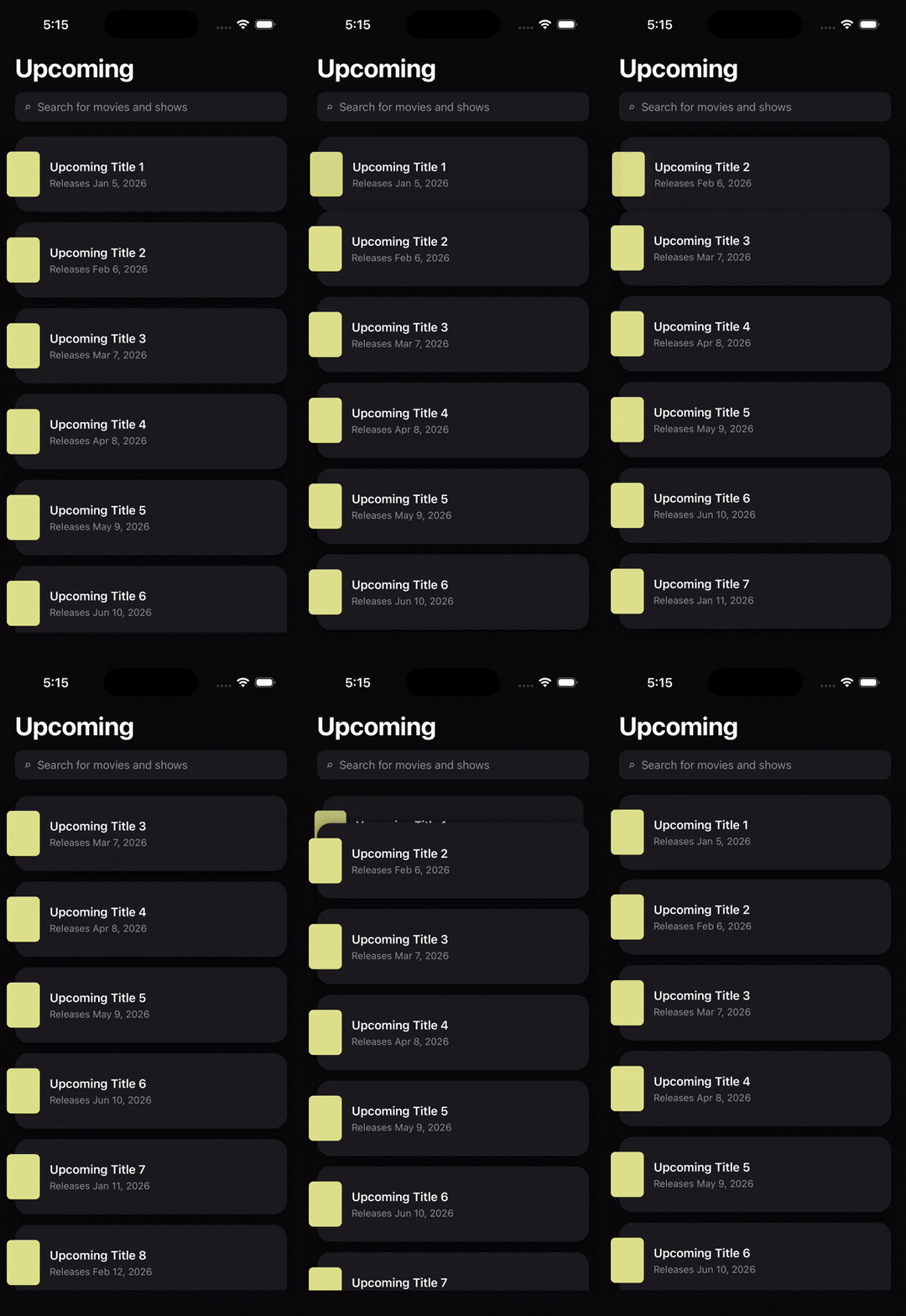
A scrollable list for React Native where cards pin to the top and stack as you scroll, built on react-native-reanimated.

Maintainers
 xlliger
Readme
react-native-stack-scroll-list
A scrollable list for React Native where each card pins to the top of the list as it scrolls past, with subsequent cards sliding up behind it to form a stack. Scrolling back up un-pins them in reverse order. Built on react-native-reanimated v3.
Install
npm install react-native-stack-scroll-list
# or
yarn add react-native-stack-scroll-list
Peer dependencies — install if you don't already have them:
npm install react-native-reanimatedFollow the reanimated install guide (add the babel plugin, rebuild). This library has no native code of its own.
Usage
import { StackScrollList } from "react-native-stack-scroll-list";

type Movie = { id: string; title: string };

const DATA: Movie[] = [
  { id: "1", title: "First" },
  { id: "2", title: "Second" },
  // ...
];

export default function Screen() {
  return (
    <StackScrollList<Movie>
      data={DATA}
      keyExtractor={(item) => item.id}
      itemHeight={96}
      itemGap={14}
      stackPeek={0}
      renderItem={({ item }) => (
        <View style={styles.card}>
          <Text>{item.title}</Text>
        </View>
      )}
    />
  );
}
See example/UpcomingListDemo.tsx for a complete screen.
Props
| Prop | Type | Default | |
| ------------------------------ | ----------------------------------- | ----------------------------- | ---------------------------------------------------------------------------------------------------------------------------------------- |
| data | ReadonlyArray<T> | — | Items to render. |
| renderItem | ({ item, index }) => ReactElement | — | Renders a single row. Its own flex / styles fill the wrapper. |
| keyExtractor | (item, index) => string | — | Stable key per row. |
| itemHeight | number | — | Height of one item in px. Required — the pin math depends on it. |
| itemGap | number | 0 | Vertical gap between items. |
| stackPeek | number | 0 | How many px each pinned card peeks out from under the one above. 0 = single card visible at top; 8 = thin edge; 30 = chunky stack. |
| scaleStops | number[] | [1, 0.94, 0.88, 0.82, 0.78] | Scale sampled at 0/1/2/3/4 cards above. |
| opacityStops | number[] | [1, 0.75, 0.45, 0.2, 0] | Opacity sampled at 0/1/2/3/4 cards above. |
| ListHeaderComponent | ReactElement \| null | — | Rendered above the rows, inside the scroll content. |
| ListFooterComponent | ReactElement \| null | — | Rendered below the rows. |
| contentContainerStyle | StyleProp<ViewStyle> | — | |
| style | StyleProp<ViewStyle> | — | |
| rowStyle | StyleProp<ViewStyle> | — | Style applied to each animated row wrapper. |
| showsVerticalScrollIndicator | boolean | false | |
| onScrollOffset | (y: number) => void | — | Fired on every scroll event with the current Y offset. |
| onEndReached | () => void | — | Lazy-load hook: fires once when the scroll position approaches the bottom. Re-arms when data.length grows or the user scrolls away. |
| onEndReachedThreshold | number | 0.5 | Distance from the bottom (as a fraction of viewport height) at which onEndReached fires. 0.5 = half a viewport. Matches FlatList. |
| ListLoadingComponent | ReactElement \| null | — | Convenience slot for a paging spinner — rendered between the rows and ListFooterComponent. Show it while the next page is in flight. |
How it works
StackScrollList is a ScrollView (not a virtualized list — pinned items must stay mounted once their natural position has scrolled off-screen). Each row owns a Reanimated worklet that, on every frame:
- Computes how far past its pin point the scroll has moved (
scrolledPast). - Pins the row by translating it down by that same amount.
- Interpolates
scaleandopacityfrom the number of layers above it, sampling the 5-point curves you supply.
zIndex={index} ensures later cards visually land on top of earlier ones.
License
MIT